|

-
Nov 8th, 2016, 11:36 AM
#1201
Re: CommonControls (Replacement of the MS common controls)
 Originally Posted by dtencer

Please direct me to instruction on how to test/use the Std-EXE version. I have only just discovered your .ocx.
Thank you
In the first post in this thread is the Std-EXE version. On that Demo you can actually test. You may need only to copy the OLEGuids.tlb in your SysWoW64 (64bit OS) or System32 (32bit OS) path first.
-
Nov 8th, 2016, 04:31 PM
#1202
Re: CommonControls (Replacement of the MS common controls)
Originally Posted by Semke
How often do you update the OCX? I see in the latest revision (10) some thing are not included (like RTL support)
I update the OCX only for internal improvements or bugfixes. Additional features are not implemented to ensure compatibility.
The new features are collected and will be implemented all together in the next OCX release. (would be then VBCCR14.OCX)
Originally Posted by chosk
I am not sure where this fall into which of the three options.
When an imagelist is set for the toolbar and there are buttons with images and there are also buttons without images, then for those buttons that do not have images there be no space for the image.
Edit to add:
This to apply only when TextAlignment is set to 1-Right. When TextAlignment is 0-Bottom, then images are expected for all buttons.
I have thought about this and came to the conclusion that by default the MS behavior should be respected.
Therefore when no ImageList is set the default image dimension will be set. Due to a bug in my ToolBar (and also in MS ToolBar) the image dimensions were set to 0x0 when removing an ImageList after a valid ImageList was set. I have fixed this bug now by setting the default dimensions "back" via TB_SETBITMAPSIZE.
But, as a second step, there could be also new properties to have actually control of what behavior you want to have.
So the new properties could be called "DefaultImageWidth" and "DefaultImageHeight" and would contain the image dimensions if no ImageList is set. (so called Default)
Of course, these properties would be set on init to the MS image dimensions to have the MS behavior.
But by changing these properties, e.g. to 0x0, you can actually then change the behavior.
What do you think?
-
Nov 8th, 2016, 09:21 PM
#1203
Hyperactive Member

Re: CommonControls (Replacement of the MS common controls)
Originally Posted by Krool
...
I have thought about this and came to the conclusion that by default the MS behavior should be respected.
Therefore when no ImageList is set the default image dimension will be set. Due to a bug in my ToolBar (and also in MS ToolBar) the image dimensions were set to 0x0 when removing an ImageList after a valid ImageList was set. I have fixed this bug now by setting the default dimensions "back" via TB_SETBITMAPSIZE.
But, as a second step, there could be also new properties to have actually control of what behavior you want to have.
So the new properties could be called "DefaultImageWidth" and "DefaultImageHeight" and would contain the image dimensions if no ImageList is set. (so called Default)
Of course, these properties would be set on init to the MS image dimensions to have the MS behavior.
But by changing these properties, e.g. to 0x0, you can actually then change the behavior.
What do you think?
Good.
-
Nov 13th, 2016, 04:44 PM
#1204
Re: CommonControls (Replacement of the MS common controls)
Update released.
Bugfix in the ToolBar control, quite important in my opinion.
The bug appeared when all buttons have no caption and at least one button has the AutoSize property set to true.
That resulted in a messed up ButtonWidth/ButtonHeight property.
-
Nov 14th, 2016, 04:42 PM
#1205
Re: CommonControls (Replacement of the MS common controls)
Again update released. This time an internal improvement.
WM_SETREDRAW was replaced with the LockWindowUpdate API in all internal ReCreate methods.
Problem was when the size of a control changed while the redraw state was locked, a "ghost" painting occured.
This will not happen with the LockWindowUpdate API, as it will invalidate the old bounding rectangle, forcing an eventual redraw.
Also LockWindowUpdate will not clear the WS_VISIBLE style bit, thus it is not necessary to check the visibility anymore.
The only downside is that LockWindowUpdate can only lock one window at a time.
So if another window is already locked then the ReCreate method will not clear the locking to break nothing. If that's the case there is no other option to have no locked redraw state, which results then in a flicker.
So the pros outweigh that single disadvantage of an eventual flicker when another window is already locked.
So instead of
Code:
Private Sub ReCreate[...]
Dim Visible As Boolean
Visible = Extender.Visible
With Me
If Visible = True Then SendMessage UserControl.hWnd, WM_SETREDRAW, 0, ByVal 0&
[...]
If Visible = True Then SendMessage UserControl.hWnd, WM_SETREDRAW, 1, ByVal 0&
.Refresh
End With
End Sub
now:
Code:
Private Sub ReCreate[...]
Dim Locked As Boolean
With Me
Locked = CBool(LockWindowUpdate(UserControl.hWnd) <> 0)
[...]
If Locked = True Then LockWindowUpdate 0
.Refresh
End With
End Sub
Last edited by Krool; Nov 14th, 2016 at 04:47 PM.
-
Nov 18th, 2016, 04:15 PM
#1206
Re: CommonControls (Replacement of the MS common controls)
Update relased.
Finally the Transparent property is included in the ToolBar control.
DEXWERX has requested this twice. 
Originally Posted by DEXWERX
Slightly unrelated, but something possibly omitted (but is in the link you posted) Are you going to add TBSTYLE_TRANSPARENT to the toolbar?
Originally Posted by DEXWERX
Now the question remains, can we get the Toolbar itself transparent (Design time Property of the toolbar / TBSTYLE_TRANSPARENT )
But, TBSTYLE_TRANSPARENT was not used for the Transparent property. It was implemented only to have the BackColor property shown/visible at design-time.
Instead, like in the other controls where a Transparent property is available, it makes a replica of the underlying background. (simulated transparency)
However, the property is ignored when the control paints via double-buffering. (same as BackColor; only working when DoublerBuffer = False)
-
Nov 29th, 2016, 05:14 AM
#1207
New Member
Re: CommonControls (Replacement of the MS common controls)
I love these controls, but I'm struggling with the DT Picker. Everything is as expected, apart from GetDayBold. Here's the code I am currently using but the behivior seems to happen in all cases even if i replace my code with the demo code
Code:
Private Sub dtp_CalendarGetDayBold(ByVal StartDate As Date, ByVal Count As Long, State() As Boolean)
    Dim rs As New ADODB.Recordset
    If Not QCOnly Then
        Set rs = LoadDatabase.Execute("SELECT DateDue, Count(*) AS [OrderCount] FROM Orders WHERE DateDue Between #" & Date2US(StartDate) & "# And #" & Date2US(StartDate + Count - 1) & "# AND HospitalCode = '" & HospitalCode & "' AND Hidden = False GROUP BY DateDue ORDER BY DateDue")
    Else
        Set rs = LoadDatabase.Execute("SELECT DateDue, Count(*) AS [OrderCount] FROM Orders WHERE DateDue Between #" & Date2US(StartDate) & "# And #" & Date2US(StartDate + Count - 1) & "# AND Investigation = 'Point Source' GROUP BY DateDue ORDER BY DateDue")
    End If
    Do While Not rs.EOF
        State(DateDiff("d", StartDate, rs.Fields("DateDue")) + 1) = True
        rs.MoveNext
    Loop
    rs.Close
    Set rs = Nothing
End Sub
(Date2US formats as mm/dd/yyyy string)
It is a hard feature to test, as the bold dates are only visible in a compiled program, but essentially I must change months then return for the correct dates to be highlighted. Any ideas?
Edit:
If i remove from my form load event the dates are highlighted as I would expect (with a default value of '1/1/16' in the property page - also struggling to make this value stay when compiling not sure why). If I use 1/11/16 (so this month) I get the same behavior though, incorrect dates highlighted, switch months and switch back and all is well. I have tried
Code:
Private Sub dtp_DropDown()
    Dim tDate As Date
    tDate = dtp.Value
    dtp.Value = "1/1/2001"
    dtp.Value = tDate
End Sub
along with various combinations of switching on and off .CalenderDayState and .Refresh in the Form_Load event.
If appropriate I can create my one thread, but this problem seems so specific to these controls I thought here would be fine...
Last edited by Sam_; Nov 29th, 2016 at 08:30 AM.
Reason: More information
-
Nov 29th, 2016, 02:18 PM
#1208
Re: CommonControls (Replacement of the MS common controls)
Update released.
@ Sam_,
the CalenderDayState should work now as expected.
Thanks for reporting.
-
Nov 29th, 2016, 03:03 PM
#1209
Addicted Member
Re: CommonControls (Replacement of the MS common controls)
Hi Krool ... about that bug...
just wondering... do you take into account that when using module (.bas) in an OCX, all "public" variable are SHARED for all instance ?
only variable in the .CTL are not shared (public and private)
I had a similar issue in past with that. I can post you an exemple project that show the bug.
-
Nov 29th, 2016, 03:50 PM
#1210
New Member
Re: CommonControls (Replacement of the MS common controls)
Originally Posted by Krool
Update released.
Thanks for reporting.
Fantastic, thanks.
-
Nov 29th, 2016, 04:40 PM
#1211
Re: CommonControls (Replacement of the MS common controls)
Originally Posted by VbNetMatrix
just wondering... do you take into account that when using module (.bas) in an OCX, all "public" variable are SHARED for all instance ?
only variable in the .CTL are not shared (public and private)
I had a similar issue in past with that. I can post you an exemple project that show the bug.
Which bug? Please show example.
-
Nov 29th, 2016, 06:53 PM
#1212
Addicted Member
Re: CommonControls (Replacement of the MS common controls)
Hi Krool,Why open the mainform vb6 collapse in the IDE?
-
Nov 30th, 2016, 08:06 AM
#1213
Addicted Member
Re: CommonControls (Replacement of the MS common controls)
Originally Posted by Krool
Which bug? Please show example.
good question... my previous post didn't post 
I'll make an example, it's easier to explain.
-
Dec 1st, 2016, 09:55 AM
#1214
Fanatic Member
Re: CommonControls (Replacement of the MS common controls)
Hello Krool,
there is a small glitch in the ProgressBar control.
If you change the height by code, a 1px frame is seen around it.
To retrace:
Use the ComCtlsDemo.
In MainForm, set VisualStyles = false for ProgressBar1.
At the end of Form_Load, add:
Code:
With ProgressBar1
.Left = 100
.Top = 600
.Width = 5530
.Height = 270
End With
Now comment out the .Height = 270.
See the difference?
Karl
P.S.: tested at 125% screen
EDIT2:
While we are at that, a caption property for the progressbar would be nice.
Like in the old old CCRP.
Last edited by Karl77; Dec 1st, 2016 at 11:19 AM.
Reason: Addition
-
Dec 1st, 2016, 04:39 PM
#1215
Re: CommonControls (Replacement of the MS common controls)
Originally Posted by Karl77
there is a small glitch in the ProgressBar control.
If you change the height by code, a 1px frame is seen around it.
To retrace:
Use the ComCtlsDemo.
In MainForm, set VisualStyles = false for ProgressBar1.
At the end of Form_Load, add:
Code:
With ProgressBar1
.Left = 100
.Top = 600
.Width = 5530
.Height = 270
End With
Now comment out the .Height = 270.
See the difference?
Karl
P.S.: tested at 125% screen
EDIT2:
While we are at that, a caption property for the progressbar would be nice.
Like in the old old CCRP.
Update released.
The problem was that normally a ProgressBar will be created with the WS_EX_STATICEDGE style bit.
However, when visual styles are enabled the style bit WS_EX_STATICEDGE is not set on window creation.
That's why this border issue only appears when using a manifest for comctl32.dll version 6.0 or higher and the VisualStyles property is set to False.
The solution was to set or remove the style bit WS_EX_STATICEDGE in the VisualStyles property.
Thanks for reporting.
For the caption property:
Yes, certainly good idea. But there are many ways of how to implement.
I imagine an "inverted" color text for classic theme and for visual theme a theme text within a white box rectangle. (for readability)
Last edited by Krool; Dec 1st, 2016 at 04:50 PM.
-
Dec 2nd, 2016, 02:50 AM
#1216
Fanatic Member
Re: CommonControls (Replacement of the MS common controls)
Hello Krool,
Originally Posted by Krool
The problem was that normally a ProgressBar will be created with the WS_EX_STATICEDGE style bit.
great, it is fixed now.
In fact I meant it the other way around :-).
The border is not wanted, it makes problems when the control is nested in another control (statusbar in this case).
I'll try to change it myself, now as I know where to look.
Otherwise we would need a Border property...
For the caption property:
Yes, certainly good idea. But there are many ways of how to implement.
I imagine an "inverted" color text for classic theme and for visual theme a theme text within a white box rectangle. (for readability)
Let the user decide:
TextAutocolor
TextForeColor
TextBackColor
TextBackgroundColor
something like that.
Thank you.
Last edited by Karl77; Dec 2nd, 2016 at 02:58 AM.
-
Dec 2nd, 2016, 11:46 AM
#1217
Re: CommonControls (Replacement of the MS common controls)
Originally Posted by Karl77
The border is not wanted, it makes problems when the control is nested in another control (statusbar in this case).
I'll try to change it myself, now as I know where to look.
Otherwise we would need a Border property...
It's difficult to have no border as it's back always when the control size has been changed.
-
Dec 2nd, 2016, 12:02 PM
#1218
Addicted Member
Re: CommonControls (Replacement of the MS common controls)
Originally Posted by Krool
Update released.
...
That's why this border issue only appears when using a manifest for comctl32.dll version 6.0 or higher and the
Speaking of it, can you post a full example on how to use a manifest for comctl32.dll ?
I never succeeded to make it right on Win7
thanks
-
Dec 2nd, 2016, 12:41 PM
#1219
Re: CommonControls (Replacement of the MS common controls)
Originally Posted by VbNetMatrix
Speaking of it, can you post a full example on how to use a manifest for comctl32.dll ?
I never succeeded to make it right on Win7
thanks
Just look the Demo..
-
Dec 2nd, 2016, 12:42 PM
#1220
Fanatic Member
Re: CommonControls (Replacement of the MS common controls)
Originally Posted by Krool
It's difficult to have no border as it's back always when the control size has been changed.
Yes, I experienced this too.
Solution seems to be simple:
Code:
Public Property Let VisualStyles(ByVal Value As Boolean)
PropVisualStyles = Value
If ProgressBarHandle <> 0 And EnabledVisualStyles() = True Then
    Dim dwExStyle As Long, dwExStyleOld As Long
    dwExStyle = GetWindowLong(hWnd, GWL_EXSTYLE)
    dwExStyleOld = dwExStyle
    If PropVisualStyles = True Then
        ActivateVisualStyles ProgressBarHandle
        If (dwExStyle And WS_EX_STATICEDGE) = WS_EX_STATICEDGE Then dwExStyle = dwExStyle And Not WS_EX_STATICEDGE
    Else
        RemoveVisualStyles ProgressBarHandle
        If Not (dwExStyle And WS_EX_STATICEDGE) = WS_EX_STATICEDGE Then
            dwExStyle = dwExStyle And Not WS_EX_STATICEDGE
        End If
    End If
    'If dwExStyle <> dwExStyleOld Then
    SetWindowLong ProgressBarHandle, GWL_EXSTYLE, dwExStyle
    Call ComCtlsFrameChanged(ProgressBarHandle)
    'End If
    Me.Refresh
End If
UserControl.PropertyChanged "VisualStyles"
End Property
EDIT:
This is also the place where a Border property could snap to.
Last edited by Karl77; Dec 2nd, 2016 at 12:46 PM.
-
Dec 2nd, 2016, 12:51 PM
#1221
Re: CommonControls (Replacement of the MS common controls)
Originally Posted by Karl77
Yes, I experienced this too.
Solution seems to be simple:
Code:
Public Property Let VisualStyles(ByVal Value As Boolean)
PropVisualStyles = Value
If ProgressBarHandle <> 0 And EnabledVisualStyles() = True Then
    Dim dwExStyle As Long, dwExStyleOld As Long
    dwExStyle = GetWindowLong(hWnd, GWL_EXSTYLE)
    dwExStyleOld = dwExStyle
    If PropVisualStyles = True Then
        ActivateVisualStyles ProgressBarHandle
        If (dwExStyle And WS_EX_STATICEDGE) = WS_EX_STATICEDGE Then dwExStyle = dwExStyle And Not WS_EX_STATICEDGE
    Else
        RemoveVisualStyles ProgressBarHandle
        If Not (dwExStyle And WS_EX_STATICEDGE) = WS_EX_STATICEDGE Then
            dwExStyle = dwExStyle And Not WS_EX_STATICEDGE
        End If
    End If
    'If dwExStyle <> dwExStyleOld Then
    SetWindowLong ProgressBarHandle, GWL_EXSTYLE, dwExStyle
    Call ComCtlsFrameChanged(ProgressBarHandle)
    'End If
    Me.Refresh
End If
UserControl.PropertyChanged "VisualStyles"
End Property
EDIT:
This is also the place where a Border property could snap to.
What does that solve when resizing?
You changed the part on RemoveVisualStyles, but there is an error on your change.
Code:
        RemoveVisualStyles ProgressBarHandle
        If Not (dwExStyle And WS_EX_STATICEDGE) = WS_EX_STATICEDGE Then
            dwExStyle = dwExStyle And Not WS_EX_STATICEDGE
        End If
Should be:
Code:
        RemoveVisualStyles ProgressBarHandle
        If (dwExStyle And WS_EX_STATICEDGE) = WS_EX_STATICEDGE Then
            dwExStyle = dwExStyle And Not WS_EX_STATICEDGE
        End If
As you want no border in both cases.
Last edited by Krool; Dec 2nd, 2016 at 01:00 PM.
-
Dec 2nd, 2016, 03:45 PM
#1222
Lively Member
Re: CommonControls (Replacement of the MS common controls)
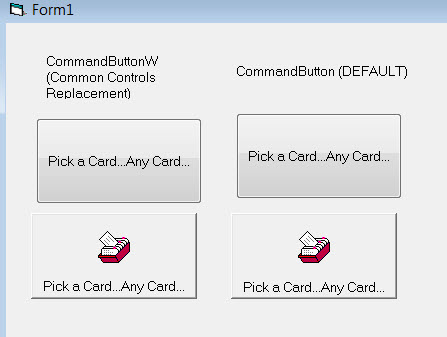
Had a clarifying question - does the new CommandButtonW make any improvements to visual styles/themes? For example, when doing a side by side comparison of the new CommonControls replacement command button vs. the default VB6 style, they look identical. I know there are a lot more features with the new CommandButtonW such as side-by-side captioning, image alignment, split buttons, etc. but is there any change in the actual visual style (e.g., a more modern WinXP or other style upgrade)?
-
Dec 3rd, 2016, 09:45 AM
#1223
Fanatic Member
Re: CommonControls (Replacement of the MS common controls)
Originally Posted by Krool
What does that solve when resizing?
Apparently it works, no border comes back on resize.
Try it...
As you want no border in both cases.
Not exactly, I don't want the border in classic style only.
Karl
Last edited by Karl77; Dec 3rd, 2016 at 10:51 AM.
-
Dec 3rd, 2016, 09:48 AM
#1224
Fanatic Member
Re: CommonControls (Replacement of the MS common controls)
Originally Posted by swambast
any improvements to visual styles/themes?
The style is given by the OS setting, and the controls use exactly this style.
Nothing less and nothing more.
Karl
-
Dec 6th, 2016, 05:26 PM
#1225
Re: CommonControls (Replacement of the MS common controls)
Update released.
Critical bugfix in the ListBoxW control. The Click event was not fired in two cases:
- User has de-selected an item in a multiple-selection list box
- User has clicked again on a selected item in a single-selection list box
I'm surprised that this bug did not pop up earlier..
-
Dec 7th, 2016, 02:50 AM
#1226
Lively Member
Re: CommonControls (Replacement of the MS common controls)
Hi, Krool!
Quiet updated common.bas file(Not seen in the history of changes) - it has new features replaces the standard-VB
There is an error:
FileLen function has always "0" return value.
-
Dec 7th, 2016, 04:58 AM
#1227
Re: CommonControls (Replacement of the MS common controls)
Originally Posted by Romeo91
Quiet updated common.bas file(Not seen in the history of changes) - it has new features replaces the standard-VB
There is an error:
FileLen function has always "0" return value.
Yes, thanks for this side note. The common.bas includes also functions not necessary for this project. Therefore I do not add in history of changes when updating.
The function FileLen was actually not complete..
I completed the function now and actually improved it. The return value is now as a 'Decimal' Variant. So it can hold unsigned big integer value. (kind of ULONGLONG)
-
Dec 9th, 2016, 12:46 PM
#1228
Addicted Member
Re: CommonControls (Replacement of the MS common controls)
Hi,
did I missed something ?
in post #1
The latest update of ComCtlsDemo.zip (december 7th 2016)
doesn't compile because of missing reference "OLE Guid and interface definition"
"Implements OLEGuids.IOleInPlaceActiveObjectVB" in "IpAdress.ctl"
Do I need any tlb that I doesn't have ?
thanks for your help
-
Dec 9th, 2016, 01:00 PM
#1229
Hyperactive Member
Re: CommonControls (Replacement of the MS common controls)
From post #1:
At design time (IDE) there is only one dependency. (OLEGuids.tlb)
It is included in the download.
-
Dec 10th, 2016, 10:34 AM
#1230
Addicted Member
Re: CommonControls (Replacement of the MS common controls)
Originally Posted by chosk
From post #1:
It is included in the download.
you're right... when I first installed it, I read everything about the component, now I was at work and tried to download and nothing worked... forgot about it. litle brain, litle brain...
-
Dec 10th, 2016, 03:02 PM
#1231
Re: CommonControls (Replacement of the MS common controls)
Update released.
Modified the OLEGuids.tlb. (with new uuid)
And sorry for this inconvenience. I know it is a pain in the *** to replace everything, but I couldn't keep it like it is. 
The IEnumerationVB interface is now removed as not necessary anymore as the Enumeration.cls is event driven since a while. (due to de-coupling issues)
The IEnumeration interface was actually always IEnumVARIANT. But it was named as IEnumeration to not intefere with the stdole.IEnumVARIANT.
But as the IUnknown interface was already named IUnknownUnrestricted to not interfere with the stdole.IUnknown I could also name it likewise to IEnumVARIANTUnrestricted, so I did now. So it is now a clear definition..
And, of course, the correction in IDispatch.GetIDsOfNames was made. (thanks to DEXWERX)
Originally Posted by DEXWERX
your IDispatch.GetIDsOfNames has the wrong definition?
It should be LPWSTR, so you can pass in a BSTR. This way VB skips the Conversion, and you can skip the DoubleUnicode hack you did here.
-
Dec 13th, 2016, 02:43 PM
#1232
Lively Member

Re: CommonControls (Replacement of the MS common controls)
Thanks for the update to 1.3. It works fine on XP, Win7 and Win10.
HERE is a Script BASIC IDE/Debugger (VB6 app) example.
I hope to be test your library with an OLE interface from Script BASIC to VB6 form controls.
Update
Your COM replacement control works fine when generated as an ActiveX .exe control.

Last edited by ScriptBASIC; Dec 15th, 2016 at 07:37 PM.
-
Dec 16th, 2016, 05:11 PM
#1233
Re: CommonControls (Replacement of the MS common controls)
Update released.
I need to explain a little bit about the recent changes in the ListView control...
The included NewWidth parameter in the ColumnAfterResize event is useful when TrackSizeColumnHeaders property is False, because when ColumnAfterResize is called the new width is not yet applied. So doing ColumnHeader.Width will return the old width.
Also the NewWidth parameter is 'ByRef', which means it can be modified in that event. By that it is possible to define a min/max width for column resizing.
Or to cancel the new width at all, example:
Code:
Private Sub ListView1_ColumnBeforeResize(ByVal ColumnHeader As LvwColumnHeader, Cancel As Boolean)
ColumnHeader.Tag = ColumnHeader.Width
End Sub

Private Sub ListView1_ColumnAfterResize(ByVal ColumnHeader As LvwColumnHeader, NewWidth As Single)
If [CancelCondition] = True Then NewWidth = ColumnHeader.Tag
End Sub
In the 15-Dec-2016 update I included the HDN_DIVIDERDBLCLICK handler in the ColumnBeforeResize event as it effects the width of a column header.
However, there is no HDN_ENDTRACK fired by HDN_DIVIDERDBLCLICK.
That's why on this update (16-Dec-2016) I isolated HDN_DIVIDERDBLCLICK and included the new event ColumnDividerDblClick, which also has a Cancel parameter.
When the ResizableColumnHeader property is set to False there is no resizing possible at all and also no ColumnBeforeResize nor ColumnDividerDblClick are generated.
Originally Posted by ScriptBASIC
Your COM replacement control works fine when generated as an ActiveX .exe control.
I don't get it. You mean generating an ActiveX .exe control? (do you mean .OCX or really .exe ?)
The downside for ActiveX .exe is that they don't work with regfree manifest..
Last edited by Krool; Dec 16th, 2016 at 05:17 PM.
-
Dec 17th, 2016, 11:24 AM
#1234
Lively Member
Re: CommonControls (Replacement of the MS common controls)
I don't get it. You mean generating an ActiveX .exe control? (do you mean .OCX or really .exe ?)
The downside for ActiveX .exe is that they don't work with regfree manifest..
The reason I'm using a .exe ActiveX control rather that a .dll version is the .exe version doesn't need to be registered before use. Good to know about the regfree issue. I was just playing around with the idea of using VB forms as controls and interacting with them from Script BASIC but IUP as a cross platform native GUI is the better solution. Using VB to create the IDE is a good example how I plan to us your library in the future.
-
Dec 17th, 2016, 11:10 PM
#1235
Lively Member
Re: CommonControls (Replacement of the MS common controls)
Originally Posted by Krool
Yes, thanks for this side note. The common.bas includes also functions not necessary for this project. Therefore I do not add in history of changes when updating.
The function FileLen was actually not complete..
I completed the function now and actually improved it. The return value is now as a 'Decimal' Variant. So it can hold unsigned big integer value. (kind of ULONGLONG)
Hi!
Krool, function FileLen still contains an error.
If someone does not see, it can affect its program code
Code:
' (VB-Overwrite)
Public Function FileLen(ByVal PathName As String) As Long
Const INVALID_HANDLE_VALUE As Long = (-1)
Const GENERIC_READ As Long = &H80000000, FILE_SHARE_READ As Long = &H1, OPEN_EXISTING As Long = 3, FILE_FLAG_SEQUENTIAL_SCAN As Long = &H8000000
Dim hFile As Long, Length As Double
If Left$(PathName, 2) = "\\" Then PathName = "UNC\" & Mid$(PathName, 3)
hFile = CreateFile(StrPtr("\\?\" & PathName), GENERIC_READ, FILE_SHARE_READ, 0, OPEN_EXISTING, FILE_FLAG_SEQUENTIAL_SCAN, 0)
If hFile <> INVALID_HANDLE_VALUE Then
    Length = GetFileSize(hFile, 0)
    CloseHandle hFile
Else
    Err.Raise Number:=53, Description:="File not found: '" & PathName & "'"
End If
End Function
Always - FileLen=0
-
Dec 18th, 2016, 03:51 AM
#1236
Re: CommonControls (Replacement of the MS common controls)
Originally Posted by Romeo91
Hi!
Krool, function FileLen still contains an error.
If someone does not see, it can affect its program code
Code:
' (VB-Overwrite)
Public Function FileLen(ByVal PathName As String) As Long
Const INVALID_HANDLE_VALUE As Long = (-1)
Const GENERIC_READ As Long = &H80000000, FILE_SHARE_READ As Long = &H1, OPEN_EXISTING As Long = 3, FILE_FLAG_SEQUENTIAL_SCAN As Long = &H8000000
Dim hFile As Long, Length As Double
If Left$(PathName, 2) = "\\" Then PathName = "UNC\" & Mid$(PathName, 3)
hFile = CreateFile(StrPtr("\\?\" & PathName), GENERIC_READ, FILE_SHARE_READ, 0, OPEN_EXISTING, FILE_FLAG_SEQUENTIAL_SCAN, 0)
If hFile <> INVALID_HANDLE_VALUE Then
    Length = GetFileSize(hFile, 0)
    CloseHandle hFile
Else
    Err.Raise Number:=53, Description:="File not found: '" & PathName & "'"
End If
End Function
Always - FileLen=0
You posted the old code. The new returns Decimal Variant. Please re-download and check again.
-
Dec 18th, 2016, 06:06 AM
#1237
Lively Member
Re: CommonControls (Replacement of the MS common controls)
Originally Posted by Krool
You posted the old code. The new returns Decimal Variant. Please re-download and check again.
File common.bas in fresh archive (from 17 December 2016) from 5 December.
This code from this file
-
Dec 18th, 2016, 06:45 AM
#1238
Hyperactive Member
Re: CommonControls (Replacement of the MS common controls)
The Function is expecting a return of FileLen as Long
I think change the line
Code:
Length = GetFileSize(hFile, 0)
to
Code:
FileLen = GetFileSize(hFile, 0)
-
Dec 18th, 2016, 07:25 AM
#1239
Re: CommonControls (Replacement of the MS common controls)
The function should be like this:
Code:
' (VB-Overwrite)
Public Function FileLen(ByVal PathName As String) As Variant
Const INVALID_HANDLE_VALUE As Long = (-1), INVALID_FILE_SIZE As Long = (-1)
Const GENERIC_READ As Long = &H80000000, FILE_SHARE_READ As Long = &H1, OPEN_EXISTING As Long = 3, FILE_FLAG_SEQUENTIAL_SCAN As Long = &H8000000
Dim hFile As Long
If Left$(PathName, 2) = "\\" Then PathName = "UNC\" & Mid$(PathName, 3)
hFile = CreateFile(StrPtr("\\?\" & PathName), GENERIC_READ, FILE_SHARE_READ, 0, OPEN_EXISTING, FILE_FLAG_SEQUENTIAL_SCAN, 0)
If hFile <> INVALID_HANDLE_VALUE Then
    Dim LoDWord As Long, HiDWord As Long, Value As Variant
    LoDWord = GetFileSize(hFile, HiDWord)
    CloseHandle hFile
    If LoDWord <> INVALID_FILE_SIZE Then
        If (LoDWord And &H80000000) Then
            Value = CDec(LoDWord And &H7FFFFFFF) + CDec(2147483648#)
        Else
            Value = CDec(LoDWord)
        End If
        If (HiDWord And &H80000000) Then
            HiDWord = HiDWord And &H7FFFFFFF
            Value = Value + (CDec(HiDWord) + CDec(2147483648#)) * CDec(4294967296#)
        Else
            Value = Value + CDec(HiDWord) * CDec(4294967296#)
        End If
        FileLen = Value
    Else
        FileLen = Null
    End If
Else
    Err.Raise Number:=53, Description:="File not found: '" & PathName & "'"
End If
End Function
Last edited by Krool; Dec 18th, 2016 at 07:31 AM.
-
Dec 19th, 2016, 03:31 AM
#1240
Re: CommonControls (Replacement of the MS common controls)
Was just noticing the columns in the ListView control weren't behaving like my normal setups... would definitely request support for column autosizing.. both the basic LVS_EX_AUTOSIZECOLUMNS style and the LVCOLUMN members you can use with it (cxMin, cxDefault, and cxIdeal)
 Posting Permissions
- You may not post new threads
- You may not post replies
- You may not post attachments
- You may not edit your posts
-
Forum Rules
|
Click Here to Expand Forum to Full Width
|



 Reply With Quote