|

-
Oct 18th, 2016, 07:58 AM
#1
Thread Starter
Hyperactive Member


Need help with SendMessage / GETTEXT
I've been trying a couple of different code samples found on the web. I must say I havn't been playing with SendMessage a lot but I was able to use it for some basic needs (exemple: a dialog box asking you to load a file: I can populate a new path and click "OK" to browse to it).
My question is concerning such a DIALOG BOX. Like I said I can make it browse to a given path. NOW I want to use GETTEXT to see in which path I currently am.
I am trying the following piece of code:
Code:
        hwndCONTROL = FindWindowEx(hwndPOPUP, 0&, "WorkerW", vbNullString)
        hwndCONTROL = FindWindowEx(hwndCONTROL, 0&, "ReBarWindow32", vbNullString)
        hwndCONTROL = FindWindowEx(hwndCONTROL, 0&, "Address Band Root", vbNullString)
        hwndCONTROL = FindWindowEx(hwndCONTROL, 0&, "msctls_progress32", vbNullString)
        hwndCONTROL = FindWindowEx(hwndCONTROL, 0&, "ComboBoxEx32", vbNullString)

        Dim strToolbarText As String
        Dim txtLen As Long
        txtLen = SendMessage(hwndCONTROL, WM_GETTEXTLENGTH, ByVal 0, ByVal 0)
        SendMessage hwndCONTROL, WM_GETTEXT, ByVal (txtLen + 1), ByVal StrPtr(strToolbarText)
... hwndPOPUP contains the right hwnd for the dialog window that has appeared. The couple of FindWindowEx lines brings me down to the hwnd of ComboBoxEx32, which is the dropdown I'm interested into. The hwndCONTROL is correctly populated all the way. The GETTEXTLENGTH does return a value of "30", which is the exact length of the string I am interested in retrieving (confirmed by using "Window Detective").
The problem is that the next line, "GETTEXT", returns "" in my strToolBarText variable. I'm near.... but can't find what the problem is! This is a dialog box appearing from IE.
Any tips? Thank you guys!!
Krass
-
Oct 18th, 2016, 04:22 PM
#2
Re: Need help with SendMessage / GETTEXT
It has been a while since I've done this kind of thing, but I'm pretty sure you need to make sure the string is already big enough to hold the text, eg:
Code:
txtLen = ...
strToolbarText = Space(txtLen)
SendMessage ...
-
Oct 19th, 2016, 03:14 PM
#3
Thread Starter
Hyperactive Member
Re: Need help with SendMessage / GETTEXT
Hello si_the_geek, I think you were right on this. But it is still behaving weirdly.
In my initial post, I was trying to retrieve the path, to make sure I am in the right folder (with my images I want to upload). In the meantime, I noticed I could skip this step by sending (SETTEXT) my path, by adding "\"1.jpg" "2.jpg"" at the end. Pressing 'OK' would just start uploading the pictures so my problem was solved.
So now I am trying to do exactly the same, but with the ADDRESS bar of an IE. The GETTEXTLENGTH is good, but it returns something weird like this:
"??????????????????????????????????l ����������������������������������"
I notice the length is good, and that the last letter, in this case "l", is the address last letter.
Any other suggestions? Here is what "Window Detective" shows me:
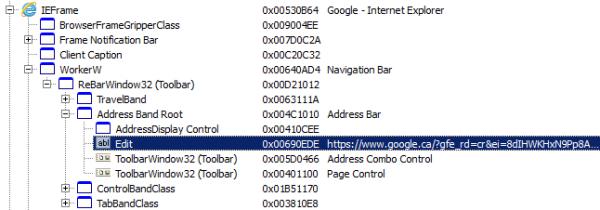
Here's the code I am using (which is quite exactly the same as my first post - I do get hwnd successfully on each call, but retrieving the edit-text doesn't work)...
Code:
    Dim strToolbarText As String
    Dim txtLen As Long

    ShellExecute 0&, vbNullString, "www.google.com", vbNullString, vbNullString, vbMaximizedFocus
    Call proWaitWithSleep(2000)

    hwndBROWSER = FindWindowEx(0&, 0&, "IEFrame", vbNullString)

    hwndCONTROL = FindWindowEx(hwndBROWSER, 0&, "WorkerW", vbNullString)
    hwndCONTROL = FindWindowEx(hwndCONTROL, 0&, "ReBarWindow32", vbNullString)
    hwndCONTROL = FindWindowEx(hwndCONTROL, 0&, "Address Band Root", vbNullString)
    hwndCONTROL = FindWindowEx(hwndCONTROL, 0&, "Edit", vbNullString)

    txtLen = SendMessage(hwndCONTROL, WM_GETTEXTLENGTH, ByVal 0, ByVal 0)
    strToolbarText = String$(txtLen, vbNullChar)
    SendMessage hwndCONTROL, WM_GETTEXT, ByVal (txtLen + 1), ByVal StrPtr(strToolbarText)

    MsgBox strToolbarText
It gives me that "?????????????l " weird string.
...any tips greatly appreciated!
Krass
-
Oct 24th, 2016, 03:30 PM
#4
Re: Need help with SendMessage / GETTEXT
i assume this indicates that the caption is in unicode
you may need to sendmessageW
an example here http://www.vbforums.com/showthread.p...o-SendMessageW
i do my best to test code works before i post it, but sometimes am unable to do so for some reason, and usually say so if this is the case.
Note code snippets posted are just that and do not include error handling that is required in real world applications, but avoid On Error Resume Next
dim all variables as required as often i have done so elsewhere in my code but only posted the relevant part
come back and mark your original post as resolved if your problem is fixed 
pete
 Posting Permissions
- You may not post new threads
- You may not post replies
- You may not post attachments
- You may not edit your posts
-
Forum Rules
|
Click Here to Expand Forum to Full Width
|



 Reply With Quote

