|

-
Aug 27th, 2016, 01:33 PM
#1
Thread Starter
Lively Member

Disabling Controls within Frame
Hi All,
Suppose I have the following layout on a form:
Frame1(0)
- Frame2(0)
- Option1(0)
- Option1(1)
- Option1(2)
- Frame3(0)
- Frame3(1)
- Text1(0)
- Text1(1)
- Text1(2)
- Text1(3)
I'd like to have a function that will disable the child controls within the container I specify (including any child containers). So for example, if I specified Frame1(0) as the container, it would disable all the controls listed in the above structure. However, if I specified Frame2(0), it would only disable the controls within that container (ie Option1(0), (1) and (2)). Lastly, if I specified Frame3(0), it would disable Frame3(1) (including Text1(0) and (1)), as well as Text1(2). Hopefully that makes sense.
I've tried separate approaches, but am stuck on the child container issue. In my first approach, I can successfully disable controls within the specified frame, but not if any of those controls are contained within their own frame (frame within a frame). On my second approach, I can disable everything, including the controls I want to leave enabled.
Any ideas? As always any assistance greatly appreciated!
Best Regards
Brad
-
Aug 27th, 2016, 02:21 PM
#2
Re: Disabling Controls within Frame
Is this about a desire to have contained controls "grayed out" or something?
Because if you disable a Frame its contained controls are effectively disabled, they just don't have their appearance altered.
-
Aug 27th, 2016, 02:28 PM
#3
Thread Starter
Lively Member
Re: Disabling Controls within Frame
 Originally Posted by dilettante

Is this about a desire to have contained controls "grayed out" or something?
Because if you disable a Frame its contained controls are effectively disabled, they just don't have their appearance altered.
Exactly that. We want the controls greyed out so there's no confusion on the part of the user whether they can be edited.
-
Aug 27th, 2016, 02:38 PM
#4
Re: Disabling Controls within Frame
Ahh, so you want to violate the Windows UI conventions. This is called "skinning."
Good luck with that. There isn't any provision for it.
I suppose you could do something like use the Tag property to mark each control's pseudo-parent and test for that in a loop over the Controls collection.
-
Aug 27th, 2016, 02:43 PM
#5
Re: Disabling Controls within Frame
I suppose another option is to toggle the Visible property of Frame controls instead of the Enabled property.
-
Aug 27th, 2016, 03:11 PM
#6
Re: Disabling Controls within Frame
Code:
Option Explicit

Public Property Let FrameAndChildrenEnabled(fra As Frame, bEnableStatus As Boolean)
    ' This enables/disables all child controls of a specific frame.
    Dim i As Integer
    Dim frm As Form
    '
    Set frm = fra.Parent
    For i = 0 To frm.Controls.Count - 1
        If bHasContainer(frm.Controls(i)) Then
            If frm.Controls(i).Container Is fra Then
                '
                ' Recursion to handle frames within frames.
                If TypeOf frm.Controls(i) Is Frame Then
                    FrameAndChildrenEnabled(frm.Controls(i)) = bEnableStatus
                Else
                    On Error Resume Next ' not all controls have an enabled property
                    frm.Controls(i).Enabled = bEnableStatus
                    On Error GoTo 0
                End If
            End If
        End If
    Next i
    fra.Enabled = bEnableStatus
End Property

Public Function bHasContainer(TheControl As Control) As Boolean
    Dim TheContainer As Control
    On Error GoTo NoContainer
    Set TheContainer = TheControl.Container
    bHasContainer = True
NoContainer:
End Function
I use it all the time.
Enjoy,
Elroy
EDIT1: Also, it's recursive, so you can have frames-on-frames, and it'll still work. I'd tend to just throw it all into a standard module, or include it into some AllPurpose.bas module you may already have.
EDIT2: Usage: FrameAndChildrenEnabled(fraSomeFrame) = True (or False)
EDIT3: Now, when you re-enable the frame using this approach, it's going to re-enable all the controls on the frame, regardless of whether or not they were enabled when you initially disabled the frame. Just an FYI.
Last edited by Elroy; Aug 27th, 2016 at 03:18 PM.
Any software I post in these forums written by me is provided "AS IS" without warranty of any kind, expressed or implied, and permission is hereby granted, free of charge and without restriction, to any person obtaining a copy. To all, peace and happiness.
-
Aug 27th, 2016, 04:49 PM
#7
Re: Disabling Controls within Frame
Not having stared at that code in a while, and having previously discussed similar issues recently on another thread, I decided to smarten-up my code posted in post #6. That code works well, but it doesn't dig down through any kind of nested container. It just digs down through frames. Also, it doesn't preserve the prior enabled state of the controls.
Therefore, I've made these modifications:
- It now enables/disables any type of container and all its child-controls. Things other than frames can be containers.
- It has an optional property to preserve the initial enabled state of the child-controls, so, upon re-enabling the container, those child-controls will just revert back to their prior state (which may be disabled).
- It still works with containers nested to any level (even when container types are mixed, such as a picturebox on a frame).
I've provided a some pictures of my testing, but I'll let you do your own as well.
And here's the improved code:
Code:
Option Explicit

Public Property Let ContainerAndChildrenEnabled(ctlContainer As Control, Optional bRetainChildStates As Boolean = False, bEnableStatus As Boolean)
    ' This enables/disables all child controls of a specific container.
    ' If the bRetainChildStates is used for disabling, it's best to also use it for re-enabling.
    ' Also, it's not a good idea to disable a nested container and then disable its parent container;
    ' just disabling the parent should do everything needed.
    Dim i As Integer
    Static c As New Collection
    Dim bOrigState As Boolean
    '
    If Not bIsContainer(ctlContainer) Then Exit Property
    If ctlContainer.Enabled = bEnableStatus Then Exit Property ' Let's not do it repeatedly.
    '
    With ctlContainer.Parent
        For i = 0 To .Controls.Count - 1
            If bHasContainer(.Controls(i)) Then
                If .Controls(i).Container Is ctlContainer Then
                    '
                    ' Recursion to handle containers within containers (nesting).
                    If bIsContainer(.Controls(i)) Then
                        ContainerAndChildrenEnabled(.Controls(i), bRetainChildStates) = bEnableStatus
                    Else
                        If bHasEnabledProp(.Controls(i)) Then
                            If bRetainChildStates Then
                                If bHasHwnd(.Controls(i)) Then
                                    If bEnableStatus Then
                                        If GetCollValueForCtnrEnable(c, CStr(.Controls(i).hWnd), bOrigState) Then
                                            .Controls(i).Enabled = bOrigState
                                        Else
                                            .Controls(i).Enabled = True
                                        End If
                                    Else
                                        AddCollValueForCtnrEnable c, CStr(.Controls(i).hWnd), .Controls(i).Enabled
                                        .Controls(i).Enabled = False
                                    End If
                                Else
                                    .Controls(i).Enabled = bEnableStatus
                                End If
                            Else
                                .Controls(i).Enabled = bEnableStatus
                            End If
                        End If
                    End If
                End If
            End If
        Next i
    End With
    ctlContainer.Enabled = bEnableStatus
End Property

Private Sub AddCollValueForCtnrEnable(c As Collection, sKey As String, bValue As Boolean)
    ' This prevents the potential to error.
    ' If a container is disabled with the bRetainChildStates flag, and then subsequently enabled without this bRetainChildStates flag,
    ' and then re-disabled again.  It will be attempting to add duplicate keys (which will cause an error).
    ' Also, if a nested container is disabled and then a parent container is subsequently disabled, this will also duplicate keys (an error).
    ' The following prevents these errors.
    On Error Resume Next
    c.Remove sKey
    On Error GoTo 0
    c.Add bValue, sKey
End Sub


Private Function GetCollValueForCtnrEnable(c As Collection, sKey As String, bValue As Boolean) As Boolean
    ' This is used only in the ContainerAndChildrenEnabled procedure.
    '
    ' Returns TRUE if found, FALSE if not.
    ' The actual value is returned in bValue.
    ' The item is also immediately deleted if it's found.
    On Error GoTo NotFound
    bValue = c.Item(sKey)
    c.Remove sKey
    GetCollValueForCtnrEnable = True
NotFound:
End Function

Public Function bHasHwnd(TheControl As Control) As Boolean
    On Error GoTo DoesntHaveProp
    bHasHwnd = TheControl.hWnd Or True
DoesntHaveProp:
End Function

Public Function bHasEnabledProp(TheControl As Control) As Boolean
    On Error GoTo DoesntHaveProp
    bHasEnabledProp = TheControl.Enabled Or True
DoesntHaveProp:
End Function

Public Function bIsContainer(TheControl As Control) As Boolean
    Const CTRL_NAME = "DummyLine"
    On Error GoTo NotContainer
    With TheControl.Parent.Controls
        bIsContainer = IsObject(.Add("VB.Line", CTRL_NAME, TheControl))
       .Remove CTRL_NAME
    End With
NotContainer:
End Function

Public Function bHasContainer(TheControl As Control) As Boolean
    Dim TheContainer As Control
    On Error GoTo NoContainer
    Set TheContainer = TheControl.Container
    bHasContainer = True
NoContainer:
End Function
And testing pics:
Upon initial running of program:
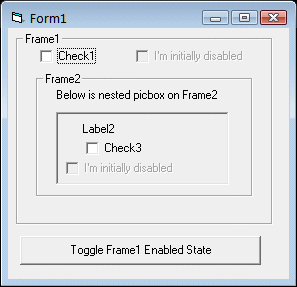
Upon first click of button (disable Frame1):

Upon another click of button (enable Frame1):
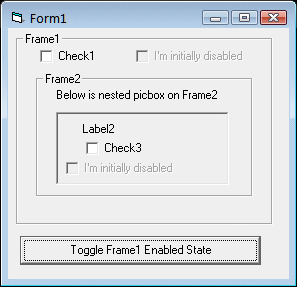
Enjoy,
Elroy
Last edited by Elroy; Aug 28th, 2016 at 10:45 AM.
Any software I post in these forums written by me is provided "AS IS" without warranty of any kind, expressed or implied, and permission is hereby granted, free of charge and without restriction, to any person obtaining a copy. To all, peace and happiness.
-
Aug 28th, 2016, 09:20 AM
#8
Re: Disabling Controls within Frame
Here's an alternative solution from the very similar thread that Elroy mentioned:
Originally Posted by Bonnie West
The following non-recursive routines are based on the code in Post #4. Rather than disabling all controls in the specified Form, the code below only disables child controls of the specified container control.
Code:
Option Explicit 'In a standard (.BAS) module

Private m_Ctrls As Collection

Public Sub DisableContainer(ByRef Container As Control)
    Dim Ctrl As Control, Ctrls As Collection

    If m_Ctrls Is Nothing Then Set m_Ctrls = New Collection
    m_Ctrls.Add Container.Enabled, CStr(ObjPtr(Container))

    Set Ctrls = New Collection
    Ctrls.Add Container

    On Error Resume Next

    For Each Ctrl In Container.Parent
        If IsDescendantOf(Container, Ctrl) Then
            With Ctrl.Container
                If Not .Enabled Then .Enabled = True
            End With

            Err.Clear
            m_Ctrls.Add Ctrl.Enabled, CStr(ObjPtr(Ctrl))
            If Err = 0& Then Ctrls.Add Ctrl
        End If
    Next

    For Each Ctrl In Ctrls
        Ctrl.Enabled = False
    Next

    On Error GoTo 0
End Sub

Public Sub RevertContainer(ByRef Container As Control)
    Dim Value As Boolean, sKey As String, Ctrl As Control

    If Not m_Ctrls Is Nothing Then On Error Resume Next Else Exit Sub

    sKey = CStr(ObjPtr(Container))
    Container.Enabled = m_Ctrls(sKey)
    m_Ctrls.Remove sKey

    For Each Ctrl In Container.Parent
        If IsDescendantOf(Container, Ctrl) Then
            Value = Ctrl.Enabled

            If Err = 0& Then
                sKey = CStr(ObjPtr(Ctrl))
                Ctrl.Enabled = m_Ctrls(sKey)
                m_Ctrls.Remove sKey
            Else
                Err.Clear
            End If
        End If
    Next

    On Error GoTo 0

    If m_Ctrls.Count = 0& Then Set m_Ctrls = Nothing
End Sub

Private Function IsDescendantOf(ByRef Parent As Control, ByRef Child As Control) As Boolean
    Dim Container As Object

         Set Container = Child
    Do:  Set Container = Container.Container
         If Container Is Parent Then IsDescendantOf = True: Exit Function
    Loop Until Container Is Parent.Parent
End Function
On Local Error Resume Next: If Not Empty Is Nothing Then Do While Null: ReDim i(True To False) As Currency: Loop: Else Debug.Assert CCur(CLng(CInt(CBool(False Imp True Xor False Eqv True)))): Stop: On Local Error GoTo 0
Declare Sub CrashVB Lib "msvbvm60" (Optional DontPassMe As Any)
-
Aug 28th, 2016, 10:14 AM
#9
Re: Disabling Controls within Frame
I wasn't happy that the programmer could do things to make my code crash in post #7 (improved version). Specifically, if they used the bRetainChildStates optional flag to disable, didn't use it to enable, and then used it to subsequently disable.
And another way would be to disable a nested container, and then subsequently disable a parent container (both using the bRetainChildStates flag).
Therefore, I made further improvements, and now it's hopefully bullet-proof, even from the programmer doing something silly like that.
Post #7 was edited and now has these further improvements.
Regards,
Elroy
EDIT1:
@Bonnie, ahhh, that's right.  You figured out how to do it without recursion. And that's a nifty little "IsDescendantOf" function you wrote. I've already snagged it. You figured out how to do it without recursion. And that's a nifty little "IsDescendantOf" function you wrote. I've already snagged it.
Last edited by Elroy; Aug 28th, 2016 at 10:19 AM.
Any software I post in these forums written by me is provided "AS IS" without warranty of any kind, expressed or implied, and permission is hereby granted, free of charge and without restriction, to any person obtaining a copy. To all, peace and happiness.
-
Aug 28th, 2016, 11:03 AM
#10
Re: Disabling Controls within Frame
I solved this kind of hassle by including the 'ContainedControls' property in my FrameW control.
-
Aug 28th, 2016, 11:40 AM
#11
Re: Disabling Controls within Frame
Since we're spit-balling a bit, I'll outline how I'd ideally like to see it work. But first, let me outline how it does work.
Let's say we have Check1 that's on Frame2. Frame2 is nested on Frame1. And Frame1 is sitting on Form1.
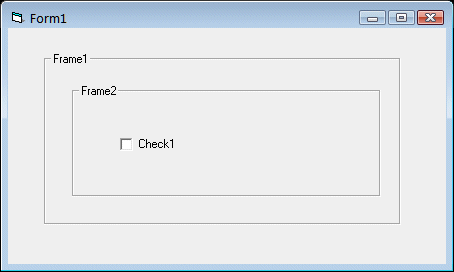
Now, here's where things get interesting. We might ask for the value of Check1.Enabled under different conditions:
Code:
MsgBox Form1.Check1.Enabled
To understand this, I'm going to "imagine" another property named "InternalEnabled". This will be the true enabled property stored internally somewhere by VB6 (and Windows) specifically for the control (which isn't what .Enabled returns).
Okay, so what does Check1.Enabled return? Basically, it returns this:
Check1.Enabled = Check1.InternalEnabled And Check1.Container.InternalEnabled And Check1.Container.Container.InternalEnabled And Check1.Container.Container.Container.InternalEnabled
Where Check1.Container is actually Frame2, and
Check1.Container.Container is actually Frame1, and
Check1.Container.Container.Container is actually Form1.
This processes is carried on for as deeply as any control is nested.
Okay, ideally, what would I really like? First, I wouldn't mind an InternalEnabled property that I could actually see. I can probably do this with an API, but it'd be nice to just have it.
Secondly, when any container is disabled, have it also dim (gray out) all the child controls (and all nested child controls). Or possibly have a property that says whether or not to do this. But not change its .InternalEnabled property.
This way, the ContainedControl.Enabled property would report False when its container was disabled, and it would also look disabled. And, if you really needed it, you could also mess with the .InternalEnabled property.
In fact, truth be told, I'd rather the regular .Enabled property returned the true control's state, and that possibly some read-only .Reachable property do what .Enabled currently does. This way, we could write code which manipulates .Enabled (and checks it) without worrying about whether its container is enabled. We can sort of do this now, but we must be careful. When writing to, say, Check1.Enabled, we actually are writing to the control's core .Enabled (.InternalEnabled) property.
Just some thoughts.
Regards,
Elroy
Last edited by Elroy; Aug 28th, 2016 at 11:43 AM.
Any software I post in these forums written by me is provided "AS IS" without warranty of any kind, expressed or implied, and permission is hereby granted, free of charge and without restriction, to any person obtaining a copy. To all, peace and happiness.
-
Aug 28th, 2016, 04:36 PM
#12
Re: Disabling Controls within Frame
Just got home and playing with the above before turning in. You may have already mentioned this but I found a disabled frame readily passes a Click event back to the form Click Event.
So a form. Put a frame on it. Put anything into the form click event to show the click. Click the frame no form click event.
Disable the frame and then click the frame - click event!!
Surely this can't be right!
-
Aug 28th, 2016, 05:06 PM
#13
Re: Disabling Controls within Frame
Right or not, that's the way any control works. That's a "problem" entirely separate from frames.
Any software I post in these forums written by me is provided "AS IS" without warranty of any kind, expressed or implied, and permission is hereby granted, free of charge and without restriction, to any person obtaining a copy. To all, peace and happiness.
-
Aug 29th, 2016, 10:33 AM
#14
Fanatic Member
Re: Disabling Controls within Frame
Originally Posted by Steve Grant
...I found a disabled frame readily passes a Click event back to the form Click Event.
Actually no - disabled frame does not receive click event, so click event 'goes to form'. 'End result' of course is the same.
In terms of supressing click event under disabled frame control, you need to check if mouse cursor co-ordinates are inside that disabled frame area. You can do it inside mouse down event.
-
Aug 29th, 2016, 06:08 PM
#15
Re: Disabling Controls within Frame
Or you put a lightweight control behind the frame.
Code:
Private Sub Form_Load()
  Label1.Move Frame1.Left, Frame1.Top, Frame1.Width, Frame1.Height
End Sub
If you disable the frame it doesn't take the input so the input goes to the form, but since there is a lightweight control on the form in that area, the click will go to that control (the label, for instance). If you don't add an event handler for the label, the event is effectively ignored.
 Posting Permissions
- You may not post new threads
- You may not post replies
- You may not post attachments
- You may not edit your posts
-
Forum Rules
|
Click Here to Expand Forum to Full Width
|



 Reply With Quote


