|

-
Aug 2nd, 2016, 05:21 AM
#1
Weird Dash in SSRS
I have an odd issue in SSRS. there's a weird Dash appearing in a textbox:-
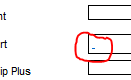
I have no idea where this is coming from.
Here's the xml for that textbox:-
xml Code:
<Textbox Name="Textbox96"> <CanGrow>true</CanGrow> <KeepTogether>true</KeepTogether> <Paragraphs> <Paragraph> <TextRuns> <TextRun> <Value>=First(Fields!ID6C.Value, "dsPerson")</Value> <ActionInfo> <Actions> <Action> <Hyperlink>="javascript:void(window.open('MyServer?/BCC Reporting/Troubled Families/ThinkFamiliesReporting/Person Indicator Detail&PersonID=" + cstr(Parameters!PersonID.Value) + "&IndicatorCode=6C&rc:Parameters=false','_blank'))"</Hyperlink> </Action> </Actions> </ActionInfo> <Style> <FontSize>7pt</FontSize> <Color>=iif(isNothing(First(Fields!ID6C.Value, "dsPerson")), "Black", "White")</Color> </Style> </TextRun> </TextRuns> <Style /> </Paragraph> </Paragraphs> <rd:DefaultName>Textbox12</rd:DefaultName> <ActionInfo> <Actions> <Action> <Hyperlink>="javascript:void(window.open('http://MyServer?/BCC Reporting/Troubled Families/ThinkFamiliesReporting/Person Indicator Detail&PersonID=" + cstr(Parameters!PersonID.Value) + "&IndicatorCode=6C&rc:Parameters=false','_blank'))"</Hyperlink> </Action> </Actions> </ActionInfo> <Top>11.01518cm</Top> <Left>30.35355cm</Left> <Height>0.4cm</Height> <Width>2.27839cm</Width> <ZIndex>88</ZIndex> <ToolTip>=First(Fields!ID6C.Value, "dsIndicatorValueDescriptions")</ToolTip> <Style> <Border> <Style>Solid</Style> </Border> <BackgroundColor>=iif(isNothing(First(Fields!ID6C.Value, "dsPerson")), "White", "Green")</BackgroundColor> <PaddingLeft>2pt</PaddingLeft> <PaddingRight>2pt</PaddingRight> <PaddingTop>2pt</PaddingTop> <PaddingBottom>2pt</PaddingBottom> </Style> </Textbox>
The value being returned from the dataset is NULL.
When I hover the mouse over the dash the cursor turns to a text selection cursor, implying that the dash is "real" text but I can't actually select it. I've even removed the text box and then put a new one on the report - the dash is still there.
Anyone got any suggestions as to where this might be coming from? I've looked at everything I can think of and I'm completely stumped.
Edit> A couple of other clues: It doesn't appear when I preview the report in visual studio. It does appear once deployed in IE, Chrome and Firefox. Deleting the deployed report and redeploying doesn't get rid of it.
Last edited by FunkyDexter; Aug 2nd, 2016 at 05:29 AM.
The best argument against democracy is a five minute conversation with the average voter - Winston Churchill
Hadoop actually sounds more like the way they greet each other in Yorkshire - Inferrd
 Posting Permissions
- You may not post new threads
- You may not post replies
- You may not post attachments
- You may not edit your posts
-
Forum Rules
|
Click Here to Expand Forum to Full Width
|



 Reply With Quote