|

-
Jul 25th, 2016, 07:08 AM
#1
Thread Starter
Junior Member

Connecting Wifi device Using visual basic
Dear all.
I have an wifi device which has been config with IP:192.168.1.3 and port :8899.
I am trying to connect the device using visual basic 2010. I have written code in python which working fine. Can someone help me to do using visal basic
Code:
import socket

TCP_IP = '192.168.1.3'
#TCTCP_IP1='192.168.1.2'
TCP_PORT = 8899
BUFFER_SIZE = 100
BUFFER_SIZE1=100
MESSAGE = "Hello, World!"

s = socket.socket(socket.AF_INET, socket.SOCK_STREAM)
#s1 = socket.socket(socket.AF_INET, socket.SOCK_STREAM)
s.connect((TCP_IP, TCP_PORT))
#s1.connect((TCTCP_IP1, TCP_PORT))

s.send(MESSAGE)
#s1.send(MESSAGE)
data = s.recv(500)
#data1= s1.recv(BUFFER_SIZE)

mod_hex=data.encode('hex').upper()
print 'Hexa decimal value Modified:',repr(mod_hex)


s.close()
#s1.close()
print "received data:", data
#print "received data:", data1
-
Jul 25th, 2016, 07:30 AM
#2
Re: Connecting Wifi device Using visual basic
.NET has its own Socket class, so that seems the logical first port of call, although there is also the TcpClient class that is easier in simple scenarios. What have you tried so far? If you haven't tried anything then how do you know that you can't do it?
-
Jul 25th, 2016, 11:25 PM
#3
Thread Starter
Junior Member
Re: Connecting Wifi device Using visual basic
I have tried below thing from forum search.
code1:But i cant able to make ensure device being connected to particular IP address.
Code:
    Sub Connect(ByVal server As [String], ByVal message As [String])
        Try
            ' Create a TcpClient.
            ' Note, for this client to work you need to have a TcpServer
            ' connected to the same address as specified by the server, port
            ' combination.
            Dim Port1 As String
            Port1 = SMCB1_Port.text
            Dim port As Int32 = CInt(Port1)
            Dim client As New TcpClient(server, port)

            ' Translate the passed message into ASCII and store it as a Byte array.
            Dim data As [Byte]() = System.Text.Encoding.ASCII.GetBytes(message)

            ' Get a client stream for reading and writing.
            '  Stream stream = client.GetStream();
            Dim stream As NetworkStream = client.GetStream()

            ' Send the message to the connected TcpServer.
            stream.Write(data, 0, data.Length)

            Console.WriteLine("Sent: {0}", message)

            ' Receive the TcpServer.response.
            ' Buffer to store the response bytes.
            data = New [Byte](256) {}

            ' String to store the response ASCII representation.
            Dim responseData As [String] = [String].Empty

            ' Read the first batch of the TcpServer response bytes.
            Dim bytes As Int32 = stream.Read(data, 0, data.Length)
            responseData = System.Text.Encoding.ASCII.GetString(data, 0, bytes)
            Console.WriteLine("Received: {0}", responseData)

            ' Close everything.
            stream.Close()
            client.Close()
        Catch e As ArgumentNullException
            Console.WriteLine("ArgumentNullException: {0}", e)
        Catch e As SocketException
            Console.WriteLine("SocketException: {0}", e)
        End Try

        Console.WriteLine(ControlChars.Cr + " Press Enter to continue...")
        Console.Read()
    End Sub 'Connect
code2: SSID detection: with below code i tried to find SSID and connect. It show avilable wifi network but i cant able to connect exist SSID
Code:
Public Class Form1

    Private Sub Form1_Load(ByVal sender As System.Object, ByVal e As System.EventArgs) Handles MyBase.Load

    End Sub


    Private Sub BtScan_Click(ByVal sender As System.Object, ByVal e As System.EventArgs) Handles BtScan.Click
        Dim proc As New System.Diagnostics.Process()
        proc.StartInfo.FileName = "netsh"
        proc.StartInfo.Arguments = "wlan show networks mode=bSSID"
        proc.StartInfo.RedirectStandardOutput = True
        proc.StartInfo.UseShellExecute = False
        proc.Start()
        MsgBox(proc.StandardOutput.ReadToEnd()


    End Sub


End Class

I have the Modbus RTu device which connected using USR-604 wifi device. The Modbus RTu send serial data for every 5s.Now My Pc acts like server and USR-604 acts as various client. Client Ip config given in the image. I could able to establish connection using python. Now my intension doing visual basic 2010. How can do using Visual basic. I Need simple class to get data likewise in python.
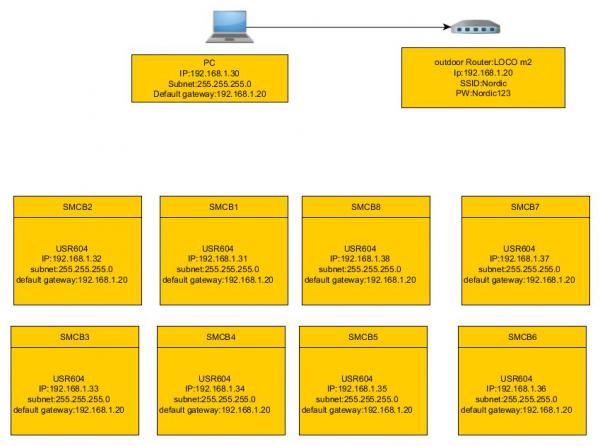
Last edited by AJITnayak; Jul 26th, 2016 at 12:34 AM.
-
Jul 26th, 2016, 12:50 AM
#4
Thread Starter
Junior Member
Re: Connecting Wifi device Using visual basic
i dont know how can i run below code to get data.
Code:
Private socket As TcpClient
    Private _stream As NetworkStream
    Private buffer(4095) As Byte

    Public Sub Connect()
        socket = New TcpClient
        socket.SendTimeout = (10 * 1000)
        socket.ReceiveTimeout = (10 * 1000)
        socket.BeginConnect("123.123.123.123", 38475, AddressOf ServerConnect, Nothing)
    End Sub

    Private Sub ServerConnect(ByVal ar As IAsyncResult)
        Try
            socket.EndConnect(ar)

            _stream = socket.GetStream()

            '// Send first 512 bytes of data to the server. Not a problem.

            _stream.BeginRead(buffer, 0, 4096, AddressOf Read, buffer)

        Catch ex As SocketException
            socket.Close()
        End Try
    End Sub

    Private Sub Read(ByVal ar As IAsyncResult)
        Try
            If _stream IsNot Nothing Then

                Dim bytesRead = _stream.EndRead(ar)

                If bytesRead = 0 Then
                    Return
                Else


                    '// How to handle received data here and respond accordingly?


                End If

                _stream.BeginRead(buffer, 0, 4096, AddressOf Read, buffer)

            End If
        Catch ex As Exception
            '// Do nothing. Disposed.
        End Try
    End Sub

    Private Sub Write(ByVal ar As IAsyncResult)
        _stream.EndWrite(ar)
    End Sub
Last edited by AJITnayak; Jul 26th, 2016 at 12:56 AM.
Tags for this Thread
 Posting Permissions
- You may not post new threads
- You may not post replies
- You may not post attachments
- You may not edit your posts
-
Forum Rules
|
Click Here to Expand Forum to Full Width
|



 Reply With Quote

