|

-
Jul 15th, 2016, 02:45 PM
#1041
Re: CommonControls (Replacement of the MS common controls)
 Originally Posted by lrd_VB6

If using the properties "BackColor" or "ForeColor", control is refreshed even if "Redraw" = False.
Done. Thanks.
-
Jul 19th, 2016, 03:05 PM
#1042
Re: CommonControls (Replacement of the MS common controls)
Improved version for the demo that shows of how to make the ToolBar control accessible per shortcut key on a MDIForm.
Just the following If statement has been included in the hook procedure: ('Me' is the MDI form)
Code:
If GetActiveWindow() = Me.hWnd Then
As WH_KEYBOARD_LL is a global hook the shortcut keys for the ToolBar were accessible from foreign processes, e.g. from the MS notepad.
And that is definitive not wanted..
The API GetActiveWindow() is perfect for this check, as:
- It will return 0 if the actual window is in a foreign process and not from within the calling thread.
- If an MDI form is active it returns always the main MDI form, even when a MDI Child form is actual active. (unlike Screen.ActiveForm, which would return the actual MDI Child form)
Last edited by Krool; Jul 19th, 2016 at 03:10 PM.
-
Jul 19th, 2016, 08:09 PM
#1043
Junior Member

Re: CommonControls (Replacement of the MS common controls)
in the ocx version 1.2 I could load a picture from an IPictureDisp into The ImageList and then create the toolbar from it in code.
Using OCX version 1.3 this does not work Am I missing anything?
Sample Code Code:
Dim tbb As VBCCR13.TbrButton, pic as IPictureDisp
 ''pic.Image = loadpicture from file or resource
 Imagelist1.ListImages.Add(1, "key",  pic.Image)
 ToolBar.ImageList = ImageList1
 Set tbb = ToolBar1.Buttons.Add(, "ButtonKey")
tbb.Description = b.Description
tbb.Enabled = b.Enabled
tbb.MixedState = b.MixedState
tbb.Image = 1
-
Jul 20th, 2016, 01:57 AM
#1044
Member

 Re: CommonControls (Replacement of the MS common controls) Re: CommonControls (Replacement of the MS common controls)
Hello,
I also found this "bug".
In "ImageList" , if "ImageWidth" <> 0 or "ImageHeiht" <> 0 AND the collection "ImageList" is empty, the addition does not work and without error.
I think the solution would be to slightly modify the ImagesList.FListImagesAdd () routine
Code:
Friend Sub FListImagesAdd(Optional ByVal Index As Long, _
                          Optional ByVal Picture As IPictureDisp)
Dim ImageListIndex As Long

    If Index = 0 Then
        ImageListIndex = Me.ListImages.Count + 1
    Else
        ImageListIndex = Index
    End If

    If Picture Is Nothing Then
        Err.Raise Number:=35607, Description:="Required argument is missing"
    ElseIf Picture.Handle = 0 Then
        Err.Raise Number:=35607, Description:="Required argument is missing"
    Else
        If ImageListHandle = 0 Or Me.ListImages.Count=0 Then
            If PropImageWidth = 0 Then PropImageWidth = UserControl.ScaleX(Picture.Width, vbHimetric, vbPixels)
            If PropImageHeight = 0 Then PropImageHeight = UserControl.ScaleY(Picture.Height, vbHimetric, vbPixels)
            If ImageListHandle = 0 Then Call CreateImageList
        End If
Or think of putting ImageWidth AND ImageHeiht to 0 BEFORE adding the first image.
Last edited by lrd_VB6; Jul 20th, 2016 at 02:04 AM.
-
Jul 20th, 2016, 07:01 AM
#1045
Junior Member
Re: CommonControls (Replacement of the MS common controls)
Originally Posted by lrd_VB6
Or think of putting ImageWidth AND ImageHeiht to 0 BEFORE adding the first image.
Ok, good suggestion, it worked.
I set ImageWidth and ImageHeight to 0, but once I added the images, I could no longer set the ImageWidth and ImageHeight property, because of the following error
Property is read-only if image list contains images
so I commented out the two lines of code and it works...
-
Jul 20th, 2016, 07:31 AM
#1046
Member
Re: CommonControls (Replacement of the MS common controls)
Originally Posted by ishalom
Ok, good suggestion, it worked.
I set ImageWidth and ImageHeight to 0, but once I added the images, I could no longer set the ImageWidth and ImageHeight property, because of the following error
Property is read-only if image list contains images
so I commented out the two lines of code and it works...
Code:
Dim tbb As VBCCR13.TbrButton, pic as IPictureDisp

    ''pic.Image = loadpicture from file or resource

    With Imagelist1
           If .Count=0 then .ImageWidth=0: .ImageHeight=0
           .ListImages.Add(1, "key",  pic.Image)
    End With
    ToolBar.ImageList = ImageList1

    Set tbb = ToolBar1.Buttons.Add(, "ButtonKey")
    tbb.Description = b.Description
    tbb.Enabled = b.Enabled
    tbb.MixedState = b.MixedState
    tbb.Image = 1
-
Jul 20th, 2016, 12:31 PM
#1047
Re: CommonControls (Replacement of the MS common controls)
I don't understand what you mean is a "bug" with the ImageList.
If the ImageWidth and/or ImageHeight is 0 it will be set automatically while loading the first image.
Code:
    If ImageListHandle = 0 And (PropImageWidth = 0 Or PropImageHeight = 0) Then
        If PropImageWidth = 0 Then PropImageWidth = UserControl.ScaleX(Picture.Width, vbHimetric, vbPixels)
        If PropImageHeight = 0 Then PropImageHeight = UserControl.ScaleY(Picture.Height, vbHimetric, vbPixels)
        Call CreateImageList
    End If
ImageListHandle = 0 means that a handle could not be created because either ImageWidth or ImageHeight is 0.
So there is no need to check if the Collection is empty because it is not possible to have the collection not empty and handle of <> 0.
What I tested now again is following:
I have the ImageHeight and ImageWidth set to both 16 pixels.
If I load now the first picture with 16x16 it works, no problem.
Even when I load a picture with 32x32 it works, it just gets "scaled".
So having ImageHeight and/or ImageWidth of 0 is just a convenience to retrieve the dimension from the first picture.
Later it is of course not possible to set ImageHeight and/or ImageWidth to 0 when pictures are already loaded.
So in my tests there is no such "bug". 
Last edited by Krool; Jul 20th, 2016 at 12:38 PM.
-
Jul 20th, 2016, 04:47 PM
#1048
Junior Member
Re: CommonControls (Replacement of the MS common controls)
Originally Posted by Krool
What I tested now again is following:
I have the ImageHeight and ImageWidth set to both 16 pixels.
If I load now the first picture with 16x16 it works, no problem.
Even when I load a picture with 32x32 it works, it just gets "scaled".
So having ImageHeight and/or ImageWidth of 0 is just a convenience to retrieve the dimension from the first picture.
Later it is of course not possible to set ImageHeight and/or ImageWidth to 0 when pictures are already loaded.
So in my tests there is no such "bug".
the problem is when populating the ImageList and Toolbar at runtime
Code:
Dim tbb As VBCCR13.TbrButton, pic as IPictureDisp

''pic.Image = load picture from file, resource or propertybag

Imagelist1.ListImages.Add(1, "key",  pic.Image)

ToolBar.ImageList = ImageList1
Set tbb = ToolBar1.Buttons.Add(, "ButtonKey")
tbb.Description = b.Description
tbb.Enabled = b.Enabled
tbb.MixedState = b.MixedState
tbb.Image = 1
if ImageHeight and/or ImageWidth is not 0 then the toolbar button won't show the picture
the problem only exist in version 13 of the ocx not in 12
Last edited by ishalom; Jul 20th, 2016 at 04:50 PM.
Reason: improve post
-
Jul 20th, 2016, 11:28 PM
#1049
Re: CommonControls (Replacement of the MS common controls)
Can you please provide a demo showing the issue?
Is this "bug" also in the Std-EXE version?
Thanks
-
Jul 21st, 2016, 01:04 AM
#1050
Member
Re: CommonControls (Replacement of the MS common controls)
Hello
I have a small test program that highlights the "bug" (problem)
The buttons "ImageSize" sets the size of the empty ImageList to 0 or 16
"Test 1" creates a imageList The TreeView without imposing size.
"Test 2" creates a imageList The TreeView by imposing a size size.
THE TEST
1. Start program
2. Click ImageSize = 0
3. Click "Test2" before "Test1" or "Test1" before "Test2"
or
1. Start program
2. Click ImageSize = 16
3. Click "Test2" before "Test1" or "Test1" before "Test2"
Following the order of tests, the message "ListImages is Nothing" appears.
This comes from the ImageList that was not created (ImageListHandle = 0) but without error when creating.
Another question.
The TreeView Version 13 "seems" slower than version 11. Is that normal?
Last edited by lrd_VB6; Jul 21st, 2016 at 01:09 AM.
-
Jul 21st, 2016, 02:02 PM
#1051
Re: CommonControls (Replacement of the MS common controls)
Originally Posted by lrd_VB6
Following the order of tests, the message "ListImages is Nothing" appears.
This comes from the ImageList that was not created (ImageListHandle = 0) but without error when creating.
Update released. (VBCCR13.OCX and Std-EXE)
Thank you!
I changed the code now to the following:
Code:
    If ImageListHandle = 0 Or (PropImageWidth = 0 Or PropImageHeight = 0) Then
        If PropImageWidth = 0 Then PropImageWidth = UserControl.ScaleX(Picture.Width, vbHimetric, vbPixels)
        If PropImageHeight = 0 Then PropImageHeight = UserControl.ScaleY(Picture.Height, vbHimetric, vbPixels)
        If ImageListHandle = 0 Then Call CreateImageList
    End If
Originally Posted by lrd_VB6
Another question.
The TreeView Version 13 "seems" slower than version 11. Is that normal?
This could be due to the extra overhead for the 'Variant' .Image property.
Is it also slower when not using the .Image property?
-
Jul 21st, 2016, 03:50 PM
#1052
Member
Re: CommonControls (Replacement of the MS common controls)
Hello,
happy to have made the project forward.
Another little detail to "tease"
In the following code:
Code:
If ImageListHandle = 0 Or (PropImageWidth = 0 Or PropImageHeight = 0) Then
        If PropImageWidth = 0 Then PropImageWidth = UserControl.ScaleX(Picture.Width, vbHimetric, vbPixels)
        If PropImageHeight = 0 Then PropImageHeight = UserControl.ScaleY(Picture.Height, vbHimetric, vbPixels)
        If ImageListHandle = 0 Then Call CreateImageList
End If
The first test is unnecessary.
By cons, it is important to leave last
If ImageListHandle = 0 Then Call CreateImageList
Last, I'd like able to benefit from your internal routines to implement the subclassing by the method of your choice (usercontrol, class or other)
To manage the mouse wheel by example.
Good luck and thank you for your work.
Last edited by lrd_VB6; Jul 21st, 2016 at 05:03 PM.
-
Jul 22nd, 2016, 02:05 PM
#1053
Re: CommonControls (Replacement of the MS common controls)
Originally Posted by lrd_VB6
Another little detail to "tease"
In the following code:
Code:
If ImageListHandle = 0 Or (PropImageWidth = 0 Or PropImageHeight = 0) Then
        If PropImageWidth = 0 Then PropImageWidth = UserControl.ScaleX(Picture.Width, vbHimetric, vbPixels)
        If PropImageHeight = 0 Then PropImageHeight = UserControl.ScaleY(Picture.Height, vbHimetric, vbPixels)
        If ImageListHandle = 0 Then Call CreateImageList
End If
The first test is unnecessary.
By cons, it is important to leave last
If ImageListHandle = 0 Then Call CreateImageList
Done. Thanks.
I also did another "tease". In the .ImageWidth and .ImageHeight property I replaced
Code:
If ImageListHandle <> 0 Then
    Call DestroyImageList
    Call CreateImageList
End If
with this
Code:
If ImageListHandle <> 0 Then Call DestroyImageList
If ImageListHandle = 0 Then Call CreateImageList
This ensures that the .hImageList will be valid when setting both .ImageWidth and .ImageHeight > 0.
For the moment this was only the case when setting at design-time. Now it is the same at run-time.
This can be important when setting the ImageList to a .ImageList property of a control prior loading the images!
Anyhow, now it should be perfect and cover all cases.
Originally Posted by lrd_VB6
Last, I'd like able to benefit from your internal routines to implement the subclassing by the method of your choice (usercontrol, class or other)
To manage the mouse wheel by example.
Please explain in more detail.
-
Jul 28th, 2016, 09:45 AM
#1054
Junior Member
Re: CommonControls (Replacement of the MS common controls)
I am not sure this is the right place to ask, but is it possible to have a background picture on the textbox?
-
Jul 28th, 2016, 03:09 PM
#1055
Re: CommonControls (Replacement of the MS common controls)
Originally Posted by ishalom
I am not sure this is the right place to ask, but is it possible to have a background picture on the textbox?
Your question gets answered there: http://www.vbforums.com/showthread.p...e-to-a-textbox
-
Jul 29th, 2016, 12:54 PM
#1056
Re: CommonControls (Replacement of the MS common controls)
General question put in the room:
Is there any need to make a lightweight ActiveX version?
Would be named VBCCR13L.OCX
If yes, which controls to exclude?
-
Jul 29th, 2016, 02:12 PM
#1057
Re: CommonControls (Replacement of the MS common controls)
My vote would be a huge NO! A HUGE advantage of what you've done is to allow someone to make a registration-free VB6 program.
If you're just looking for more to do, add a Column Headers Property Page to the Listview control, or add the tabctl32.ocx (SSTab) to the list of what you've covered. 
If you included the SSTab, I could go totally registration-free, with no SxS stuff on my primary project, which would be wonderful.
IDK, just my humble opinion, but I see the whole advantage of the wonderful work you've done is being able to wrap everything up into a single project.
Best Regards,
Elroy
Any software I post in these forums written by me is provided "AS IS" without warranty of any kind, expressed or implied, and permission is hereby granted, free of charge and without restriction, to any person obtaining a copy. To all, peace and happiness.
-
Jul 29th, 2016, 02:38 PM
#1058
Re: CommonControls (Replacement of the MS common controls)
@Elroy, I was talking about the .OCX and not the Std-EXE.
The package of Std-EXE would remain full as you can pick what you actually need.
For the OCX is different, you know?
Thats why I want to know if there is a need to make a lightweight ActiveX version.(VBCCR13L.OCX)
-
Jul 29th, 2016, 03:30 PM
#1059
Re: CommonControls (Replacement of the MS common controls)
Oh yes, in years past, I've done my own OCX compiles. However, these days, I just tend to pull the source code of my custom controls into whatever project I'm working on.
It just seems that, if someone were going to go "back" to an OCX, they'd just use the one from Microsoft. However, I do realize that you're offering some features that aren't in the original Microsoft controls.
If you're like me, you're just possibly looking for a way to do some further work on this project. I also know that it's most fun for me if it's some idea I've thought up on my own. But just to gently set it on the table, having this for the SSTab control would be wildly cool IMHO. Regarding the Column Headers Property Page, I could do that pretty easily myself if I really wanted it.
I do hope you continue with the joy of coding in VB6, whatever that may involved.
Regards,
Elroy
Any software I post in these forums written by me is provided "AS IS" without warranty of any kind, expressed or implied, and permission is hereby granted, free of charge and without restriction, to any person obtaining a copy. To all, peace and happiness.
-
Jul 30th, 2016, 07:57 AM
#1060
Lively Member
Re: CommonControls (Replacement of the MS common controls)
I agree I don't see any real need to make a lightweight OCX as you can pick the controls from the std package if wish, (and I like the ability to use the OCX side by side with no registration) my wish list is as above is a SStab replacement and a really good grid control like LynxGrid (development stopped long ago).
I am only a novice programmer but use these controls all the time, due to my programs having to run on WYSE terminals which don't allow me to register anything.
The exe where getting very large 2mb+ but now I have got the side by side OCX working its great and keeps the exe size down.
-
Jul 30th, 2016, 12:54 PM
#1061
Re: CommonControls (Replacement of the MS common controls)
Originally Posted by jpskiller
I agree I don't see any real need to make a lightweight OCX as you can pick the controls from the std package if wish, (and I like the ability to use the OCX side by side with no registration) my wish list is as above is a SStab replacement and a really good grid control like LynxGrid (development stopped long ago).
I am only a novice programmer but use these controls all the time, due to my programs having to run on WYSE terminals which don't allow me to register anything.
The exe where getting very large 2mb+ but now I have got the side by side OCX working its great and keeps the exe size down.
Its true. Actually it doesnt matter nowadays if a OCX is 4.6MB or only 2MB. And it would be difficult to find the best mix for such a lightweight OCX.
Concerning the grid replacement. I need also such an replacement, so I am developing a MSFlexGrid replacement. It will replace it completely, though the MSHFlexGrid will be replaced only partially as I don't think I will implement bands. Of course all known bugs and limitations (e.g. lack of mouse wheel support, cell limit, etc.) will be away.
But this will be in a separate project. It will not be included in this project as it is too big.
For SSTab. To be honest, I dont know much of it and what is the advantage over the TabStrip control?
-
Jul 30th, 2016, 10:50 PM
#1062
Hyperactive Member
Re: CommonControls (Replacement of the MS common controls)
The main different to a user is every tab of the SSTab is a container by itself. During design mode, you can put controls in the tabs. Unlike TabStrip where you need to have another container - usually picture box. During runtime, have to resize the picturebox when the TabStrip is resized. Don't have to do this with SSTab.
The downside is that SSTab is not themed, so it can look out of place when the other controls are themed.
Edited later to add:
In VB.NET, the tabs in TabStrip are containers.
Last edited by chosk; Jul 31st, 2016 at 05:41 AM.
-
Jul 31st, 2016, 10:39 AM
#1063
Re: CommonControls (Replacement of the MS common controls)
I know I'm going to say stuff that'll keep Krool from ever seriously looking at the SSTab, but hey ho. Each tab actually isn't a container. The whole control is a container, but the individual tabs just have some interesting logic that moves the controls around. What it actually does is add and subtract 75000 twips from the control's left property to move it into and out of sight when the tabs are clicked.
I've actually got some code that'll switch the tab a control is on, and it has nothing to do with changing the control's container. I've actually previously posted these procedures in these forums.
The SSTab is also a bit buggy on one account (although, overall, I've found it to be quite bulletproof). The sole bug I've found is that, under certain circumstances, it'll let a control on a non-visible tab take the focus. So, when you're using the TAB-keyboard-key to change focus, the focus will appear to be in la-la-land. I've written a class that I instantiate and attach to each SSTab control that I use that corrects this bug.
I must say though, all in all, I do like the SSTab control a great deal.
Regards,
Elroy
Any software I post in these forums written by me is provided "AS IS" without warranty of any kind, expressed or implied, and permission is hereby granted, free of charge and without restriction, to any person obtaining a copy. To all, peace and happiness.
-
Aug 1st, 2016, 07:24 AM
#1064
Junior Member
Re: CommonControls (Replacement of the MS common controls)
I have played around with the Std-EXE, and I still use your OCX (thank you).
as a user of your OCX, I can say that a lightweight one would not be necessary. It is great the way it is, and you are better of spending your time with the stuff the others have mentioned.
The SStab would also be great, as Elroy says the ms one is a bit (a lot) buggy (I have stopped using it a long time ago). but the idea of not needing a picture box for each tab and the need of moving it around during design time, would be great.
since I see others are using this space for requests I would like to add two of mine:
1) the vb controls have a RightToLeft Property, with your OCX I have to use window API, and on a form with a controls it's a bit messy.
Also the Label Control does not have an hWnd Property.
2) how about a PpropertyList, its not part of the MS Common Controls, but your are BETTER....
this is the code used for RightToLeft
Code:
Private Declare Function GetWindowLong Lib "User32" Alias "GetWindowLongA" (ByVal hWnd As Long, ByVal nIndex As Long) As Long
Private Declare Function SetWindowLong Lib "User32" Alias "SetWindowLongA" (ByVal hWnd As Long, ByVal nIndex As Long, ByVal dwNewLong As Long) As Long
Private Const WS_EX_RIGHT = &H1000&
Private Const WS_EX_RTLREADING = &H2000&
Private Const WS_EX_LAYOUTRTL = &H400000
Private Const WS_EX_LEFTSCROLLBAR = &H4000&
Private Const GWL_EXSTYLE = (-20)

Private Const GWL_STYLE = (-16)
Private Const WS_EX_NOINHERITLAYOUT = &H100000

Public Sub SetRTLControl(hwnd As Long)
Dim l As Long
l = GetWindowLong(hwnd, GWL_EXSTYLE)
l = l Or WS_EX_LAYOUTRTL
l = SetWindowLong(hwnd, GWL_EXSTYLE, l)

End Sub
Last edited by ishalom; Aug 1st, 2016 at 07:40 AM.
-
Aug 1st, 2016, 12:36 PM
#1065
Fanatic Member
Re: CommonControls (Replacement of the MS common controls)
The original SSTab has also problems on multi-monitor systems.
I gave up on it years ago as well.
The major advantage of SSTab over the TabStrip is the easy handling at design time.
And at runtime, it makes things easier as well.
I like the idea of a STTab replacement.
---
Lightweight OCX: I can't imagine a single reason for it.
---
Karl
-
Aug 1st, 2016, 01:59 PM
#1066
Re: CommonControls (Replacement of the MS common controls)
Hey Karl,
I virtually never sit down at a computer these days that doesn't have at least two monitors on it. One of my home development computers has three, but my primary one only has two. Also, virtually all of my clients these days have primary workstations with two monitors. In my primary application, I've even worked out procedures for shoving forms to the second monitor, specifically so they can view two things at once while working within the application, and the SSTab is frequently on one (if not both) of these forms.
I'm just wondering what multi-monitor problems you've seen with the SSTab control.
And yes, I suppose it is the "coolness" of IDE design-time development that attracts me to the control. I just love being able to click the tabs and redesign one of the tab/pages while in the IDE.
Regards,
Elroy
p.s. Regarding multiple monitors, I'm starting to think we've all gone the wrong direction, except possibly for some specific applications. My next system is going to have a 4k Ultra HD video card in it, with a single 4k Ultra HD monitor that's somewhere in the neighborhood of 40" diagonal. That way, I can put forms and windows wherever I darn well please.
Any software I post in these forums written by me is provided "AS IS" without warranty of any kind, expressed or implied, and permission is hereby granted, free of charge and without restriction, to any person obtaining a copy. To all, peace and happiness.
-
Aug 2nd, 2016, 01:31 AM
#1067
Fanatic Member
Re: CommonControls (Replacement of the MS common controls)
Hello Elroy,
OT:
Regarding monitor usage, it seems we both have the same conditions.
Originally Posted by Elroy
I'm just wondering what multi-monitor problems you've seen with the SSTab control.
Don't remember exactly, it is too long ago.
I think the problems occurred with negative screen coordinates, then the click onto a tab didn't work.
BTW, problems with negative screen coordinates can be found e.g. in the comctl32 treeview.
The NodeClick events doesn't work in this case.
Because Visual Styles were not possible with SSTAB, I gave up when XP came out.
p.s. Regarding multiple monitors, I'm starting to think we've all gone the wrong direction, except possibly for some specific applications. My next system is going to have a 4k Ultra HD video card in it, with a single 4k Ultra HD monitor that's somewhere in the neighborhood of 40" diagonal. That way, I can put forms and windows wherever I darn well please.
Not sure.
I had the same idea, but...
With such sizes, the eye-screen distance is too different, upper left is further away than bottom left - problem for me.
Next is, the single pixel is very small, and doing pixel-fine work is even harder than with standard monitors.
And the quality of the cheaper ones is not so very super, I don't want to spend much more than 1000 for such a monitor.
Last is, a 40" display is virtually 4 standard displays - and a 20" monitor is quite small.
But I must confess, I didn't try a 40" 4K setup in reality.
Now I use 3x 26" 1920x1200.
I wait until a monitor dies.
Karl
-
Aug 3rd, 2016, 04:29 AM
#1068
Fanatic Member
Re: CommonControls (Replacement of the MS common controls)
Hi Elroy,
I'm just wondering what multi-monitor problems you've seen with the SSTab control.
From your own other post:
and I've found that the SSTab control's size gets totally confused when DPI isn't set to precisely 96 DPI.
So it doesn't matter which problems I experienced in the past.
Non-DPI-aware is a killer anyway.
Krool's controls ARE DPI aware.
Better than the originals, really.
Perhaps someday he is bored and creates an SSTAB replacement.
Karl
-
Aug 3rd, 2016, 08:46 AM
#1069
Re: CommonControls (Replacement of the MS common controls)
Hi Karl,
Well, to date, I've insisted that my clients always set their monitors to 96 DPI, so I have no problems. If they want things bigger, they just use screen resolution (with the accompanying fuzziness). As suggested in another thread, I know I've got to bite-the-bullet on this quite soon. I've played with it some, and found that the SSTab control is particularly problematic. I think the solution is just to "take charge" of its size (as well as the size of all the controls it contains, and the controls nested on containers on its tabs). Arghh. It's just not something I'm looking forward to.
Regards,
Elroy
Any software I post in these forums written by me is provided "AS IS" without warranty of any kind, expressed or implied, and permission is hereby granted, free of charge and without restriction, to any person obtaining a copy. To all, peace and happiness.
-
Aug 4th, 2016, 04:52 PM
#1070
Fanatic Member
Re: CommonControls (Replacement of the MS common controls)
Tested briefly Listview control, but seems that it does allow editing only in first column? Likewise when FullRowSelect is set to False, it does not allow focus/selection in to other columns.
Listview has an another quirk... Try to drag some item in Listview3 upwards, works ok - but dragging item downwards, it pushes all items 'front' of it downwards, not just jump over as it should.
Last edited by Tech99; Aug 4th, 2016 at 05:03 PM.
-
Aug 4th, 2016, 11:40 PM
#1071
Hyperactive Member
Re: CommonControls (Replacement of the MS common controls)
I am experimenting to create a Windows 10 style Hamburger Menu using OptionButtons as menu. How can I remove the round circle thing on the left so that only the caption show? I am using OptionButtons instead of Labels because I can vertical-center the caption.
Thanks.
Edit:
I think I use a Label and vertical center the caption manually. It also doesn't have the selected rectangle that makes it more suitable.
Last edited by chosk; Aug 5th, 2016 at 10:48 AM.
-
Aug 5th, 2016, 01:35 PM
#1072
Re: CommonControls (Replacement of the MS common controls)
is there an example of using a toolbar split dropdown button?
-
Aug 5th, 2016, 02:30 PM
#1073
Re: CommonControls (Replacement of the MS common controls)
Originally Posted by DEXWERX
is there an example of using a toolbar split dropdown button?
In the demo here.
-
Aug 5th, 2016, 09:37 PM
#1074
New Member
Re: CommonControls (Replacement of the MS common controls)
Benefits of using the existing controls over what is? There is every driver has the same properties? They are new?
You can apply for a name change OLEGuids.tlb new to avoid a conflict with my current OLEGuids.tlb in the system32 folder?
-
Aug 6th, 2016, 01:47 AM
#1075
Re: CommonControls (Replacement of the MS common controls)
Originally Posted by dungdn93
You can apply for a name change OLEGuids.tlb new to avoid a conflict with my current OLEGuids.tlb in the system32 folder?
You can rename my OLEGuids.tlb to OLEGuids2.tlb for instance. The uuid and library name differs, so no conflicts.
-
Aug 7th, 2016, 10:23 PM
#1076
Hyperactive Member
Re: CommonControls (Replacement of the MS common controls)
Hi Krool,
I am not sure whether I can or should ask you to include features in the LabelW control to align caption vertically. And also for a MouseOver event or something where when the mouse is over it, we can use the event to change the backcolor and change back when it leaves. This will make the label usable as a button to make the app adopt the Windows 10 look.
Right now, I have to insert a vbCrLf to push the caption down but then I will need to make the Label very tall. I also use MouseMove on the LabelW and also the form (and any other controls) to revert the LabelW backcolor back to non-hover color. This create a lot of flicker.
I attach a screen hot of my demo against the Windows 10 Money app for comparision.
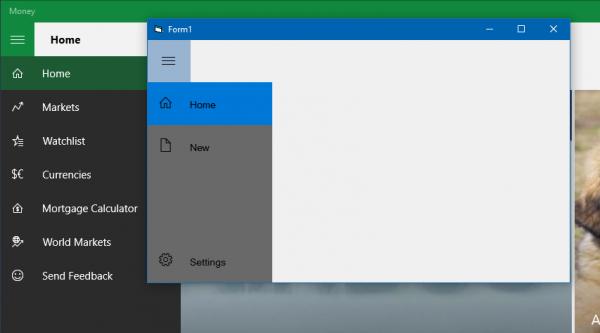
Last edited by chosk; Aug 7th, 2016 at 10:26 PM.
-
Aug 7th, 2016, 11:00 PM
#1077
Hyperactive Member
Re: CommonControls (Replacement of the MS common controls)
I intend to use this also in Windows 7 by making the form without caption and border and creating my own caption bar. The Seogoe MDL2 Assets font can be downloaded and installed in Windows 7 from the link the lower choice option with the captcha:
https://www.azfonts.net/download/segoe-mdl2-assets.html
Eventually, I intend to use from a resource to avoid installing the font.
Here is the code to a very raw demo:
Code:
Option Explicit

Private Sub Form_Load()

    LabelW0.Font.Name = "Segoe MDL2 Assets"
    LabelW1.Font.Name = "Segoe MDL2 Assets"
    LabelW2.Font.Name = "Segoe MDL2 Assets"
    LabelW3.Font.Name = "Segoe MDL2 Assets"

    LabelW0.Font.Size = 14
    LabelW1.Font.Size = 14
    LabelW2.Font.Size = 14
    LabelW3.Font.Size = 14

    LabelW0.Caption = vbCrLf & Space(4) & ChrW$(&HE700)
    LabelW1.Caption = vbCrLf & Space(4) & ChrW$(&HE80F) & Space(5) & "Home"
    LabelW2.Caption = vbCrLf & Space(4) & ChrW$(&HE160) & Space(5) & "New"
    LabelW3.Caption = vbCrLf & Space(4) & ChrW$(&HE713) & Space(5) & "Settings"

End Sub

Private Sub Form_MouseMove(Button As Integer, Shift As Integer, X As Single, Y As Single)
    LabelW1.BackColor = &H80000015
    LabelW2.BackColor = &H80000015
    LabelW3.BackColor = &H80000015
End Sub

Private Sub Frame1_MouseMove(Button As Integer, Shift As Integer, X As Single, Y As Single)
    LabelW1.BackColor = &H80000015
    LabelW2.BackColor = &H80000015
    LabelW3.BackColor = &H80000015
End Sub

Private Sub LabelW1_MouseMove(Button As Integer, Shift As Integer, X As Single, Y As Single)
    LabelW1.BackColor = &H8000000D
    LabelW2.BackColor = &H80000015
    LabelW3.BackColor = &H80000015
End Sub

Private Sub LabelW2_MouseMove(Button As Integer, Shift As Integer, X As Single, Y As Single)
    LabelW2.BackColor = &H8000000D
    LabelW1.BackColor = &H80000015
    LabelW3.BackColor = &H80000015
End Sub

Private Sub LabelW3_MouseMove(Button As Integer, Shift As Integer, X As Single, Y As Single)
    LabelW3.BackColor = &H8000000D
    LabelW1.BackColor = &H80000015
    LabelW2.BackColor = &H80000015
End Sub
-
Aug 8th, 2016, 03:37 PM
#1078
Re: CommonControls (Replacement of the MS common controls)
Update released.
Originally Posted by chosk
I am not sure whether I can or should ask you to include features in the LabelW control to align caption vertically.
I have now included the VerticalAlignment property in the LabelW control. It supports also multi-line text.
-
Aug 8th, 2016, 11:50 PM
#1079
Hyperactive Member
Re: CommonControls (Replacement of the MS common controls)
Originally Posted by Krool
Update released.
I have now included the VerticalAlignment property in the LabelW control. It supports also multi-line text.
Hi Krool,
Thank you very much.
-
Aug 9th, 2016, 06:31 AM
#1080
Junior Member
Re: CommonControls (Replacement of the MS common controls)
Can't seem to find the link to download the OCX 1.3 and the Stdexe
 Posting Permissions
- You may not post new threads
- You may not post replies
- You may not post attachments
- You may not edit your posts
-
Forum Rules
|
Click Here to Expand Forum to Full Width
|



 Reply With Quote