|

-
Jul 14th, 2016, 08:54 AM
#1
Thread Starter
New Member


 SystemIOException SystemIOException
Hi guys,
i was wondering if any of you could help, i am creating a logging app that records audio and video and saves the data to a USB stick/drive every minute.
Everything works fine, and i have been testing to see if i could get it to crash when using is (and i can).
I use a background worker thread to compress the temporary files and save them to the USB drive every 60 seconds, however if i remove the USB drive once it starts writing i get a SystemIOException.
I have tried different things like using a try/catch statement in the background worker thread to cancel the thread, but still get this exception.
The program will be used by people who i know will do this even thigh the manual states to press the USB eject button and wait for the program to report the USB drive can be removed.
My question is how to i stop this error crashing the program, every other part of the program seems to work great and i just cant seem to see how to overcome this.
Any help is appreciated.
Regards
Stu
-
Jul 14th, 2016, 09:59 AM
#2
Re: SystemIOException
I'd have to see a good bit more of your code to give you specialized advice, but in general when you know a particular exception is coming, you use a Try..Catch to handle it.
IOException is sort of general and could mean a lot of things, so you might have to dig into it to see if it's the right one. Here's an option:
Code:
Try
    ' The code that saves the file
Catch ex As System.IO.IOException
    If ex.Message = "Whatever the message is, arrogantly assuming everyone speaks English" Then
        ' This is the case where they pulled the drive out, yell at them with a message box
    Else
        ' This is some other error case, best to let it burn
        Throw
    End If
End Catch
That code will intercept this specific IOException (assuming you put the right String in for the message) and handle that without crashing. Any other IOException will continue to crash the program. This sounds bad, but is ultimately good. If you willy-nilly write code that ignores exceptions, you can get in situations where obvious assumptions are no longer true, and your program behaves in weird ways that cost you days of debugging time.
If you can, try to find a better way to figure out if it's the right IOException than using the Message property. That one can change with the system language. I'm not sure if a better way does exist, there isn't always some unique property to check. That's why it's a very bad idea to throw very general exceptions like IOException, Microsoft.
-
Jul 14th, 2016, 10:05 AM
#3
Re: SystemIOException
You make it sound like the Try...Catch in the thread is not actually catching the exception. Is that true? If so, then is there any reason why you believe that the exception is even happening on the code in the Try block? Cause it seems like the Try...Catch might be wrapping the wrong code.
My usual boring signature: Nothing
 
-
Jul 14th, 2016, 10:21 AM
#4
Thread Starter
New Member
Re: SystemIOException
Sitten Thanks for the response,
below is a little program i created to generate the error:
It just needs one Button on a form and System.IO.Compression and System.IO.Compression.FileSystem added as references.
Code:
Imports System.Windows.Forms
Imports System
Imports System.Runtime.InteropServices
Imports System.ComponentModel
Imports System.IO
Imports System.IO.Compression
Imports System.IO.DriveInfo
Imports System.Management
Imports System.Xml

Public Class Form1
    Private bw As BackgroundWorker = New BackgroundWorker
    Dim SaveLoc As String = "E:\"
    Dim startedCompress As Boolean = False
    Private Sub Button1_Click(sender As Object, e As EventArgs) Handles Button1.Click
        bw.RunWorkerAsync()
    End Sub

    Private Sub bw_DoWork(ByVal sender As Object, ByVal e As DoWorkEventArgs)
        Debug.Print(DateTime.Now.ToString & " - BW Started")
        Try
            If bw.CancellationPending = True Then
                e.Cancel = True
            Else
                'do work
                doCompress("C:\Temp\Test")
            End If
        Catch ex As Exception
            Debug.Print(DateTime.Now.ToString & " - Unable to start background worker thread: " & ex.Message)
        End Try
    End Sub
    Private Sub bw_RunWorkerCompleted(ByVal sender As Object, ByVal e As RunWorkerCompletedEventArgs)
        Debug.Print(DateTime.Now.ToString & " - BW Complete")
    End Sub

    Private Sub doCompress(ByVal fn As String)
        Try
            If Directory.Exists(Mid$(SaveLoc, 1, 3)) Then
                startedCompress = True
                If Not (fn.Contains("TestAudio")) And fn <> "" Then
                    Dim fileName As String = System.IO.Path.GetFileName(fn)
                    Dim dirname As String = DateTime.Now.ToString("yyyyMMdd-HHmmss")
                    If My.Computer.FileSystem.DirectoryExists(SaveLoc & "\" & dirname) = False Then
                        My.Computer.FileSystem.CreateDirectory(SaveLoc & "\" & dirname)
                    End If
                    Dim wavCompressname = "SND-" & fileName & ".zip"
                    Dim wavName = fileName & ".wav"
                    'Do Audio
                    If System.IO.File.Exists(SaveLoc & wavCompressname) Then
                        System.IO.File.Delete(SaveLoc & wavCompressname)
                    End If
                    Dim audDir As String = fn & "\"
                    Dim ZipDir As String = SaveLoc & dirname & "\" & wavCompressname
                    ' Debug.Print("-------------------------------------------------" & fileName & "--------------------------")
                    'Debug.Print(DateTime.Now.ToString & "    -    Start Compress")
                    If File.Exists(ZipDir) Then
                        ZipDir = ZipDir.Replace(".zip", "-1.zip")
                        '   Debug.Print("file exists - renameing file to: " & ZipDir)
                    End If
                    ZipFile.CreateFromDirectory(audDir, ZipDir, CompressionLevel.Optimal, False)

                    startedCompress = False
                End If
            End If
        Catch dirNotFound As System.IO.DirectoryNotFoundException
            ' Code to handle DirectoryNotFoundException.
            Debug.Print(DateTime.Now.ToString & " - Directory Not Found: ")
        Catch fileNotFound As System.IO.FileNotFoundException
            ' Code to handle FileNotFoundException.
            Debug.Print(DateTime.Now.ToString & " - File Not Found: ")
        Catch *********** As System.IO.***********Exception
            ' Code to handle ***********Exception.
            Debug.Print(DateTime.Now.ToString & " - Path Too Long: ")
        Catch ioEx As System.IO.IOException
            ' Code to handle IOException.
            Debug.Print(DateTime.Now.ToString & " - IO: ")
        Catch security As System.Security.SecurityException
            ' Code to handle SecurityException.
            Debug.Print(DateTime.Now.ToString & " - Security: ")
        Catch ex As Exception
            Debug.Print(DateTime.Now.ToString & " - Could not Compress files: " & ex.Message)
        End Try
    End Sub

    Private Sub Form1_Load(sender As Object, e As EventArgs) Handles Me.Load
        bw.WorkerSupportsCancellation = True
        bw.WorkerReportsProgress = False
        AddHandler bw.DoWork, AddressOf bw_DoWork
        AddHandler bw.RunWorkerCompleted, AddressOf bw_RunWorkerCompleted
    End Sub
End Class
I put some stuff into the "C:\Temp\Test" directory, this will be zipped onto the flash drive located in the SaveLoc variable in this case "E:\", make sure there is enough in the temp\test directory to take a little time to compress, i have about 23MB of images and audio this takes about 4-6 seconds to compress and save the files.
Once you click the button wait a second and then remove the USB flash drive (please use a clean drive as i would hate for anything you have on the drive becoming corrupt due to bad removal). I have had to do this 3 or 4 times before it shows the error below:

when i look at the View Details i get:
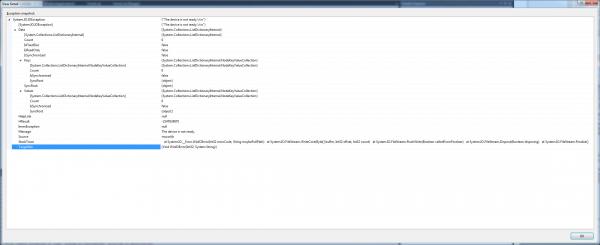
The image above i cant seem to find a way to save all of the information in an XML or text format from VS2012
the immediate window shows:
14/07/2016 16:07:57 - BW Started
14/07/2016 16:08:01 - BW Complete
14/07/2016 16:08:14 - BW Started
14/07/2016 16:08:18 - BW Complete
14/07/2016 16:08:24 - BW Started
14/07/2016 16:08:30 - BW Complete
14/07/2016 16:09:46 - BW Started
A first chance exception of type 'System.IO.IOException' occurred in mscorlib.dll
A first chance exception of type 'System.IO.IOException' occurred in mscorlib.dll
A first chance exception of type 'System.IO.IOException' occurred in mscorlib.dll
14/07/2016 16:09:47 - IO:
14/07/2016 16:09:47 - BW Complete
14/07/2016 16:10:03 - BW Started
A first chance exception of type 'System.IO.IOException' occurred in mscorlib.dll
A first chance exception of type 'System.IO.IOException' occurred in mscorlib.dll
A first chance exception of type 'System.IO.IOException' occurred in mscorlib.dll
14/07/2016 16:10:04 - IO:
14/07/2016 16:10:04 - BW Complete
A first chance exception of type 'System.IO.IOException' occurred in mscorlib.dll
the actual exception occurred after the Background worker reported complete, so i am at a loss as i would expect it to do the same each time, but as you see from above it reported it was caught when it gave the time and the - IO text, but sometimes it crashes.
I have no idea what to try next.
Hopefully this extra info helps explain why i am confused.
Thanks
Stu
-
Jul 14th, 2016, 10:22 AM
#5
Thread Starter
New Member
Re: SystemIOException
Hi Shaggy,
you may be correct, i added some more info as i took the bit of compression code from my main program and made a small program (above) that has the same error.
Cheers
Stu
-
Jul 14th, 2016, 10:37 AM
#6
Re: SystemIOException
 Originally Posted by stulish

Sitten Thanks for the response,
below is a little program i created to generate the error:
It just needs one Button on a form and System.IO.Compression and System.IO.Compression.FileSystem added as references.
Code:
Imports System.Windows.Forms
Imports System
Imports System.Runtime.InteropServices
Imports System.ComponentModel
Imports System.IO
Imports System.IO.Compression
Imports System.IO.DriveInfo
Imports System.Management
Imports System.Xml

Public Class Form1
    Private bw As BackgroundWorker = New BackgroundWorker
    Dim SaveLoc As String = "E:\"
    Dim startedCompress As Boolean = False
    Private Sub Button1_Click(sender As Object, e As EventArgs) Handles Button1.Click
        bw.RunWorkerAsync()
    End Sub

    Private Sub bw_DoWork(ByVal sender As Object, ByVal e As DoWorkEventArgs)
        Debug.Print(DateTime.Now.ToString & " - BW Started")
        Try
            If bw.CancellationPending = True Then
                e.Cancel = True
            Else
                'do work
                doCompress("C:\Temp\Test")
            End If
        Catch ex As Exception
            Debug.Print(DateTime.Now.ToString & " - Unable to start background worker thread: " & ex.Message)
        End Try
    End Sub
    Private Sub bw_RunWorkerCompleted(ByVal sender As Object, ByVal e As RunWorkerCompletedEventArgs)
        Debug.Print(DateTime.Now.ToString & " - BW Complete")
    End Sub

    Private Sub doCompress(ByVal fn As String)
        Try
            If Directory.Exists(Mid$(SaveLoc, 1, 3)) Then
                startedCompress = True
                If Not (fn.Contains("TestAudio")) And fn <> "" Then
                    Dim fileName As String = System.IO.Path.GetFileName(fn)
                    Dim dirname As String = DateTime.Now.ToString("yyyyMMdd-HHmmss")
                    If My.Computer.FileSystem.DirectoryExists(SaveLoc & "\" & dirname) = False Then
                        My.Computer.FileSystem.CreateDirectory(SaveLoc & "\" & dirname)
                    End If
                    Dim wavCompressname = "SND-" & fileName & ".zip"
                    Dim wavName = fileName & ".wav"
                    'Do Audio
                    If System.IO.File.Exists(SaveLoc & wavCompressname) Then
                        System.IO.File.Delete(SaveLoc & wavCompressname)
                    End If
                    Dim audDir As String = fn & "\"
                    Dim ZipDir As String = SaveLoc & dirname & "\" & wavCompressname
                    ' Debug.Print("-------------------------------------------------" & fileName & "--------------------------")
                    'Debug.Print(DateTime.Now.ToString & "    -    Start Compress")
                    If File.Exists(ZipDir) Then
                        ZipDir = ZipDir.Replace(".zip", "-1.zip")
                        '   Debug.Print("file exists - renameing file to: " & ZipDir)
                    End If
                    ZipFile.CreateFromDirectory(audDir, ZipDir, CompressionLevel.Optimal, False)

                    startedCompress = False
                End If
            End If
        Catch dirNotFound As System.IO.DirectoryNotFoundException
            ' Code to handle DirectoryNotFoundException.
            Debug.Print(DateTime.Now.ToString & " - Directory Not Found: ")
        Catch fileNotFound As System.IO.FileNotFoundException
            ' Code to handle FileNotFoundException.
            Debug.Print(DateTime.Now.ToString & " - File Not Found: ")
        Catch *********** As System.IO.***********Exception
            ' Code to handle ***********Exception.
            Debug.Print(DateTime.Now.ToString & " - Path Too Long: ")
        Catch ioEx As System.IO.IOException
            ' Code to handle IOException.
            Debug.Print(DateTime.Now.ToString & " - IO: ")
        Catch security As System.Security.SecurityException
            ' Code to handle SecurityException.
            Debug.Print(DateTime.Now.ToString & " - Security: ")
        Catch ex As Exception
            Debug.Print(DateTime.Now.ToString & " - Could not Compress files: " & ex.Message)
        End Try
    End Sub

    Private Sub Form1_Load(sender As Object, e As EventArgs) Handles Me.Load
        bw.WorkerSupportsCancellation = True
        bw.WorkerReportsProgress = False
        AddHandler bw.DoWork, AddressOf bw_DoWork
        AddHandler bw.RunWorkerCompleted, AddressOf bw_RunWorkerCompleted
    End Sub
End Class
I put some stuff into the "C:\Temp\Test" directory, this will be zipped onto the flash drive located in the SaveLoc variable in this case "E:\", make sure there is enough in the temp\test directory to take a little time to compress, i have about 23MB of images and audio this takes about 4-6 seconds to compress and save the files.
Once you click the button wait a second and then remove the USB flash drive (please use a clean drive as i would hate for anything you have on the drive becoming corrupt due to bad removal). I have had to do this 3 or 4 times before it shows the error below:
when i look at the View Details i get:
The image above i cant seem to find a way to save all of the information in an XML or text format from VS2012
the immediate window shows:
the actual exception occurred after the Background worker reported complete, so i am at a loss as i would expect it to do the same each time, but as you see from above it reported it was caught when it gave the time and the - IO text, but sometimes it crashes.
I have no idea what to try next.
Hopefully this extra info helps explain why i am confused.
Thanks
Stu
Ok, so it soundsl ike you're getting this while running it in the IDE... right? Press Ctrl+Alt+E ... that should bring up a dialog where you can tell the IDE to break when certain exceptions happen... I believe the second one is the one your interested in . "Common Language Runtime Exceptions" ... clear the first check box under the Thrown col.... having that checked is the same as VB6's old "break on all errors" setting... even when handcled, as soon as the exception is thrown, it'll stop. Often in development and debugging, this is desired... but not always. Clearing that will allow the exceptions that are handled to be handled properly.
See if that gets you the desired effect.
-tg
-
Jul 14th, 2016, 11:28 AM
#7
Thread Starter
New Member
Re: SystemIOException
Thanks Techgnome,
I will try that in the morning when back in the office and let you know.
Stu
-
Jul 14th, 2016, 12:39 PM
#8
Re: SystemIOException
What TG suggested is good...as long as you are using the right version of VS. That functionality changed radically in VS2015 and those instructions won't work. You still want to do the same thing, but 2015 allows for setting a FAR more complex filter. I haven't done that in several months, and don't recall quite how to get to it, so it might take a bit of exploration if you are using VS2015.
My usual boring signature: Nothing
-
Jul 14th, 2016, 12:48 PM
#9
Re: SystemIOException
The short version of the story:
VS has a feature where it will break on exceptions before the code checks to see if the exceptions were handled. This is useful in certain cases, but mostly annoying. So if you break on a "first-chance" exception, that doesn't mean the program is about to crash: it could be that there's an exception handler that will handle it.
So most people end up turning it off after getting burned by it, then turning it back on when they need it again later.
-
Jul 15th, 2016, 01:07 AM
#10
Thread Starter
New Member
Re: SystemIOException
Originally Posted by techgnome
Ok, so it soundsl ike you're getting this while running it in the IDE... right? Press Ctrl+Alt+E ... that should bring up a dialog where you can tell the IDE to break when certain exceptions happen... I believe the second one is the one your interested in . "Common Language Runtime Exceptions" ... clear the first check box under the Thrown col.... having that checked is the same as VB6's old "break on all errors" setting... even when handcled, as soon as the exception is thrown, it'll stop. Often in development and debugging, this is desired... but not always. Clearing that will allow the exceptions that are handled to be handled properly.
See if that gets you the desired effect.
-tg
Hi TG,
I checked first thing and nothing is checked in the Exceptions window, i expanded the System.IO branch to check also and still nothing:

so still none the wiser 
-
Jul 15th, 2016, 02:50 AM
#11
Thread Starter
New Member
Re: SystemIOException
I have continued playing adding some more Try/Catch blocks to see if some other part of the program is causing the problem, i also ran it as 'Release' to see if the same is observed and it was.
the message i receive now is still a IOException but the detail is: 'The volume for a file has been externally altered so that the opened file is no longer valid.'
below is the updated code, i had to add 2 labels to the form for messages and add a thread safe text setting method to allow me to set the text in the labels.
the updated code is below with all the new try/catch etc.
again if you try this use a blank USB flash drive as i have had it corrupt the drive once (luckily it was blank due to the nature of removing the drive mid write i thought it would be wise).
Code:
Imports System.Windows.Forms
Imports System
Imports System.Runtime.InteropServices
Imports System.ComponentModel
Imports System.IO
Imports System.IO.Compression
Imports System.IO.DriveInfo
Imports System.Management
Imports System.Xml
Imports System.Threading
Public Class Form1
    Private WithEvents bw As BackgroundWorker = New BackgroundWorker
    Dim SaveLoc As String = "E:\"
    Dim startedCompress As Boolean = False
    Delegate Sub SetTextCallback([text] As String)
    Private demoThread As Thread = Nothing
    Private Sub Button1_Click(sender As Object, e As EventArgs) Handles Button1.Click
        Try
            bw.RunWorkerAsync()

        Catch ex As Exception
            SetText2(DateTime.Now.ToString & " - Could not Compress files1: " & ex.Message)
            bw.CancelAsync()
            bw.Dispose()
        End Try
    End Sub
    Private Sub SetText1(ByVal [text] As String)

        ' InvokeRequired required compares the thread ID of the
        ' calling thread to the thread ID of the creating thread.
        ' If these threads are different, it returns true.
        If Label1.InvokeRequired Then
            Dim d As New SetTextCallback(AddressOf SetText1)
            Me.Invoke(d, New Object() {[text]})
        Else
            Label1.Text = [text]
        End If
    End Sub
    Private Sub SetText2(ByVal [text] As String)

        ' InvokeRequired required compares the thread ID of the
        ' calling thread to the thread ID of the creating thread.
        ' If these threads are different, it returns true.
        If Label2.InvokeRequired Then
            Dim d As New SetTextCallback(AddressOf SetText2)
            Me.Invoke(d, New Object() {[text]})
        Else
            Label2.Text = [text]
        End If
    End Sub

    Private Sub doCompress(ByVal fn As String)
        Try
            If Directory.Exists(Mid$(SaveLoc, 1, 3)) Then
                startedCompress = True
                If Not (fn.Contains("TestAudio")) And fn <> "" Then
                    Dim fileName As String = System.IO.Path.GetFileName(fn)
                    Dim dirname As String = DateTime.Now.ToString("yyyyMMdd-HHmmss")
                    If My.Computer.FileSystem.DirectoryExists(SaveLoc & "\" & dirname) = False Then
                        My.Computer.FileSystem.CreateDirectory(SaveLoc & "\" & dirname)
                    End If
                    Dim wavCompressname = "SND-" & fileName & ".zip"
                    Dim wavName = fileName & ".wav"
                    'Do Audio
                    If System.IO.File.Exists(SaveLoc & wavCompressname) Then
                        System.IO.File.Delete(SaveLoc & wavCompressname)
                    End If
                    Dim audDir As String = fn & "\"
                    Dim ZipDir As String = SaveLoc & dirname & "\" & wavCompressname
                    ' Debug.Print("-------------------------------------------------" & fileName & "--------------------------")
                    'Debug.Print(DateTime.Now.ToString & "    -    Start Compress")
                    If File.Exists(ZipDir) Then
                        ZipDir = ZipDir.Replace(".zip", "-1.zip")
                        '   Debug.Print("file exists - renameing file to: " & ZipDir)
                    End If
                    Try
                        ZipFile.CreateFromDirectory(audDir, ZipDir, CompressionLevel.Optimal, False)
                    Catch ex As Exception
                        SetText2(DateTime.Now.ToString & " - Zip Error")
                        bw.CancelAsync()
                        bw.Dispose()
                    End Try
                    startedCompress = False
                End If
            End If
        Catch dirNotFound As System.IO.DirectoryNotFoundException
            ' Code to handle DirectoryNotFoundException.
            SetText2(DateTime.Now.ToString & " - Directory Not Found: ")
            bw.CancelAsync()
            bw.Dispose()
        Catch fileNotFound As System.IO.FileNotFoundException
            ' Code to handle FileNotFoundException.
            SetText2(DateTime.Now.ToString & " - File Not Found: ")
            bw.CancelAsync()
            bw.Dispose()
        Catch *********** As System.IO.***********Exception
            ' Code to handle ***********Exception.
            SetText2(DateTime.Now.ToString & " - Path Too Long: ")
            bw.CancelAsync()
            bw.Dispose()
        Catch ioEx As System.IO.IOException
            ' Code to handle IOException.
            SetText2(DateTime.Now.ToString & " - IO: ")
            bw.CancelAsync()
            bw.Dispose()
        Catch security As System.Security.SecurityException
            ' Code to handle SecurityException.
            SetText2(DateTime.Now.ToString & " - Security: ")
            bw.CancelAsync()
            bw.Dispose()
        Catch ex As Exception
            SetText2(DateTime.Now.ToString & " - Could not Compress files: " & ex.Message)
            bw.CancelAsync()
            bw.Dispose()
        End Try
    End Sub

    Private Sub Form1_Load(sender As Object, e As EventArgs) Handles Me.Load
        bw.WorkerSupportsCancellation = True
        bw.WorkerReportsProgress = True

        AddHandler bw.DoWork, AddressOf bw_DoWork
        AddHandler bw.RunWorkerCompleted, AddressOf bw_RunWorkerCompleted
    End Sub

    Private Sub bw_DoWork(sender As Object, e As DoWorkEventArgs) Handles bw.DoWork
        SetText1(DateTime.Now.ToString & " - BW Started")
        Try
            If bw.CancellationPending = True Then
                e.Cancel = True
            Else
                'do work
                doCompress("C:\Temp\Test")
            End If
        Catch ex As Exception
            Debug.Print(DateTime.Now.ToString & " - Unable to start background worker thread: " & ex.Message)
            bw.CancelAsync()
            bw.Dispose()
        End Try
    End Sub

    Private Sub bw_ProgressChanged(sender As Object, e As ProgressChangedEventArgs) Handles bw.ProgressChanged
        SetText2("Prog Changed")
    End Sub

    Private Sub bw_RunWorkerCompleted(sender As Object, e As RunWorkerCompletedEventArgs) Handles bw.RunWorkerCompleted
        SetText1(DateTime.Now.ToString & " - BW Complete")
    End Sub
End Class
Regards
Stu
-
Jul 18th, 2016, 07:42 AM
#12
Thread Starter
New Member
Re: SystemIOException
Hi Guys,
I have been continueing with this, and basically have Try/Catch statements in every part of the program and it still happens.
So i have been trying to think of another way to accomplish it.
If i created a DLL or external program to do the compression and saving of the data, and then ran the DLL/external program, the error would occur in this and maybe i could just close the external program?? and keep the main app running.
What are everyone's thoughts on this???? would this be a bad way to go for any reason.
Cheers
Stu
-
Jul 19th, 2016, 11:55 AM
#13
Re: SystemIOException
What I think is happening is that your code executes to completion, but the underlying IO system hasn't finished writing it to the media. When you remove it, the IO System reports a failure to complete the writing on the thread that initiated the writing (don't know if that's true or not). Since it's a background worker, which has already completed, you get the unhanded exception.
Two things you could do:
In the application events, add code to the unhanded exception handler. This may or may not catch it.
Secondly, add a domain unhanded exception handler. This should catch it.
You could still have an external program, but you are going to get that annoying IOException; I'd exhaust other options, first, and identify the cause or at least get closer.
"Ok, my response to that is pending a Google search" - Bucky Katt.
"There are two types of people in the world: Those who can extrapolate from incomplete data sets." - Unk.
"Before you can 'think outside the box' you need to understand where the box is."
Tags for this Thread
 Posting Permissions
- You may not post new threads
- You may not post replies
- You may not post attachments
- You may not edit your posts
-
Forum Rules
|
Click Here to Expand Forum to Full Width
|



 Reply With Quote


