|

-
Feb 9th, 2016, 03:08 AM
#1
VB6 Threading-Examples using the vbRichClient5 ThreadHandler
As the Title says, three Threading-Examples which make use of the vbRichClient5-cThreadHandler-Class.
(as requested in this thread here: http://www.vbforums.com/showthread.p...=1#post4991011)
Make sure (in addition to downloading the SourceCode), that you download and install a new RC5-version (>= 5.0.40)
first before running the second, more advanced example (since it requires SQLites support for "FileURIs",
which were not yet recognized in the cConnection.CreateNewDB-method in RC5-versions below 5.0.40).
Here's the SourceCode for the three examples:
ThreadingRC5.zip
The Zip contains three Project-Folders (_Hello World, ThreadedDirScan and AsyncFolderCopy) -
please make sure, before running the Main-VB-Projects in those Folders,
to compile the appropriate ThreadLib-Dlls from their own LibProject-SubFolders - then
placing the compiled Thread-Dll-Files in the ParentFolder (where the Main-Projects reside).
Ok, how does it work - best we start with the simpler Example, the one in the _Hello World-Folder:
VB6-Threading works best and most stable (since it was designed for that), when the
"threaded Routines" reside in a compiled ActiveX-Dll(Class) - that's the one thing which
is a bit of a "hurdle" for those who never used or compiled ActiveX-Dll-Projects so far.
But it's really quite simple... When you start out fresh - and plan to use threading
(because you have a routine which is a long-runner, blocking your UI) - then the
first step should be, to move that critical Function (and its Sub-Helper-Routines) into:
1) a Private Class in your Main-Project first
- test it there, so that you're sure everything works Ok
- also check that this Class gets everything over Function-Parameters and doesn't rely on "global Variables" outside of it
if you already have such a Class in your Main-Project - all the better - you can now move this Class:
2) as a Public Class into a new ActiveX-Dll-Project (setting its Class-Instancing-Property to 5 - MultiUse)
In case of the _Hello World-Demo, this ThreadClass' is named cThread and its Code-Content looks entirely normal:
Code:
Option Explicit

Public Function GetThreadID() As Long
  GetThreadID = App.ThreadID
End Function

Public Function StringReflection(S As String) As String
  StringReflection = StrReverse(S)
End Function
Just two simple Routines, you plan to execute on the new Thread, which
your compiled SimpleThreadLib.dll is later instantiated on (by the Main-Thread).
As already mentioned, you can now compile this ActiveX-Dll Project, placing the Dll-Binary
in its ParentFolder (_Hello World), where the Main-StdExe-Project resides.
This StdExe-Project (ThreadCall.vbp in _Hello World) contains only a single Form, which in turn has this code:
For instantiation of the above ThreadDll-ThreadClass (cThread)
Code:
Option Explicit

Private WithEvents TH As cThreadHandler 'the RC5-ThreadHandler will ensure the communication with the thread-STA

Private Sub Form_Load() 'first let's instantiate the ThreadClass (regfree) on its own thread, returning "a Handler" (TH)
  Set TH = New_c.RegFree.ThreadObjectCreate("MyThreadKey", App.Path & "\SimpleThreadLib.dll", "cThread")
End Sub
And for Execution of the two Thread-Functions (from within Form_Click) it contains:
Code:
Private Sub Form_Click()
Dim StrResult As String, ThreadID As Long
  Cls
  Print Now; " (ThreadID of the Main-Thread: " & App.ThreadID & ")"; vbLf
  Print "Let's perform a few calls against the ThreadClass which now runs on its own STA "; vbLf

  'first we demonstrate synchronous Calls against the Thread-Instance, which was created regfree in Form_Load
  StrResult = TH.CallSynchronous("StringReflection", "ABC")
  Print "Direct (synchronous) StringReflection-Call with result: "; StrResult

  ThreadID = TH.CallSynchronous("GetThreadID")
  Print "Direct (synchronous) GetThreadID-Call with result: "; ThreadID; vbLf

  'now the calls, which are more common in threading-scenarios - the asynchronous ones, which don't
  'make the caller wait for the result (instead the results will be received in the Event-Handler below)
  TH.CallAsync "StringReflection", "ABC"
  TH.CallAsync "GetThreadID"

  Print "The two async calls were send (now exiting the Form_Click-routine)..."; vbLf
End Sub

'Our TH-Object is the clientside ThreadHandler, who's able to communicate with the Thread
'raising appropriate Events here, when results come back (in case of the async-calls)
Private Sub TH_MethodFinished(MethodName As String, Result As Variant, ErrString As String, ErrSource As String, ByVal ErrNumber As Long)
  If ErrNumber Then Print "TH-Err:"; MethodName, ErrString, ErrSource, ErrNumber: Exit Sub

  Print "MethodFinished-Event of TH for: "; MethodName; " with Result: "; Result
End Sub
That's all - I hope the above code-comments are sufficient - feel free to ask, when something is not clear.
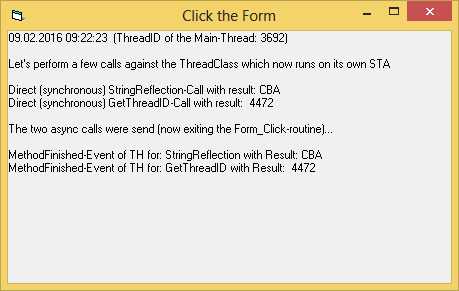
Forgot to attach a ScreenShot of the Output produced by the Form_Click-Event above:
Will describe the second, more advanced example in a follow-up post in this thread.
Edit: The Demo-Zip now contains a third example (in SubFolder \AsyncFolderCopy),
to show how a low-level copying of an entire Folder-structure (with full control at the File-Level) can be implemented.
Olaf
Last edited by Schmidt; May 24th, 2016 at 02:09 PM.
-
Feb 9th, 2016, 03:54 AM
#2
Re: VB6 Threading-Examples using the vbRichClient5 ThreadHandler
The second, more advanced Example resides in the Folder: ThreadedDirScan,
and covers a "useful real-world-scenario" which fullfills the following requirements:
- start a (deep, recursive) scanning for Files on the worker-thread, but ensure that:
- the Main-Thread reflects the current Scan-Results in a List, updating and prolonging it
- but this List shall in addition remain usable (scrollable, clickable) over the threaded scan-run...
- this way the Main-Thread can already make use of the (so far) found files from the threaded scan,
- which will happily proceed undisturbed, without blocking the GUI - until all Files were found
To make it even a bit harder, the scan shall be used (although usable on all FileTypes)
primarily to scan for Image-Files, which shall be visualized with a little ThumbNail in
the List-Control.
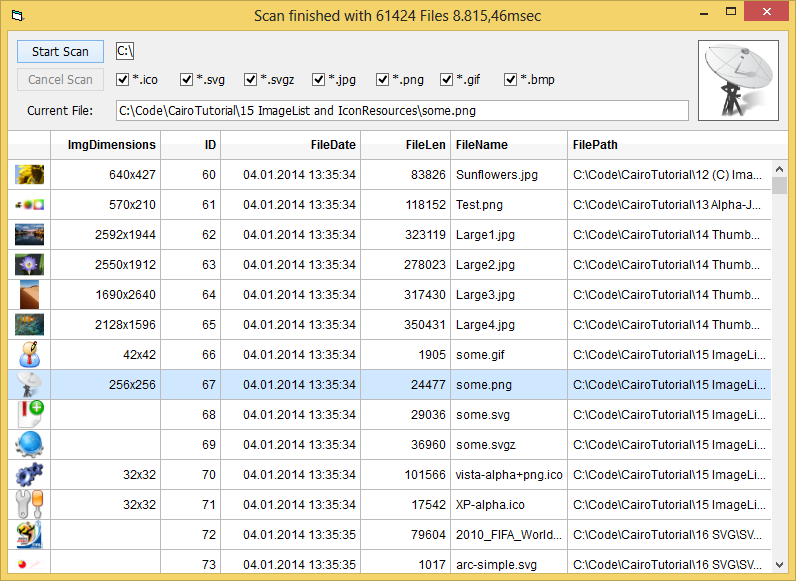
Here is a ScreenShot, how the GUI will look (showing the results of a completed scan,
but wouldn't look much different whilst a scan is still in progress):
To accomplish that conveniently, I've made use of primarily three things:
1) the Event-Support which is available with the RC5-Threading-Helpers
2) SQLites (InMemoryDB-) FileURIs, which allow working against a shared InMemory-DB across Threads
3) a Virtual-ListControl, which will render only its currently visible Rows - and has the Data sitting "outside" (in the MemDB)
The code which is related to 1) is sitting in the cThread-Class of the DirScanThreadLib-ActiveX-Dll-Project
Code:
Option Explicit

'two Event-Naming-Conventions, for communication with the vbRichClients hidden cThreadProxy-Class (not reaching the clients, when raised)
Event CancelCheck(Cancel As Boolean)  'ask the hosting cThreadProxy, whether a client demanded Job-Cancelling
Event GetFactory(Factory As cFactory) 'ask the cThreadProxy, to deliver a RichClient-Factory-Instance regfree (not used here in this Demo)

'but this is a true User-receivable Event (just define and raise it normally, as any other VB-Event)
Event ScanProgress(ByVal FilesCount As Long)
In the Main-Project, the above User-Event (ScanProgress) is received and handled this way:
Code:
'and here's the place, where User-Events will be received (when Raised from the Thread-Class)
Private Sub TH_ThreadEvent(MethodName As String, EventName As String, ByVal ParamCount As Long, P1 As Variant, P2 As Variant, P3 As Variant, P4 As Variant, P5 As Variant, P6 As Variant, P7 As Variant, P8 As Variant)
  If EventName = "ScanProgress" Then FilesCount = P1
End Sub
As for Code, related to 2) and 3), I will only show the code-snippet from the Main-Project, which
is responsible for the refresh of the (Rs-)Data beneath the "sliding-Window" of the virtual ListControl
(in the appropriate VList_OwnerDrawItem Event):
Code:
  If Rs Is Nothing Or CurTopIndex <> VList.TopIndex Or CurVisibleRows <> VList.VisibleRows Then
     CurTopIndex = VList.TopIndex
     CurVisibleRows = VList.VisibleRows
     'the Rs is retrieved with only as many Records as needed, to fill the currently "VisibleRows" of the VList (takes only 1 msec or so)
     Set Rs = Cnn.OpenRecordset("Select * From Scan Where ID > " & CurTopIndex & " Limit " & CurVisibleRows + 1)
  End If
Because that's the part which is perhaps surprising (to consider and undertake at all), since normally
one wouldn't perform an SQL-request on every single needed "List-Refresh" (as e.g. whilst Scrolling),
due to "performance considerations"... But an InMemory-DB is a different animal - very responsive
and "calculatable" in its response-times, because no "potentially blocking or slow HD-Device-IO" will
interfer when performing Selects against it.
Just ask, when there are more questions with regards to this example...
Edit: Here's an additional comment about the ucVList.ctl which is included in the Main-Project...
It will behave entirely flicker-free only, when the compiled Main-Application was "manifested"
(with a CommonControls-entry - that's why I've included an appropriate 'manifest.res' in the Project).
For flickerfree usage in the VB6-IDE itself, VB6.exe could be "manifested" as well... (I'm using
my VB6-IDE this way since Win7, without larger problems - aside from the "ColorDialogue-issue").
Olaf
Last edited by Schmidt; Feb 10th, 2016 at 03:55 AM.
Reason: Some additional comments about the ucVList.ctl
-
Feb 9th, 2016, 01:57 PM
#3
Re: VB6 Threading-Examples using the vbRichClient5 ThreadHandler
This is an exciting demo - I wasn't aware of the new URI feature of SQLite, so that opens up some interesting possibilities for fast, query-able, and easily shared structured data.
Small comment, not a big deal - in the Dir scan demo, there's an unused form called frmThreadCall.frm. I first looked at the code in a text editor rather than open the demo i nVB6, and it threw me off temporarily because the URI filename is different compared to the one in the DLL. I was unsure as to how the data would be shared with a different filename. Figured it all out after actually opening the VBP though.
Thanks for the demo!
-
Feb 10th, 2016, 03:33 AM
#4
Re: VB6 Threading-Examples using the vbRichClient5 ThreadHandler
 Originally Posted by jpbro

I wasn't aware of the new URI feature of SQLite, so that opens up some interesting possibilities for fast, query-able, and easily shared structured data.
Yep - although the feature is available for quite some time now, I only stumbled about
it's relevance for cross-thread MemDB-usage in a discussion on the SQLite-Mailinglist
(a few weeks ago). It'll allow some interesting things also among the worker-threads
of the RichClients RPC-Server (without using any "RPC-Singletons").
Too bad I discovered it so late (just read, that it's in there since version 3.7.7 already).
Originally Posted by jpbro
Small comment, not a big deal - in the Dir scan demo, there's an unused form called frmThreadCall.frm. I first looked at the code in a text editor rather than open the demo i nVB6, and it threw me off temporarily because the URI filename is different compared to the one in the DLL. I was unsure as to how the data would be shared with a different filename. Figured it all out after actually opening the VBP though.
Will clean-up the Zip-archive and re-upload - thanks for pointing it out.
Olaf
-
Feb 21st, 2016, 09:17 PM
#5
Hyperactive Member

Re: VB6 Threading-Examples using the vbRichClient5 ThreadHandler
The demo is very helpful, especially the first one; the second is a bit tricky for me, but I will take my time to digest.
Thanks again, for the contribution you made for our community.
-
Apr 1st, 2016, 10:43 AM
#6
Hyperactive Member
Re: VB6 Threading-Examples using the vbRichClient5 ThreadHandler
Supposing there is a method implementation like this:
Code:
Public Function Adding(x As Long, y as Long) as Long
End Function
And method calls like these:
Code:
dim x as long, y as long
TH.CallAsync "Adding", x, y
Code:
TH.CallAsync "Adding", clng(2), clng(3)
Code:
TH.CallAsync "Adding", 2, 3
The first two will work fine; However the third one will cause a type mismatch.
-
Apr 1st, 2016, 10:46 AM
#7
Re: VB6 Threading-Examples using the vbRichClient5 ThreadHandler
Maybe VB is assuming 2 and 3 are Integers since they fit in the Integer range? Try 2& and 3& to force Longs and see if that works.
-
Apr 1st, 2016, 10:55 AM
#8
Hyperactive Member
Re: VB6 Threading-Examples using the vbRichClient5 ThreadHandler
Originally Posted by jpbro
Maybe VB is assuming 2 and 3 are Integers since they fit in the Integer range? Try 2& and 3& to force Longs and see if that works.
I tried your method. Works.
-
Apr 1st, 2016, 10:59 AM
#9
Hyperactive Member
Re: VB6 Threading-Examples using the vbRichClient5 ThreadHandler
Oh yes, there might be another problem but it's not fully tested.
Supposing you have this in your method implementation:
Code:
    dim cancel as boolean
    RaiseEvent BeforeExecuting(cancel)
    If cancel Then
        Exit Sub
    End If
Well, if even I set the cancel to true, in my event handler, it never goes to Exit Sub
-
Apr 1st, 2016, 11:10 AM
#10
Re: VB6 Threading-Examples using the vbRichClient5 ThreadHandler
Are you handling the event in the CThreadHandler ThreadEvent method? If so, make sure you don't have a typo when testing the EventName parameter value.
-
Apr 1st, 2016, 09:09 PM
#11
Hyperactive Member
Re: VB6 Threading-Examples using the vbRichClient5 ThreadHandler
Originally Posted by jpbro
Are you handling the event in the CThreadHandler ThreadEvent method? If so, make sure you don't have a typo when testing the EventName parameter value.
OK, I tested again today. The problem still remains.
The class implementation:
Code:
Option Explicit
Public Event BeforeExecuting(cancel As Boolean)
Function Adding(x As Long, y As Long) As Long
Dim cancel As Boolean
RaiseEvent BeforeExecuting(cancel)
If cancel Then
    Adding = 0
Else
    Adding = x + y
End If
End Function
The method call
Code:
Private WithEvents th As cThreadHandler
Private Sub Test()
    Set th = New_c.RegFree.ThreadObjectCreate("Key1", RegFree_mXlObjectsDllPath, RegFree_cAsyncTesting)
    th.CallAsync "Adding", 9&, 11&
End Sub
Private Sub th_MethodFinished(MethodName As String, Result As Variant, ErrString As String, ErrSource As String, ByVal ErrNumber As Long)
    Debug.Print MethodName, Result, ErrString, ErrSource, ErrNumber
End Sub
Private Sub th_ThreadEvent(MethodName As String, EventName As String, ByVal ParamCount As Long, P1 As Variant, P2 As Variant, P3 As Variant, P4 As Variant, P5 As Variant, P6 As Variant, P7 As Variant, P8 As Variant)
    Debug.Print MethodName, EventName, ParamCount, P1
    P1 = True
    Debug.Print MethodName, EventName, ParamCount, P1
End Sub
Immediate Window:
Code:
Adding        BeforeExecuting              1            False
Adding        BeforeExecuting              1            True
Adding         20                                        0
As I know, there is a .CancelExecuting Method already provided by cThreadHandler, so I don't, perhaps, have to implement a cancel mechanism in my own class implementation. I can just shut the whole thing down. But this demo is only to show the problem that comes with parameter passing in ThreadEvent.
Last edited by bPrice; Apr 1st, 2016 at 09:23 PM.
-
Apr 1st, 2016, 09:30 PM
#12
Re: VB6 Threading-Examples using the vbRichClient5 ThreadHandler
I've tried your code here and I am getting the same results - not sure if the RC5 thread handler is designed to reflect ByRef values in events back to the thread that raised the event. I'm sure Olaf has the answer though.
That said, there is a special event called CancelCheck(Cancel As Boolean) that you can use and it will let you do exactly what you are trying to do with your BeforeExecuting event. I've tried substituting BeforeExecuting for CancelCheck and it works for me.
-
Apr 2nd, 2016, 12:33 AM
#13
Hyperactive Member
Re: VB6 Threading-Examples using the vbRichClient5 ThreadHandler
Originally Posted by jpbro
I've tried your code here and I am getting the same results - not sure if the RC5 thread handler is designed to reflect ByRef values in events back to the thread that raised the event. I'm sure Olaf has the answer though.
That said, there is a special event called CancelCheck(Cancel As Boolean) that you can use and it will let you do exactly what you are trying to do with your BeforeExecuting event. I've tried substituting BeforeExecuting for CancelCheck and it works for me.
Well ... Why there is not a CancelCheck Event for my cThreadHandler. Perhaps we don't have the same version of RC5? Anyway, to find a bypass around this problem is not why I am here. In real application, I might just drop throwing values back to the event firing thread.
But here, I try to get to the bottom of the issue
-
Apr 2nd, 2016, 01:06 AM
#14
Re: VB6 Threading-Examples using the vbRichClient5 ThreadHandler
Originally Posted by jpbro
I've tried your code here and I am getting the same results - not sure if the RC5 thread handler is designed to reflect ByRef values in events back to the thread that raised the event.
For the sake of more speed in the (currently PipeBased) Thread-Communication,
I refrained from "reflecting "ByRef-Params back into the caller" (in both directions).
The RPC-Classes of the RC5 (which work over sockets, and don't need to save
every last micro-sec) *do* support ByRef - Reflection (for simple Types and Arrays) though...
Originally Posted by jpbro
That said, there is a special event called CancelCheck(Cancel As Boolean) that you can use and it will let you do exactly what you are trying to do with your BeforeExecuting event. I've tried substituting BeforeExecuting for CancelCheck and it works for me.
@bPrice
Yep, the CancelCheck-mechanism is there, to be able to detect (from within the Thread),
whether the "TH-hosting-Class or -Form on the other end" (in the Main-Thread) wants to
"get rid of the Thread as soon as possible" (to be able to close the thread gracefully, instead
of calling ThreadTerminate as the "last measure" in case the Thread is "plowing on without noticing").
Though note, that sharing Data (behind a Variable or an UDT-Array) is quite easily
possible between the TH-hosting Class and the Thread-Class...
The easiest way (if it's only a few Bits you need) is by passing a Pointer to a
(Privately declared) LongFlag to the ThreadClass at Initialization-Time of the 'TH'
(using a synchronous call, to make sure it's there).
In the HostClass or -Form (in the Main-Thread):
Code:
Private Flag As Long

Private Sub InitThreadHandler()
  Set TH = ...' regfree-createthread etc.
  If Not TH.CallSynchronous("InitSharedMemory", VarPtr(Flag)) Then MsgBox "Shared Flag-Creation failed"
End Sub
And in the ThreadClass one can then just use 'Flag' this way (over a Private Property)
Code:
Option Explicit

Private Declare Sub GetMem4 Lib "msvbvm60" (ByVal Addr As Long, RetVal As Long)
Private Declare Sub PutMem4 Lib "msvbvm60" (ByVal Addr As Long, ByVal NewVal As Long)

Private pFlag As Long

'one can call that Init-Function synchronously at TH-Creation-Time in the Host-Class
Public Function InitSharedMemory(VarPtrOfFlag As Long) As Boolean
  pFlag = VarPtrOfFlag
  If pFlag Then InitSharedMemory = True 'indicate success back to the caller
End Function

Private Property Get Flag() As Long
  If pFlag Then GetMem4 pFlag, Flag
End Property
Private Property Let Flag(ByVal RHS As Long)
  If pFlag Then PutMem4 pFlag, RHS
End Property
Olaf
Last edited by Schmidt; Apr 2nd, 2016 at 01:12 AM.
-
Apr 2nd, 2016, 01:49 AM
#15
Re: VB6 Threading-Examples using the vbRichClient5 ThreadHandler
Originally Posted by bPrice
Supposing there is a method implementation like this:
Code:
Public Function Adding(x As Long, y as Long) as Long
End Function
And method calls like these:
Code:
dim x as long, y as long
TH.CallAsync "Adding", x, y
Code:
TH.CallAsync "Adding", clng(2), clng(3)
Code:
TH.CallAsync "Adding", 2, 3
The first two will work fine; However the third one will cause a type mismatch.
You don't need a Cross-Thread-Call to test the behaviour in this case...
E.g. when you put that into a simple Form...
Code:
Function DoAdd(x As Long, y as Long) as Long
  DoAdd = x + y
End Function
... and then test it (e.g. in Form_Click)
Code:
Private Sub Form_Click()
   Debug.Print DoAdd(1, 2)
End Sub
You will get the same error.
Edit: (and sorry) with regards to the above example...
There will be no error in the above call (because the compiler
will see that the "target-params" are of type Long - and then
is passing the correctly typed ("promoted") Literals into the Method.
To reproduce the error, you will have to do basically as I do in my
deserializing+calling-mechanism - where I detect the Types which
were contained in the serialized content - and then I pass those
Typed-Params (in this case the detected Integers) per IDispatch.Invoke
to the Thread-Method (somewhat comparable to VBs CallByName-call).
Code:
Private Sub Form_Click()
  'the deserializer will detect the Integers which were passed instead of Long
  Dim x As Integer: x = 1
  Dim y As Integer: y = 2

  'and then calls IDispatch.Invoke with them, basically as shown below
  Caption = CallByName(Me, "DoAdd", VbMethod, x, y)
End Sub

Public Function DoAdd(x As Long, y As Long) As Long
  DoAdd = x + y
End Function
Typewise Unspecified Integer-Literals (in the low range below -32768 to 32767),
are always treated by the VB-Compiler as being of type Integer (not Long).
You can check this yourself in the DirectWindow:
?TypeName(1) ... will print out Integer
?TypeName(32767) ... will print out Integer
?TypeName(32768) ... will print out Long
Olaf
Last edited by Schmidt; Apr 2nd, 2016 at 02:56 AM.
-
Apr 2nd, 2016, 11:31 PM
#16
Hyperactive Member
Re: VB6 Threading-Examples using the vbRichClient5 ThreadHandler
hello Olaf
Can vbRichClient used in office vba IDE? do u have any demo?
-
Apr 3rd, 2016, 05:13 PM
#17
Re: VB6 Threading-Examples using the vbRichClient5 ThreadHandler
You will have to check-in the reference to it in your VBA-Project -
then nearly all of the RC5-Classses should work in VBA as they do in VB6
(it's still COM after all).
Olaf
-
Apr 3rd, 2016, 08:22 PM
#18
Hyperactive Member
Re: VB6 Threading-Examples using the vbRichClient5 ThreadHandler
Originally Posted by loquat
hello Olaf
Can vbRichClient used in office vba IDE? do u have any demo?
I *usually* use RC5 in my VBA projects. So far as it seems, it works great. As Olaf has pointed out that RC5 is COM, so basically you can utilize those classes in any other languages that has COM support. I even tested it in .Net once I don't use Java, or Python but I guess they all support COM to some degree.
It should be ideally used with VB6, though. And it's written in VB6, so perhaps registration of msvbvm60.dll is also required?
Last edited by bPrice; Apr 3rd, 2016 at 08:29 PM.
-
Apr 3rd, 2016, 09:48 PM
#19
Hyperactive Member
Re: VB6 Threading-Examples using the vbRichClient5 ThreadHandler
A small example for VBA usage.
1, First write your code for your class implementation in an ActiveX DLL Project in VB6. i.e. Inside class module cAsyncTesting, put the following code:
Code:
Option Explicit
Public Event BeforeSplit()
Public Event AfterSplit()
Public Function StringSplit(StrSource As String, Delimiter As String) As String()
    RaiseEvent BeforeSplit
    StringSplit = Split(StrSource, Delimiter)
    RaiseEvent AfterSplit
End Function

2, Give a Name to your ActiveX project, i.e. mXlObjects. Then compile it, so you get the DLL like below:

3, Reference the RC5 for your VBA project:

4, Make sure you put your method calling code in a "Class module", so the cThreadHandler is able to receive events. That said, in VBA, it should be the worksheet objects, or the workbook object.

Important Note: Unlike VB6, the VBA project will retain the instances(module level) that are created by a previous subroutine. So you might need to reset the project before running another test. Or you might run into errors.
5, The actual calling code, and the immediate window messages:
Code:
Option Explicit
Private Const RegFree_mXlObjectsDllPath As String = "C:\Users\Administrator\Desktop\Objects\mXlObjects.dll"
Private Const RegFree_mXlTestClassName As String = "cAsyncTesting"
Private Const RegFree_mXlTestMethodName As String = "StringSplit"
Private WithEvents th As cThreadHandler
Private Sub Test()

    Dim strSourceArr() As String, strSource As String
    Dim i As Long

    'Starting a counter. Once you have referenced RC5 in your project.
    'You will have a globally available "constructor" New_c, similar meaning to New keyword
    New_c.Timing True

    Debug.Print New_c.Timing, "Constructing a string for demo purposes"
    ReDim strSourceArr(0 To 9)
    For i = LBound(strSourceArr) To UBound(strSourceArr)
        strSourceArr(i) = CStr(i)
    Next
    strSource = Join(strSourceArr, "|")


    Debug.Print New_c.Timing, "Creating a cThreadHandler and making an asynchronous call"
    Set th = New_c.RegFree.ThreadObjectCreate("AnyUniqueKey", RegFree_mXlObjectsDllPath, RegFree_mXlTestClassName)
    th.CallAsync RegFree_mXlTestMethodName, strSource, "|"
    Debug.Print New_c.Timing, "End of the calling subroutine"

End Sub

Private Sub th_MethodFinished(MethodName As String, Result As Variant, ErrString As String, ErrSource As String, ByVal ErrNumber As Long)
    Debug.Print New_c.Timing, MethodName, "Result: " & Join(Result, "|")
End Sub

Private Sub th_ThreadEvent(MethodName As String, EventName As String, ByVal ParamCount As Long, P1 As Variant, P2 As Variant, P3 As Variant, P4 As Variant, P5 As Variant, P6 As Variant, P7 As Variant, P8 As Variant)
    Debug.Print New_c.Timing, MethodName, "EventName: " & EventName
End Sub
Code:
 0.01msec     Constructing a string for demo purposes
 2.79msec     Creating a cThreadHandler and making an asynchronous call
 25.22msec    End of the calling subroutine
 30.52msec    StringSplit   EventName: BeforeSplit
 35.98msec    StringSplit   EventName: AfterSplit
 40.72msec    StringSplit   Result: 0|1|2|3|4|5|6|7|8|9
6, Note that the calling subroutine had ended before the method call finished. So it's asynchronous. Usually if you put your class in the same project, create an instance, and call its method, the end of subroutine will only be reached after everything is done for that method call.
Last edited by bPrice; Apr 3rd, 2016 at 10:34 PM.
-
Apr 9th, 2016, 04:09 AM
#20
Hyperactive Member
Re: VB6 Threading-Examples using the vbRichClient5 ThreadHandler
Last edited by bPrice; Apr 9th, 2016 at 04:15 AM.
-
Apr 9th, 2016, 04:37 AM
#21
Hyperactive Member
Re: VB6 Threading-Examples using the vbRichClient5 ThreadHandler
Things aren't going so well. After changing the properties to "Persistable", it's successful to make the async method call, but I keep getting unexpected errors. The whole thing is tested before porting to Regfree handling, though.
It seems that the object passed to the ThreadHandler is losing its values.
-
Apr 9th, 2016, 05:19 AM
#22
Re: VB6 Threading-Examples using the vbRichClient5 ThreadHandler
Originally Posted by bPrice
Things aren't going so well. After changing the properties to "Persistable", it's successful to make the async method call, but I keep getting unexpected errors. The whole thing is tested before porting to Regfree handling, though.
It seems that the object passed to the ThreadHandler is losing its values.
Why do you want to pass an Object in this case - and not e.g. a VB(A)-String- or VariantArray directly?
For Objects to be allowed to be passed into the ThreadHandlers Param-Serializer,
those have to be (I)Persistable-support, but will also have to be "known"
(Interface-wise) on both ends of the ThreadCall - and this Interface-Knowledge
is drawn from the registry - meaning, when you want to write your own persistable
Objects, you will have to hos these Classes in (and then registering) an ActiveX-Dll.
Already "known" Objects are those which are registered in the System (e.g. ADO-Recordsets),
or are interface-wise accessible because they are part of the vbRichClient5.dll (e.g. cRecordsets,
cCollection).
But as said, since in your Err-Message I saw, that you apparently want to pass an
XL-Array, why not use e.g. a (two-dimensional) VariantArray for that, which you can
derive (directly within Excel) from e.g. a complete Cell-Range with one line of code.
Olaf
-
Apr 9th, 2016, 06:32 AM
#23
Hyperactive Member
Re: VB6 Threading-Examples using the vbRichClient5 ThreadHandler
Originally Posted by Schmidt
But as said, since in your Err-Message I saw, that you apparently want to pass an
XL-Array, why not use e.g. a (two-dimensional) VariantArray for that, which you can
derive (directly within Excel) from e.g. a complete Cell-Range with one line of code.
Well, I can do that.  The reason why the problem even occurred is that I took things for granted, "thought" it would work, and ran into an unexpected error. Obviously "things" turned out to be more than they looked. The object passing is not mandatory in my situation, and therefore I might just avoid doing it. The reason why the problem even occurred is that I took things for granted, "thought" it would work, and ran into an unexpected error. Obviously "things" turned out to be more than they looked. The object passing is not mandatory in my situation, and therefore I might just avoid doing it.
For Objects to be allowed to be passed into the ThreadHandlers Param-Serializer,
those have to be (I)Persistable-support, but will also have to be "known"
(Interface-wise) on both ends of the ThreadCall - and this Interface-Knowledge
is drawn from the registry - meaning, when you want to write your own persistable
Objects, you will have to hos these Classes in (and then registering) an ActiveX-Dll.
Already "known" Objects are those which are registered in the System (e.g. ADO-Recordsets),
or are interface-wise accessible because they are part of the vbRichClient5.dll (e.g. cRecordsets,
cCollection).
Thanks again, for the explanation, though I am not so sure if you meant that if both the Atx-Dlls were registered on the system, there would be no errors, so here are some additions to the error:
Snapshot:

The mXlStringArray class is hosted, yes, in an ActiveX-Dll. I have set the class property to "Persistable" and recompiled, so it is registered to the system and is then referenced in my VB6 test project. The error message is gone and I CAN MAKE a call, but the object will lose its contained data, thus generating other errors, i.e. Subscript out of range.
Last edited by bPrice; Apr 9th, 2016 at 06:40 AM.
-
Apr 9th, 2016, 06:30 PM
#24
Re: VB6 Threading-Examples using the vbRichClient5 ThreadHandler
Originally Posted by bPrice
The mXlStringArray class is hosted, yes, in an ActiveX-Dll. I have set the class property to "Persistable" and recompiled, so it is registered to the system and is then referenced in my VB6 test project. The error message is gone and I CAN MAKE a call, but the object will lose its contained data, thus generating other errors, i.e. Subscript out of range.
Not having seen any code - I'm not sure where the error creeps in.
Here's an easy example you can use, that shows that VB6' persistable Class-Objects will work,
when passed as Parameters (or returned as Function-Results)... It is done as an extension
of the [_Hello World]-Example (as contained in the Source-Zip in the Opener-Posting of this thread).
The Dll you place your serializable class in, should be registered on the system.
To avoid more Dlls than necessary, I'm going to place a new Class cSerializable
within the SimpleThreadLib.dll-Project of above mentioned [_Hello World]-example:
Code:
Option Explicit 'ClassName: cSerializable - switch its properties to MultiUse and Persistable

Public L As Long, S As String, D As Date 'define 3 Public Properties

Private Sub Class_Initialize() 'init Default-Values
  L = 1
  S = "Some String 1"
  D = Now
End Sub

Private Sub Class_ReadProperties(PropBag As PropertyBag) 'implement Read-Props
  L = PropBag.ReadProperty("L", L)
  S = PropBag.ReadProperty("S", S)
  D = PropBag.ReadProperty("D", D)
End Sub

Private Sub Class_WriteProperties(PropBag As PropertyBag) 'implement Write-Props
  PropBag.WriteProperty "L", L
  PropBag.WriteProperty "S", S
  PropBag.WriteProperty "D", D
End Sub
Then, in the same SimpleThreadLib.dll-Project - extend the already existing cThread-Class with a new method:
Code:
Option Explicit 'ClassName: cThread - (should already be at MultiUse)

Public Function GetThreadID() As Long
  GetThreadID = App.ThreadID
End Function

Public Function StringReflection(S As String) As String
  StringReflection = StrReverse(S)
End Function

Public Function PassSerializableObjectAndReturnIt(SO As cSerializable) As cSerializable
  SO.L = SO.L + 1 'increment the Long-Property
  SO.S = Left$(SO.S, Len(SO.S) - 1) & SO.L 'change the last Char of the String-Property
  SO.D = SO.D + 1 'add one day to the Date-Property
  Set PassSerializableObjectAndReturnIt = SO 'return the changed SO-object
End Function
Now re-compile the SimpleThreadLib.dll-Project into the Folder, where the Main-Project is placed -
and then start up the Main-Project (ThreadCall.vbp):
In the Form, extend it to now this code:
Code:
Option Explicit

Private WithEvents TH As cThreadHandler

Private Sub Form_Load() 'first let's instantiate the ThreadClass (regfree) on its own thread, returning "a Handler"
  Set TH = New_c.RegFree.ThreadObjectCreate("MyThreadKey", App.Path & "\SimpleThreadLib.dll", "cThread")
End Sub

Private Sub Form_Click()
Dim StrResult As String, ThreadID As Long
  Cls
  Print Now; " (ThreadID of the Main-Thread: " & App.ThreadID & ")"; vbLf
  Print "Let's perform a few calls against the ThreadClass which now runs on its own STA "; vbLf

  'first we do synchronous Calls against the Thread-Instance, which was created regfree in Form_Load
  StrResult = TH.CallSynchronous("StringReflection", "ABC")
  Print "Direct (synchronous) StringReflection-Call with result: "; StrResult

  ThreadID = TH.CallSynchronous("GetThreadID")
  Print "Direct (synchronous) GetThreadID-Call with result: "; ThreadID; vbLf

  'now the calls, which are more common in threading-scenarios - the asynchronous ones, which don't
  'make the caller wait for the result (instead the results will be received in the Event-Handler below)
  TH.CallAsync "StringReflection", "ABC"
  TH.CallAsync "GetThreadID"

  Dim SO As Object: Set SO = CreateObject("SimpleThreadLib.cSerializable")
  Print "-> SO-content before the 3. call: "; SO.L; ", "; SO.S; ", "; SO.D
  TH.CallAsync "PassSerializableObjectAndReturnIt", SO

  Print "The three async calls were send (now exiting the Form_Click-routine)..."; vbLf
End Sub

'Our TH-Object is the clientside ThreadHandler, who's able to communicate with the Thread
'raising appropriate Events here, when results come back (in case of the async-calls)
Private Sub TH_MethodFinished(MethodName As String, Result As Variant, ErrString As String, ErrSource As String, ByVal ErrNumber As Long)
  If ErrNumber Then Print "TH-Err:"; MethodName, ErrString, ErrSource, ErrNumber: Exit Sub

  If IsObject(Result) Then
    Print "MethodFinished-Event of TH for: "; MethodName; " with Result: "
    Print "-> SO-content, returned from the call: "; Result.L; ", "; Result.S; ", "; Result.D
  Else
    Print "MethodFinished-Event of TH for: "; MethodName; " with Result: "; Result
  End If
End Sub
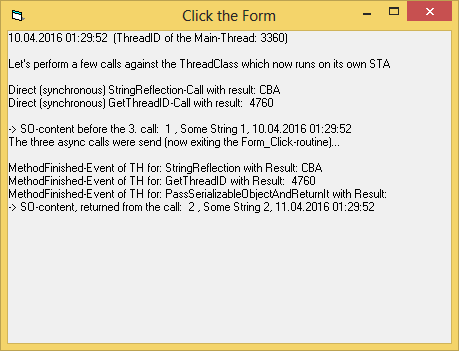
It should print out this:
That said (and demonstrated) - I wouldn't use this kind of VB6-serializing -
since it is error-prone (due to requiring registered typelibs/dlls) - and
there's easier methods to transport larger datablobs between threads
(e.g. JSON, a shareable SQLite-InMemory-DB, or simply Variant-Arrays).
Olaf
Last edited by Schmidt; Apr 9th, 2016 at 06:33 PM.
-
Apr 9th, 2016, 09:57 PM
#25
Hyperactive Member
Re: VB6 Threading-Examples using the vbRichClient5 ThreadHandler
Tested and worked:

I see that to use a persistable object, one has to implement property read/write via a PropertyBag class, which is unknown to me by the way until this post. So basically to make my own objects persistable, I probably need a rewrite of them...
a shareable SQLite-InMemory-DB, or simply Variant-Arrays
Guess this is where I am heading now.
-
Apr 14th, 2016, 08:36 PM
#26
Re: VB6 Threading-Examples using the vbRichClient5 ThreadHandler
Hi Olaf,
I've done a few tests, and I suspect I know the answer, but I just wanted to confirm - the Sqlite file: URI spec is only good for cross-thread communication, not cross-process communication, correct?
Thanks.
-
Apr 15th, 2016, 01:17 PM
#27
Re: VB6 Threading-Examples using the vbRichClient5 ThreadHandler
Originally Posted by jpbro
I've done a few tests, and I suspect I know the answer, but I just wanted to confirm - the Sqlite file: URI spec is only good for cross-thread communication, not cross-process communication, correct?
Yes, the feature relies on SQLites "Shared Cache"-allocation - and this is
only available "InProcess" (so, only cross-thread inside a given hosting-process).
Regards,
Olaf
-
Apr 15th, 2016, 02:20 PM
#28
Re: VB6 Threading-Examples using the vbRichClient5 ThreadHandler
Thanks for the confirmation 
-
Apr 16th, 2016, 01:57 AM
#29
Hyperactive Member
Re: VB6 Threading-Examples using the vbRichClient5 ThreadHandler
Having another question here:
Code:
Private Sub th_ThreadEvent(MethodName As String, EventName As String, ByVal ParamCount As Long, P1 As Variant, P2 As Variant, P3 As Variant, P4 As Variant, P5 As Variant, P6 As Variant, P7 As Variant, P8 As Variant)
The passed in MethodName is called "BroadCastedEvent", not exactly the method name that I am expecting, i.e. "NameOfTheMethodThatRaisedTheEvent". I guess this is not important but it's just a question.
-
Apr 16th, 2016, 02:01 AM
#30
Hyperactive Member
Re: VB6 Threading-Examples using the vbRichClient5 ThreadHandler
Originally Posted by jpbro
Thanks for the confirmation
Right, and this is what I got from SQLite documentation before using the URI spec:
In version 3.5.0, shared-cache mode was modified so that the same cache can be shared across an entire process rather than just within a single thread.
Enabling shared-cache for an in-memory database allows two or more database connections in the same process to have access to the same in-memory database.
Shared-cache mode is enabled on a per-process basis.
-
Apr 16th, 2016, 04:33 AM
#31
Re: VB6 Threading-Examples using the vbRichClient5 ThreadHandler
Originally Posted by bPrice
Having another question here:
Code:
Private Sub th_ThreadEvent(MethodName As String, EventName As String, ByVal ParamCount As Long, P1 As Variant, P2 As Variant, P3 As Variant, P4 As Variant, P5 As Variant, P6 As Variant, P7 As Variant, P8 As Variant)
The passed in MethodName is called "BroadCastedEvent", not exactly the method name that I am expecting, i.e. "NameOfTheMethodThatRaisedTheEvent". I guess this is not important but it's just a question.
I can only give the Name of the "MethodThatRaisedTheEvent", when it was triggered by a
synchronous or asynchronous request "from the outside" (because in this case the
MethodName came in as a Parameter from the TH of the MainThread).
For Methods which are jumped-to from the inside of the ThreadClass (e.g. by a Class-internal Timer),
I use the generic MethodName "BroadCastedEvent".
Olaf
-
May 24th, 2016, 02:06 PM
#32
Re: VB6 Threading-Examples using the vbRichClient5 ThreadHandler
Added a third example (AsyncFolderCopy) into the Demo-Zip of the Opener-Posting.
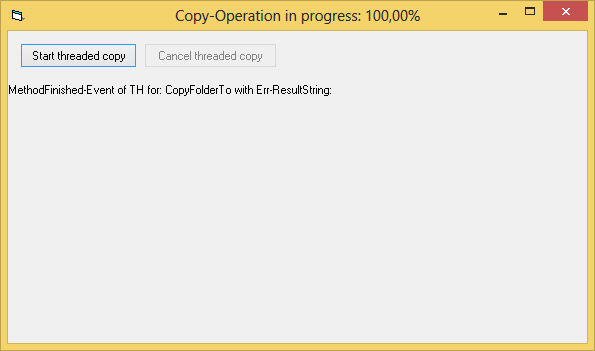
The Demo-GUI is relatively simple (sporting only Progress-Event-Handling in the Form.Caption and Start/Cancel-Buttons):
The implementation-code that's needed in the cCopyThread-Class of the ThreadLib-ActiveX-Dll can be considered requiring "average skills",
and thus sitting somewhere between the other two example-Folders of the Demo-Zip which can be labelled:
- "easy" (_Hello World) -
- and "advanced" (ThreadedDirScan)
Note, that as with all other examples - the ThreadLib-ActiveX-Dll-Project needs to be compiled first into the Folder where the GUI-VB6-Project resides.
Code:
Option Explicit

'two Event-Naming-Conventions, for communication with the vbRichClients hidden cThreadProxy-Class (not reaching the clients, when raised)
Event CancelCheck(Cancel As Boolean)  'ask the hosting cThreadProxy, whether a client demanded Job-Cancelling
Event GetFactory(Factory As cFactory) 'ask the cThreadProxy, to deliver a RichClient-Factory-Instance regfree (not used here in this Demo)

'Userdefined-Event
Event Progress(ByVal Percent As Double, ByVal ProgrFileSizeInSrc As Currency, ByVal TotalFileSizeInSrc As Currency)

Private F As cFactory, New_c As cConstructor 'RC5-lib-related Constructor-Variables
Private mProgrFileSizeInSrc As Currency, mTotalFileSizeInSrc As Currency, mCancelled As Boolean 'Class-internal Helper-variables

Public Function CopyFolderTo(ByVal DstFolder As String, ByVal SrcFolder As String, Optional ByVal ApplyFileAttributesToDst As Boolean, Optional ByVal Filter As String, Optional ByVal Level As Long) As String
  On Error Resume Next 'we use "in-place-errorhandling" here, and accumulate the Errors in the return-value of this function (if there are any)

  If Level = 0 Then 'init (reset) the Private Variables, when we start a new "deep-copy" (at root-recursion-level Zero)
    If New_c Is Nothing Then 'when the New_c-constructor is not yet initialized,
      RaiseEvent GetFactory(F) 'retrieve a Factory over the built-in Event (to avoid specifying paths for regfree RC5-inits)
      Set New_c = F.C 'init the New_c-constructor-variable from the Factory-Property
    End If
    mCancelled = False 'reset the Cancel-Flag
    mProgrFileSizeInSrc = 0 'reset the Progress-FileSize
    mTotalFileSizeInSrc = GetTotalFileSize(SrcFolder, Filter) 'get the Total-Size of all Files (over a recursive-scan)
  End If

  Dim DL As cDirList, i As Long
  Set DL = New_c.FSO.GetDirList(SrcFolder, dlSortNone, Filter, True)
  If Err Then CopyFolderTo = CopyFolderTo & Err.Description & vbCrLf: Err.Clear: Exit Function


  New_c.FSO.EnsurePathEndSep DstFolder
  If Not New_c.FSO.FolderExists(DstFolder) Then New_c.FSO.CreateDirectory DstFolder
  If Err Then CopyFolderTo = CopyFolderTo & Err.Description & vbCrLf: Err.Clear: Exit Function

  For i = 0 To DL.FilesCount - 1 'copy the files from the current directory chunkwise
    CopyFileChunkWiseTo DstFolder & DL.FileName(i), DL.Path & DL.FileName(i)
    If Err Then CopyFolderTo = CopyFolderTo & "Error copying: " & DL.Path & DL.FileName(i) & " " & Err.Description & vbCrLf: Err.Clear
    If Cancelled Then Exit Function

    If ApplyFileAttributesToDst Then New_c.FSO.SetFileAttributesEx DstFolder & DL.FileName(i), DL.FileAttributes(i) And Not (FA_READONLY Or FA_HIDDEN), _
                                              DL.FileLastAccessTime(i), DL.FileLastWriteTime(i), DL.FileCreationTime(i)
    If Err Then CopyFolderTo = CopyFolderTo & Err.Description & vbCrLf: Err.Clear
  Next
  For i = 0 To DL.SubDirsCount - 1 'recursions into Sub-Directories
    CopyFolderTo = CopyFolderTo & CopyFolderTo(DstFolder & DL.SubDirName(i), DL.Path & DL.SubDirName(i), ApplyFileAttributesToDst, Filter, Level + 1)
    If Cancelled Then Exit Function

    If ApplyFileAttributesToDst Then New_c.FSO.SetFileAttributesEx DstFolder & DL.SubDirName(i), DL.SubDirAttributes(i) And Not (FA_READONLY Or FA_HIDDEN), _
                                            DL.SubDirLastAccessTime(i), DL.SubDirLastWriteTime(i), DL.SubDirCreationTime(i)
    If Err Then CopyFolderTo = CopyFolderTo & Err.Description & vbCrLf: Err.Clear
  Next
  If Level = 0 Then RaiseEvent Progress(1, mProgrFileSizeInSrc, mTotalFileSizeInSrc)
End Function

'Helper-Function, to determine the TotalSize (Sum of all Files in Bytes) of a given Directory (using a recursive scan)
Private Function GetTotalFileSize(ByVal SrcFolder As String, Optional ByVal Filter As String) As Currency
  On Error Resume Next
    Dim DL As cDirList
    Set DL = New_c.FSO.GetDirList(SrcFolder, dlSortNone, Filter, True)
    If Err = 0 Then GetTotalFileSize = GetTotalFileSize + DL.TotalFileSizeInDir
  On Error GoTo 0

  If Cancelled Then Exit Function
  Dim i As Long
  For i = 0 To DL.SubDirsCount - 1
    GetTotalFileSize = GetTotalFileSize + GetTotalFileSize(DL.Path & DL.SubDirName(i))
    If Cancelled Then Exit Function
  Next
End Function

'Helper-Function, which performs a low-level, chunk-wise copying of a file (to be able to cancel early, even when larger files >2GB are copied)
Private Function CopyFileChunkWiseTo(DstFile As String, SrcFile As String) As String
  Dim Src As cStream, Dst As cStream, BytesRead As Long
  Set Src = New_c.FSO.OpenFileStream(SrcFile, STRM_READ Or STRM_SHARE_DENY_NONE)
  Set Dst = New_c.FSO.CreateFileStream(DstFile, STRM_WRITE Or STRM_SHARE_DENY_NONE)

  Const BufSize As Long = 4194304: Static Buf(0 To BufSize - 1) As Byte
  Do Until Src.GetPosition = Src.GetSize
    BytesRead = Src.ReadToPtr(VarPtr(Buf(0)), BufSize)
    Dst.WriteFromPtr VarPtr(Buf(0)), BytesRead
    mProgrFileSizeInSrc = mProgrFileSizeInSrc + BytesRead

    Static T As Double, LastT As Double
    T = New_c.HPTimer
    If T - LastT > 0.2 Then 'ensure, that we don't raise ThreadEvents more than about 5 times per second
      If Cancelled Then Exit Function
      RaiseEvent Progress(mProgrFileSizeInSrc / mTotalFileSizeInSrc, mProgrFileSizeInSrc, mTotalFileSizeInSrc)
      LastT = T
    End If
  Loop
End Function

Private Function Cancelled() As Boolean 'helper-function to signalize early exits in the Job-Procedures...
  If Not mCancelled Then RaiseEvent CancelCheck(mCancelled) '...by raising the appropriate Helper-Event
  Cancelled = mCancelled
End Function
Olaf
-
Aug 20th, 2016, 03:24 AM
#33
Lively Member
Re: VB6 Threading-Examples using the vbRichClient5 ThreadHandler
Have a problem:
In the old times when I work with elements of a large array, the only way is to loop through the entire array and work on each element sequentially. Now with the advent of multi-threading, I came up with an idea that I might be able to split the array into parts each of which gets dealt with by a separate thread. Therefore, I thought, the performance could be boosted.
I experimented on it and it proved to be not the case. Due to the fact, I guess, that all data transfered between threads, over the cThreadHandler, is copied back and forth, the time cost for copying data well exceeds the time saved by using separate threads. Imagine copy arrays of millions of elements again, again, and again across threads...
I wish I could make all threads work on a same block data, is it possible? Otherwise all the copying & joining data are not going to get me what I want. 
-
Aug 20th, 2016, 05:58 AM
#34
Re: VB6 Threading-Examples using the vbRichClient5 ThreadHandler
Originally Posted by Resurrected
...I might be able to split the array into parts each of which gets dealt with by a separate thread. Therefore, I thought, the performance could be boosted.
I experimented on it and it proved to be not the case. Due to the fact, I guess, that all data transfered between threads, over the cThreadHandler, is copied back and forth, the time cost for copying data well exceeds the time saved by using separate threads. Imagine copy arrays of millions of elements again, again, and again across threads...
I wish I could make all threads work on a same block data, is it possible?
Of course...
To avoid unnecessary allocations (or copying) there's several approaches:
1) allocate (ReDim) the large Array once (in the Main-Thread)
1.1) pass only the Pointer to that Array (and its dimensions) into your ThreadClass
1.2) span a virtual Array over that pointer (using SafeArray-techniques)
1.3) important is, that from within the thread, you "unbind" the virtually spanned Array again at the end of processing
2) allocate (ReDim) a separate part of the large Array only once in the ThreadClass (in a useful WorkBuf-Size)
2.1) instruct the Threads, to each fill their "WorkBuf-Array-Part" (on their own, isolated Thread-Allocation)
2.1) when a Thread is finished with its part, it passes a Pointer to its WorkBufArray-area back to the MainThread
2.2) The MainThread then being able (along with additional Infos, where this part belongs) to copy over this part very fast (per CopyMemory) into the large MainArray-Allocation.
The latter approach is a bit safer to handle, because one wouldn't have to take care of proper "SafeArray-Unbinding" within the threads.
E.g. I was using something like that (as described in 2) in a Multithreaded MandelBrot-Rendering,
where the (ScreenPixel) size of the total MandelBrot-area was known - each thread then performing
MandelBrot-calculations on only a "stripe" of the total area - and then reporting back only
the pointer of such a "thread-internally filled stripe-buffer" to the MainThread.
The Mainthread then being able, to do a "Blit to a hDC in the MainThread" directly from that
passed Pointer (that's possible per StretchDIBits for example).
So, approach #1 (Spanning of Virtual-Arrays) is the least resource- and communication intensive - but approach #2
is also useful in some cases (where a kind of copying is involved anyways, as e.g. in a Screen-Blit-Operation).
To give a clear recommendation for one or the other, I'd need to know what your scenario is...
Olaf
Last edited by Schmidt; Aug 21st, 2016 at 03:37 AM.
-
Aug 28th, 2016, 08:18 AM
#35
Lively Member
Re: VB6 Threading-Examples using the vbRichClient5 ThreadHandler
Hello Olaf
For the time being, I think I will go for approach 1).
And sorry I didn't reply sooner because I was trying really hard to wrap my head around SAFEARRAY, VARIANT, BSTR, and related memory manipulation APIs like CopyMemory.
Before posting in this thread, I had no experience with them. So I studied them for a whole week. This site proved to be VERY helpful.
So far I have something like this (not perfect at all, but I will try to build upon the idea)
In the ActiveX DLL project, I have a modMemoryFuncs and cAccelerator:
Code:
'Standard Module
Option Explicit
Public Const VARIANT_STRUCTURE_LENGTH = 16
Public Const PTR_LENGTH_32BIT As Long = 4
Public Declare Function VarPtr Lib "msvbvm60.dll" (Var As Any) As Long
Public Declare Function VarPtrArray Lib "msvbvm60.dll" Alias "VarPtr" (Var() As Any) As Long
Public Declare Sub CopyMemory Lib "kernel32" Alias "RtlMoveMemory" (Destination As Any, Source As Any, ByVal Length As Long)
Public Declare Sub FillMemory Lib "kernel32" Alias "RtlFillMemory" (Destination As Any, ByVal Length As Long, ByVal Fill As Byte)
Private Type SAFEARRAYBOUND
    cElements As Long
    lLbound As Long
End Type
Private Type SAFEARRAY_VECTOR
    cDims As Integer
    fFeatures As Integer
    cbElements As Long
    cLocks As Long
    pvData As Long
    rgsabound(0) As SAFEARRAYBOUND
End Type
Code:
'Class Module
Private vDataHolder As Variant
Private Sub Class_Terminate()
    FillMemory ByVal VarPtr(vDataHolder), PTR_LENGTH_32BIT, 0
End Sub
Public Sub InStrAccelerated(pData As Long, _
                            RangeStart As Long, _
                            RangeEnd As Long, _
                            Find As String, _
                            CompareMethod As Long)
    Dim i As Long

    On Error Resume Next

    CopyMemory ByVal VarPtr(vDataHolder), ByVal pData, VARIANT_STRUCTURE_LENGTH

    For i = RangeStart To RangeEnd
        vDataHolder(i, 2) = InStr(1, vDataHolder(i, 1), Find, CompareMethod)
    Next

End Sub
In the VBA Project, I have a cAccelelator(same name), which is a wrapper for multiple threadhandlers, and a modMain:
Code:
'Standard Module
Sub Test()

Dim ac As cAccelerator
Set ac = New cAccelerator

Dim v As Variant
v = Selection.Cells.Value
'get a variant array with several millions of rows and 2 columns

ac.InStrAccelerated v, "man", vbTextCompare
'process

Selection.Cells.Value = v
'show results

End Sub
Code:
'Class Module
Private ThreadPool As cCollection
Private ThreadOperateRanges() As tpOperateRange
Private ThreadHandlerInstance As cThreadHandler
Private Type tpOperateRange
    Start As Long
    End As Long
End Type
Private Const DLL_FILE_PATH As String = "C:\Users\Administrator\Desktop\cThread\cThread3.dll"
Private Const DLL_CLASS_NAME As String = "cAccelerator"

Public Sub InStrAccelerated(Data As Variant, Find As String, CompareMethod As VbCompareMethod)
    Dim RLB As Long, RUB As Long, I As Long

    New_c.Timing True

    RLB = LBound(Data, 1)
    RUB = UBound(Data, 1)
    GetOperateRange RLB, RUB

    For I = 0 To ThreadPool.Count - 1
        Set ThreadHandlerInstance = ThreadPool.ItemByIndex(I)

        ThreadHandlerInstance.CallAsync "InStrAccelerated", _
                                        VarPtr(Data), _
                                        ThreadOperateRanges(I).Start, _
                                        ThreadOperateRanges(I).End, _
                                        Find, _
                                        CompareMethod
    Next

    Debug.Print "Thread Calling Finished", New_c.Timing
    For I = 0 To ThreadPool.Count - 1
        Set ThreadHandlerInstance = ThreadPool.ItemByIndex(I)
        ThreadHandlerInstance.WaitForEmptyJobQueue
        Debug.Print "Thread " & I & " Ended", New_c.Timing
    Next


End Sub
Private Sub GetOperateRange(RangeStart As Long, RangeEnd As Long)
    Dim RangeTotalLength As Long, RangeAverageLength As Long, RangeCurStart As Long, I As Long
    RangeTotalLength = RangeEnd - RangeStart
    RangeAverageLength = CLng(RangeTotalLength / ThreadPool.Count)
    RangeCurStart = RangeStart
    For I = LBound(ThreadOperateRanges) To UBound(ThreadOperateRanges)
        ThreadOperateRanges(I).Start = RangeCurStart
        ThreadOperateRanges(I).End = RangeCurStart + RangeAverageLength
        RangeCurStart = RangeCurStart + RangeAverageLength + 1
    Next
    ThreadOperateRanges(UBound(ThreadOperateRanges)).End = RangeEnd
End Sub
Private Sub Class_Initialize()
    Dim cores As Long, I As Long
    cores = New_c.GetCPUCoresCount
    Set ThreadPool = New_c.Collection(False, BinaryCompare, True)
    If cores < 4 Then
        Err.Raise 999, , "Supported only for system with at least 4 CPU cores"
    Else
        For I = 0 To cores - 2
            ThreadPool.Add New_c.RegFree.ThreadObjectCreate(CStr(I), DLL_FILE_PATH, DLL_CLASS_NAME, THREAD_PRIORITY_NORMAL)
        Next
        ReDim ThreadOperateRanges(0 To cores - 2)
    End If
End Sub
Private Sub Class_Terminate()
    ThreadPool.RemoveAll
    Set ThreadPool = Nothing
End Sub
Code:
Thread Calling Finished      22.26msec
Thread 0 Ended               820.89msec
Thread 1 Ended               821.60msec
Thread 2 Ended               822.10msec

I am trying to simulate a quicker synchrounous calling by using multi-thread technique provided by RichClient.
-
Aug 28th, 2016, 08:46 AM
#36
Lively Member
Re: VB6 Threading-Examples using the vbRichClient5 ThreadHandler
Finally. Not new. Edit this post away.
Last edited by Resurrected; Aug 31st, 2016 at 05:47 AM.
-
Aug 28th, 2016, 09:28 AM
#37
Lively Member
Re: VB6 Threading-Examples using the vbRichClient5 ThreadHandler
Sorry there is a format error and I can't correct it since I am "new" and not allowed for editting.
Compare results. It's not working.
Code:
Thread Calling Finished 119.73msec
Thread 0 Ended 3,659.41msec
Thread 1 Ended 4,491.96msec
Thread 2 Ended 4,780.21msec

Synchrounous Start 0.00msec
Synchrounous End 4,602.77msec
Code:
Thread Calling Finished 0.14msec
Thread 0 Ended 3,048.75msec
Thread 1 Ended 6,056.63msec
Thread 2 Ended 6,058.44msec
Synchrounous Start 0.00msec
Synchrounous End 4,754.38msec
-
Aug 29th, 2016, 09:27 AM
#38
Lively Member
Re: VB6 Threading-Examples using the vbRichClient5 ThreadHandler
Olaf, I have tried a different way, still there is no performance gain at all.
Same stuff in the ActiveX DLL Project, but VBA project this time is different:
In the Workbook module:
Code:
Private WithEvents p As cThreadPool
Sub Test2()
    Set p = New cThreadPool

    Dim v As Variant
    v = Selection.Cells.Value
    'get a variant array with several millions of rows and 2 columns

    New_c.Timing True
    Dim i As Long, k As Long
    Debug.Print "Synchrounous Start", New_c.Timing
    For k = 1 To 5
        For i = LBound(v, 1) To UBound(v, 1)
            v(i, 2) = InStr(1, v(i, 1), "manuf", vbTextCompare)
        Next
    Next
    Debug.Print "Synchrounous End", New_c.Timing

    New_c.Timing True
    Debug.Print "Asynchrounous Start", New_c.Timing
    p.InstrAccelerated v, "manuf", vbTextCompare
    'process


End Sub
Private Sub p_MethodFinished(ResultData As Variant)
    Debug.Print "Asynchrounous End", New_c.Timing
    'Selection.Cells.Value = ResultData
End Sub
In the cThreadPool Module:
Code:
Option Explicit

Private Const DLL_FILE_PATH As String = "C:\Users\Administrator\Desktop\cThread\cThread3.dll"
Private Const DLL_CLASS_NAME As String = "cAccelerator"

Public Event MethodFinished(ResultData As Variant)
Private ThreadInstances As cCollection
Private ThreadOperateRanges() As tpOperateRange
Private Type tpOperateRange
    Start As Long
    End As Long
End Type
Private ThreadFinishedMethods() As Boolean
Private Data As Variant
Private Sub Class_Initialize()
    Dim cores As Long, i As Long, NewThreadInstance As cThreadWrapper
    cores = New_c.GetCPUCoresCount
    Set ThreadInstances = New_c.Collection(False, BinaryCompare, True)
    If cores < 4 Then
        Err.Raise 999, , "Supported only for system with at least 4 CPU cores"
    Else
        For i = 0 To cores - 2
            Set NewThreadInstance = New cThreadWrapper
            NewThreadInstance.CreateThread Me, i, DLL_FILE_PATH, DLL_CLASS_NAME
            ThreadInstances.Add NewThreadInstance
            Set NewThreadInstance = Nothing
        Next
        ReDim ThreadOperateRanges(0 To cores - 2)
        ReDim ThreadFinishedMethods(0 To cores - 2)
    End If
End Sub
Private Sub Class_Terminate()
    ThreadInstances.RemoveAll
    Set ThreadInstances = Nothing
End Sub
Friend Sub ThreadWrapperCallback(Idx As Long)
    Dim i As Long
    ThreadFinishedMethods(Idx) = True
    For i = LBound(ThreadFinishedMethods) To UBound(ThreadFinishedMethods)
        If Not ThreadFinishedMethods(i) Then Exit Sub
    Next
    RaiseEvent MethodFinished(Data)
End Sub
Private Sub GetOperateRange(RangeStart As Long, RangeEnd As Long)
    Dim RangeTotalLength As Long, RangeAverageLength As Long, RangeCurStart As Long, i As Long
    RangeTotalLength = RangeEnd - RangeStart
    RangeAverageLength = CLng(RangeTotalLength / ThreadInstances.Count)
    RangeCurStart = RangeStart
    For i = LBound(ThreadOperateRanges) To UBound(ThreadOperateRanges)
        ThreadOperateRanges(i).Start = RangeCurStart
        ThreadOperateRanges(i).End = RangeCurStart + RangeAverageLength
        RangeCurStart = RangeCurStart + RangeAverageLength + 1
    Next
    ThreadOperateRanges(UBound(ThreadOperateRanges)).End = RangeEnd
End Sub
Public Sub InstrAccelerated(SourceData As Variant, Find As String, CompareMethod As VbCompareMethod)
    Dim ThreadWrapper As cThreadWrapper, i As Long
    Data = SourceData
    GetOperateRange LBound(Data, 1), UBound(Data, 1)
    For i = 0 To ThreadInstances.Count - 1
        Set ThreadWrapper = ThreadInstances.ItemByIndex(i)
        ThreadWrapper.AccelerateInStr _
                    VarPtr(Data), _
                    ThreadOperateRanges(i).Start, _
                    ThreadOperateRanges(i).End, _
                    Find, CompareMethod
    Next
End Sub
In the cThreadWrapper Module:
Code:
Option Explicit

Public WithEvents TH As cThreadHandler
Private ThreadPool As cThreadPool, ThreadIdx As Long
Public Sub CreateThread(ByThreadPool As cThreadPool, ByVal ThreadIdxZeroBased As Long, _
                        ByVal ThreadLibPath As String, ByVal ThreadClass As String)
    ThreadIdx = ThreadIdxZeroBased
    Set ThreadPool = ByThreadPool
    Set TH = New_c.RegFree.ThreadObjectCreate(ObjPtr(Me), ThreadLibPath, ThreadClass)
End Sub
Private Sub Class_Terminate()
    If Not TH Is Nothing Then TH.WaitForEmptyJobQueue
    Set TH = Nothing
End Sub
Public Sub AccelerateInStr(pData As Long, _
                            RangeStart As Long, _
                            RangeEnd As Long, _
                            Find As String, _
                            CompareMethod As Long)

    If Not TH Is Nothing Then TH.CallAsync "AccelerateInStr", _
       pData, _
       RangeStart, _
       RangeEnd, _
       Find, _
       CompareMethod
End Sub
Private Sub TH_MethodFinished(MethodName As String, Result As Variant, ErrString As String, ErrSource As String, ByVal ErrNumber As Long)
    ThreadPool.ThreadWrapperCallback ThreadIdx
End Sub
No performance gain at all.. Maybe a little but I really think it's because I tested Synchorounous method first...
Code:
Synchrounous Start           0.00msec
Synchrounous End             3,247.98msec
Asynchrounous Start          0.00msec
Asynchrounous End            3,022.75msec
Last edited by Resurrected; Aug 31st, 2016 at 05:48 AM.
-
Aug 29th, 2016, 09:28 AM
#39
Lively Member
Re: VB6 Threading-Examples using the vbRichClient5 ThreadHandler
I start to think that the VARIANT can only be accessed by a single thread at a time.
-
Aug 29th, 2016, 08:01 PM
#40
Lively Member
Re: VB6 Threading-Examples using the vbRichClient5 ThreadHandler
I have tried yet another testing. This time, there is no passing Variant pointer. Just trying to generate some data:
Code:
Public Sub GenerateData()
    Dim i As Long, str As String
    For i = 1 To 9999999
        str = i
    Next
End Sub
I run GenerateData synchrounously for 3 times, and record time. Then I use 3 threads each of which runs GenerateData for 1 time simultaneously. The result is still not satisfying, but there is some improvements:
Code:
Synchrounous Start           0.00msec
Synchrounous End             4,929.96msec

Asynchrounous Start          0.00msec
Asynchrounous End            3,388.14msec
I thought that running 3 threads to generate the same amount of data would only take approximately 1/3 time. But it turned out to be only slightly faster.
To process same variant array, there is no time saved, however.
 Posting Permissions
- You may not post new threads
- You may not post replies
- You may not post attachments
- You may not edit your posts
-
Forum Rules
|
Click Here to Expand Forum to Full Width
|



 Reply With Quote