|

-
May 9th, 2016, 12:41 PM
#1
 FolderView: Enhance Folder View "Templates" in Windows 10 FolderView: Enhance Folder View "Templates" in Windows 10
Something that bugs me about Windows 10 is how few Folder View Templates there are to choose from:
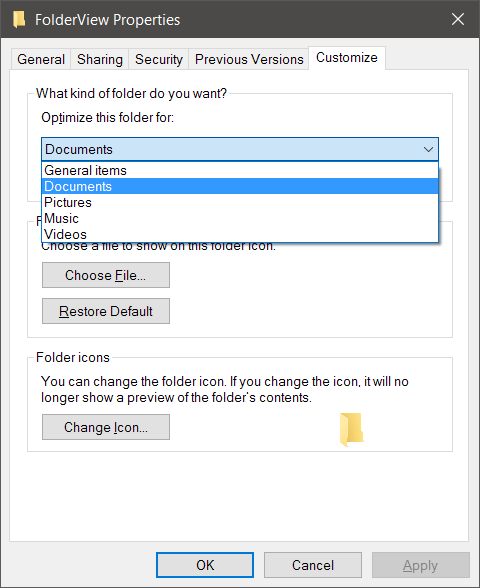
So I'm rolling up my sleeves and trying to figure out how to enhance/replace this functionality. This is a brand new project I'm starting today, written in VB6, and after initial research I already have many questions about Windows. Not so much VB6, but hopefully this is an acceptable thread. I just need a place to organize my notes and whatnot, and I'm most comfortable using MB threads for this kind of thing.
I envision FolderView's user interface as part of the context menu when you right-click the blank space on the right side of a folder in explorer. So far, I'm able to add both basic items as well as submenus, so that's all I should really need.
The actual Folder View settings for any given folder are held in the registry, so in theory it should be a simple matter to copy settings from any given folder to any other given folder or group of folders. (Like, for example: Apply this folder's view settings to all subfolders.)
Last edited by Ellis Dee; May 9th, 2016 at 12:47 PM.
-
May 9th, 2016, 12:43 PM
#2
Context Menu
For a proof-of-concept, I added an "open command prompt here" item to that context menu:

This opens a command prompt to whatever folder is open when you right-click the whitespace on the right in explorer. This is actually a pretty useful feature in-and-of-itself, so if anyone wants to do the same, open regedit and navigate to the following key:
HKEY_CLASSES_ROOT\Directory\Background\shell
1. Add a new key under shell (next to the "cmd" key) and name it whatever you want to appear in the context menu. Leave the default value blank.
2. Add a string value to this new key named NoWorkingDirectory and leave it blank.
3. Optionally, add another string value named Icon and set its value to "C:\Windows\System32\cmd.exe" (no quotes).
4. Add a new key under it named command and set its default value to the following: cmd.exe /s /k pushd "%V"
The icon works fine, but I didn't like that it was the only icon in the list so I opted not to use it.
Adding a menu is only marginally more difficult. You can see the "Folder View" menu in the screenshot above; I've started adding the menu but haven't added the items yet. Mainly because I haven't figured out exactly what those items should be yet.
This article describes what registry changes you need to do to add submenus to an explorer context menu. The article explains how to do this for the desktop, essentially letting you make a floating start menu, but it's the same idea regardless which context menu you're customizing.
Last edited by Ellis Dee; May 9th, 2016 at 12:52 PM.
-
May 9th, 2016, 01:04 PM
#3
User Interface
I envision the following features:
Templates:- Save the current folder's view as a custom template, letting the user name it whatever. These custom templates will be saved to User\AppData\Roaming.
- Apply any previously-saved custom template to the current folder.
- A form that lets the user manage these custom templates. (Rename, Delete, or change the order they appear in the context menu.)
"Freeform":- Apply the current folder's view settings to all subfolders.
Not entirely sure how I want to organize all this into the context menu setup. My initial thought as I type this:
Folder View
...General
...Music
...Audiobooks
...Pictures
...Videos
...-
...Apply to subfolders
...-
...Save View
...Manage Views
-
May 9th, 2016, 01:44 PM
#4
Initial Research
Folder View Settings - Back Up and Restore in Windows offers a BAT file for backing up and restoring your folder settings. The backup portion of this BAT file saves the following registry entries:
Code:
HKCU\Software\Microsoft\Windows\Shell\BagMRU
HKCU\Software\Microsoft\Windows\Shell\Bags
HKCU\Software\Microsoft\Windows\ShellNoRoam\Bags
HKCU\Software\Microsoft\Windows\ShellNoRoam\BagMRU
HKCU\Software\Classes\Local Settings\Software\Microsoft\Windows\Shell\BagMRU
HKCU\Software\Classes\Local Settings\Software\Microsoft\Windows\Shell\Bags
From looking at my own registry, the list of individual custom folder views appears to be in:
HKCU\Software\Classes\Local Settings\Software\Microsoft\Windows\Shell\Bags
BagMRU is a nice unique search term, which uncovers Explaining the Bags/BagMRU registry tree (trying), which in turn links to the following utility:
ShellBagsView v1.16
That doesn't appear to have been updated for Windows 10, but 10 seems to use the same setup as Windows 7. Running it on my machine, I do indeed get a list of all my individual folder settings.
More googling turns up Windows Shellbag Forensics, which describes how investigators can see all the folders you've accessed, including deleted folders, and even including those you navigated to on removable flash drives. That's a bit unsettling.
Parsing Windows ShellBags Using the ShellBags Parser EnScript offers more insight on forensic investigation of shellbags, but that's starting to drift away from the topic. (But I found it interesting.)
Shellbags Forensics: Addressing a Misconception delves even deeper into the forensic analysis aspects, but more relevant to my needs it also links to what appears to be the definitive research on shellbag data structure:
PDF: Windows Shell Item format specification
Now we're cooking with gas.
More googling turns up this code, which helpfully enumerates CLSIDs for known special folders.
And finally, if you started to get uneasy skimming through those forensics articles, you're not alone. Here's an article I ran across that seemed to be reading my mind: How to remove old Shellbag entries in Windows for privacy.
Last edited by Ellis Dee; May 9th, 2016 at 01:53 PM.
-
May 9th, 2016, 04:16 PM
#5
Re: FolderView: Enhance Folder View "Templates" in Windows 10
My first question is how to translate these strings. For a test, I used the linked ShellBagsView utility to locate a longish folder name for one of my apps: CharacterBuilderLite. ShellBagsView says it's Slot Number 293. When I use regedit to navigate over to...
HKCU\Software\Classes\Local Settings\Software\Microsoft\Windows\Shell\Bags\293
...and look for string data in the binary field, here's what it looks like:
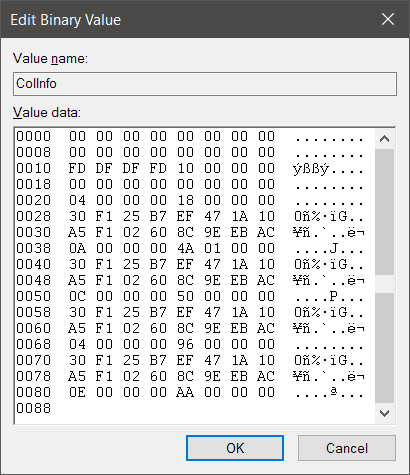
That's not very promising. Not only don't I see the obvious human-readable text all the examples show, but I also see the same two rows repeating four times.
EDIT: The 293 key has no values, only a single subkey "Shell." Shell has one value (SniffedFolderType with value "Documents") and one subkey. That subkey has lots and lots of values, most of which are REG_DWORDs. The only non-numeric values are as follows:
ColInfo (Binary) -- as shown in the image above
GroupByKey:FMTID (String) "{00000000-0000-0000-0000-000000000000}"
Vid (String) "{137E7700-3573-11CF-AE69-08002B2E1262}"
Sort (Binary) -- see image below
And finally, the key itself is named "{7D49D726-3C21-4F05-99AA-FDC2C9474656}"
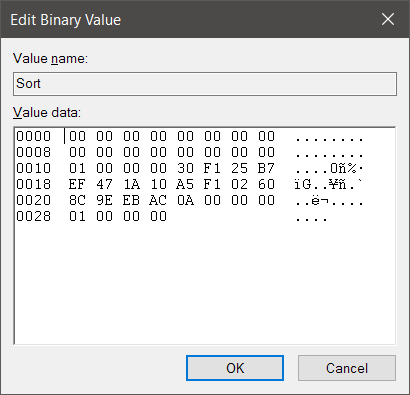
Anyone have any ideas? The data is clearly somewhere based on ShellBagsView working, and it pretty much has to be somewhere inside this 293 key, right? I'm just not seeing it yet.
EDIT 2: Okay, that same Vid value shows up in a ton of other slot numbers. So it's definitely not that.
EDIT 3: The key name shows up in a bunch of other slot numbers as well, so it's most likely not there either.
Last edited by Ellis Dee; May 9th, 2016 at 04:36 PM.
-
May 9th, 2016, 04:45 PM
#6
Re: FolderView: Enhance Folder View "Templates" in Windows 10
Aha, I see the human-readable path names under the BagMRU key, not the Bags key. Not for CharacterBuilderLite; I haven't figured out how to connect the MRU list to the slot numbers when just given a path name to look up quite yet. But progress!
-
May 10th, 2016, 12:39 PM
#7
Re: FolderView: Enhance Folder View "Templates" in Windows 10
Apparently my (very old) registry library doesn't read/write binary values properly. (Or at all.) So now I'm trying to figure out how to get that working.
Anyone know how to read/write binary registry values using API? I'm not interested in scripting, or anything that adds a reference or component.
-
May 11th, 2016, 02:00 PM
#8
Re: FolderView: Enhance Folder View "Templates" in Windows 10
Found a link on these forums from ten years ago to:
Easy-to-use Registry Editing Class
Testing just now, this properly reads binary data from some test keys I added to the registry. I copied actual ShellBag items to a temporary HKCU key so I could play around with them and make sure my read/write calls are correct before I let them loose on actual ShellBags.
I now appear to be armed with all the tools I need, finally! Now it's just a matter of sitting down and writing this thing.
-
May 11th, 2016, 03:51 PM
#9
Re: FolderView: Enhance Folder View "Templates" in Windows 10
Posting to ease your loneliness...
If you don't know where you're going, any road will take you there...
My VB6 love-children: Vee-Hive and Vee-Launcher
-
May 13th, 2016, 06:52 AM
#10
Re: FolderView: Enhance Folder View "Templates" in Windows 10
Ran across another forensics paper that may be of use at some point:
PDF: Windows ShellBag Forensics in Depth
-
May 15th, 2016, 12:49 PM
#11
Re: FolderView: Enhance Folder View "Templates" in Windows 10
For this project I'm going to need to know the location of all Windows 10 special folders. That way I can find the appropriate shellbags when, say, you open Documents, then in the left side panel you click "Music" under Documents, then go to the Artist\Allbum subfolder. The shellbag path for that may very well be:
Music\Artist\Album
As opposed to:
C:\Users\Ellis\Music\Artist\Album
Pretty sure I'm going to be receiving the latter from the context menu, but I will need to convert it to the former to compare against shellbag paths.
Code for locating special folders in Windows XP using SHGetFolderPath() is everywhere. But code for finding special folders in Vista and later using SHGetKnownFolderPath() is remarkably difficult to find. Most everything I found used typelibs or late-bound shell scripting objects. Nothing that just used simple API calls.
Thankfully I finally found Randy Birch's sample project showing how to do it, so I adapted his technique into a bas module with a simple interface for programmers. I've added this to the CodeBank in case anyone else wants it:
VB6: Windows 10 Known Folders / SHGetKnownFolderPath
Last edited by Ellis Dee; May 15th, 2016 at 12:55 PM.
 Posting Permissions
- You may not post new threads
- You may not post replies
- You may not post attachments
- You may not edit your posts
-
Forum Rules
|
Click Here to Expand Forum to Full Width
|



 Reply With Quote