|

-
Apr 18th, 2016, 04:15 PM
#1
Thread Starter
Fanatic Member

Text align = distribute
Is there any way to distribute text across a label or textbox like in Access (other than to enter spaces manually)?
-
Apr 18th, 2016, 04:20 PM
#2
Re: Text align = distribute
I've never seen(or heard of) a distribute text align. Could you provide an example or a more accurate description?
-
Apr 18th, 2016, 04:24 PM
#3
Thread Starter
Fanatic Member
Re: Text align = distribute
Not |......hello......|
But |h...e...l...l...o|
-
Apr 18th, 2016, 04:26 PM
#4
Re: Text align = distribute
Sure you could create your own custom label control and do whatever you want with it.
Basically you would determine the width of the label and the total width of the string.
take the remainder and divide it by the number of letters + 1.
Manually position each letter in the control's paint event.
The more difficult part would be to handle text that is too wide for the control.
Burn the land and boil the sea
You can't take the sky from me
~T
-
Apr 18th, 2016, 04:56 PM
#5
Hyperactive Member
Re: Text align = distribute
 Originally Posted by Gruff

Burn the land and boil the sea
You can't take the sky from me
Thanks, now I am missing Firefly.  Seriously that show needs a revival but I guess Joss Whedon is probably making too much money directing Avenger movies to ever try to go back to Firefly/Serenity. Seriously that show needs a revival but I guess Joss Whedon is probably making too much money directing Avenger movies to ever try to go back to Firefly/Serenity.
-
Apr 18th, 2016, 05:22 PM
#6
Re: Text align = distribute
i liked the show a lot. Loved the theme song.
projecttoday:
This is just a rough off the cuff piece of code. But I am sure it could be adapted for your needs.
Code:
Public Class DistributedLabel
  ' UserControl
  Public Property mText As String = ""

  Protected Overrides Sub OnPaint(e As PaintEventArgs)
    MyBase.OnPaint(e)

    Dim Txt As String = mText
    If Txt.Length = 0 Then Exit Sub

    With e.Graphics
      Dim Remainder As Integer = CInt(Me.ClientRectangle.Width - .MeasureString(Txt, Me.Font).Width)

      Dim Spacer As Integer = Remainder \ (Txt.Length + 1)
      Dim BB As SolidBrush = New SolidBrush(Me.BackColor)
      Dim FB As SolidBrush = New SolidBrush(Me.ForeColor)

      .FillRectangle(BB, Me.ClientRectangle)
      Dim X As Integer = Spacer

      For i = 0 To mText.Length - 1
        Dim C As Char = mText.ToArray(i)
        If i = 0 Then X = Spacer \ 2
        .DrawString(C, Me.Font, FB, New Point(X, 2))
        X = CInt(X + (.MeasureString(C, Me.Font).Width + Spacer))
      Next
      BB.Dispose()
      FB.Dispose()
    End With
  End Sub
End Class
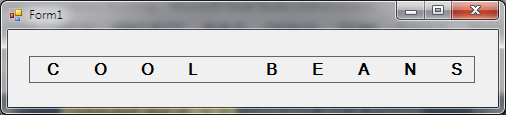
Burn the land and boil the sea
You can't take the sky from me
~T
-
Apr 18th, 2016, 05:47 PM
#7
Re: Text align = distribute
Did a quick few tests. I tried using an inherited Label instead of a generic usercontrol.
It didn't buy anything for the effort.
I'd go with the usercontrol and add vertical alignments.
(Top, Middle, Bottom)
Burn the land and boil the sea
You can't take the sky from me
~T
 Posting Permissions
- You may not post new threads
- You may not post replies
- You may not post attachments
- You may not edit your posts
-
Forum Rules
|
Click Here to Expand Forum to Full Width
|



 Reply With Quote

