|

-
Apr 10th, 2016, 11:46 PM
#1
Thread Starter
Enjoy the moment

 [RESOLVED] Update Syntax in Access not the same as in vb 6 code why? [RESOLVED] Update Syntax in Access not the same as in vb 6 code why?
hey
i have a code that update a certain field if it contains this mark [']
when i run it in the access table it works fine
when i run it in the vb 6 code i get a error why?
this is the code
in access
Code:
UPDATE Customers SET FullName = Replace(FullName,"'","")
in vb 6
Code:
CN.Execute "UPDATE Customers SET FullName = Replace(FullName," ' ","")"
tnx for any help
salsa 
-
Apr 11th, 2016, 12:17 AM
#2
Re: Update Syntax in Access not the same as in vb 6 code why?
> CN.Execute "UPDATE Customers SET FullName = Replace(FullName," ' ","")"
You must double the double quote
CN.Execute "UPDATE Customers SET FullName = Replace(FullName,""'"","""")"
-
Apr 11th, 2016, 02:32 AM
#3
Thread Starter
Enjoy the moment
Re: Update Syntax in Access not the same as in vb 6 code why?
-
Apr 11th, 2016, 08:31 AM
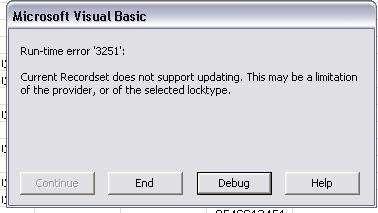
#4
Re: Update Syntax in Access not the same as in vb 6 code why?
Jet SQL Expression Service VBA does not include a Replace$() function.
MS Access uses a private API embedded in the Jet 4.0 and ACE engines to inject its own VBA engine as a substitute expression processor. This is also how MS Access allows "user defined functions" written in the Access VBA macro language to be called within Jet/ACE SQL expressions.
Some of this is historical: Originally MS Access used another language ("Access Basic") and needed a way to inject it. Jet SQL VBA goes back to the VB5 era which has no Replace$() function.
When VB6 expanded the range of intrinsic functions in its VBA namespace Microsoft didn't expend the Jet SQL Expression Service's VBA namespace. This hasn't happened in the later (renamed) ACE engines either.
It can get confusing because "VBA" means different things in different contexts. In VB6 it is just the namespace of a default global object, in Jet SQL it refers to an expression syntax wrapped around its own global object, and in MS Access it is a macro language wrapped around a global object and a procedural processor.
-
Apr 11th, 2016, 08:34 AM
#5
Re: Update Syntax in Access not the same as in vb 6 code why?
The article How to configure Jet 4.0 to prevent unsafe functions from running in Access 2003 contains a list of the functions accepted by the Jet SQL Expression parser.
-
Apr 11th, 2016, 08:41 AM
#6
Thread Starter
Enjoy the moment
Re: Update Syntax in Access not the same as in vb 6 code why?
so you are saying sir it is not possible to run this code from vb ?
-
Apr 11th, 2016, 09:56 AM
#7
Re: Update Syntax in Access not the same as in vb 6 code why?
 Originally Posted by salsa31

so you are saying sir it is not possible to run this code from vb ?
But, why you want to replace in your table all single quote with double quote ? 
Isn't a good idea (by me is totally wrong).
-
Apr 11th, 2016, 10:17 AM
#8
Thread Starter
Enjoy the moment
Re: Update Syntax in Access not the same as in vb 6 code why?
Originally Posted by gibra
But, why you want to replace in your table all single quote with double quote ?
Isn't a good idea (by me is totally wrong).
i dont want to replace it with double quote
i just want to check if there is a quote then remove it thats all
this is how i run it in access
Code:
UPDATE Customers SET FullName = Replace(FullName,"'","")
i want to do the same thing with vb 6
-
Apr 11th, 2016, 10:29 AM
#9
Re: Update Syntax in Access not the same as in vb 6 code why?
Sorry. I misunderstood the question. Deleting my answer.
Okay. The best way I can think of is two step.
1) Use your existing method inside access to clean that field of ")" in the FullName field.
2) Create a filter in the tool that adds ")" to the text that removes it before the text is added to the database.
Last edited by Gruff; Apr 11th, 2016 at 10:37 AM.
Burn the land and boil the sea
You can't take the sky from me
~T
-
Apr 11th, 2016, 10:39 AM
#10
Thread Starter
Enjoy the moment
Re: Update Syntax in Access not the same as in vb 6 code why?
Originally Posted by Gruff
Sorry. I misunderstood the question. Deleting my answer.
Okay. The best way I can think of is two step.
1) Use your existing method inside access to clean that field of ")" in the FullName field.
2) Create a filter in the tool that adds ")" to the text that removes it before the text is added to the database.
can you give me an example please?
-
Apr 11th, 2016, 10:48 AM
#11
Re: Update Syntax in Access not the same as in vb 6 code why?
You already know how to do #1
Regarding #2: Since I do not know how you input your text into the field in the first place I cannot say
Last edited by Gruff; Apr 11th, 2016 at 11:33 AM.
Burn the land and boil the sea
You can't take the sky from me
~T
-
Apr 11th, 2016, 11:22 AM
#12
Re: Update Syntax in Access not the same as in vb 6 code why?
Og for the love of ENIAC....
CN.Execute "UPDATE Customers SET FullName = Replace(FullName,"","", """")"
first a case of not enough double quoting... then a case of too much in the wrong spot ....
Replace takes three paramerters, the haysatck, the needle and what to replace it with... this will look in FullName find , in the text and replace it with an empty string...
We're not building rockets here folks...
-tg
-
Apr 11th, 2016, 11:36 AM
#13
Re: Update Syntax in Access not the same as in vb 6 code why?
So your saying Dil is wrong in post #4 TG?
Burn the land and boil the sea
You can't take the sky from me
~T
-
Apr 11th, 2016, 11:38 AM
#14
Thread Starter
Enjoy the moment
Re: Update Syntax in Access not the same as in vb 6 code why?
Originally Posted by techgnome
Og for the love of ENIAC....
CN.Execute "UPDATE Customers SET FullName = Replace(FullName,"","", """")"
first a case of not enough double quoting... then a case of too much in the wrong spot ....
Replace takes three paramerters, the haysatck, the needle and what to replace it with... this will look in FullName find , in the text and replace it with an empty string...
We're not building rockets here folks...
-tg
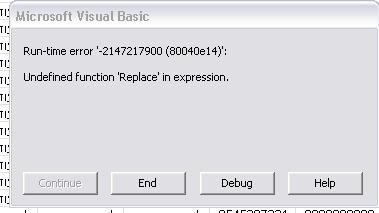
well sir that didnt help
Code:
CN.Execute "UPDATE Customers SET FullName = Replace(FullName,"","", """")"
i still get the same error
-
Apr 11th, 2016, 01:11 PM
#15
Re: Update Syntax in Access not the same as in vb 6 code why?
Originally Posted by salsa31
i dont want to replace it with double quote
I'm sorry, I misread.
-
Apr 11th, 2016, 01:16 PM
#16
Thread Starter
Enjoy the moment
Re: Update Syntax in Access not the same as in vb 6 code why?
Originally Posted by gibra
I'm sorry, I misread.
thats ok
i guess there isnt a way to make this update through vb 6 only through access it self
-
Apr 11th, 2016, 02:09 PM
#17
Re: Update Syntax in Access not the same as in vb 6 code why?
Originally Posted by salsa31
thats ok
i guess there isnt a way to make this update through vb 6 only through access it self
However, Replace doesn't work outside of MS Access environment.
Even disabling the SandBoxMode registry key, at least to me it never worked. 
So you'd better open a recordset to change values.
-
Apr 11th, 2016, 02:37 PM
#18
Thread Starter
Enjoy the moment
Re: Update Syntax in Access not the same as in vb 6 code why?
-
Apr 11th, 2016, 03:01 PM
#19
Re: Update Syntax in Access not the same as in vb 6 code why?
Originally Posted by salsa31
But it has nothing to do with your problem, that is instead related to SQL in Access database.
-
Apr 11th, 2016, 03:05 PM
#20
Thread Starter
Enjoy the moment
Re: Update Syntax in Access not the same as in vb 6 code why?
Originally Posted by gibra
But it has nothing to do with your problem, that is instead related to SQL in Access database.
 LOL LOL
-
Apr 11th, 2016, 03:19 PM
#21
Re: Update Syntax in Access not the same as in vb 6 code why?
Left(...), Mid(...) and Instr(...) are supported though, so an (although horrible looking)
workaround would be possible directly in "plain JET-SQL"...
Olaf
-
Apr 11th, 2016, 04:06 PM
#22
Re: Update Syntax in Access not the same as in vb 6 code why?
the following seems to work(at least on my system):
Code:
Private Sub Command1_Click()
   Dim Conn As New ADODB.Connection
   Conn.ConnectionString = "Provider=Microsoft.ACE.OLEDB.12.0;Data Source=C:\Users\IkkeEnGij\Documents\TheDatabase.accdb"
   Conn.Open
   Conn.Execute "UPDATE Table1 SET Table1.TheName = Replace(Table1.TheName,chr(39),"""")"
   Conn.Close
End Sub
Last edited by IkkeEnGij; Apr 11th, 2016 at 04:15 PM.
Reason: writeing error
do not put off till tomorrow what you can put off forever
-
Apr 11th, 2016, 04:07 PM
#23
Thread Starter
Enjoy the moment
Re: Update Syntax in Access not the same as in vb 6 code why?
Originally Posted by Schmidt
Left(...), Mid(...) and Instr(...) are supported though, so an (although horrible looking)
workaround would be possible directly in "plain JET-SQL"...
Olaf
can you give me a example please what do you mean?
-
Apr 11th, 2016, 04:10 PM
#24
Re: Update Syntax in Access not the same as in vb 6 code why?
do not put off till tomorrow what you can put off forever
-
Apr 11th, 2016, 04:18 PM
#25
Thread Starter
Enjoy the moment
Re: Update Syntax in Access not the same as in vb 6 code why?
Originally Posted by IkkeEnGij
does post#22 not work ?
no my friend still same error
Code:
Set CN = New ADODB.Connection
StrSql = "Provider=Microsoft.Jet.OLEDB.4.0;"
StrSql = StrSql & "Data Source=" & App.Path & "\HairDesign.mdb;"
StrSql = StrSql & "Jet OLEDB:Database Password=035924794"
CN.ConnectionString = StrSql
CN.Open
CN.Execute "UPDATE Customers SET Customers.FullName = Replace(Customers.FullName,chr(39),"""")"
CN.Close
-
Apr 11th, 2016, 05:09 PM
#26
Re: Update Syntax in Access not the same as in vb 6 code why?
on my system it works perfectly with ADO and DAO and VB6 sp6
aceoledb/acedao
Try with DAO
if it does not work, post an example database (unprotected)
do not put off till tomorrow what you can put off forever
-
Apr 12th, 2016, 01:44 AM
#27
Re: Update Syntax in Access not the same as in vb 6 code why?
Originally Posted by IkkeEnGij
the following seems to work(at least on my system):
Code:
Private Sub Command1_Click()
   Dim Conn As New ADODB.Connection
   Conn.ConnectionString = "Provider=Microsoft.ACE.OLEDB.12.0;Data Source=C:\Users\IkkeEnGij\Documents\TheDatabase.accdb"
   Conn.Open
   Conn.Execute "UPDATE Table1 SET Table1.TheName = Replace(Table1.TheName,chr(39),"""")"
   Conn.Close
End Sub
This isn't JET provider, this is ACE provider.
Using JET doesn't work.
-
Apr 12th, 2016, 01:58 AM
#28
Thread Starter
Enjoy the moment
Re: Update Syntax in Access not the same as in vb 6 code why?
Originally Posted by gibra
This isn't JET provider, this is ACE provider.
Using JET doesn't work.
then how should i do it?
-
Apr 12th, 2016, 02:39 AM
#29
Re: Update Syntax in Access not the same as in vb 6 code why?
Originally Posted by salsa31
then how should i do it?
As said, the SQL isn't really beautiful, but (for single Replacements) it should work as shown below:
Code:
Option Explicit 'Into a VB-Form in an empty Project

Const JetPrefix = "Provider=Microsoft.Jet.OLEDB.4.0;Data Source="

Private Cnn As Object

Private Sub Form_Load()
  Dim DBName$: DBName = Environ("temp") & "\test1.mdb"
  If CreateObject("Scripting.FileSystemObject").FileExists(DBName) Then Kill DBName

  Set Cnn = CreateObject("ADOX.Catalog").Create(JetPrefix & DBName)
      Cnn.Execute "Create Table T1(ID Identity Primary Key, Txt Text(255))"
      Cnn.Execute "Insert Into T1(Txt) Values('O''Brien')"

  'show the original Value which sits in the Field
  Debug.Print GetRs("Select Txt From T1")(0)

  'do a (single) Replacement on all fields which contain an apostrophe
  Cnn.Execute "Update T1 Set Txt = Left(Txt,Instr(Txt,'''')-1) & Mid(Txt,Instr(Txt,'''')+1) Where Instr(Txt,'''')>0"

  'let's see if that worked...
  Debug.Print GetRs("Select Txt From T1")(0)
End Sub

Function GetRs(SQL As String) As Object
  Set GetRs = CreateObject("ADODB.Recordset")
      GetRs.CursorLocation = 3  'adUseClient
      GetRs.Open SQL, Cnn, 3, 3 'adOpenStatic, adLockOptimistic
End Function
Olaf
-
Apr 12th, 2016, 04:17 AM
#30
Re: Update Syntax in Access not the same as in vb 6 code why?
Originally Posted by salsa31
then how should i do it?
As already worte, use a ADODB.Recordset , loop records, and replace single quote. Ex:
Code:
rs.Open "SELECT Fullname FROM Customers .....", ...........
Do While Not rs.Eof
    rs!Fullname = Replace$(rs!Fullname, "'", vbNulString)
    rs.MoveNext
Loop
-
Apr 12th, 2016, 06:29 AM
#31
Re: Update Syntax in Access not the same as in vb 6 code why?
Originally Posted by gibra
This isn't JET provider, this is ACE provider.
Using JET doesn't work.
afaik ACE should work with .mdb to
there are a lot of possibilitys to try out
among others using a recordset (as you suggested)
if it does not work with ADO try with DAO
if it does not work with JET, try ACE
so i see at least 8 different methods to try
sql with ADO/DAO JET/ACE
recordset with ADO/DAO JET/ACE
but of cource if one asks a question about databases
including an example database would be the smart thing to do
do not put off till tomorrow what you can put off forever
-
Apr 12th, 2016, 06:37 AM
#32
Re: Update Syntax in Access not the same as in vb 6 code why?
Originally Posted by IkkeEnGij
on my system it works perfectly with ADO and DAO and VB6 sp6
aceoledb/acedao
And i did try it out
but is was with an .accdb
just saying so there is no misunderstanding
do not put off till tomorrow what you can put off forever
-
Apr 12th, 2016, 07:02 AM
#33
Re: Update Syntax in Access not the same as in vb 6 code why?
Perhaps the question that should be asked is "WHY?" why are you manipulating the data like this? What's the purpose of dropping the ' from the data? Other than to piss off a bunch of Irish?
-tg
-
Apr 12th, 2016, 08:22 AM
#34
Re: Update Syntax in Access not the same as in vb 6 code why?
Originally Posted by techgnome
Perhaps the question that should be asked is "WHY?" why are you manipulating the data like this? What's the purpose of dropping the ' from the data? Other than to piss off a bunch of Irish?
-tg
I agree 100%.
Why?
-
Apr 12th, 2016, 10:00 AM
#35
Thread Starter
Enjoy the moment
Re: Update Syntax in Access not the same as in vb 6 code why?
Originally Posted by gibra
As already worte, use a ADODB.Recordset , loop records, and replace single quote. Ex:
Code:
rs.Open "SELECT Fullname FROM Customers .....", ...........
Do While Not rs.Eof
    rs!Fullname = Replace$(rs!Fullname, "'", vbNulString)
    rs.MoveNext
Loop
Code:
        Dim Rs As New ADODB.Recordset
        Rs.Open "SELECT Fullname FROM Customers", CN
        Do While Not Rs.EOF
            Rs!FullName = Replace$(Rs!FullName, "'", vbNullString)
        Rs.MoveNext
        Loop
        Rs.Close
-
Apr 12th, 2016, 10:03 AM
#36
Thread Starter
Enjoy the moment
Re: Update Syntax in Access not the same as in vb 6 code why?
Tg ANd Gibra
this is a old database AMIGOS
-
Apr 12th, 2016, 03:00 PM
#37
Re: Update Syntax in Access not the same as in vb 6 code why?
i just tested with the .mdb Olaf put here
works perfectly with ACEDAO
Code:
Private Sub Command1_Click()
    Dim db As DAO.Database
    Set db = OpenDatabase("C:\0test\test1.mdb")
    db.Execute "UPDATE T1 SET T1.Txt = Replace(T1.Txt,""'"","""")"
    db.Close
    Set db = Nothing
End Sub
works perfectly with ACEOLEDB
Code:
Private Sub Command1_Click()
   Dim Conn As New ADODB.Connection
   Conn.ConnectionString = "Provider=Microsoft.ACE.OLEDB.12.0;Data Source=C:\0test\test1.mdb"
   Conn.Open
   Conn.Execute "UPDATE T1 SET T1.Txt = Replace(T1.Txt,""'"","""")"
   Conn.Close
End Sub
do not put off till tomorrow what you can put off forever
 Posting Permissions
- You may not post new threads
- You may not post replies
- You may not post attachments
- You may not edit your posts
-
Forum Rules
|
Click Here to Expand Forum to Full Width
|



 Reply With Quote


