|

-
Mar 31st, 2016, 08:07 AM
#1
Thread Starter
Addicted Member


 [RESOLVED] Change appearance of disabled controls? [RESOLVED] Change appearance of disabled controls?
Is there a way to change the appearance of disabled controls? Specifically the DateTimePicker, ComboBox and RadioButton controls? The following code works nicely with text boxes:
Code:
CType(ctrl, TextBox).ForeColor = Color.Black
CType(ctrl, TextBox).BackColor = Color.White
CType(ctrl, TextBox).ReadOnly = True
But when used with other controls, they're still grayed out:
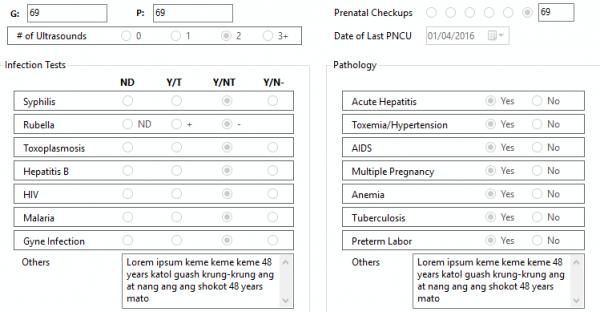
I can of course use readonly textboxes for the DateTimePicker and ComboBox output data, but I'd rather not to use textboxes or labels for radiobuttons. Any suggestions?
====================
ほんとにどもありがとう!
Rie Ishida
-
Mar 31st, 2016, 10:57 AM
#2
Re: Change appearance of disabled controls?
You may think the controls look better if you change the colors but those colors are user preference settings in Windows, a user my have Windows setup to show blue text on a yellow window, and when they run your app everything will look weird to them, or maybe they (color blind) won't even be able to read the text due to the colors you choose! If you want the controls to have different colors then that should be an option in your app, let the user change them if they want to, MS has all sorts of guidelines for how apps are supposed to look and work,
https://msdn.microsoft.com/en-us/lib...(v=vs.85).aspx
Add:
So if you do change the colors like that, be better to use the users prefs.,
Code:
CType(ctrl, TextBox).ForeColor = SystemColors.WindowText
CType(ctrl, TextBox).BackColor =SystemColors.Window
CType(ctrl, TextBox).ReadOnly = True
As far as disabled controls, never done it but maybe instead of disabling them, override their mouse and keyboard so they don't do anything, but their colors shouldn't look like enabled controls then either, thats just too confusing!
Last edited by Edgemeal; Mar 31st, 2016 at 04:28 PM.
 Posting Permissions
- You may not post new threads
- You may not post replies
- You may not post attachments
- You may not edit your posts
-
Forum Rules
|
Click Here to Expand Forum to Full Width
|



 Reply With Quote
