|

-
Mar 2nd, 2016, 04:56 PM
#1
Thread Starter
Lively Member

Why this code won't update my Access database record?? pls help... :-(
Hi!
I'm on a small project where I have to enter and later maybe manage some data in MS Access 2007
database.
I don the writing into, deleting etc. to the database but for some reason I can't update the
desire data in the database.
Here is my code and I really tried out a lot of thinks but no way to update the data. :-(
This is not the whole code of my project of course, actually this is only the code how I connect to the
database and the button manipulating code for updating.
Can somebody watch to the code and give some idea what I does wrong?
Code:
Module Connection
    Public conn As New OleDb.OleDbConnection
    Public strstring As String
    Public Sub connections()
        On Error Resume Next
        strstring = "Provider=Microsoft.ACE.OLEDB.12.0;Data Source=Cowboy.accdb"
        conn.ConnectionString = strstring
        conn.Open()
    End Sub
End Module


Private Sub Button4_Click(sender As Object, e As EventArgs) Handles Button4.Click
        On Error Resume Next
        Dim OleDBC As New OleDbCommand

        With OleDBC
            .Connection = conn
            .CommandText = "Update [Baza_zivotinja] set [Boja]='" & TextBox1.Text & "',[ID]='" & TextBox2.Text & "',[Pol]='" & TextBox3.Text & "',[Datum_osemenjivanje]='" & DateTimePicker1.Value.ToShortDateString & "',[Datum_teljenje]='" & DateTimePicker2.Value.ToShortDateString & "',[Datum_uvoza]='" & DateTimePicker2.Value.ToShortDateString & "',[Tezina]='" & TextBox4.Text & "',[ID_Oca]='" & TextBox5.Text & "',[Ime_oca]='" & TextBox6.Text & "',[ID_Majke]='" & TextBox7.Text & "',[Ime_majke]='" & TextBox8.Text & "',[Nepomena]='" & RichTextBox1.Text & "',[Uzrast]='" & TextBox9.Text & "', Where [ID] = " & TextBox2.Text & ""
            .ExecuteNonQuery()
            .Dispose()
            Call loaddata()
        End With

End Sub
Thank you very much.
-
Mar 2nd, 2016, 05:14 PM
#2
Re: Why this code won't update my Access database record?? pls help... :-(
The first step is to remove this line:
On Error Resume Next
What that will do is hide any errors, which is probably what is happening.
My usual boring signature: Nothing
 
-
Mar 2nd, 2016, 05:40 PM
#3
Thread Starter
Lively Member
Re: Why this code won't update my Access database record?? pls help... :-(
Hu!
Thank you mate! :-)
I removed the On error Resume Next.
Now I know I have a syntax error in the UPDATE statement.
But what is the error? I can't see it.
I checked it several times but no luck. :-(
Here is the shorter version of my updating statement with still syntax error:
Code:
.CommandText = "UPDATE [Baza_zivotinja] set [Boja]='" & TextBox1.Text & "', Where [ID] = " & TextBox2.Text & ""
What could be the problem?
Sorry I'm novice in VB .Net but I have lot of experience in old versions of VB 1.0 around '92 and up to VB 6.0...
Thanks for any advice.
-
Mar 2nd, 2016, 06:14 PM
#4
Re: Why this code won't update my Access database record?? pls help... :-(
Finding SQL errors in a lengthy statement can be a total pain. It would be nice if the error message gave you more information about where the error is, but that's often not the case.
On the other hand, that shorter update statement should be MUCH easier to diagnose. The first thing I would suggest is to use parameters. That may solve the problem anyways, if the problem has to do with formatting of the inputs, but concatenating in user input, such as you are doing, leaves you open to SQL Injection attacks. That may not be an issue if your users aren't malicious, but you just never can trust those users.
There IS an error in that shorter version, though, and now that I look, the same error exists in the longer version: You can't have that comma before the WHERE statement, so try this:
Code:
.CommandText = "UPDATE [Baza_zivotinja] set [Boja]='" & TextBox1.Text & "' Where [ID] = " & TextBox2.Text & ""
My usual boring signature: Nothing
-
Mar 2nd, 2016, 06:19 PM
#5
Re: Why this code won't update my Access database record?? pls help... :-(
well, that's fine, but the problem is with the SQL, not the VB code, so you're not going to get a pass on that excuse. :P
I highly recommend parameters for things like this... it would have made it a lot easier to see the problem - which is a wayward comma after you set you last field... just before the where.
-tg
-
Mar 2nd, 2016, 06:26 PM
#6
Thread Starter
Lively Member
Re: Why this code won't update my Access database record?? pls help... :-(
Thanks for your time and help, at this moment I found that coma too.
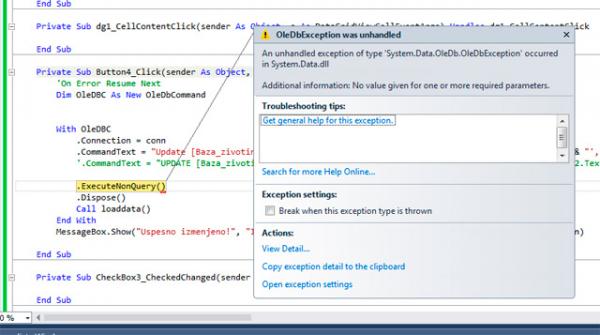
Now, without the coma before WHERE statement I got this error:
"No value given for one or more required parameters"
All the datatype in my database are set to TEXT.
All the variables in my sql statement are filled with the data what it should be.
One think what is moving through my head is, is it possible does the
"No value given for one or more required parameters" error exist because of the
Code:
DateTimePicker1.Value.ToShortDateString
what I use in the SQL statement?
Actually, that is in some sort of date format and not text, or I'm wrong?
Is that "DateTimePicker1.Value.ToShortDateString" represented as a string? I think it is because its
value is ToShortDateString.
Or is there any other problem because this error is triggered?
-
Mar 2nd, 2016, 06:33 PM
#7
Thread Starter
Lively Member
Re: Why this code won't update my Access database record?? pls help... :-(
techgnome:
You are right for the excuse, that was my mistake, simple syntax error... sorry.... 
What you guys mean when you say I should use parameters?
Should I avoid to use in the SQL statement lets say the TextBox1.Text?
Should I change it like this:
Code:
Dim A as String
A = TextBox1.Text
' And now should I use the A variable in SQL?
-
Mar 2nd, 2016, 06:34 PM
#8
Re: Why this code won't update my Access database record?? pls help... :-(
I'm going to put two pieces of advice, and then I think I'm out.
1) Parameters. Let me say that again: Parameters... Parameters are your friend and should be used, especially in complex stuff like this. Odds are, youi're trying to store some "text" that has a tick mark ( ' ) in it... which then ends the string in your SQL ... and after that, everything goes to ____ ... plus it opens you up to injection attacks... it's known as the Little Bobby Tables problem... you do NOT want that.
2) There is no reason what so ever for everything to be a string/text... numbers are number, dates are dates, booleans are booleans ... treat them with the respect they deserve and store them properly. Between storing thigns properly as they should be and parameters, it reduces the things that can go wrong.
-tg
-
Mar 3rd, 2016, 05:20 AM
#9
Thread Starter
Lively Member
Re: Why this code won't update my Access database record?? pls help... :-(
Hi all good people!
I hate because I can't find the problem but I cant. :-(
I spent several hours checking, tweaking but still the same.
After I removed the coma in front of the WHERE statement which cos an other problem I always got this error:
"...No value given for one or more required parameters.."
I checked all the spellings of the names of the column and all the statements values but still get the error.
I also tried to put all the contents of the text boxes to variables which was defined as string and so
wrote the variables into the SQL command but without success.
Here is my code line where the problem exist but I can't see. :-(
Code:
.CommandText = "Update [Baza_zivotinja] set [Boja]='" & TextBox1.Text & "', [ID]='" & TextBox2.Text & "', [Pol]='" & TextBox3.Text & "',[Datum_osemenjivanje]='" & DateTimePicker1.Value.ToShortDateString & "',[Datum_teljenje]='" & DateTimePicker2.Value.ToShortDateString & "',[Datum_uvoza]='" & DateTimePicker3.Value.ToShortDateString & "',[Tezina]='" & TextBox4.Text & "',[ID_Oca]='" & TextBox5.Text & "',[Ime_oca]='" & TextBox6.Text & "',[ID_Majke]='" & TextBox7.Text & "',[Ime_majke]='" & TextBox8.Text & "',[Nepomena]='" & RichTextBox1.Text & "',[Uzrast]='" & TextBox9.Text & "' Where [ID] = " & TextBox2.Text & ""
Sorry for the long statement but I wish to show the exact code.
Can somebody confirm does my SQL statement is correct written?
Here is the screen shot of the error msg.
Does the error msg points to the exact line where the error msg screen pops up or to the line where I wrote the SQL statement?
I'm a bit confused.
Thanks for any advice.
My best regards.
-
Mar 3rd, 2016, 07:32 AM
#10
Thread Starter
Lively Member
Re: Why this code won't update my Access database record?? pls help... :-(
Problem solved!!! 
There was a syntax error in the SQL statement.
An incorrect writing of the cell name.
It was "Nepomena" but it has to be "Napomena".
However, thanks for spending your time for my error.
My best regards.
-
Mar 3rd, 2016, 11:08 AM
#11
Re: Why this code won't update my Access database record?? pls help... :-(
Yeah, that's one of the trickiest errors. What's really fun about it is that the process has sufficient information to give you an error message that would REALLY help....but they don't. All they'd have to do is have the parser horff up the symbol it didn't recognize and you'd know EXACTLY where to look in the string, but that would make it too easy.
Still, I'll add one more time: Use parameters.
My usual boring signature: Nothing
-
Mar 3rd, 2016, 03:18 PM
#12
Hyperactive Member
Re: Why this code won't update my Access database record?? pls help... :-(
Jodank, when you start using complex statements like this, it is really tough to find errors by going through the code. You might want to start using
Code:
Debug.Print(.CommandText)
and look in the Immediate Window on the Debug menu because this will turn all the code into a full statement again. You can then see where you missed commas, spaces, etc. and see what the parameters (when you start using them) ultimately insert into the statement.
 Posting Permissions
- You may not post new threads
- You may not post replies
- You may not post attachments
- You may not edit your posts
-
Forum Rules
|
Click Here to Expand Forum to Full Width
|



 Reply With Quote

