|

-
Mar 1st, 2016, 04:33 PM
#1
Thread Starter
Fanatic Member

Trouble with Group by
Hello
Code:
"Select affiche, Count(num)as num from Table1 where num = " & Text1.Text & " GROUP BY affiche", DB, adOpenStatic, adLockOptimistic

 MsgBox RSS.RecordCount
The msgbox is returning false results.
In the database I can see only one item in the affiche field but the msgbox is returning 2 items.
The same thing with distinct funcction
Code:
"Select distinct affiche from Table1 where num = " & Text1.Text & " ", DB, adOpenStatic, adLockOptimistic
Then I used DISTINCTROW function
Code:
"Select DISTINCTROW affiche from Table1 where num = " & Text1.Text & " ", DB, adOpenStatic, adLockOptimistic
the mesagebox returns 3
Attachment 135733
Last edited by Mustaphi; Mar 1st, 2016 at 04:43 PM.
-
Mar 1st, 2016, 04:55 PM
#2
Re: Trouble with Group by
Then that means there are two different values for affiche in the table.
-tg
-
Mar 1st, 2016, 05:31 PM
#3
Thread Starter
Fanatic Member
Re: Trouble with Group by
 Originally Posted by techgnome

Then that means there are two different values for affiche in the table.
-tg
Could you tell me How do I know that affiche has more than one value?
-
Mar 1st, 2016, 05:34 PM
#4
Re: Trouble with Group by
Well one way would be to print the results to the debug window after opening the rss
Code:
Do Until RSS.EOF
     Debug.print RSS(0)
    RSS.MoveNext
Loop
-
Mar 1st, 2016, 07:10 PM
#5
Thread Starter
Fanatic Member
Re: Trouble with Group by
This is what I did
Code:
"Select affiche, Count(num)as num from Table1 where num = " & Text1.Text & " GROUP BY affiche", DB, adOpenStatic, adLockOptimistic
Do Until RSS.EOF
     Debug.print RSS(0)
    RSS.MoveNext
Loop
Nothing happens
-
Mar 2nd, 2016, 04:22 AM
#6
Re: Trouble with Group by
What database are you using? My suggestion would be to design your query using the database tools and only then transfer it into client side code. So if you're in SQL Server then use Management Studio's Query Window. If you're in Access use the SQL View of the Query Designer.
If you design the query in the database and you're not getting the expected result then either your query or the data is wrong.
The best argument against democracy is a five minute conversation with the average voter - Winston Churchill
Hadoop actually sounds more like the way they greet each other in Yorkshire - Inferrd
-
Mar 2nd, 2016, 07:28 AM
#7
Re: Trouble with Group by
Originally Posted by Mustaphi
This is what I did
Code:
"Select affiche, Count(num)as num from Table1 where num = " & Text1.Text & " GROUP BY affiche", DB, adOpenStatic, adLockOptimistic
Do Until RSS.EOF
     Debug.print RSS(0)
    RSS.MoveNext
Loop
Nothing happens
Well that's a blatant lie... something did happen... something should have been written out to the debug window. Did you look? What do you want? Big giant flashing neon signs? Did you even try setting a break point, stepping through the code and seeing the values one by one? Maybe it's the lack of coffee talking but this feels like dealing with my 9 year-old ... if it doesn't come right out, slap her in the face, she throws her hands up and says "it's toooo harrrrd" and gives up.
What about the table? Did you try looking in the table? That's where the data is... What's in the table? That doesn't take any special skills. What about running the query through Query Designer first? hhhmmmm?
It's moments like this that make me wonder what the hell they are teaching these days... clearly debugging and diagnostics is not on any of the agendas out there...
-tg
-
Mar 2nd, 2016, 07:48 AM
#8
Thread Starter
Fanatic Member
Re: Trouble with Group by
What database are you using?
I'm using access
If you're in Access use the SQL View of the Query Designer
I did and I could see only one item in the SQL View Designer.
-
Mar 2nd, 2016, 08:07 AM
#9
Thread Starter
Fanatic Member
Re: Trouble with Group by
something did happen... something should have been written out to the debug window. Did you look?
No sir nothing is printed
I cleared my form of all controls so that I would see something printed but nothing.
What about the table? Did you try looking in the table?
In the table there is only one record.
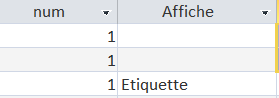
I modified the code to send a message instead of printing I get two successive messages one is null and the other holds Etiquette
Code:
"Select affiche, Count(num)as num from Table1 where num = " & Text1.Text & " GROUP BY affiche", DB, adOpenStatic, adLockOptimistic
Do Until RSS.EOF
     msgbox RSS(0)
    RSS.MoveNext
Loop
It's moments like this that make me wonder what the hell they are teaching these days
Teaching in the first world is not teaching in the third world countries.
-
Mar 2nd, 2016, 08:23 AM
#10
Thread Starter
Fanatic Member
Re: Trouble with Group by
I notice that there is a problem with debugging
I opened a new project , I added a command button then I wrote this code:
Debug.print "1"
Nothing was printed
-
Mar 2nd, 2016, 08:29 AM
#11
Re: Trouble with Group by
No... there are THREE records... 1... 2... 3... and in the Affiche field there are TWO VALUES.... two blanks (which IS A VALUE - a blank string: "" - which apparently is a NULL value, but still) and "Etiquette" ... THAT IS what you're getting. So that's why you're getting two records... because when you group by the field, you get "Ettiquette" and NULL -- clearly those are not the same, so yeah... and the messagebox proves that out - you got two completely different value.
don't want them? then filter them out before you group by.
My jab about teaching wasn't necessarily at your situation - of which I know nothign about - but at the teachign industry in general when it comes to things like this. For what ever reason no one, and I include the shiny technical college down the way from me - doesn't seem to teach some of the most fundamental basics... debugging and diagnostics are two of those things... and it does everyone a disservice because a good large majority of programming is trying to figure out what the ______________ is wrong, and more often than not, it's in someone else's code.
-tg
-
Mar 2nd, 2016, 09:39 AM
#12
Re: Trouble with Group by
I think TG's due a nice soothing Taco. I'm still hoping you'll deliver over this side of the pond and I've even moved from Southampton to Bristol, just to be closer and make your deliveries quicker.
Putting what TG said a different way, it sounds like you haven't really understood what a Group By does. It will show you a single line for each distinct value (or combination of values) in the Group By clause. Null is a value (sort of) so you will get a row returned for Null as well as the row being returned for Etiquette. If you had another 3 rows in there, each saying Etiquette, you would still get two rows, one for Null and one for Etiquette. If you added another record which showed Insolence, you would get three results and so on.
So the question becomes, what result did you expect? If you want a row for each individual value that appeared in the column and wasn't blank then you need to add a where clause ("where Affiche is not null"). If you wanted something else then you're going to have to give us a bit more explanation.
The best argument against democracy is a five minute conversation with the average voter - Winston Churchill
Hadoop actually sounds more like the way they greet each other in Yorkshire - Inferrd
-
Mar 2nd, 2016, 10:50 AM
#13
Re: Trouble with Group by
Originally Posted by Mustaphi
This is what I did
Code:
"Select affiche, Count(num)as num from Table1 where num = " & Text1.Text & " GROUP BY affiche", DB, adOpenStatic, adLockOptimistic
Do Until RSS.EOF
     Debug.print RSS(0)
    RSS.MoveNext
Loop
Nothing happens
There is nothing there that actually opens the recordset. I assume that it is just an error in pasting but that first line should start with RSS.Open
Make sure that you have the immediate window visible.
Also not that in that bit of code it will only print something if there is at least one record returned by the query
-
Mar 2nd, 2016, 11:47 AM
#14
Thread Starter
Fanatic Member
Re: Trouble with Group by
then you need to add a where clause ("where Affiche is not null")
Thanks a lot sir
That's what I was looking for
However I couldn't get the appropriate syntax the way you suggest.
So I'm doing like this:
Code:
"Select affiche, Count(num)as num from Table1 where (affiche <> '') and num = " & Text1.Text & " GROUP BY affiche"
The query is working charm but I don't know if the (not IsNull) is more performant.
thank you a lot
-
Mar 2nd, 2016, 01:46 PM
#15
Re: Trouble with Group by
It's nothing to do with performance, it's to do with the value Null vs the value ''. They're different but since a null cannot be displayed (it's actually an absence of a value) it's usually displayed as an empty string. I assumed your data contained nulls but, given that your Where clause is working as written, it's clear that it actually contains empty strings instead. So the where clause you have is fine.
The best argument against democracy is a five minute conversation with the average voter - Winston Churchill
Hadoop actually sounds more like the way they greet each other in Yorkshire - Inferrd
-
Mar 3rd, 2016, 03:05 PM
#16
Re: Trouble with Group by
I might be late, but it's pretty obvious he doesn't know where Debug.Print actually prints.
Hit CTRL+G in the IDE before you run the program, and the "Immediate Window" should show. That's where your Debug.Print Prints to... 
 Posting Permissions
- You may not post new threads
- You may not post replies
- You may not post attachments
- You may not edit your posts
-
Forum Rules
|
Click Here to Expand Forum to Full Width
|



 Reply With Quote

