|

-
Feb 17th, 2016, 11:00 AM
#1
Thread Starter
Member

Which Version of Visual studio should i choose.
I have been doing programming with Visual Studio 2013 Express for the past year or 2 on the side making programs for my company. Now that i have some experience under my belt i would like to upgrade from the express version to a paid version. I looked into the newer versions and it seems to have what I'm looking for but there are some things i wont use. Basically i would like to one day make an app for a surface or ipad and i know that you can do that with the 2015 version but can you do that with 2013? I was looking at the professional version and that seems to be a good fit for me seeing that i am not a programmer by trade and it is also the cheapest one. What are your opinions?
PS I have looked at the features from Visual Studios website so you dont need to copy and paste the link.
Thanks
-
Feb 17th, 2016, 11:12 AM
#2
Re: Which Version of Visual studio should i choose.
I don't know about programming for the iPad ... but I think VS2013 will work fine for the Surface tablets ... If you're going to move to VS2015, I'd look at the Community Edition first... it's a full-blown version of Visual Studio. It's aimed at the hobby programmer, small shops, and the tinkerers ... You only need to pony up for the paid version if your shop is over a certain size, or your sales exceed a specified amount. It's definately worth the look.
I use 2013 because that's what my work requires... I don't have the space to install 2015 (how does that happen in the modern times?) so I can't make a fair comparison... there are some around here though that have used it, and other than the interface (which I think we all agree was best in 2010) I haven't seen any complaints.
-tg
-
Feb 17th, 2016, 11:26 AM
#3
Re: Which Version of Visual studio should i choose.
I've used both 2015 and 2013. What 2015 added to the IDE was more and faster feedback. It is also supposed to have more support for JavaScript, but I haven't noticed much of a difference between the two in that regard. Both could stand to see some improvements, and both are ok already. JavaScript might be important if you are writing something for the iPad.
As a general rule, VS was getting slower with each version. I feel that 2015 may start up a little faster than 2013, or at least no slower (stopping the general slide to slower and slower launch times), but when it is running, it's actually a bit TOO responsive, in my opinion. For example, if you start typing out a string literal, such as:
Dim st1 As String = "
As soon as you hit that first quotation mark, the IDE notices that and re-colors every line after that until a closing quote is encountered, while also flagging all the resulting errors (since the matching quote will be the opening quote of some random string later in the code). This happens FAST. In fact, I'm amazed at how quick it is, but the result is that colors are dancing around on the screen, underlines are coming and going, and so on. I pretty much can't type fast enough for VS to not complain about my partially completed lines of code. Being a bit slower would be nice.
There are also lots of other features standard in VS2015 that I have yet to use, but which look pretty nice. There's a better integrated profiler, and more feedback as far as running behavior while in debug mode, and it looks like there are more types of templates and the like.
The bottom line is that VS2015 is "more of everything" over 2013. Most of that is good, some of that is annoying. Also, some of the annoying things can be turned off, which is nice. Lots of customization, though I can't say that the same wasn't there in previous versions.
My usual boring signature: Nothing
 
-
Feb 17th, 2016, 11:41 AM
#4
Re: Which Version of Visual studio should i choose.
You don't need to pay for Visual Studio, ever, at least with VS 2015. It lets you use extensions in the free version, which was necessary for their business goals with Xamarin they're probably trying to be sly about. The only difference between versions of Visual Studio is how many decade-behind MS tools burden the package, and how many gigabytes of installation you have to wait through.
For Surface and iPad the paths are very different.
There's not really an app "type" for Surface. It's a Windows device. MS would encourage you to make an application using one of the Windows Store templates. You can develop and debug any of those for free, but publishing the app will require a Windows Store license and I suppose those are around $100. This is true of any version of VS. Or, you could just make a WPF or WinForms application. You'll have to deal with DPI scaling if you are targeting a Surface, so your choices are either: "WPF is harder to learn but behaves well" or "WinForms is more widely known but requires extra work to look OK on a Surface." My suggestion is WPF, 10 years from now won't remember WinForms.
For iOS, you generally will develop in Objective-C or Swift. VS 2015 is apparently gaining (or has) the ability to compile Objective-C projects. So you'd have to learn Objective-C to use that feature. It's a neat language, but it's clear Swift will be more relevant for iOS going forward.
There are also the Xamarin products that allow you to use C# or VB in Visual Studio to produce iOS-targeted projects. They're very expensive, roughly $1500/product/year per developer. If you want an app that works the same on both iOS and Windows Phone, you'd need at least 2 products, so $3k/year is the entry price. I'm not sure if their WinPhone support runs on a Surface yet, so it might be a waste.
Either way, there's no good route to produce both Surface and iOS applications with the same codebase or for cheap using VB .NET right now. If you're interested in developing for tablet platforms, my advice is spend the $2000 you were going to spend on Visual Studio and Xamarin on a MacBook Pro instead, then get free XCode and some books about iOS development with Swift. Wait until there's actually a Windows tablet market before investing time in it.
This answer is wrong. You should be using TableAdapter and Dictionaries instead.
-
Feb 17th, 2016, 11:46 AM
#5
Re: Which Version of Visual studio should i choose.
 Originally Posted by Shaggy Hiker

I've used both 2015 and 2013. What 2015 added to the IDE was more and faster feedback. It is also supposed to have more support for JavaScript, but I haven't noticed much of a difference between the two in that regard. Both could stand to see some improvements, and both are ok already. JavaScript might be important if you are writing something for the iPad.
As a general rule, VS was getting slower with each version. I feel that 2015 may start up a little faster than 2013, or at least no slower (stopping the general slide to slower and slower launch times), but when it is running, it's actually a bit TOO responsive, in my opinion. For example, if you start typing out a string literal, such as:
Dim st1 As String = "
As soon as you hit that first quotation mark, the IDE notices that and re-colors every line after that until a closing quote is encountered, while also flagging all the resulting errors (since the matching quote will be the opening quote of some random string later in the code). This happens FAST. In fact, I'm amazed at how quick it is, but the result is that colors are dancing around on the screen, underlines are coming and going, and so on. I pretty much can't type fast enough for VS to not complain about my partially completed lines of code. Being a bit slower would be nice.
There are also lots of other features standard in VS2015 that I have yet to use, but which look pretty nice. There's a better integrated profiler, and more feedback as far as running behavior while in debug mode, and it looks like there are more types of templates and the like.
The bottom line is that VS2015 is "more of everything" over 2013. Most of that is good, some of that is annoying. Also, some of the annoying things can be turned off, which is nice. Lots of customization, though I can't say that the same wasn't there in previous versions.
Ewww... I'd prefer it simply does what it does now and give me both quotes at once... Same with parenthesis and brackets.
-tg
-
Feb 17th, 2016, 12:29 PM
#6
Re: Which Version of Visual studio should i choose.
Originally Posted by techgnome
Ewww... I'd prefer it simply does what it does now and give me both quotes at once... Same with parenthesis and brackets.
-tg
Which version gives you both quotes at once?
2010 only gives me the second quote if I try to leave the line. But it doesn't try to hi-light the rest of the file either, as it apparently knows a string can't be continued on the next line and won't flag the missing double quote as an error, but will add it for you if you try to leave the line.
-
Feb 17th, 2016, 12:40 PM
#7
Re: Which Version of Visual studio should i choose.
I use VS2013 Professional ... it may be an option somewhere, but as soon as I type ( or " it gives me the closing ) and " appropriately ... and if I press a closing " while right next to it, it recognizes that and doesn't double it up but simply highlights it and moves me out of the string.
-tg
-
Feb 17th, 2016, 12:43 PM
#8
Re: Which Version of Visual studio should i choose.
The option to add the closing ) is available in 2015. It may even be the default, as it was set that way for me. I hated that, because I was so totally in the habit of adding the closing ) myself that I'd do it anyways and end up with an error. The behavior of the double quotes is pretty odd, as it WILL allow multi-line strings. There may be a setting that I don't know about, though. I didn't know about the option to turn off the auto close parenthesis until one of the characters around here told me (I think I remember who, but won't say lest I have it wrong).
My usual boring signature: Nothing
-
Feb 17th, 2016, 12:58 PM
#9
Re: Which Version of Visual studio should i choose.
Originally Posted by Shaggy Hiker
The option to add the closing ) is available in 2015. It may even be the default, as it was set that way for me. I hated that, because I was so totally in the habit of adding the closing ) myself that I'd do it anyways and end up with an error. The behavior of the double quotes is pretty odd, as it WILL allow multi-line strings. There may be a setting that I don't know about, though. I didn't know about the option to turn off the auto close parenthesis until one of the characters around here told me (I think I remember who, but won't say lest I have it wrong).
Does 2015 Xpress Desktop have that option too? (Whats it called?) , doesn't seem to work for me. If I type,
Debug.WriteLine("ok"
and press enter the error list shows ")" expected.
-
Feb 17th, 2016, 01:22 PM
#10
Re: Which Version of Visual studio should i choose.
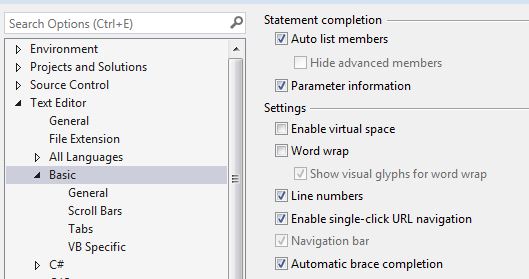
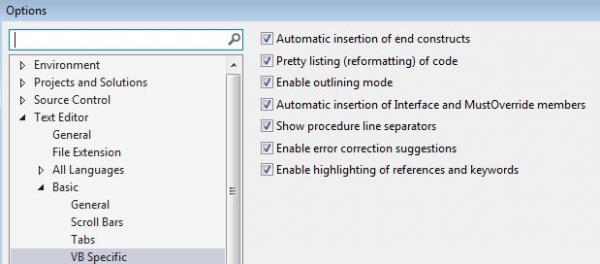
Tools, Options ... it's the Automatic brace completion ... don't know if it also does the quotes, but I believe that's the option that handles the () ...
Strike that... now I think it's the Automatice insertion of end constructs.... maybe? maybe not? I'll have to turn some of those off and see what happens.
-tg
-
Feb 17th, 2016, 01:39 PM
#11
Re: Which Version of Visual studio should i choose.
Ahhhh OK, I see how it works now.
I type "(" it auto adds ")", I was trying to modify the line. 
edit: ^ Thats the Auto Brace option
Thanks! 
fwiw, 2015 xpress desktop w/Update1 doesn't have "vb specific", its looks like this,...
Attachment 135409
Last edited by Edgemeal; Feb 17th, 2016 at 01:44 PM.
-
Feb 17th, 2016, 02:03 PM
#12
Re: Which Version of Visual studio should i choose.
I don't see the point of using anything but the latest version, if you have to choose, and don't know what would be better. You may be able to pick up a used copy of an earlier version for cheap, though.
Depending on your company size (is it your company, or you work for them?) you may need to pay the $500 or whatever it is for VS2015 Professional (which is the same as the Community Edition, but allows corporate usage).
For iPad development, you will need a Mac (not free) and Xcode (free-ish depending on your app 'distribution').
"Ok, my response to that is pending a Google search" - Bucky Katt.
"There are two types of people in the world: Those who can extrapolate from incomplete data sets." - Unk.
"Before you can 'think outside the box' you need to understand where the box is."
-
Feb 17th, 2016, 03:00 PM
#13
Re: Which Version of Visual studio should i choose.
One thing that will likely drive you nuts is that MS screwed up Intellisense in VB for 2015. It has long been screwed up in C#, so it may be just an example of convergence, I just wish that they'd decided to un-screw C# rather than add the screwup to VB. The issue can be seen when you add a messagebox, as I was just doing. There are something like 21 overloads of .Show, so you have lots of alternatives. I added a message, then a caption, then a comma. At that point, I have pretty clearly indicated that I'm choosing one of the overloads that takes THREE arguments (or more), so in past versions, Intellisense brings up the buttons as the likely next alternative. No longer. In 2015, Intellisense brings up the first of the two argument alternatives, so you don't even get a suggestion of what the third argument might be, despite clearly indicating that you want a third argument. This was working in all past versions of VB.NET, now it is not.
Better yet, once you get sorted that you want a button, Intellisense won't give you the button options. Instead, it gives you ALL options, useful or not, at that point. If you type the O for Ok, then you will get the right option, but you have to know what the options are, and if the one you want isn't the first thing it could suggest in alphabetic order, then you get the wrong suggestion, even though the suggestion couldn't POSSIBLY be used there. For example, when I try to add an exclamation icon as the fourth icon, I type e. The first suggestion? ex, which is the exception variable for a Catch block I happen to be in. That isn't even a valid entry at that point. The next option in the list is exception, which is even less useful, if that's even possible. Again, this was something that VS has had right for VB from the beginning of .NET, and was generally wrong for C# for a long time. Now it is wrong for VB, as well.
Convergence is not so wonderful in some ways.
My usual boring signature: Nothing
-
Feb 17th, 2016, 03:09 PM
#14
Re: Which Version of Visual studio should i choose.
If I understood that right, the intellisense has been like that since 2010 ... as long as it gives the procedure hint correctly, I'm generally ok with the intellisense fire-hose treatment.
-tg
-
Feb 17th, 2016, 03:15 PM
#15
Re: Which Version of Visual studio should i choose.
Intelisence in 2015 isn't as smart as say 2010, in 2015 it shows options that really shouldn't be listed, I was even going to post a rant about how stupid intelisence is in 2015 with boolean variables, but I just did the Update 1 and see they fixed that, I may actually start using 2015 now.
-
Feb 17th, 2016, 03:24 PM
#16
Re: Which Version of Visual studio should i choose.
Originally Posted by techgnome
If I understood that right, the intellisense has been like that since 2010 ... as long as it gives the procedure hint correctly, I'm generally ok with the intellisense fire-hose treatment.
-tg
I have 2010 professional, and I think you might have the "All" tab selected by default.
I have the Common tab selected by default, so when the "," is put in for the third parameter the dropdown shows a short list of all the button enumerations, not a list of all things.
-
Feb 17th, 2016, 03:32 PM
#17
Re: Which Version of Visual studio should i choose.
Yeah, 2010 got it right. I didn't use 2012 for much of anything, and don't remember it. I didn't think 2013 had the firehose treatment (I think I mostly used 2013 for JS projects, which don't have a working intellisense anyways), but 2015 certainly does.
My usual boring signature: Nothing
-
Feb 19th, 2016, 01:23 AM
#18
Hyperactive Member
Re: Which Version of Visual studio should i choose.
Originally Posted by SJWhiteley
For iPad development, you will need a Mac.
This is why I will never develop anything for any Apple product. That and the fact that you have to pay Apple $100/year to keep your apps in their store. Meanwhile Google only charges a 1 time Account setup fee of like $25 or $35 and you can write code on Windows, Linux, or Mac. I have no idea about the Windows store costs.
-
Feb 19th, 2016, 07:31 AM
#19
Re: Which Version of Visual studio should i choose.
Originally Posted by Shaggy Hiker
Yeah, 2010 got it right. I didn't use 2012 for much of anything, and don't remember it. I didn't think 2013 had the firehose treatment (I think I mostly used 2013 for JS projects, which don't have a working intellisense anyways), but 2015 certainly does.
You can get intellisense in VS2010 for JS to a certain extent. Still not very 'intelligent' but at least allows you to see the available commands. You put a comment at the top of the JS file. I believe I also have a plugin, but developing in JS really sucks the big one with regards to code management.
"Ok, my response to that is pending a Google search" - Bucky Katt.
"There are two types of people in the world: Those who can extrapolate from incomplete data sets." - Unk.
"Before you can 'think outside the box' you need to understand where the box is."
-
Feb 19th, 2016, 08:58 AM
#20
Re: Which Version of Visual studio should i choose.
There are several annoying things in VS2015 but overall I believe it’s a good release and that professional edition is a solid choice for most developers. If a developer or team of developers are writing professional grade solutions then Enterprise edition should be considered in regards to better testing tools and features for testing which I did not realize until going from my Enterprise edition to another developer with professional edition. I can’t say enough about unit testing done right as this can pin-point bugs during development and assist in finding issues down the road. Yet if you are not concerned with this then professional edition should be adequate for your needs.
Also, if you have any future plans for coding in C# then VS2015 (edition does not matter for this) is the way to go as there are many enhancements in C# 6.
Off topic, consider using VS Online, TFS for source control or if warranted you can (as we do) host a local TFS.
-
Feb 19th, 2016, 12:05 PM
#21
Re: Which Version of Visual studio should i choose.
Originally Posted by SJWhiteley
...
For iPad development, you will need a Mac (not free) and Xcode (free-ish depending on your app 'distribution').
I do stand corrected; it looks like you can use VS2015 for iOS and Android development using C# and C++ using Tamarin. I couldn't say how successful that will be.
"Ok, my response to that is pending a Google search" - Bucky Katt.
"There are two types of people in the world: Those who can extrapolate from incomplete data sets." - Unk.
"Before you can 'think outside the box' you need to understand where the box is."
-
Feb 19th, 2016, 02:04 PM
#22
Re: Which Version of Visual studio should i choose.
Xamarin. Not Tamarin. I mentioned them in post #4. They're very good, but more expensive than most hobbyists want to fool with.
This answer is wrong. You should be using TableAdapter and Dictionaries instead.
-
Feb 22nd, 2016, 07:37 AM
#23
Re: Which Version of Visual studio should i choose.
Originally Posted by Sitten Spynne
Xamarin. Not Tamarin. .
It was autocorrected...
"Ok, my response to that is pending a Google search" - Bucky Katt.
"There are two types of people in the world: Those who can extrapolate from incomplete data sets." - Unk.
"Before you can 'think outside the box' you need to understand where the box is."
-
Feb 23rd, 2016, 11:55 AM
#24
Re: Which Version of Visual studio should i choose.
I'm sorry to resurrect this thread, but I've been seeing a number of issues on SO in regards to VB2015 that convinces me that the compiler is not reliable. The latest is this post: VB.NET Iterator Function Loses Local Variables. For those that want to give the code in question a spin to reproduce the error, you need to have Compiler Optimizations enabled.
For a more complete list of issues, you can review: https://github.com/dotnet/roslyn/iss...rea-Compilers+
 Posting Permissions
- You may not post new threads
- You may not post replies
- You may not post attachments
- You may not edit your posts
-
Forum Rules
|
Click Here to Expand Forum to Full Width
|



 Reply With Quote


