|

-
Jan 14th, 2016, 01:47 PM
#1
IE9 after Jan 2016 Patch Tuesday - page rendering
Starting right after the Patch Tuesday burden was installed here page rendering within thread pages went bonkers.
Everything renders in w-i-i-i-d-e layout, necessitating scrolling back and forth to read anything. This is even after cancelling the humpty-jumpty (right sidebar crap I thought was going away when we all reported how duff it is).
Yes you can full-screen the browser but come on, you don't own my monitor. What gives?
I can use Chrome here when I must, but I can't install IE11 on this Vista box. Microsoft has chosen not to support this officially still supported OS.
-
Jan 14th, 2016, 01:48 PM
#2
Re: IE9 after Jan 2016 Patch Tuesday - page rendering
Hmm, after posting I see this thread doesn't exhibit the behavior. Maybe it has something to do with the presence of quote blocks or code blocks?
-
Jan 14th, 2016, 01:53 PM
#3
Re: IE9 after Jan 2016 Patch Tuesday - page rendering
We made a change on the width of the code block from 650 to 850 pixels. That might be the issue. We couldn't get dynamic code boxes working, so this was a compromise. It sounds like at least one person would like us to put it back to 650.
Anyone else? Respond with Keep it at 850 or Put it back to 650.
Thanks
-
Jan 14th, 2016, 02:15 PM
#4
Re: IE9 after Jan 2016 Patch Tuesday - page rendering
It's the pre tag, class "alt2" ... when I set it to width:100% ... it sizes with the browser just fine...
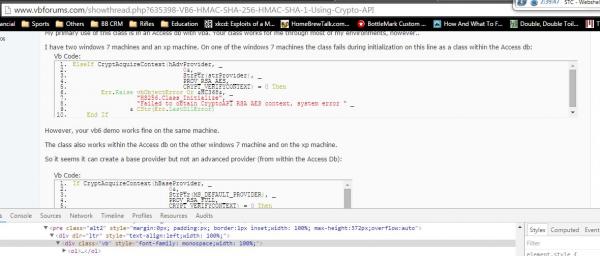
(I also changed let and vb in an effort to find the right one ... I re-tested it on the second code block in the post changing just the style for alt2, gave me the expected result.
-tg
-
Jan 14th, 2016, 03:42 PM
#5
Re: IE9 after Jan 2016 Patch Tuesday - page rendering
Keep it at 850.
OK in Chrome/Win7 here!
-
Jan 14th, 2016, 04:12 PM
#6
Re: IE9 after Jan 2016 Patch Tuesday - page rendering
Keep it at 850, no problems with IE11/FF/Chrome on Win7 here.
-
Jan 14th, 2016, 07:12 PM
#7
Re: IE9 after Jan 2016 Patch Tuesday - page rendering
Good to have confirmation that it wasn't an IE9 "fix" involved at least.
I don't expect sympathy from anyone here, so let the chips fall where they may I suppose. Anxiously awiting the next "improvement," like pages rendered upside-down or translated to pig-latin or whatever. 
-
Jan 15th, 2016, 08:05 AM
#8
Re: IE9 after Jan 2016 Patch Tuesday - page rendering
 Originally Posted by dilettante

Anxiously awiting the next "improvement," like pages rendered upside-down or translated to pig-latin or whatever.
We were actually considering a white on white text display. It would make for a cleaner presentation of information.
See how much cleaner this line is!
-
Jan 15th, 2016, 09:46 AM
#9
Re: IE9 after Jan 2016 Patch Tuesday - page rendering
Missed opportunity though: moving to larger typeface sizes every 6 months or so, forcing people to run browsers full-screen and buying ever higher density monitors. Think of the kickbacks from the monitor makers alone! Constant monitor upgrading and covering the field of vision in monitors like an inverted fly's eye in order to view multiple windows.
-
Jan 15th, 2016, 10:46 AM
#10
Re: IE9 after Jan 2016 Patch Tuesday - page rendering
Part of the problem we face running a site is that different people want different things. When one person wants it very wide and want person wants something very skinny, it starts to get hard to keep everyone happy. Of course the simple answer is dynamic, but that's not working. Hopefully we can get that figured out at some point. 
-
Jan 16th, 2016, 11:04 AM
#11
Re: IE9 after Jan 2016 Patch Tuesday - page rendering
To be fair, this happened 2 days after IE9 was end of lifed, so maybe this can get shuttled to "Closed - won't fix" ��
Also it looks like emoji storage is borked. That's supposed to be a party popper.
*edit*
Actually it seems to just be this thread that can't handle emoji. I was making a feedback thread to demonstrate, but it was happy with my party popper. ��
Last edited by Sitten Spynne; Jan 16th, 2016 at 11:15 AM.
This answer is wrong. You should be using TableAdapter and Dictionaries instead.
-
Jan 16th, 2016, 01:09 PM
#12
Re: IE9 after Jan 2016 Patch Tuesday - page rendering
IE9 was not end-of-lifed on Vista. It actually is still supported and is still getting monthly patches.
But I tried this on Chrome and the same issue arises there, so it had nothing to do with patches or with IE (9 or any other version). It was merely a coincidence that a concession to "full screeners" was made.
So now we have to live with a broken site that is only viewable with browsers full-screened, or at least stretched to nearly so.
I think a very poor call has been made on this and the change should be reverted.
-
Jan 16th, 2016, 02:11 PM
#13
Re: IE9 after Jan 2016 Patch Tuesday - page rendering
Rather than get bogged down in that discussion I shouldn't have started, here's my feelings:
Make the width of the element as small as possible. Pick a smallish target resolution and stick to it. If you want to support people with gigantic screens, I swear this forum software has a concept of "themes" and that's a good solution.
I say this because if you've got a small monitor, you don't really have an option to deal. But if you have a big monitor, it's only a minor annoyance that the site doesn't fill the available space. Consider this feedback:
- The only time I ever maximize a window is if I'm watching a movie on a computer or presenting a PowerPoint, for several reasons related to each configuration I use. In short, screen width is sort of like code columns: just because the IDE's line limit is some theoretical like 65KB doesn't mean you should write all of your code on a single line.
- My work rig has 2 24" monitors at whatever stupid resolution "HD" is. A fullscreen browser on that setup running text from left to right is very fatiguing to read. In general, I use a window that's 800-1000px wide and spanning less than half my screen. This lets me fit 2 or sometimes 3 browser windows with documentation on one monitor. Until I get to a site like MSDN that asserts "no one could ever possibly want less than 1,000 pixels, that's ludicrous". Then I have to specially resize for that site, and I get less efficient.
- My creaky old laptop's resolution is 1280x800. To make multitasking easier, I make my browser about 1000px wide so I can still click on other windows or monitor scrolling console windows, and I make it smaller if I have more stuff open. That's pretty tight considering 25% of the forum's width is devoted to advertising.
- My remaining desktop PC's a 26" monitor. I like to put my browser side by side with another application. Pretty much the only thing I do on a Windows PC is resolve my bank statement with Quicken. I make my browser exactly as wide as my bank statement.
I hate horizontal scrolling. Making the size dynamic's tough. The next-best solution is picking an attractive, but too-skinny width. I shudder to think about how the site renders on a Surface or other similar modern device.
Last edited by Sitten Spynne; Jan 16th, 2016 at 02:16 PM.
This answer is wrong. You should be using TableAdapter and Dictionaries instead.
-
Jan 18th, 2016, 10:16 AM
#14
Re: IE9 after Jan 2016 Patch Tuesday - page rendering
Also important: the current layout scheme pushes some of the forum's advertisements off of my screen. I'm pretty sure your advertisers would be upset if they knew this, generally ad deals pay a premium to be "above the fold", so to speak.
Here's a screenshot of the rendered page on my fully maximized Chrome window on a common model of MacBook Pro, shrunk down to be useless by the forum software:
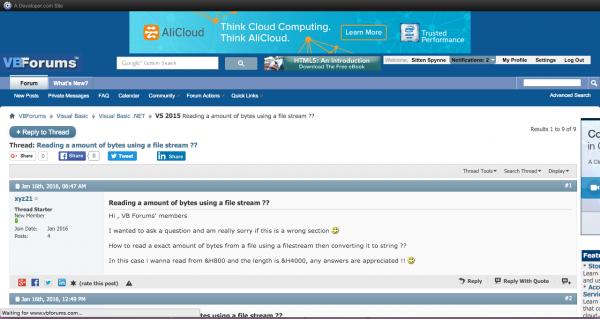
Note how only a sliver of the top-right ad is visible. Someone paid good money to put it in front of my eyeballs. I bet they'd be upset to know it's not there.
For some reason, this only happens in some threads. Most of the time my window's about 15% skinnier than that, and the side column fits fine. Even now, as I type, the ad's completely visible in my browser. So it's just one particular type of page I haven't narrowed down yet.
Also, kudos for not having obnoxious ads. I'm keeping uBlock turned off on this site. I used to post ridiculously frequently on another forum and now, even WITH an ad blocker, the pages manage to auto-start video and obscure posts. So I don't visit anymore.
This answer is wrong. You should be using TableAdapter and Dictionaries instead.
-
Jan 18th, 2016, 09:25 PM
#15
Re: IE9 after Jan 2016 Patch Tuesday - page rendering
I had some issues, some of the times that the forum will keep on loading although the page has been loaded.
Haven't done it today but yesterday it was all like, page loads and bzzz, bzzz, bzzzz, bzzz, the circle keeps spinning around and get's on my nerves, bzzz bzzzz bzzzz. I use Firefox (always).
ἄνδρα μοι ἔννεπε, μοῦσα, πολύτροπον, ὃς μάλα πολλὰ
πλάγχθη, ἐπεὶ Τροίης ἱερὸν πτολίεθρον ἔπερσεν·
-
Jan 27th, 2016, 04:02 PM
#16
Re: IE9 after Jan 2016 Patch Tuesday - page rendering
No idea when this started, but now VBForums pages have no scrollbars at all!
-
Jan 27th, 2016, 09:21 PM
#17
Re: IE9 after Jan 2016 Patch Tuesday - page rendering
Strange, now scrollbars are back again.
-
Jan 27th, 2016, 10:06 PM
#18
Re: IE9 after Jan 2016 Patch Tuesday - page rendering
Just how much have you had to drink tonight dil?
-tg
-
Jan 28th, 2016, 02:15 AM
#19
Re: IE9 after Jan 2016 Patch Tuesday - page rendering
I say that the site should not bend to the will of people who find it burdensome to click the Maximise button on their browser window.
 Posting Permissions
- You may not post new threads
- You may not post replies
- You may not post attachments
- You may not edit your posts
-
Forum Rules
|
Click Here to Expand Forum to Full Width
|



 Reply With Quote


