|

-
Apr 21st, 2015, 08:18 AM
#41
Re: Program Testers
 Originally Posted by reexre

About vbWidgets:
1) where should I put the vbWidgets.DLL ? (I put it in App.Path)
I have AppPath\vbRC5BaseDlls containing the RichClient DLLs
Always put it beside vbRichClient5.dll for regfree deployment, so this is correct.
Originally Posted by reexre
2) is it correct (to make it RegFree) my change on vbWidgets SubMain ?:
No, what's already there inside Sub Main was correct - and ensures that
the vbWidgets.dll can use *other classes from the RC5 regfree internally*.
In your case, you want to create instances of Classes regfree, which vbWidgets.dll
*exports* on its outside interface (all of the cwWidget-Thingys).
And so, this case has to be handled within your App, not in vbWidgets.dll.
I've seen, that you re-create a New_c (along with a Cairo) regfree in each and
every Class in your StdExe-Project. That is *not* necessary.
When New_c and Cairo are defined Public in a *.bas Module, then they are
automatically "visible" and usable in each and every code-snippet in your
entire Project, so they have to be created Regfree only *once* (in Sub Main()).
Now, to create Widget-Classes regfree from within your Std-Exe-Project,
I usually write a small function for that ....(Public, and placed in the same
Code-Module (besides Sub Main()):
Code:
Public Function NewWidget(ClassName As String) As Object
  If App.Logmode Then 'we run compiled
     Set NewWidget = New_c.RegFree.GetInstanceEx(App.Path & "\vbRC5BaseDlls\vbWidgets.dll", ClassName)
  Else 'we run in the IDE, so we create the instance from the registered version
     Set NewWidget = CreateObject("vbWidgets." & ClassName)
  End If
End FUnction
Originally Posted by reexre
3) Where can I find Other Branches of vbWidgets ?
The one on GitHub is the one to use, if you have useful enhancements which
you think should be placed in the Master-Branch there, post them to me,
or make a Git-Pull-Request.
Originally Posted by reexre
4
Not so easy, I succeded on changing a little bit the cwFileList
so that when a Key is pressed, it set its position to the first item that start with pressedKey-character.
(quite like VB-Control)
That would be a change you could mail me, so that I can update the GitHub-Repo.
Originally Posted by reexre
5) How to set the Zorder of widgets ?
ah, ok, they seem to follow the "Form.Widgets.Add(" creation order.
At the moment I do not need to change it at Runtime.
IIRC there should be already a "MoveToFront"-Method in cWidgetBase.
Originally Posted by reexre
6) PropertyGrid-Widget
Seems so easy, but not to me...
Even just only Implementing the PropertyGrid-Widget is an hard challenge for me.
Does standard cwGrid implement "right Column shows the Value (depending on the Value-Type, switching between TextBox, Combo or CheckBox)." ??? [I need HscrollBar too]
In the PropertyGrid-Widget should appear only the properties of Selected Node
-When a Node is Clicked Public-PARAMS-UDT-variable values should be "transfered" to the Grid (and diplay only them)
-When user tweaks properties on GRID they should be transfered to the Public-PARAMS....
I'm thinking about an easyer way...
First thing to make it easy should be, to transfer all your Imaging-Algos into a Dll-Project -
wrapping each of the Algos in its own Class (with all its Parameters as Public Properties).
Example for an RGB-Color-Inversion-Algo:
Code:
Option Explicit

'the Properties are free definable, and can be enumerated completely with the RC5.cProperties-Enumerator later on
Public OnRedChannel As Boolean
Public OnGreenChannel As Boolean
Public OnBlueChannel As Boolean

Private Sub Class_Initialize() 'set Default-Values
  OnRedChannel = True
  OnGreenChannel = True
  OnBlueChannel = True
End Sub

'Now, two generic (unchanging) Public Methods, each Class has to implement in the same signature

'one for Pixels, to process in a Surface-Container
Public Sub PerformOnSurface(Src As cCairoSurface, Dst As cCairoSurface)
   If OnRedChannel Then 'perform your Inversion Loop on the Red-Bytes of Src

   End If

   If OnGreenChannel Then ... a.s.o.
End Sub

'and one for your Double-Precision-Arrays
Public Sub PerformOnDoubleArrays(SrcR() As Double, SrcG() As Double, SrcB() As Double)
   If OnRedChannel Then 'perform your Loop on SrcR

   End If

   If OnGreenChannel Then ... a.s.o.
End Sub

'Maybe two additional Properties should be defined in such a default-interface on each of those Classes
Public Property Get SupportsSurfaces() As Boolean

End Property
Public Property Get SupportsDoubleArrays() As Boolean

End Property
With such a generic usable Dll-Class-definition (which later on would even allow People
to contribute "Plugins"), you should be able to cover most of what you currently have.
I mean, why not "doing it right from the get-go", since you're currently in a re-design-
phase anyways...
Remember, that you can easily load such an "Algo-Class-Definition" from your Dll
regfree later on (quite similar to what you do with vbWidgets.dll-Classes) - and you could
run them in the IDE (whilst developing your surrounding GUI-Project) *native-compiled*
in full-speed (from the compiled Dll).
I know that such "architectural-considerations" are sometimes "hurtful for the creative mind"
(which doesn't want to get bothered with such "unimportant details")  - but once you have it - but once you have it
in place, you will thank yourself later on, when the project evolves.
Olaf
Last edited by Schmidt; Apr 21st, 2015 at 12:27 PM.
-
Apr 22nd, 2015, 01:12 PM
#42
Re: Program Testers
on VList I put an event on W_KeyUp Event
Code:
RaiseEvent KeyPressedMy(KeyCode)
W.RaiseBubblingEvent Me, "KeyPressedMy", KeyCode
[W.RaiseBubblingEvent] I don't know what is this , I just copy from other places.
And On cwFileList
Code:
Private Sub VList_KeyPressedMy(wK As Integer)
'REEXRE

    Dim J      As Long

    For J = 0 To VList.ListCount - 1
        If UCase(Left$(mDirList.FileName(J), 1)) >= Chr$(wK) Then: Exit For
    Next

    If J <> 0 Then
        VList.ListIndex = J
        VList.Selected(J) = True
    End If

    VList.Widget.Refresh
    W.Refresh

End Sub
Widget Creation:
Code:
Private WithEvents cmdSave As vbWidgets.cwButton
Set cmdSave = Me.Widgets.Add(New vbWidgets.cwButton, "cmdSave", 325, 20, 65, 60)
where ME is another (parent)widgets (or fMain.Form )
is wrong ? (seems to work)
fx DLL
Not so difficult to Create a DLL with all the FXs in separate Classes.
Not so clear point to me is creating the ProgressBar Events that each class will fires.
MIX2 class example:
Code:
Option Explicit

Public Event SetProgress(V As Long, Str As String)

Public MixMode As Long
Public Value100 As Double


Private Sub Class_Initialize()
    Value100 = 50
    MixMode = 0
End Sub


Public Sub RUN(V1() As Double, V2() As Double, OUT() As Double)
    Dim X      As Long
    Dim Y      As Long
    Dim XT     As Long
    Dim YT     As Long
    Dim P      As Double

    XT = UBound(V1, 1)
    YT = UBound(V1, 2)
    ReDim OUT(XT, YT)

    MixMode = MixMode    ' MAINparams(caller).P(1)
    P = Value100 * 0.01    'MAINparams(caller).P(2) * 0.01

    RaiseEvent SetProgress(0, "")

    Select Case MixMode
    Case 0    'AVG
        For X = 0 To XT
            For Y = 0 To YT
                OUT(X, Y) = V1(X, Y) * (1 - P) + V2(X, Y) * P
            Next
        Next
    Case 1  'MUL
        For X = 0 To XT
            For Y = 0 To YT
                OUT(X, Y) = V1(X, Y) * V2(X, Y)
            Next
        Next

    Case 2  'SUM
        For X = 0 To XT
            For Y = 0 To YT
                OUT(X, Y) = V1(X, Y) + V2(X, Y)
                If OUT(X, Y) > 1 Then OUT(X, Y) = 1
            Next
        Next
    Case 3  'DIFF
        For X = 0 To XT
            For Y = 0 To YT
                OUT(X, Y) = V1(X, Y) - V2(X, Y)
            Next
        Next

    Case 4    'GREATER
        For X = 0 To XT
            For Y = 0 To YT
                If V1(X, Y) > V2(X, Y) Then
                    OUT(X, Y) = V1(X, Y)
                Else
                    OUT(X, Y) = V2(X, Y)
                End If
            Next
        Next

    Case 5    'SMALLER
        For X = 0 To XT
            For Y = 0 To YT
                If V1(X, Y) < V2(X, Y) Then
                    OUT(X, Y) = V1(X, Y)
                Else
                    OUT(X, Y) = V2(X, Y)
                End If
            Next
        Next

    End Select


    RaiseEvent SetProgress(100, "")

End Sub
- In Main Project it is not possible to declare the Events of Dll-Classes in a Module
(Private withevents MyDLL.ClassName)
So I must declare all the Effects (whole DLL) in a New (MainProject) Class.
And this New MainProject (all-fx in DLL) Class will have:
Code:
Public WithEvents FX01 As PhotoFX.SetOutput
Public WithEvents fxMIX2 As PhotoFX.MIX2
Private Sub Class_Initialize()
   Set FX01 = New PhotoFX.SetOutput
   Set fxMIX2 = New PhotoFX.MIX2
End Sub
For each effect.
...
..Anyway this works ...
I'm going to make all the effects in a single DLL.
- I never made a distributable (without Installer) project that contains my own DLLs
So, Should I make it regFree ? , how to do it?
- this way all the algorithms will be usable by anyone in another project ... (not so good)
cwGRID
How to do it?
I'm sure I cant make it myself.
-First, it must display only property of selected Node-fx.
Left Column Property Name, Right Column the widget, that can be
cwText
cwButton-checkbox
cwDropDownList
cwHscrollBar.
-I think the right column-widgets should have the ability to RaiseEvents too, so when user changes their values, the MAINParams(whichNode).Parameter(CurrentParameter) values are updated.
[The Project-Flow can have the same NodeFxType many times in different Nodes]
-How should it recognize the Type of widgets to display ? since on fx-DLLs most fx-properties are simply numerical (long)
[For example how would it know if it is a cwText or a cwHscrollbar ? ]
-Some of the Row of the cwGRID should be hidden depending on another Row value. [not a must]
(for example in MIX2 , If cwDropDownlist is "AVG" a cwHScroll should be visible, but in other cases (SUM,SUB,...) the cwHScroll should be hidden (because useless)
...I'm feeling "complexity" is increasing too much
Last edited by reexre; Apr 22nd, 2015 at 01:24 PM.
-
Apr 22nd, 2015, 09:01 PM
#43
Re: Program Testers
Originally Posted by reexre
on VList I put an event on W_KeyUp Event
I've implemented your suggestion in cwFileList now.
Please wait a few days for a new release of vbWidgets
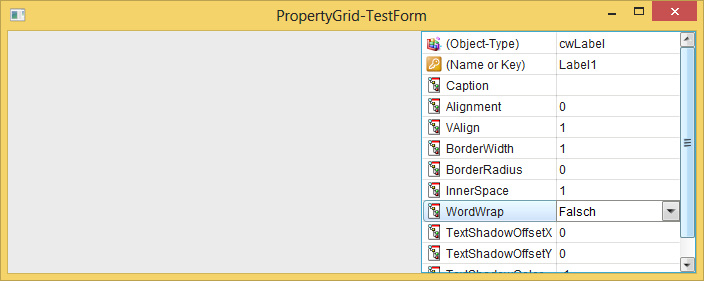
(since I also implement a cwPropertyGrid currently, which I need for a Form-Designer anyways).
Originally Posted by reexre
[W.RaiseBubblingEvent] I don't know what is this , I just copy from other places.
A normally raised VB-Event will only be *directly* received by the class which
hosts that Widget (withEvents) - whilst the Bubbling-events move through
each and every Parent (up to the hosting WidgetForm) and can be received
there too...(which allows for a whole lot of easy to implement scenarios -
e.g. something like "Control-Arrays" are not necessary anymore, since with
the Bubbling-Events the Parent will receive any Event from any Child-Widget
anyways).
Originally Posted by reexre
Widget Creation:
Code:
Private WithEvents cmdSave As vbWidgets.cwButton
Set cmdSave = Me.Widgets.Add(New vbWidgets.cwButton, "cmdSave", 325, 20, 65, 60)
where ME is another (parent)widgets (or fMain.Form )
is wrong ? (seems to work)
Any Object which supports a "Widgets" Property can host other ChildWidgets -
the approach is entirely hierarchic and even the simplest little cwLabel can
act as a Container for other Widgets.
Originally Posted by reexre
fx DLL
Not so difficult to Create a DLL with all the FXs in separate Classes.
Not so clear point to me is creating the ProgressBar Events that each class will fires.
Introduce an additional Parameter (of Type IProgressEvent) - this way
the caller of your "heavy Functions" can pass its own Object-Instance
into the called Method (per Me) - the only necessity is, that the caller
in question (e.g. your cfForm-Class, or a Container-WIdget), implements
IProgressEvent (with VBs Implements-Keyword)
IProgressEvent itself can be defined in a small (Public) VB-Class,
which contains only the Method-Signature - as e.g.:
Code:
Public Sub Progress(Byval Percentage As Double, Sender As Object)
End Sub
This callback-scheme is quite a lot faster than normal VB-Events.
Originally Posted by reexre
I'm going to make all the effects in a single DLL.
- I never made a distributable (without Installer) project that contains my own DLLs
So, Should I make it regFree ? , how to do it?
In the same way (over a small function, as seen in one of my last posts) which shows,
how you should instantiate Classes from vbWidgets.dll (per ClassName-String-Param).
Originally Posted by reexre
- this way all the algorithms will be usable by anyone in another project ... (not so good)
This is solvable with ease, since any Plugin-Dll (also those from other authors),
will need (besides the Algo-Classes) a central "Main-Class" (e.g. named cMain),
which will provide (also over a "normed Interface") methods like:
Code:
Public Function GetAvailableAlgorithmClassNames() As Collection
End Function

'and for those who want to make the usage dependent on a Password or Key,
'there's the cCrypt-Class which allows e.g. for CRAM-MD5 or CRAM-SHA1
'challenge-response Authentication, and the result of that could be stored
'in a Dll-Global *.bas-Module-variable, which on Procedure-Entry of all the
'FX-Functions would be visible - and would allow an "early exit" (doing nothing,
'in case there was no successful authentication)
So that's elegantly solvable over such a cMain-Class, which you will need anyways
(e.g. when a routine is parsing the "Plugins-Directory" for available Dlls, the
cMain-class could be easily instantiated regfree - and calling its Method:
GetAvailableAlgorithmClassNames would then allow you a Listing for each
of the found Dlls (what they have to offer).
Originally Posted by reexre
cwGRID
Don't bother - it's "in the works" already (80% already done).
Here's a ScreenShot of what I've currently accomplished:
Olaf
Last edited by Schmidt; Apr 22nd, 2015 at 09:23 PM.
-
Apr 27th, 2015, 02:59 AM
#44
 Re: Program Testers Re: Program Testers
UPDATE
I could not get out from Dlls-hell
Tried this, but did not work
Code:
Public Function NewWidget(ClassName As String) As Object
  If App.Logmode Then 'we run compiled
     Set NewWidget = New_c.RegFree.GetInstanceEx(App.Path & "\vbRC5BaseDlls\vbWidgets.dll", ClassName)
  Else 'we run in the IDE, so we create the instance from the registered version
     Set NewWidget = CreateObject("vbWidgets." & ClassName)
  End If
End FUnction
Now it's used:
in cFmain
Code:
Public PANELMain As cwPanelMain
Private Sub Class_Initialize()
    Set Form = Cairo.WidgetForms.Create(vbSizable, "PhotoModularFX " & APP.Major & "." & APP.Minor & "." & APP.Revision, , 900, 700)
    Set PANELMain = Form.Widgets.Add(New cwPanelMain, "PanelMain", Form.ScaleWidth - 400, 0, 400, 300)
End Sub
in cwPanelMain:
Code:
Private WithEvents cFile1 As vbWidgets.cwFileList
Private Sub Class_Initialize()
    Set W = Cairo.WidgetBase
    Set cFile1 = W.Widgets.Add(New cwFileList, "File1", 180, 20, 140, 240)
End Sub
So I created a little Exe to Run as Administrator for the registration of vbWidgets.dll based on this code.
No Dll problem for vbRichClient and my own dll PhotoFX.dll
Code:
Public WithEvents fxMIX2 As PhotoFX.MIX2
Private Sub Class_Initialize()
Set fxMIX2 = GetInstanceFromBinFolder("PhotoFX", "Mix2", "BIN")
UPDATE on 1st Post
Update 0.2.132 (28-Apr-2015)
Last edited by reexre; Apr 28th, 2015 at 04:05 AM.
-
Apr 27th, 2015, 09:09 AM
#45
Addicted Member

Re: Program Testers
How does this example is done using cwGrid?
Can provide the sample project file to learn?

-
Apr 28th, 2015, 07:42 PM
#46
Re: Program Testers
Originally Posted by smileyoufu
How does this example is done using cwGrid?
Can provide the sample project file to learn?
This is not done *using* the cwGrid, but instead the *approach* (how cwGrid itself was implemented)
is used in cwPropertyGrid as well ("visually inheriting" from cwVList).
I will post an appropriate example either end of this week - maybe mid next week, but not much later,
in the CodeBank.
Olaf
-
May 1st, 2015, 03:03 PM
#47
-
May 1st, 2015, 05:54 PM
#48
Re: Program Testers
Originally Posted by reexre
0.2.149
Finally , after hard work here there is the Full Functional Version.  Now it's possible to tweak parameters values
 (Disabled in previous vbRichClient-GUI version)
Go to #1 post of this thread to download
Nice so far.
Maybe a hint again for your currently needed Installer/Uninstaller (which I think is only
used for the vbWidgets.dll).
As already written further above - to create new Widgets you will simply have to
Paste the following small Function into a *.bas-Module (e.g. into the same one, which contains Sub Main)
Code:
Public Function NewWidget(ClassName As String) As Object
  If App.Logmode Then 'we run compiled
     Set NewWidget = New_c.RegFree.GetInstanceEx(App.Path & "\vbRC5BaseDlls\vbWidgets.dll", ClassName)
  Else 'we run in the IDE, so we create the instance from the registered version
     Set NewWidget = CreateObject("vbWidgets." & ClassName)
  End If
End Function
Now, with that routine in place, you should do a global project-search for the string:
'New cw' (without the apostrophes)
This should stop on all positions, where you create any Widget-Instances...
Now you will only have to decide, if the "marked" WidgetCreation line in your current search-
result specifies a Widget from vbWIdgets.dll (as e.g. cwVList) - or if one of your own
(Project-Private defined cwMyWidget-Classes) was found.
In case of a Widget from vbWidgets.dll, you can then use:
e.g. instead of:
Code:
Form.Widgets.Add New cwVList, ..., ...
The new regfree Creation-Routine from your *.bas Module this way:
Code:
Form.Widgets.Add NewWidget("cwVList"), ..., ...
This shouldn't take more than 2 Minutes or so.
The little NewWidget-Function Auto-Detects already, whether you run your Project within the IDE -
and in this case it uses the recently compiled (or registered) version of vbWidgets.dll -
or in case you run compiled - it will "draw the Widget-Instance" regfree from the vbWidgets.dll
which was placed in your \vbRC5BaseDlls\-Folder (sitting there beside vbRichClient5.dll).
Just take care (in case you edit stuff on vbWidgets.dll and recompile yourself), that this recently
compiled or registered version of vbWidgets.dll is placed also in the \vbRC5BaseDlls\-Folder,
before you test it in Binary-Format, or "zip it for deployment". That latter one is a requirement,
because the IDE will "link in the interfaces from the Widget-Classes" always from the recently
registered (or compiled) Version of vbWidgets in your System - so when you later run your
Executable-Binary - those "linked in interfaces" have to match with the ones it finds in the
regfree loaded version of vbWidgets.dll, it finds in your \vbRC5BaseDlls\-Folder.
That's because the vbWidgets.dll Project is still in development - and although many of its
Widgets are already "interface-stable enough", there's still some Widget-Classes where some
changes or enhancments are made - and thus this Dll-Project is (other than the vbRichClient5-Dll)
not yet switched into "Binary-Compatibility Mode" (it still is at "Project-Compatibility"), which
allows for easier creation of Project-Groups for Debugging.
HTH
Olaf
-
May 3rd, 2015, 01:34 AM
#49
Addicted Member
Re: Program Testers
Thank you very much.
Look forward to your demo release schedule
-
May 3rd, 2015, 12:15 PM
#50
Re: Program Testers
Thank you very much Olaf, I'll take into account your Suggestion later.
I have a simple question:
I populate a cwDropDownList where items are not inserted in alphabetical order.
1)-I want that they appear in the list in alphabetical order
2)-and I want that when an item is selected, the returned position(index) is not the Alphabetical order one,
but the one corrisponding to Insertion order.
(don't know if I was clear)
EG
Insertion
HDR (item 0)
DoG (item 1)
ABS (item 2)
Appear:
ABS
DoG
HDR
and
when I select HDR I want to be returned 0
when I select ABS I want to be returned 2
To populate the cwDropDownList I do this way: (maybe there's a better way)
Code:
    Set cmbFxSelector = W.Widgets.Add(New cwDropDownList, "cmbFxSelector", 5, 250, 90, 25)
    Set COL = New_c.Collection(False, TextCompare, True)
    For I = 0 To UBound(ActionString)
        COL.Add I, ActionString(I)
    Next
    cmbFxSelector.SetDataSource COL, "cmbData"
-
May 3rd, 2015, 01:10 PM
#51
Re: Program Testers
Originally Posted by reexre
I populate a cwDropDownList where items are not inserted in alphabetical order.
1)-I want that they appear in the list in alphabetical order
2)-and I want that when an item is selected, the returned position(index) is not the Alphabetical order one,
but the one corrisponding to Insertion order.
(don't know if I was clear)
That's entirely clear (and a quite common scenario).
The cwDropDownlist implements the Widget-DataSource-Methods
(which work in conjunction with the cDataSource-Class-Type).
cDataSource in turn can be "handed-over" either a cCollection or a cRecordset.
You discovered that already on your own.
What now remains is, that you make use of the cDataSource-Class's Sort-Property.
Code into a *normal* VB-TestForm (but ensure Project-References to vbRichClient5 and vbWidgets):
Code:
Option Explicit

Private WithEvents pnlTest As cWidgetForm
Private WithEvents cmbFx As cwDropDownList

Private Sub Form_Load()
  Set pnlTest = Cairo.WidgetForms.CreateChild(hWnd)
  Set cmbFx = pnlTest.Widgets.Add(New cwDropDownList, "cmbFx", 10, 10, 200, 25)

  Dim Col As cCollection
  Set Col = New_c.Collection(False)
      Col.Add 0, "HDR"
      Col.Add 1, "DoG"
      Col.Add 2, "ABS"

  cmbFx.SetDataSource Col, "cmbData"
  cmbFx.DataSource.Sort = "Key Asc" 'or "Key Desc" if you want descending Order
  cmbFx_Click
End Sub

Private Sub Form_Resize()
  ScaleMode = vbPixels
  pnlTest.Move 0, 0, ScaleWidth, ScaleHeight
End Sub

Private Sub cmbFx_Click()
  If cmbFx.ListIndex < 0 Then Exit Sub
  Caption = cmbFx.DataSource("Value") & " " & cmbFx.DataSource("Key")
  'or alternatively: Caption = cmbFx.DataSource(1) & " " & cmbFx.DataSource(0)
End Sub
Here is a ScreenShot:
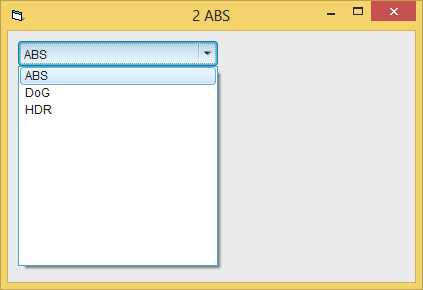
The Sort-behaviour can (other than with VB-Combo or ListControls)
be switched at Runtime (either to Asc, Desc or an empty String in the Sort-Prop will ensure "no sorting" again)
Olaf
Last edited by Schmidt; May 3rd, 2015 at 01:13 PM.
-
May 4th, 2015, 06:37 PM
#52
-
May 13th, 2015, 05:11 PM
#53
Re: Program Testers
Update 0.2.399 (14-may-2015)
[New Node Effects:]
* FDoG (DoG along Flow)
* PYRAMID - Pyramid Based Level-Details enhancement/reduction
* Noise (Fractional Brownian Motion)
[Other:]
-Fine Blur Radius (cents)
-Improved DoG
-
May 20th, 2015, 06:33 PM
#54
Re: Program Testers
Update 0.2.471 (20-may-2015)
[New Node Effects:]
* Pyramid RGB (Pyramid Based Level-Details enhancement/reduction)
* Noise Deformer (Spatial deform by Noise)
* Kuwahara filter (Single channel)
[Other:]
- Click blackboard for screenshot (Saved on Screenshots Folder)
- a little faster FakeHDR
- Fixed a bug on "DoG Flow"
- Changed RGB wheights of HCY-colorspace (CCIR 601)
- Managed cairoFSO bug (Sometimes ShowOpenDialog function returns values like: "AAAA.jpg|01.jpg")
-
May 20th, 2015, 11:00 PM
#55
Re: Program Testers
Originally Posted by reexre
- Managed cairoFSO bug (Sometimes ShowOpenDialog function returns values like: "AAAA.jpg|01.jpg")
Are you sure, that you didn't activate the MultiFile-Select-Flag (OFN_ALLOWMULTISELECT)?
Because that's the return-format which gets delivered, in case you made a selection of multiple Files.
Olaf
-
May 21st, 2015, 05:06 AM
#56
Re: Program Testers
I applied no flags, so they are the default ones. And I tried to multiselect, but it is not allowed by default (seems to me)
It happens when I load picture A and then I load picture B. If I load first picture B, no error. And it happens only with certain filesname/picture.
The filename after separator | is not any one of current folder. it's a number name such as 01.jpg , 1.jpg
I thought it could be due to Dropbox , I think it "appends" extra data on files.
When copying files from "Dropbox folders" to external USB storage , a system warning tells that "some extra data" will not be copyed.

NTFS to FAT
Last edited by reexre; May 21st, 2015 at 05:43 AM.
-
May 21st, 2015, 07:24 AM
#57
Re: Program Testers
Originally Posted by reexre
I applied no flags, so they are the default ones. And I tried to multiselect, but it is not allowed by default (seems to me)
The Flag which enables the selection of multiple Files is: OFN_ALLOWMULTISELECT ...
And I tried with the new RC5-version 5.0.31 to handle the ZeroChar-Detection
on returned results a bit differently now - maybe that makes a difference on XP
(it didn't make any on Win7 and Win8 which I tested here).
Would be nice if you could check this new version out on your XP-machine
(without your applied Workarounds) - and give me a shout in case the behaviour
is still there...
Olaf
-
May 21st, 2015, 07:50 AM
#58
Re: Program Testers
Hi reexre. Looks like you are making lots of continued improvements to the program. Nice work!
I notice some of the effects you've added are identical to those in PhotoDemon. If you developed them independently, that's great, but if you based them off PhotoDemon code, please make sure to follow the project's BSD license (which is clearly marked at the top of all source files).
In particular, notice of copyright and a copy of the license must be included with your project. This is especially important if you used PhotoDemon code for filters like Kuwahara, which an outside developer contributed to PD. I need to make sure the copyrights of my third-party contributors are respected.
-
May 23rd, 2015, 03:08 PM
#59
Re: Program Testers
Tanner
Kwuahara is done by myself.
Code:
Public Sub ACTION41_Kuwahara(caller As Long, v1() As Double, _
                             oV1() As Double)
    Dim X      As Long
    Dim y      As Long
    Dim Xt     As Long
    Dim Yt     As Long
    Dim vv     As Double

    Dim R      As Long
    Dim pXF    As Long
    Dim pXT    As Long
    Dim pYF    As Long
    Dim pYT    As Long
    Dim pX     As Long
    Dim pY     As Long

    Dim i      As Long

    Dim MinSD  As Double
    Dim CT     As Double
    Dim J      As Long


    R = MAINparams(caller).p(1)
    If R < 1 Then R = 1

    Xt = UBound(v1, 1)
    Yt = UBound(v1, 2)
    ReDim oV1(Xt, Yt)


    Dim Mean(1 To 4) As Double
    Dim stdDEV(1 To 4) As Double
    Dim SUM    As Double
    Dim SUM2   As Double

    SETprogress 0

    For X = 0 To Xt

        For y = 0 To Yt

            For i = 1 To 4

                If i = 1 Or i = 3 Then
                    pXF = X - R
                    If pXF < 0 Then pXF = 0
                    pXT = X
                Else
                    pXF = X
                    pXT = X + R
                    If pXT > Xt Then pXT = Xt
                End If


                If i <= 2 Then
                    pYF = y - R
                    If pYF < 0 Then pYF = 0
                    pYT = y
                Else
                    pYF = y
                    pYT = y + R
                    If pYT > Yt Then pYT = Yt
                End If

                SUM = 0
                SUM2 = 0
                CT = 0
                For pX = pXF To pXT
                    For pY = pYF To pYT
                        vv = v1(pX, pY) * 50
                        SUM = SUM + vv
                        SUM2 = SUM2 + vv * vv
                        CT = CT + 1
                    Next
                Next

                stdDEV(i) = (CT * SUM2 - SUM * SUM) / CT

                Mean(i) = (SUM / CT) * 0.02
            Next i

            MinSD = 1E+88
            For i = 1 To 4
                If stdDEV(i) < MinSD Then MinSD = stdDEV(i): J = i
            Next

            oV1(X, y) = Mean(J)

        Next
        If X Mod 240 = 0 Then SETprogress 100 * X / Xt
    Next

    SETprogress 100

End Sub
I took from your code only nature filters and temperature do they nave some kind of copyright ?
In case give me instructions I will do ASAP
Last edited by reexre; May 23rd, 2015 at 03:31 PM.
-
May 23rd, 2015, 03:28 PM
#60
Re: Program Testers
Originally Posted by Schmidt
Would be nice if you could check this new version out on your XP-machine
(without your applied Workarounds) - and give me a shout in case the behaviour
is still there...
Now not on XP... I'll be on XP in fiew days . In case something will not work with New Version of vbRC I'll tell you (thanks)
-
May 25th, 2015, 07:34 AM
#61
Re: Program Testers
Originally Posted by reexre
Tanner
Kwuahara is done by myself.
Nice work! I haven't seen many Kuwahara implementations "in the wild", let alone in VB, so it is great to see other people working with it.
I took from your code only nature filters and temperature do they nave some kind of copyright ?
In case give me instructions I will do ASAP
Yes, like all open-source projects, PhotoDemon's code is under copyright. Open-sourcing a program doesn't remove copyrights; it just means people are allowed to use your copyrighted work with minimal restrictions. But the work still belongs to the original creator.
The BSD license PhotoDemon uses is probably the easiest and simplest open-source license. Somewhere in your project (About screen, README, Help PDF, whatever), you just need to make sure the user sees which parts of the program are BSD-licensed, and what the terms of the license are. So something like this is fine:
Code:
Temperature and Nature Filters originally from the PhotoDemon project, www.photodemon.org.

PhotoDemon is Copyright (c) 2015 by Tanner Helland and Contributors. All rights reserved.

Redistribution and use in source and binary forms, with or without modification, are permitted provided that the following conditions are met:

    Redistributions of source code must retain the above copyright notice, this list of conditions and the following disclaimer.
    Redistributions in binary form must reproduce the above copyright notice, this list of conditions and the following disclaimer in the documentation and/or other materials provided with the distribution.

THIS SOFTWARE IS PROVIDED BY THE COPYRIGHT HOLDERS AND CONTRIBUTORS "AS IS" AND ANY EXPRESS OR IMPLIED WARRANTIES, INCLUDING, BUT NOT LIMITED TO, THE IMPLIED WARRANTIES OF MERCHANTABILITY AND FITNESS FOR A PARTICULAR PURPOSE ARE DISCLAIMED. IN NO EVENT SHALL THE COPYRIGHT HOLDER OR CONTRIBUTORS BE LIABLE FOR ANY DIRECT, INDIRECT, INCIDENTAL, SPECIAL, EXEMPLARY, OR CONSEQUENTIAL DAMAGES (INCLUDING, BUT NOT LIMITED TO, PROCUREMENT OF SUBSTITUTE GOODS OR SERVICES; LOSS OF USE, DATA, OR PROFITS; OR BUSINESS INTERRUPTION) HOWEVER CAUSED AND ON ANY THEORY OF LIABILITY, WHETHER IN CONTRACT, STRICT LIABILITY, OR TORT (INCLUDING NEGLIGENCE OR OTHERWISE) ARISING IN ANY WAY OUT OF THE USE OF THIS SOFTWARE, EVEN IF ADVISED OF THE POSSIBILITY OF SUCH DAMAGE.
Since your project is closed source, the second point is what matters: "Redistributions in binary form must reproduce the above copyright notice, this list of conditions and the following disclaimer in the documentation and/or other materials provided with the distribution."
Open-source licenses are important for a lot of reasons. They are the only way users know to report bugs or suggestions upstream, so I can fix and improve the original code (and all the other projects who use the code can benefit).
They are also important for letting others know that they are free to use those filters and features in their own projects.
Anyway, keep up the good work. The new vbWidgets interface is a really nice improvement.
-
May 26th, 2015, 05:06 AM
#62
Re: Program Testers
I changed my mind, those "effects" have been removed from my project.
At the moment I prefer this project to be the result of my own work.
I prefer not to include in readme, PDF-help ecc... links/names of contributors except Olaf Schmidt or someone who will have or had an heavy impact on the quality of the project.
Last edited by reexre; May 27th, 2015 at 06:35 PM.
-
May 27th, 2015, 06:36 PM
#63
Re: Program Testers
Update 0.2.555 (28-may-2015)
[Nodes]
* New RGBtweaker Node
* New Standard POW Node
* New Local HE (Histogram Equalization)
* New Anisotropic Kwuahara (Still developing)
* New "Pencil Drawing" (Still developing)
[Other:]
-Improved Kwuahara
-Bug Fix on MUL (base 0.5)
-
Jun 14th, 2015, 04:51 PM
#64
Re: Program Testers
Update 0.2.770 (14-jun-2015)
[Nodes]
* Changed Stipple
* Little change on LCDDisplay (color)
[Other:]
- New check-switch parameters look
- Added Mix2 (Blend) modes: Dissolve,Screen(Dodge),Overlay,Hard Light,Soft Light (Cairo),Color Dodge and Color Burn
- Little bug fix on Histogram Eq. and Local HE.
Update 0.2.669 (5-jun-2015)
[Nodes]
*New Median
*New LCD-Display
*New Glow (Still developing)
*New Exp-Log functions
*New STIPPLE
[Other:]
-Distortion: Now Rotate without Skew
-Finished Local HE
and a lot of
new Flow-Projects
-
Jun 14th, 2015, 04:53 PM
#65
Re: Program Testers
Coming soon sepia and scratches ... for old film style
Last edited by reexre; Jun 14th, 2015 at 04:56 PM.
-
Jul 19th, 2015, 09:54 AM
#66
Re: Program Testers
Update 0.2.865 (20-jul-2015)
[Nodes]
* NEW Input2 (Secondary Input Picture)
* NEW Tilt-Shift - Fake Miniature
* NEW Curve: Simple 5Points Spline Curve transformation (X at every 1/4)
* Improved Size2X, SizeHalf (15851)
[Other]
- Improved Histogram Eq. and Local HE.
Update 0.2.822 (21-jun-2015)
[Nodes]
* NEW Sepia (from RGB)
* NEW Sepia (from GrayScale)
* NEW Scratches
* NEW 8-Colors
[Other]
- A lot faster "Local HE"
- Improved Noise-node
- Improved Histogram Eq. and Local HE.
-
Jul 22nd, 2015, 01:25 PM
#67
Re: Program Testers
@ OLAF
hi
please could you give me some information about the Antialiasing CairoContest options?
CC.AntiAlias = CAIRO_ANTIALIAS_DEFAULT
CC.AntiAlias = CAIRO_ANTIALIAS_GRAY
CC.AntiAlias = CAIRO_ANTIALIAS_SUBPIXEL
I need the faster except CAIRO_ANTIALIAS_NONE
http://cairographics.org/documentati...ants-antialias
By the way, in widgets I suppose this Setting is inheritable. Am I right ?
To me CAIRO_ANTIALIAS_DEFAULT seems slower
thanks
Last edited by reexre; Jul 22nd, 2015 at 01:38 PM.
-
Jul 31st, 2015, 06:56 AM
#68
Re: Program Testers
Update 0.2.919 (31-jul-2015)
[Nodes]
* NEW RGB>HSL - Colorspace conversion according to Quasimondo.com
* NEW HSL>RGB - "
* NEW SNN (1D) - Symmeric Nearest Neighour Smoothing filter
* NEW SNN (RGB) - "
* NEW FLIP - Verical Horizontal & Both Filp
* NEW FLIP3 - 3channels Verical Horizontal & Both Filp
* NEW RAMP - Gradient Ramp:Left-Right,Right-Left,Up-Down,Down-Up,Cone Up,Cone Down,Pyramid Up,Pyramid Down,Auger Right, Auger Left
- Little larger Font of "Fx Selector"
Update 0.2.890 (23-jul-2015)
[Nodes]
* NEW HistoMATCH - Histogram Match (Histogram Match - Change Input1 to match Input2 Histogram)
* NEW Pixelate - Pixelate
- FLOW: changed Sobel weights
- Bug fixed when trying to add a new connection (MouseUp-Event)
- Faster Interface
-
Aug 24th, 2015, 04:10 AM
#69
Re: Program Testers
Update 0.2.998 (19-Aug-2015)
[Nodes]
* NEW Formula - Editable Custom Formula
* NEW Sketch - Sketch style abstraction
* NEW HMD - Height Map Deformer. Deform by Input Height Map
* NEW WATERMAP - Simulation of raindrops (Experimental)
* NEW GLASS - Glass Tiles (1 ch and 3 ch)
* NEW QUANTIZE - Uniform, Histogram Based
[Other]
- New RAMP/gradient settings: Repeat, and RepeatMode
- Invert - Added ByPass option.
- CheckBox - Fixed bug: Sometimes (old projects) unchangeable..
- Size2x,SizeHalf: Customizable Kernels : (15851)(0.2-5-9.6-5-0.2) (1.5-5-7-5-1.5)
-
Sep 16th, 2015, 04:27 PM
#70
Re: Program Testers
Update 0.2.1103 (15-Sep-2015)
[Nodes]
- NEW BCS : Brightness Constrast Saturation (RGB)
- NEW DCT BP: Discrete Cosine Transform Band Pass (experimental)
- NEW DCT fx: Discrete Cosine Transform FX (experimental)
- NEW Formula2 : 2 Variables custom Formula
- NEW Formula3 : 3 Variables custom Formula
- NEW Offset : Horizontal-Verical Offset
- NEW ADD : New node Add, so no need to use [Value]&[Mix2]
[Other]
- Cntrl-C, Cntrl-V to copy and paste Parameters value from one node to another (of the same type)
- PAINT: Added Smoothed parameter
- RAMP: Added shape option
- FLOW: New Smooth algorithm
- GUI: Little Smaller Nodes
- Bug Fix FLIP3 : Both
- Bug Fix RAMP
Last edited by reexre; Sep 16th, 2015 at 04:34 PM.
-
Sep 27th, 2015, 08:28 AM
#71
Re: Program Testers
@OLAF and who may help
I'm trying to implement an "Halftone" FX.
To refresh , each Fx Sub is called this way:
Code:
Public Sub ACTION86_HALFtone(caller As Long, Input() As Double, _
                             Output() As Double)
where input and output are 2D array of doubles whom ranges from 0-1.
and, in this case, there's 1 input and 1 output.
I need to paint/draw on a Surface so:
Code:
    Dim Srf As cCairoSurface
    Dim CC As cCairoContext

    xT = UBound(Input, 1)
    yT = UBound(Input, 2)

    Set Srf = New_c.Cairo.CreateSurface(xT + 1, yT + 1, ImageSurface)
    Set CC = Srf.CreateContext
At this point I need to Draw on the CC surface and get the Bytes ( to put them on "Output" ), so:
Code:
    Dim Bytes() As Byte

    CC.Paint vbBlack
    CC.SetLineWidth 0.1, False
    CC.SetSourceColor vbWhite, 1
Inside some cycles the CC.surface is drawn, for example this way:
Code:
For X ...
For Y ...
            CC.Ellipse X, Y, v, v
            CC.Fill
Next
Next
Now, to put the result to the "Output" I do it this way:
Code:
    CC.Surface.BindToArray Bytes

    For X = 0 To xT

        For Y = 0 To yT
            Output(X, Y) = 1 - CDbl(Bytes(X * 4+1 , Y))/255
        Next
    Next
    CC.Surface.ReleaseArray Bytes

    Set CC = Nothing
    Set Srf = Nothing
If I remember the Bytes should be of ABGR that's way X is * 4
The Problem is that some times it works, but sometimes only some left Part of the surface is returned. (contained in Bytes)
these ways:
Right:

Wrong:

I really can't figure out what's wrong! :-/
Hope for your help!
-
Sep 27th, 2015, 08:37 AM
#72
Re: Program Testers
Hi
Just resolved !!!
It was caused by CC.Ellipse X, Y, v, v
when V=0.
To Resolve just a V >=0 is needed. (even 0.001)
-
Oct 10th, 2015, 12:00 PM
#73
Re: Program Testers
Update 0.2.1162 (10-Oct-2015)
[Nodes]
- NEW Gamma , Gamma3 : Forward Inverse Gamma Correction
- NEW Halftone : Oriented Round/Squared dots Half toning
- NEW Rgb>XYZ Colorspace conversion
- NEW XYZ>RGB Colorspace conversion
- HSL : New Standard RGB<->HSL colorspace conversion
[Other]
- Smaller Watermark font-text
- Icons on Fx-Selector / Constructor
-
Oct 27th, 2015, 06:23 AM
#74
Re: Program Testers
Update 0.2.1222 (27-Oct-2015)
[Nodes]
- NEW VRLCN: Variable Radius Local Contrast Normalization (WIP)
- NEW RGB>YUV , RGB>YCbCr Colorspace conversion
- NEW YUV>RGB , YCbCr>RGB "
- GLOW: Improved (test it with Glow.txt Projects)
- FLOW: Step back to previous Smooth-algorithm [Before 0.2.1103 15-Sep-2015]
[Other]
- CheckBox, ComboList: Apparence
- Main BackGround: Dark Colored
- About 300Kbytes lighter EXE
-
Nov 9th, 2015, 11:56 AM
#75
Re: Program Testers
Update 0.2.1265 (09-NOV-2015)
[Nodes]
- NEW Diffusion: Iso/Anisotropic Diffusion.
[Other]
- Bilateral: Removed "orientation based"
- Improved Internal Memory Management
until update of Softpedia use Direct link
Last edited by reexre; Dec 28th, 2015 at 07:19 PM.
-
Dec 8th, 2015, 09:43 AM
#76
-
Dec 28th, 2015, 07:17 PM
#77
-
Jan 7th, 2016, 03:13 PM
#78
Re: Program Testers
Download here
until Softpedia.com update
Update 0.2.1467 (07-Jan-2016)
[Nodes]
- NEW BilaOA: Oriented-Aligned Bilateral Filter
- NEW ZMBLUR: Zoom Blur 1 channel
- NEW ZMBLUR3: Zoom Blur 3 channels
- NEW MTBLUR: Motion Blur 1 channel
- NEW MTBLUR3: Motion Blur 3 channels
- MIX2 (Blend): 6 New mix modes:
Linear Dodge
Linear Burn
Linear Light
Pin Light
Abs Diff.
Exclusion
+ Swap Inputs option
- VRLCN: Improvements and more parameters
- FLOW: New 5x5 Dx,Dy Kernels
[Other]
- Bugs fix: StdDEV,StdDEV3
Update 0.2.1400 (21-Dec-2015)
[Nodes]
- NEW ThrBLUR: - Threshold BLUR
- NEW ThrBLUR3: - Threshold BLUR 3 channels
- GLOW: New Algorithm
[Other]
- BugFix: RGB>HSL Bug fix (Quasimondo)
- BugFix: AutoArrange
- Basic Error-Handler implementation
-
Jan 7th, 2016, 03:16 PM
#79
Re: Program Testers
List of Node-Fx available:
LIST of NODE/FXs - V 0.2.1469
Code:
001 (059) - 8COLORS	 3 3  params:2
		Retro 8Colors style
			Parameters :
				Dot Size -	From 1 to 32
				Gap Size -	From 0 to 16


002 (085) - ADD	 1 1  params:1
		Add a constant Value to Input
			Parameters :
				value -	From -100 to 100


003 (021) - ADV. LC	 1 1  params:3
		Advanced Local Contrast (Still developing.. )
			Parameters :
				Radius -	Integer
				Amount -	From 1 to 800
				Limit -	From 10 to 50


004 (081) - BCS	 3 3  params:3
		Brightness Contrast Saturation  (RGB)
			Parameters :
				Brightness -	From -100 to 100
				Contrast -	From -100 to 100
				Saturation -	From -100 to 200


005 (096) - BILAOA	 1 1  params:6
		Orientation-Aligned Bilateral Filter  (WIP)
			Parameters :
				Radius -	Integer
				Resistence -	From 1 to 250
				Extra Iterations       -	Integer
				Tang Radius % -	From 0 to 100
				Recompute Flow -	ON/OFF
				Interpolate -	ON/OFF


006 (013) - BILATERAL	 1 1  params:4
		Edge preserving smoothing filter. (In this software it take into account Gradient Angle too.)
			Parameters :
				Radius -	Integer
				Range -	From 0 to 200
				Extra Iterations       -	Integer
				Fast Mode -	ON/OFF


007 (020) - BLUR	 1 1  params:2
		Gaussian Blur
			Parameters :
				Radius -	Integer
				R Cents -	From 0 to 99


008 (034) - BORDERS	 1 1  params:3
		Darker Borders /  Vignetting
			Parameters :
				Inner -	From 1 to 100
				Outer -	From 1 to 100
				Choose type  :
					Black
					White


009 (022) - CARTMEV2	 1 1  params:3
		perform an Effect similar to LC (but separable) taken from an old program
			Parameters :
				Amount -	From 0 to 500
				Extra Iterations       -	Integer
				+ Bilateral  -	ON/OFF


010 (052) - CLAMP01	 1 1  params:0
		Clamp channel values between 0 and 1 - The Outputs of some modules can be outside of 0-1 range


011 (062) - CURVE	 1 1  params:5
		Simple 5Points Spline Curve transformation (X at every 1/4)
			Parameters :
				000 -	From 0 to 100
				025 -	From 0 to 100
				050 -	From 0 to 100
				075 -	From 0 to 100
				100 -	From 0 to 100


012 (024) - DCT BP	 1 1  params:6
		EXPERIMENTAL Discrete Cosine Transform Band Pass
			Parameters :
				Pass Bad or Cut Band:
					Pass
					Cut
				Peak -	From 0 to 1000
				Low -	From -1 to 1000
				High -	From 0 to 1001
				Base Mode

KEEP BASE = No overall luminance change
NO BASE = Positve and negative output values
HALF = Halftone Overall luminance value
:
					Keep Base
					No Base
					0.5 (Half)
				Amplify -	From 100 to 400


013 (082) - DCT FX	 1 1  params:1
		EXPERIMENTAL Discrete Cosine Transform FX
			Parameters :
				Angle -	From -25 to 25


014 (109) - DEVELOP	 1 1  params:0
		Developing new Node Work In Progress! do not use!


015 (097) - DIFFUSION	 1 1  params:4
		Iso/Anisotropic Diffusion
			Parameters :
				Radius     -	Integer
				Resistence -	From 1 to 500
				Extra Iterations       -	Integer
				Anisotropy Mode     :
					None
					Simplified
					Advanced(E)
					Advanced(B)


016 (035) - DISTORTION	 1 1  params:5
		DISTORT, a set of spatial Deform algorithm (Rotate Too)
			Parameters :
				Deform Mode  (# = N of Parameters used)   :
					Pinch
					FishEye
					Sin Radial
					Radius to Power #
					Sin Cartesian
					Sqr Cartesian
					ArcSin Cartesian
					(1-ar^2) Cart.#
					LENS #
					Log # #
					3rd Ord.Poly.###
					WideAngle #
					Rotate #
					Swirl1 #
					Swirl2 #
				Param1 -	From 1 to 200
				Param2 -	From 1 to 100
				Param3 -	From 1 to 100
				Antialiased -	ON/OFF


017 (030) - DITHERING	 1 1  params:1
		Error Diffusion Dithering
			Parameters :
				Dither Algorithm:
					floyd-steinberg
					jarvis
					stucki
					atkinson
					sierra
					RobertoMior


018 (028) - DOG	 1 1  params:5
		Difference of Gaussians  (R2=R*2)
			Parameters :
				Radius -	Integer
				Out Multiply -	From 100 to 5000
				Output Part:
					Both (+0.5)
					Positive
					Negative
					ABS
				R Cents -	From 0 to 99
				Invert output -	ON/OFF


019 (036) - DOGBYF	 1 1  params:6
		Flow based DoG (Difference of Gaussians)
			Parameters :
				Radius -	Integer
				R Cents -	From 0 to 99
				Length Mul -	From 100 to 999
				Out Multiply -	From 100 to 5000
				Output Part:
					Both (+0.5)
					Positive
					Negative
					ABS
				Invert output -	ON/OFF


020 (046) - EXP-LOG	 1 1  params:1
		Perform Exp() or Log() function. More precisely: EXP=(Exp(x)-1)/(Exp(1)-1), LOG=Log(x*(Exp(1)-1)+1)
			Parameters :
				Exp or Log   :
					Exp
					Log


021 (092) - EXPER1	 1 3  params:0
		Just a Experimental function


022 (027) - EXPERIMENT	 1 1  params:0
		NOT ready!


023 (023) - FAKEHDR	 1 1  params:6
		HDR tone Mapping
			Parameters :
				Radius -	Integer
				Range -	From 0 to 200
				Extra Iterations       -	Integer
				Amount -	From 0 to 800
				Flatness -	From 0 to 800
				Radius Mode
-Fixed: All params are used
-Incremental: Radius and Iterations are Unused  :
					Fixed Radius
					Incremental Radius


024 (098) - FAKEHDR2	 1 1  params:3
		Fake HDR2 Experimental
			Parameters :
				Max Radius -	From 1 to 100
				Strength -	From 1 to 100
				BASE -	From 1 to 100


025 (106) - FFTTEST	 1 1  params:1
		EXPERIMENTAL fft Not Ready!
			Parameters :
				Rad 2^...    -	From 1 to 8


026 (069) - FLIP	 1 1  params:1
		Horizontal Vertical & Both Flip/Mirror
			Parameters :
				Flip Mode    :
					Horizontal
					Vertical
					Both


027 (070) - FLIP3	 3 3  params:1
		Horizontal Vertical & Both Flip/Mirror
			Parameters :
				Flip Mode    :
					Horizontal
					Vertical
					Both


028 (009) - FLOW	 1 2  params:2
		Calc Gradient Flow - Outputs 1-Magnitude, 2-Angle (Range 0-1)
			Parameters :
				Smooth -	Integer
				Smooth Mode    :
					Standard
					Advanced


029 (076) - FORMULA	 1 1  params:1
		Formula - Custom Formula ... Powerfull but slow
			Parameters :
				Formula


030 (079) - FORMULA2	 2 1  params:1
		Formula2 - 2 inputs Custom Formula ... Powerfull but slow
			Parameters :
				Formula


031 (080) - FORMULA3	 3 1  params:1
		Formula3 - 3 inputs Custom Formula ... Powerfull but slow
			Parameters :
				Formula


032 (088) - GAMMA	 1 1  params:1
		Forward / Inverse Gamma Correction
			Parameters :
				Correction     :
					Forward
					Inverse


033 (089) - GAMMA3	 3 3  params:1
		RGB Forward / Inverse Gamma Correction
			Parameters :
				Correction     :
					Forward
					Inverse


034 (072) - GLASS	 1 1  params:3
		Glass effect (1 Channel)
			Parameters :
				Size   -	Integer
				Style     :
					Square
					Diamond
					Diamond2
					Diamond3
				Antialiased  -	ON/OFF


035 (073) - GLASS3	 3 3  params:3
		Glass effect (3 Channels)
			Parameters :
				Size   -	Integer
				Style     :
					Square
					Diamond
					Diamond2
					Diamond3
				Antialiased  -	ON/OFF


036 (048) - GLOW	 1 1  params:3
		Glow Effect
			Parameters :
				Radius   -	Integer
				Amount -	From 25 to 200
				Threshold -	From 50 to 100


037 (086) - HALFTONE	 1 1  params:3
		Halftone
			Parameters :
				Size -	From 30 to 150
				Dot Mode     :
					Black Rounded
					White Rounded
					Black Box
					Box 2
					Leaf
				Angle -	From 0 to 180


038 (053) - HATCHING	 1 1  params:3
		Hatching-Stipple  - Still developing
			Parameters :
				Size  -	From 40 to 100
				Iterations  -	From 1 to 200
				Previous State -	ON/OFF


039 (026) - HCY>RGB	 3 3  params:0
		Convert HCY (hue-saturation-Luma) colorspace to RGB Color space


040 (015) - HISTO EQU.	 1 1  params:2
		HISTOGRAM Equalization. (CLHE - Contrast Limited Histogram Equalization)
			Parameters :
				Max Slope -	From 0 to 100
				Extremes Cut -	From 0 to 200


041 (064) - HISTOMATCH	 2 1  params:0
		Histogram Matching - Change Input1 to match Input2 Histogram


042 (074) - HMAPD	 4 3  params:2
		Height Map Deform. Deform by Heightmap (4th input as heightmap)
			Parameters :
				Amount   -	Integer
				Antialiased  -	ON/OFF


043 (066) - HSL>RGB	 3 3  params:1
		Convert HSL (Hue, Saturation, Luminance) to RGB colorspace with quasimondo.com or Standard Algorithm
			Parameters :
				Algorithm    :
					Quasimondo
					Standard


044 (000) - INPUT	 0 3  params:0
		The Loaded Picture


045 (060) - INPUT 2	 0 3  params:1
		Secondary support Input picture
			Parameters :
				File Path


046 (008) - INVERT	 1 1  params:1
		Invert a channel: Output = 1 - Input
			Parameters :
				ByPass -	ON/OFF


047 (016) - K-MEAN 1D	 1 1  params:1
		Set N of Clusters
			Parameters :
				Clusters -	Integer


048 (017) - K-MEAN 2D	 2 2  params:1
		Set N of Clusters
			Parameters :
				Clusters -	Integer


049 (018) - K-MEAN 3D	 3 3  params:1
		Set N of Clusters
			Parameters :
				Clusters -	Integer


050 (041) - KUWAHARA	 1 1  params:2
		Non-linear smoothing filter that preserves edges
			Parameters :
				Radius -	Integer
				Radius2 (Must be smaller than R1)     -	Integer


051 (043) - KUWANISO	 1 1  params:2
		Anisotropic Kuwahara  (Still Developing)
			Parameters :
				Radius -	Integer
				Extra Iterations       -	Integer


052 (012) - L CONTRAST	 1 1  params:1
		Set Radius
			Parameters :
				Radius -	Integer


053 (003) - LAB>RGB	 3 3  params:0
		Convert Lab colorspace to RGB Color space


054 (049) - LCD DISP.	 3 3  params:2
		LCD Display Effect
			Parameters :
				'Dot' Size  (Default=8)    -	Integer
				Threshold -	From 0 to 100


055 (099) - LCN	 1 1  params:2
		Local Contrast Normalization
			Parameters :
				Radius -	From 1 to 100
				'Source' vs Half -	From 0 to 100


056 (045) - LOCAL HE	 1 1  params:6
		Local Histogram Equalization   (CLAHE - Contrast Limited Adaptive Histogram Equalization)
			Parameters :
				Radius   -	Integer
				Step   (Must be <= Radius)     -	Integer
				Max Slope -	From 0 to 100
				Blend % -	From 0 to 100
				Circle Shaped -	ON/OFF
				Extremes Cut -	From 0 to 200


057 (047) - MEDIAN	 1 1  params:4
		Median Filter
			Parameters :
				Radius   -	Integer
				Step   (Must be <= Radius)     -	Integer
				Circle Shaped -	ON/OFF
				Extra Iterations       -	Integer
-
Jan 7th, 2016, 03:17 PM
#80
Re: Program Testers
part 2:
Code:
058 (006) - MIX 2	 2 1  params:3
		Mix 2 channels
			Parameters :
				Mix Mode:
					wheighted SUM
					MUL
					ADD
					SUB
					Lighten
					Darken
					Dissolve
					Screen(Dodge)
					Overlay
					Hard Light
					Soft Light (Cairo)
					Color Dodge
					Color Burn
					Linear Dodge
					Linear Burn
					Linear Light
					Pin Light
					Abs Diff.
					Exclusion
				<<A    -    B>> -	From 0 to 100
				Swap Inputs -	ON/OFF


059 (007) - MIX 3	 3 1  params:4
		Mix 3 channels
			Parameters :
				Mix Mode:
					wheighted SUM
					SUM
				A -	From 1 to 100
				B -	From 1 to 100
				C -	From 1 to 100


060 (112) - MTBLUR	 1 1  params:2
		Motion BLUR (1 channel)
			Parameters :
				Angle -	From -90 to 90
				Blur Amout -	From 5 to 100


061 (113) - MTBLUR3	 3 3  params:2
		Motion BLUR 3 channels
			Parameters :
				Angle -	From -90 to 90
				Blur Amout -	From 5 to 100


062 (005) - MUL	 1 1  params:2
		Multiply by a Value (base 0.5 means an X shift by -0.5)
			Parameters :
				(1) 50 = 0.5   (2) 100 = 1   (3) 200 = 2  -	Integer
				Based 0.5 -	ON/OFF


063 (038) - NOISE	 0 1  params:1
		NOISE - Fractional Brownian Motion
			Parameters :
				Frequency -	From 5 to 3000


064 (039) - NOISER	 1 1  params:4
		Spatial Deform by Noise (Fractional Brownian Motion)
			Parameters :
				X Frequency -	From 5 to 100
				Y Frequency -	From 5 to 100
				X Amount -	From 0 to 100
				Y Amount -	From 0 to 100


065 (083) - OFFSET	 1 1  params:3
		Horizontal veritcal Offset
			Parameters :
				Offset Mode     :
					Percentage
					Pixels
				Horizontal -	From -50 to 50
				Vertical -	From -50 to 50


066 (084) - OFFSET3	 3 3  params:3
		Horizontal vertical Offset
			Parameters :
				Offset Mode     :
					Percentage
					Pixels
				Horizontal -	From -50 to 50
				Vertical -	From -50 to 50


067 (001) - OUTPUT	 3 0  params:0
		The Output (saved Picture)


068 (011) - PAINT	 3 1  params:3
		Set first 2  Input as Outputs of FLOW, and 3th as Source to 'paint' to
			Parameters :
				Brush Size -	Integer
				Extra Iterations       -	Integer
				Smoothed -	From 0 to 100


069 (044) - PENCIL	 1 1  params:0
		Pencil Drawing    (Still Developing)


070 (063) - PIXELATE	 3 3  params:2
		Pixelate
			Parameters :
				Dot Size -	From 1 to 32
				Gap Size -	From 0 to 16


071 (031) - POW	 1 1  params:1
		Standard Power
			Parameters :
				(1) 50 = 0.5   (2) 100 = 1   (3) 200 = 2  -	Integer


072 (004) - POWEX	 1 1  params:2
		Hi values decrease contrast, Low Values Increase Contrast - Special Kind of Power function (see PDF)
			Parameters :
				Based on AVG -	ON/OFF
				(1) 50 = 0.5   (2) 100 = 1   (3) 200 = 2  -	Integer


073 (037) - PYRAMID D	 1 1  params:5
		Pyramid Based Level-Details Enhancement / Reduction
			Parameters :
				Fine -	From 1 to 1000
				Medium -	From 1 to 1000
				Coarse -	From 1 to 1000
				BASE -	From 0 to 100
				Threshold -	From 0 to 100


074 (040) - PYRAMRGB	 3 3  params:5
		Pyramid Based Level-Details Enhancement / Reduction
			Parameters :
				Fine -	From 1 to 1000
				Medium -	From 1 to 1000
				Coarse -	From 1 to 1000
				BASE -	From 0 to 100
				Threshold -	From 0 to 100


075 (078) - QUANTIZE	 1 1  params:2
		Simple quantization
			Parameters :
				N of segments (min=2)    -	Integer
				Method     :
					Uniform
					Histogram Based


076 (071) - RAMP	 0 1  params:4
		Gradient Ramp
			Parameters :
				Ranp Mode    :
					Left-Right
					Right-Left
					Up-Down
					Down-Up
					Cone Up
					Cone Down
					Pyramid Up
					Pyramid Down
					Auger Right
					 Auger Left
				Repeat       -	Integer
				Repeat Mode    :
					Standard
					Countinous
				Shape Mode    :
					Linear
					Sin90
					Sin180
					Cubic
					Sqr
					Pow2


077 (025) - RGB>HCY	 3 3  params:0
		Convert RGB colorspace to HCY (hue-saturation-Luma) Color space - For simplicity consider it as  HSL


078 (065) - RGB>HSL	 3 3  params:1
		Convert RGB colorspace to HSL (Hue, Saturation, Luminance) with quasimondo.com or Standard Algorithm
			Parameters :
				Algorithm    :
					Quasimondo
					Standard


079 (002) - RGB>LAB	 3 3  params:0
		Convert RGB colorspace to Lab Color space


080 (090) - RGB>XYZ	 3 3  params:0
		Convert RGB colorspace to XYZ


081 (094) - RGB>YUV	 3 3  params:1
		Convert RGB colorspace to Y'UV  Y(Luma)UV or YCbCr
			Parameters :
				ColorSpace     :
					YCbCr
					YUV


082 (050) - RGBSCREEN	 3 3  params:0
		RGB screen effect NOT Ready|


083 (029) - RGBTWEAK	 3 3  params:3
		Add/Sub RGB Values  (it can be used even with other channels types)
			Parameters :
				RED / Ch1 -	From -100 to 100
				GREEN / Ch2 -	From -100 to 100
				BLUE / Ch3 -	From -100 to 100


084 (058) - SCRATCHES	 0 1  params:2
		Scratches. to Simulate old film
			Parameters :
				Amount -	From 1 to 100
				Density -	From 50 to 1000


085 (056) - SEPIA	 3 3  params:0
		Sepia - Vintage


086 (057) - SEPIA GRAY	 1 3  params:1
		Sepia - Vintage Starting from GrayScale Image
			Parameters :
				Blend Mode    :
					Standard
					Overlay
					Screen


087 (042) - SHIFT	 1 1  params:1
		'Shift' left/right - Very useful to HUE shift
			Parameters :
				Value -	From -500 to 500


088 (014) - SHOCK	 1 1  params:2
		Shock filter ...  Still Developing
			Parameters :
				Length -	Integer
				Extra Iterations       -	Integer


089 (054) - SIZE2X	 1 1  params:1
		Resize Width and Height by 2X
			Parameters :
				Kernel Mode    :
					Light Blur (1)
					No Blur (0.2)
					More Blur (1.5)


090 (055) - SIZEHALF	 1 1  params:1
		Resize Width and Height by Half
			Parameters :
				Kernel Mode    :
					Light Blur (1)
					No Blur (0.2)
					More Blur (1.5)


091 (077) - SKETCH	 3 3  params:5
		Sketch style Abstraction on RGB channels
			Parameters :
				Edge Darkness -	From -100 to 100
				bkgrnd Darkness -	From -100 to 100
				BackGround -	ON/OFF
				bkgrnd Angle -	From 0 to 100
				BackGround Density     :
					2-Normal
					3-Sparse1
					4-Sparse2
					1-Dense


092 (033) - SMOOTH S	 1 1  params:2
		Smooth Step (Threshold)
			Parameters :
				To -	From 0 to 1000
				From -	From 0 to 1000


093 (067) - SNN	 1 1  params:2
		Symmetric Nearest Neighbour (Edge Preserving Smoothing)
			Parameters :
				Radius   -	Integer
				Extra Iterations       -	Integer


094 (068) - SNN3	 3 3  params:2
		RGB Symmetric Nearest Neighbour (Edge Preserving Smoothing)
			Parameters :
				Radius   -	Integer
				Extra Iterations       -	Integer


095 (102) - STDDEV	 1 1  params:3
		Standard Deviation
			Parameters :
				Radius    -	From 1 to 15
				Mul Factor    -	From 10 to 100
				Output Invert -	ON/OFF


096 (103) - STDDEV3	 3 3  params:3
		Standard Deviation 3
			Parameters :
				Radius    -	From 1 to 15
				Mul Factor    -	From 10 to 100
				Output Invert -	ON/OFF


097 (051) - STIPPLE	 1 1  params:3
		Stipple effect  still Developing!
			Parameters :
				Dot Size  -	From 40 to 100
				Iterations  -	From 1 to 200
				Previous State -	ON/OFF


098 (107) - THRBLUR	 1 1  params:5
		Threshold Gaussian Blur
			Parameters :
				Radius -	Integer
				R Cents -	From 0 to 99
				Threshold -	From 5 to 999
				Extra Iterations       -	Integer
				Fast Mode -	ON/OFF


099 (108) - THRBLUR3	 3 3  params:5
		Threshold Gaussian Blur, 3 channels
			Parameters :
				Radius -	Integer
				R Cents -	From 0 to 99
				Threshold -	From 5 to 999
				Extra Iterations       -	Integer
				Fast Mode -	ON/OFF


100 (061) - TILT SHIFT	 3 3  params:4
		Fake Miniature - ToyEffect - Good with 'Panoramas' Pictures
			Parameters :
				Horizon -	From 1 to 99
				Amount -	From 1 to 200
				Saturation -	From 0 to 100
				Fast Mode -	ON/OFF


101 (087) - TRACE	 1 1  params:0
		Trace WIP - Still developing!


102 (019) - USM	 1 1  params:3
		Unsharp Mask
			Parameters :
				Radius -	Integer
				Amount -	From 1 to 300
				Threshold -	From 0 to 100


103 (010) - VALUE	 0 1  params:1
		A constant Value (No input, only 1 output)
			Parameters :
				Constant Value ( 50=0.5   100 = 1   200 = 2 )  -	Integer


104 (032) - VRCLAHE 	 1 1  params:2
		Variable Radius CLAHE (a sort of Fake HDR) - Very slow, since for each pixel is done a Contrast Limited Histogram Equalization using its pixel neighbour window
			Parameters :
				Max Contrast -	From 20 to 100
				Max Radius -	From 20 to 80


105 (093) - VRLCN	 1 1  params:5
		Variable Radius Local Contrast Normalization (WIP)
			Parameters :
				Max Radius -	From 1 to 100
				'Source' vs Half -	From 0 to 100
				Norm Strength -	From 50 to 200
				SQR: Attenuate low constrast regions
Linear: Standard, enphasize low constrast regions         :
					Square Root
					Linear
				Radius Sense -	From -100 to 100


106 (114) - VRLCN2	 1 1  params:5
		DO NOT USE ! WIP - Variable Radius Local Contrast Normalization
			Parameters :
				Max Radius -	From 1 to 100
				'Source' vs Half -	From 0 to 100
				Norm Strength -	From 50 to 200
				SQR: Attenuate low constrast regions
Linear: Standard, enphasize low constrast regions         :
					Square Root
					Linear
				Radius Sense -	From -100 to 100


107 (075) - WATERMAP	 0 1  params:4
		Water Height Map , to use as input for HMD (HeightMap Deformer)
			Parameters :
				Water Mode    :
					Pool
				Pre Iterations   -	Integer
				Rain Density    -	Integer
				Speed (For Video Frames)    -	Integer


108 (100) - XMESH	 1 1  params:1
		Creates a Mesh by selecting the most relevant points and drawing them according to proximity
			Parameters :
				N Points -	From 1000 to 10000


109 (104) - XPEN	 3 3  params:0
		Experimental Pencil


110 (105) - XPOIS	 3 3  params:3
		Experimental Pois Art
			Parameters :
				Max Radius    -	From 20 to 99
				BackGround:
					Gray
					White
					Black
				Gaps Fill:
					Low x1
					Medium x2
					High x4
					SuperHigh x8


111 (101) - XSTROKES	 3 3  params:5
		Experimental Art-Draw Strokes
			Parameters :
				Density    -	From 20 to 1000
				'Curvature' -	From 20 to 500
				Pressure (Alpha) -	From 10 to 100
				BackGround:
					White
					Black
				PenSize -	From 1 to 100


112 (091) - XYZ>RGB	 3 3  params:0
		Convert XYZ colorspace to RGB


113 (095) - YUV>RGB	 3 3  params:1
		Convert Y'UV or YCbCr Colorspace to RGB
			Parameters :
				ColorSpace     :
					YCbCr
					YUV


114 (110) - ZMBLUR	 1 1  params:4
		ZOOM BLUR (1 channel)
			Parameters :
				Center X -	From -200 to 200
				Center Y -	From -200 to 200
				Blur Amout -	From 1 to 100
				Progressive = Blur More far from center      :
					Constant
					Progressive
					Prog. Squared
					Prog. Squared 2


115 (111) - ZMBLUR3	 3 3  params:4
		ZOOM BLUR 3 channels
			Parameters :
				Center X -	From -200 to 200
				Center Y -	From -200 to 200
				Blur Amout -	From 1 to 100
				Progressive = Blur More far from center      :
					Constant
					Progressive
					Prog. Squared
					Prog. Squared 2
 Posting Permissions
- You may not post new threads
- You may not post replies
- You may not post attachments
- You may not edit your posts
-
Forum Rules
|
Click Here to Expand Forum to Full Width
|



 Reply With Quote