|

-
Dec 3rd, 2015, 01:35 PM
#1
Thread Starter
PowerPoster


 [RESOLVED] Check if DTPicker1 time value is incresed by 5 minutes from the current time [RESOLVED] Check if DTPicker1 time value is incresed by 5 minutes from the current time
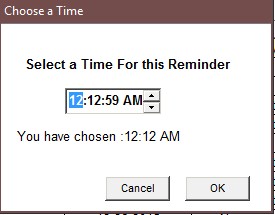
I have a time picker that sets reminders it opens to the current time. I want to make sure the time is increased by 5 minutes when the OK button is clicked
if DTPicker1.value < 5 minutes from now
msgbox "you must increase the time by at least 5 minutes"
Exit Sub
end if
it opens like this:
DTPicker1.CustomFormat = "hh:mm tt"
DTPicker1.Format = dtpCustom
DTPicker1.Value = Now
DTPicker1.Format = 2
it shows the time as AM/PM
have tried this
If DateDiff("n", Time, DTPicker1.Value) < 5 Then
MsgBox "You must increase the time by at least 5 minutes."
End If
and this:
Dim date1 As Date
date1 = CDate(DTPicker1.Value)
If DateDiff("n", date1, Now) < 5 Then
MsgBox ("You must increase the time by at least 5 minutes.")
End If
they do not work
how can this be written ?
Waiting for a full featured smart phone with out marrying a provider
Go Android 
Go raiders 
-
Dec 3rd, 2015, 02:45 PM
#2
Re: Check if DTPicker1 time value is incresed by 5 minutes from the current time
Shouldn't it be "m" instead of "n" in DateDiff, to compare minutes?
-
Dec 3rd, 2015, 03:01 PM
#3
Re: Check if DTPicker1 time value is incresed by 5 minutes from the current time
Looks like you have the values reversed from what you want. If you want 5 minutes or more from now then you want
Code:
If DateDiff("n",Now,date1) < 5 Then
The way you have it would give you 5 minutes or more before now rather than after
If you want 5 minutes or more in either direction then you can use the ABS() function
Code:
If ABS(DateDiff("n",Now,date1)) < 5 Then
-
Dec 3rd, 2015, 03:08 PM
#4
Thread Starter
PowerPoster
Re: Check if DTPicker1 time value is incresed by 5 minutes from the current time
 Originally Posted by fafalone

Shouldn't it be "m" instead of "n" in DateDiff, to compare minutes?
Thanks , but need to check total time, if hours are increased then it wold be more than 5 minutes
Waiting for a full featured smart phone with out marrying a provider
Go Android
Go raiders
-
Dec 3rd, 2015, 06:35 PM
#5
Re: Check if DTPicker1 time value is incresed by 5 minutes from the current time
Originally Posted by fafalone
Shouldn't it be "m" instead of "n" in DateDiff, to compare minutes?
m is for Months n is used for minutes
a bit confusing but.....
anyway the values being in the wrong position is likely why he was having a problem
-
Dec 3rd, 2015, 09:23 PM
#6
Thread Starter
PowerPoster
Re: Check if DTPicker1 time value is incresed by 5 minutes from the current time
Originally Posted by DataMiser
m is for Months n is used for minutes
a bit confusing but.....
anyway the values being in the wrong position is likely why he was having a problem
This works
If DateDiff("n", Time, TimeValue(DTPicker1.Value)) < 5 Then
MsgBox "You must increase the time by at least 5 minutes."
End If
Waiting for a full featured smart phone with out marrying a provider
Go Android
Go raiders
-
Dec 3rd, 2015, 11:18 PM
#7
Re: [RESOLVED] Check if DTPicker1 time value is incresed by 5 minutes from the curren
That is pretty much what i showed in my post, you have dropped the date part but the key is the order in which they appear in the statement
Code:
If DateDiff("n", now, DTPicker1.Value) < 5 Then
Would give you the same result
 Posting Permissions
- You may not post new threads
- You may not post replies
- You may not post attachments
- You may not edit your posts
-
Forum Rules
|
Click Here to Expand Forum to Full Width
|



 Reply With Quote