|

-
Dec 2nd, 2015, 03:43 PM
#1
Thread Starter
New Member

Mouse click and send keystroke to an external application form
Dear all,
I write a program mimic human moving cursor and typing to help me auto fill Solidworks properties. My program supposed to use pixel by pixel comparison to locate the fill , then send many "DEL" to delete the chars which are currently context , and then send keystroke of the "Name of the properties" that I want.
I tested my program by using a notepad. My program worked good.
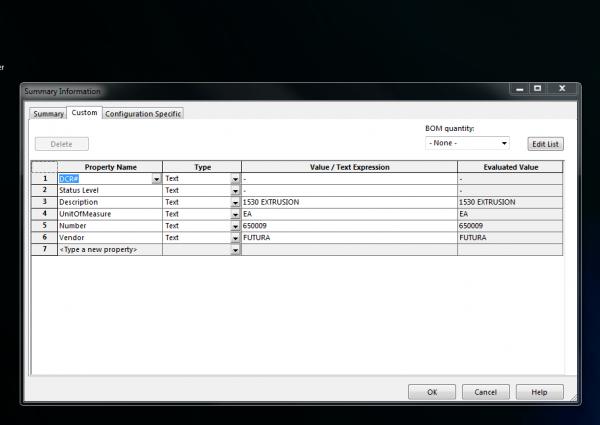
However, Solidworks properties window did not accept keystroke change (Please see the attached image of the properties window). My program found the DCR# position and clicked on it, but no key can be send to the properties field. Any suggestion?
Note: I have tried to put "sleep" between each step. I have also tried to do multiple left click action to the fill, but the multiple left click does not work too. Again, my program works if the clicking and typing on Notepad.
Tags for this Thread
 Posting Permissions
- You may not post new threads
- You may not post replies
- You may not post attachments
- You may not edit your posts
-
Forum Rules
|
Click Here to Expand Forum to Full Width
|



 Reply With Quote