|

-
Nov 10th, 2015, 11:54 AM
#1
Thread Starter
New Member

Change property of a column in datagrid
Hello,
I am wondering if anybody can have a look to my issue and help me with the code.
here is the situation:
I have a simple but old access '97 DB (mdb) who is feed by an third party program.
I want to collect some data out of it present it in a datagrid and export this into a excel file.
This all works fine, except for one thing:
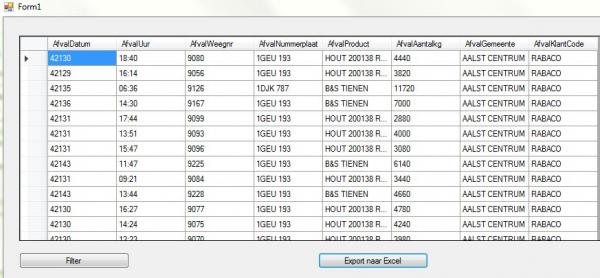
One of the column (0) has dates in it (ex.25/11/2015) but the mdb is missconfigured and gives a 5digit (numbers) in stead of.
now may question is how can change the gridview so that it adapts the colomn and transforms the 5digits into a real date.
Here is my code:
Code:
Imports System.Data.OleDb
Public Class Form1
    Private Sub Form1_Load(sender As Object, e As EventArgs) Handles MyBase.Load

    End Sub

    Dim connString As String = "Provider=Microsoft.Jet.OLEDB.4.0;Data Source=C:\Progwsrb\Data\WSRB.mdb"

    Dim MyConn As OleDbConnection
    Dim da As OleDbDataAdapter
    Dim ds As DataSet
    Dim tables As DataTableCollection
    Dim source1 As New BindingSource

    Private Sub btn_filter_Click(ByVal sender As System.Object, ByVal e As System.EventArgs) Handles btn_filter.Click
        MyConn = New OleDbConnection
        MyConn.ConnectionString = connString
        ds = New DataSet
        tables = ds.Tables
        da = New OleDbDataAdapter("Select AfvalDatum, AfvalUur, AfvalWeegnr, AfvalNummerplaat, AfvalProduct, AfvalAantalkg, AfvalGemeente, AfvalKlantCode from [TblAfval] WHERE AfvalKlantCode = 'RABACO' ORDER BY AfvalKlantCode", MyConn) 'Change items to your database name

        da.Fill(ds, "TblAfval") 'Change items to your database name
        Dim view As New DataView(tables(0))
        source1.DataSource = view
        DataGridView1.DataSource = view

        DataGridView1.Columns(0).ValueType = GetType(Date)

    End Sub
Here are 2 screenshot out of excel to make it more clear:
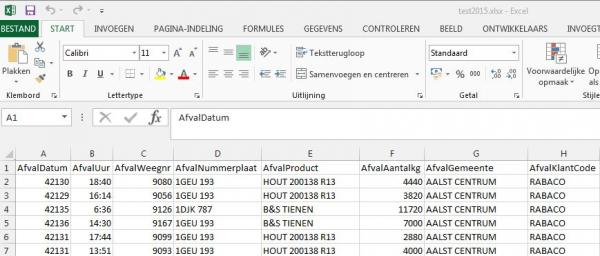
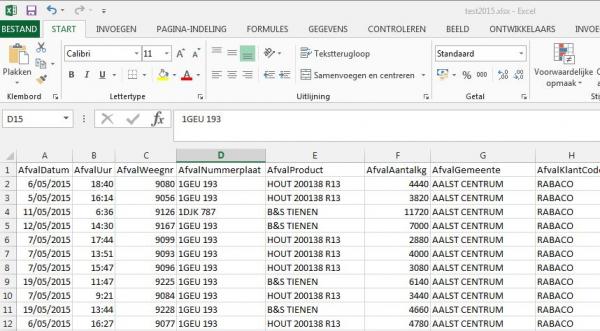
Here is a screenshot of the actual gridview
Many thanks for all your help
Kindly regards,
Koen
-
Nov 10th, 2015, 12:29 PM
#2
Re: Change property of a column in datagrid
Koen,
The integer value you are seeing for the date is referred to as an Office Automation Date.
To see this, give this code a try:
Code:
Dim d As DateTime = DateTime.FromOADate(42130)
and you will see that you can retrieve the proper date value.
Please answer this question before I recommend a solution for the DGV:
Do you need to edit the date values in the DGV?
Edit:
Never mind answering that question. On reflection it will be best to just transform the OADate to a .Net Date when read from Access.
Last edited by TnTinMN; Nov 10th, 2015 at 12:42 PM.
-
Nov 10th, 2015, 01:52 PM
#3
Re: Change property of a column in datagrid
Something like this should work. It uses a datareader to first set the DataTable schema. It then changes the type of the column with the AODate to DateTime and finally fills the table converting the AODate to a DateTime as it reads each record.
Code:
Dim dt As New DataTable
Using conn As New OleDb.OleDbConnection("Your Connection String"), _
      cmd As New OleDb.OleDbCommand("Your Selection Query", conn)
   conn.Open()
   Using rdr As IDataReader = cmd.ExecuteReader(CommandBehavior.CloseConnection)
      For Each r As DataRow In rdr.GetSchemaTable().Rows
         Dim col As New DataColumn()
         With col
            .ColumnName = CStr(r("ColumnName"))
            .DataType = CType(r("DataType"), Type)
            .ReadOnly = CBool(r("IsReadOnly"))
            .AutoIncrement = CBool(r("IsAutoIncrement"))
            .Unique = CBool(r("IsUnique"))
         End With
         dt.Columns.Add(col)
      Next

      Dim dateFieldIndex As Int32 = rdr.GetOrdinal("AfvalDatum")
      dt.Columns(dateFieldIndex).DataType = GetType(DateTime)
      Dim values(0 To rdr.FieldCount - 1) As Object
      Do While rdr.Read()
         rdr.GetValues(values)
          values(dateFieldIndex) = DateTime.FromOADate(CDbl(values(dateFieldIndex)))

         dt.Rows.Add(values)
      Loop
   End Using ' rdr
   conn.Close()
End Using
Tags for this Thread
 Posting Permissions
- You may not post new threads
- You may not post replies
- You may not post attachments
- You may not edit your posts
-
Forum Rules
|
Click Here to Expand Forum to Full Width
|



 Reply With Quote
