|

-
Oct 14th, 2015, 03:01 PM
#801
Re: CommonControls (Replacement of the MS common controls)
Last edited by Krool; Oct 14th, 2015 at 03:09 PM.
-
Oct 14th, 2015, 03:47 PM
#802
Fanatic Member

Re: CommonControls (Replacement of the MS common controls)
Thanks for the insights.
Code:
With MF.xbar(0)

    .Buttons.Clear
    .MinButtonWidth = 0
    .MaxButtonWidth = 0

    .TextAlignment = TbrTextAlignBottom

    .ImageList = MF.imgl_BMP

    Set Btn = .Buttons.Add(, "ppa", "First button", 0, 1)
    Btn.ToolTipText = "14"
    Set Btn = .Buttons.Add(, "ppb", , 0, 2)
    Btn.ToolTipText = "15"

    .TextAlignment = TbrTextAlignRight

End With
This way it works as well.
One can live with this 'solution'.
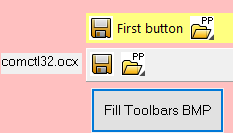
a value of 30 means 2 pixel
In some cases, yes.
When it comes to different DPI settings, then not.
The toolbar behaves strange on different DPI settings.
A snippet of the effort to handle this can be seen in xbar_MouseDown.
But that is another story.
2 issues left:
1) Transparency handling
2) Adressing the imagelist's picture by key as string.
To 1)
Quite important.
If this is not possible I can stop other effort.
To the latter:
No problem, I could write a small function to manage this.
It would be more elegant to do it in the usercontrol's code.
Up to now I didn't find the right place where such a thing can be done.
Could you give me an advice where to place such code?
Good night Krool.
-
Oct 14th, 2015, 04:34 PM
#803
Fanatic Member
Re: CommonControls (Replacement of the MS common controls)
Unfortunately I have found that placeholder is not available for a button.
Enough for today.
-
Oct 14th, 2015, 06:46 PM
#804
Hyperactive Member
Re: CommonControls (Replacement of the MS common controls)
 Originally Posted by Karl77

The usage of BMP was a test only.
They don't have any transparency and the white is in the picture itself.
And no, I didn't set the mask color to white.
yes I know the white is in the picture itself, that's why you need to set the mask color to the same white color so the white will be used as the color that should be transparent, otherwise it will use the default color of the imagelist for the transparent color and it seems it ain't white..
-
Oct 14th, 2015, 11:46 PM
#805
Re: CommonControls (Replacement of the MS common controls)
Originally Posted by Karl77
Unfortunately I have found that placeholder is not available for a button.
Enough for today.
Use the 'Separator' with a CustomWidth value set. then its same as placeholder.
-
Oct 15th, 2015, 02:30 AM
#806
Fanatic Member
Re: CommonControls (Replacement of the MS common controls)
Originally Posted by SuperDre
yes I know the white is in the picture itself, that's why you need to set the mask color to the same white color so the white will be used as the color that should be transparent, otherwise it will use the default color of the imagelist for the transparent color and it seems it ain't white..
This is not what I would name transparency.
The maskcolor just replaces a certain color (white in our case) with nothing.
It gives the impression of transparency if you don't look close.
20 years AGO this was good enough.
Masking works ok for rectangular shapes, if you have round or angled shapes it just looks bad.
What we need today is real transparency, means respecting the alpha channel of the picture.
Comctl32.dll can handle the alpha channel.
Again, in this case the usage of BMP was meant as a test only.
Last edited by Karl77; Oct 15th, 2015 at 07:17 AM.
Reason: forgotten word
-
Oct 15th, 2015, 02:34 AM
#807
Fanatic Member
Re: CommonControls (Replacement of the MS common controls)
Originally Posted by Krool
Use the 'Separator' with a CustomWidth value set. then its same as placeholder.
Ah, good hint.
But with TbrButtonStyleSeparator we get also a visible separator.
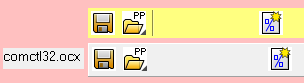
Regardless if the Divider property is set or not.
Not very wanted.
For compatibility reasons, you could introduce TbrButtonStylePlaceholder?
At best without the vertical line...
-
Oct 15th, 2015, 06:25 AM
#808
Re: CommonControls (Replacement of the MS common controls)
Originally Posted by Karl77
Ah, good hint.
But with TbrButtonStyleSeparator we get also a visible separator.
Regardless if the Divider property is set or not.
Not very wanted.
For compatibility reasons, you could introduce TbrButtonStylePlaceholder?
At best without the vertical line...
The Divider property is not for the buttons. Its for the control itself. (Displays a divider line at bottom)
-
Oct 15th, 2015, 07:16 AM
#809
Fanatic Member
Re: CommonControls (Replacement of the MS common controls)
Originally Posted by Krool
The Divider property is not for the buttons. Its for the control itself. (Displays a divider line at bottom)
Oh well, yes.
I could have seen that myself.
Anyway, besides that, we get this vertical line.
I'll try a bit more to see if this also happens when a separator with zero size produces it as well.
For the placeholder usage the vertical line is not dramatic, I want to move a control to this place anyway.
This covers the vertical line then.
-
Oct 22nd, 2015, 02:33 PM
#810
Re: CommonControls (Replacement of the MS common controls)
Originally Posted by Karl77
2 issues left:
1) Transparency handling
2) Adressing the imagelist's picture by key as string.
To 1)
Quite important.
If this is not possible I can stop other effort.
To the latter:
No problem, I could write a small function to manage this.
It would be more elegant to do it in the usercontrol's code.
Up to now I didn't find the right place where such a thing can be done.
1)
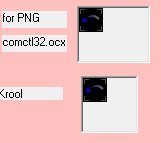
I did some test on the ImageLists.
Here is the result when returning the 'Picture' property of a ListImage.
Here is the result when returning the 'ExtractIcon' property of a ListImage.
And this looks exactly what is the result on the ToolBar...
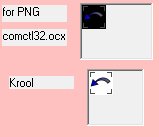
However, I did not figure out yet why the MS ToolBar is displaying the ListImage "transparent" and my Toolbar is displaying the background black from the MS ImageList and white from my ImageList..
2)
I thouht about this earlier. For TabStrip, ToolBar this could be done without any performance reduction. But for ListView this would result perfromance issues as the real image index is always provided in response to LVN_GETDISPINFO. And for the moment I am hesitating about this as this would cause a non-consistency.
Last edited by Krool; Oct 22nd, 2015 at 02:43 PM.
-
Oct 23rd, 2015, 01:57 AM
#811
Fanatic Member
Re: CommonControls (Replacement of the MS common controls)
Originally Posted by Krool
1)
Here is the result when returning the 'ExtractIcon' property of a ListImage.
And this looks exactly what is the result on the ToolBar...
No, it's not the same.
The transparency is replaced by white now, not black.
(The white icons in the former examples are BMPs, the color itself is white - not transparent.)
-
Oct 23rd, 2015, 07:44 AM
#812
Frenzied Member
Re: CommonControls (Replacement of the MS common controls)
I haven't yet follow the issue of toolbar. But I never had issue using maskcolor for my own-drawn toolbar (CreateWindowEx,"ToolbarWindow32") though it is not Krool's one.
Last edited by Jonney; Oct 23rd, 2015 at 07:48 AM.
-
Oct 23rd, 2015, 12:04 PM
#813
Lively Member
Re: CommonControls (Replacement of the MS common controls)
on a side note guys, how do you use the replacment common dialog box for saving / loading files
-
Oct 29th, 2015, 03:22 AM
#814
Fanatic Member
Re: CommonControls (Replacement of the MS common controls)
Regarding the transparency of buttons on toolbar, any news or insights?
-
Nov 8th, 2015, 08:27 AM
#815
Frenzied Member
Re: CommonControls (Replacement of the MS common controls)
Originally Posted by Karl77
Regarding the transparency of buttons on toolbar, any news or insights?
Probably this link helps you. "ImageList and the Safety Palette" written by dilettante.
-
Nov 8th, 2015, 10:01 AM
#816
Fanatic Member
Re: CommonControls (Replacement of the MS common controls)
Originally Posted by Jonney
Thanks, but I don't have problems handling the various image formats...
They just don't show as intended on the Krool toolbar.
While they do on the comctl32.dll toolbar via comctl32.ocx.
Doesn't matter, for now I gave up with the Krool toolbar.
-
Nov 9th, 2015, 05:20 AM
#817
Lively Member
Re: CommonControls (Replacement of the MS common controls)
Hi, Krool!!
1. Event "TabClick" for control TabStrip don't work if it is an array of controls.
Code:
Private Sub TabStrip1_TabClick(Index As Integer, ByVal TabItem As TbsTab)
   MsgBox Index
End Sub
2. Is it possible to add transparency to the tab row?
If you place one item to another, you can see the background of control
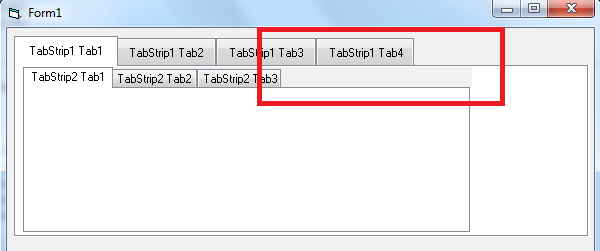
P.S. In addition can you add a property multiline to TabStrip.Tabs.Caption ?
Last edited by Romeo91; Nov 9th, 2015 at 05:38 AM.
-
Nov 9th, 2015, 05:47 PM
#818
Re: CommonControls (Replacement of the MS common controls)
Originally Posted by Romeo91
1. Event "TabClick" for control TabStrip don't work if it is an array of controls.
Code:
Private Sub TabStrip1_TabClick(Index As Integer, ByVal TabItem As TbsTab)
   MsgBox Index
End Sub
2. Is it possible to add transparency to the tab row?
If you place one item to another, you can see the background of control
P.S. In addition can you add a property multiline to TabStrip.Tabs.Caption ?
1. The Event is firing by me, even in an array of controls. Please let me have your project to resolve.
2. It's quite tricky to do it properly. And not straight forward. Because you need to intercept WM_PAINT, use WM_PRINTCLIENT to a memory DC, clip regions and fill background before. In XP it's different then on W7 (XP has rounded corners, W7 not). Thus I did not yet implement such a feature. Will change maybe in future.
Point P.S.: You can put 'vbLf' to a Tab caption by code. But in order to see the multiline text you may use 'TabWidthStyleFixed' and set TabFixedWidth/TabFixedHeight accordingly.
-
Nov 10th, 2015, 12:53 AM
#819
Lively Member
Re: CommonControls (Replacement of the MS common controls)
Originally Posted by Krool
1. The Event is firing by me, even in an array of controls. Please let me have your project to resolve.
This is a test project - Test_Tabstrip.zip
I have identified, the event caught only since the second tab.
Originally Posted by Krool
Point P.S.: You can put 'vbLf' to a Tab caption by code. But in order to see the multiline text you may use 'TabWidthStyleFixed' and set TabFixedWidth/TabFixedHeight accordingly.
Thank you, it works. Now it seems to me is not enough text orientation. Orientation is only at the bottom.
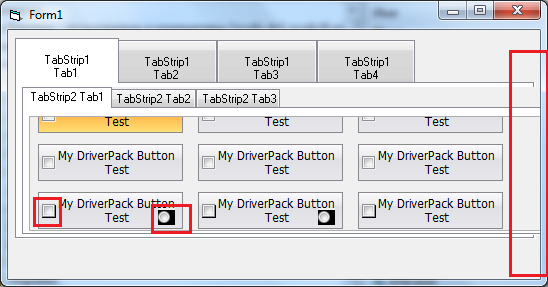
Please see also:
1. The behavior of the checkbox and option controls outside of the visible portion of the container.
2. Resizing Tabstrip when the form is resized.
I can not understand what went wrong, or other 3rd-party control or in your code. In this project, this behavior is present.
Last edited by Romeo91; Nov 10th, 2015 at 12:59 AM.
-
Nov 11th, 2015, 02:37 PM
#820
Re: CommonControls (Replacement of the MS common controls)
Originally Posted by Romeo91
I have identified, the event caught only since the second tab.
This is normal. TabClick event is firing in response to TCN_SELCHANGE. So whenever the selected tab changes the event is firing.
Originally Posted by Romeo91
1. The behavior of the checkbox and option controls outside of the visible portion of the container.
This is because you have set the Transparent property of my CheckBoxW and OptionButtonW to True and at the time the controls are not visible, thus causing a black background. What you need to do is calling '.Refresh' on those controls in case you scroll.
Originally Posted by Romeo91
2. Resizing Tabstrip when the form is resized.
This is due to an error in your code. Look below image.

-
Nov 12th, 2015, 02:38 AM
#821
Lively Member
Re: CommonControls (Replacement of the MS common controls)
Originally Posted by Krool
This is normal. TabClick event is firing in response to TCN_SELCHANGE. So whenever the selected tab changes the event is firing.
I do not understand why this is normal?
It turns out I can never catch the events TabClick for the TabStrip2(0) on all tabs which is "located on the first tab TabStrip1" ?
This code for first tab of TabStrip2(0) on TabStrip1 not work always
Case TCN_SELCHANGE
Index = SendMessage(TabStripHandle, TCM_GETCURSEL, 0, ByVal 0&)
If Index >= 0 Then RaiseEvent TabClick( Me.Tabs(Index + 1))
instead of returning an object, just goes to the function ComCtl Subclass Proc - and don't returns the object in
Public Property Get Item(ByVal Index As Variant) As TbsTab
Set Item = PropTab(Index)
End Property
Originally Posted by Krool
What you need to do is calling '.Refresh' on those controls in case you scroll.
Thanks. I try it.
Originally Posted by Krool
This is due to an error in your code. Look below image.
Thanks
Last edited by Romeo91; Nov 12th, 2015 at 03:23 AM.
-
Nov 12th, 2015, 04:59 PM
#822
Re: CommonControls (Replacement of the MS common controls)
Originally Posted by Romeo91
I do not understand why this is normal?
It turns out I can never catch the events TabClick for the TabStrip2(0) on all tabs which is "located on the first tab TabStrip1" ?
This code for first tab of TabStrip2(0) on TabStrip1 not work always
instead of returning an object, just goes to the function ComCtl Subclass Proc - and don't returns the object in
I do now understand what you mean. Yes, the reason is indeed due to control array.
The cause for this is a little bit complicated.
I will bring an update very soon to fix this issue on all controls.
Last edited by Krool; Nov 12th, 2015 at 05:22 PM.
-
Nov 13th, 2015, 05:39 PM
#823
Re: CommonControls (Replacement of the MS common controls)
Important update released.
Control arrays are now working properly on all controls.
-
Nov 14th, 2015, 01:43 PM
#824
Hyperactive Member
Re: CommonControls (Replacement of the MS common controls)
Hi Krool,
I am using the CommonDialog.cls to .ShowPrinter. I am unable to find the .Orientation so that after choosing the orientation (portrait or landscape) in the dialog, I want to use it to set the Printer.Orientation = .Orientation.
Is there a way to do this?
-
Nov 14th, 2015, 05:08 PM
#825
Re: CommonControls (Replacement of the MS common controls)
Originally Posted by chosk
I am using the CommonDialog.cls to .ShowPrinter. I am unable to find the .Orientation so that after choosing the orientation (portrait or landscape) in the dialog, I want to use it to set the Printer.Orientation = .Orientation.
Is there a way to do this?
Printer.Orientation will be set already after dialog automatically.
-
Nov 14th, 2015, 11:26 PM
#826
Hyperactive Member
Re: CommonControls (Replacement of the MS common controls)
Tks Krool.
Yes, Printer.Orientation is set automatically. I should have tested first.
Just one more question. How about .Copies? I just tested it to select 2 but printed only 1.
-
Nov 15th, 2015, 02:46 AM
#827
Hyperactive Member
Re: CommonControls (Replacement of the MS common controls)
Hi Krool,
Using the CommonDialog.cls, I have a line:
Code:
.CancelError = True
and originally with the VB6 CommonDialog, I have this code in ErrorHandler:
Code:
If Err.number = mscomdlg.CdlCancel Then Exit Sub
Is it correct that with the CommonDialog.cls, I change this to:
Code:
If Err.number = CdlErrorConstants.CdlCancel Then Exit Sub
It seems to work but I want to be sure.
-
Nov 15th, 2015, 03:03 AM
#828
Re: CommonControls (Replacement of the MS common controls)
Originally Posted by chosk
Using the CommonDialog.cls, I have a line:
Code:
.CancelError = True
and originally with the VB6 CommonDialog, I have this code in ErrorHandler:
Code:
If Err.number = mscomdlg.CdlCancel Then Exit Sub
Is it correct that with the CommonDialog.cls, I change this to:
Code:
If Err.number = CdlErrorConstants.CdlCancel Then Exit Sub
It seems to work but I want to be sure.
Yes, you can do.
Originally Posted by chosk
Just one more question. How about .Copies? I just tested it to select 2 but printed only 1.
You have to take care in your code to print more than once when .Copies is > 1.
Last edited by Krool; Nov 15th, 2015 at 02:30 PM.
-
Nov 15th, 2015, 11:59 PM
#829
Hyperactive Member
Re: CommonControls (Replacement of the MS common controls)
Originally Posted by Krool
You have to take care in your code to print more than once when .Copies is > 1.
I already have prior codes to handle .Copies to print any number of copies selected in a For-Next loop when using the VB6 CommonDialog. But I am unable to find .Copies in CommonDialog.cls. I have also tested Printer.Copies and it is not automatically set.
I have gone through the dropdown list of CommonDialog.cls and can't find anything that can be used. I am missing something on how to capture the number of copies selected and use it.
-
Nov 16th, 2015, 02:58 PM
#830
Re: CommonControls (Replacement of the MS common controls)
Originally Posted by chosk
I already have prior codes to handle .Copies to print any number of copies selected in a For-Next loop when using the VB6 CommonDialog. But I am unable to find .Copies in CommonDialog.cls. I have also tested Printer.Copies and it is not automatically set.
I have gone through the dropdown list of CommonDialog.cls and can't find anything that can be used. I am missing something on how to capture the number of copies selected and use it.
You need to specify the flag 'CdlPDUseDevModeCopiesAndCollate'.
Then the VB.Printer.Copies will be set after the show printer dialog.
In the MS CommonDialog you also need to specify the flag 'cdlPDUseDevModeCopies' in order to get a meaningful value returned in the .Copies property.
I will include the constant 'CdlPDUseDevModeCopies' in my CommonDialog.cls to be compatible on that. (in fact 'CdlPDUseDevModeCopiesAndCollate' is same as 'CdlPDUseDevModeCopies', anyhow)
Last edited by Krool; Nov 16th, 2015 at 03:04 PM.
-
Nov 16th, 2015, 07:15 PM
#831
Frenzied Member
Re: CommonControls (Replacement of the MS common controls)
I don't so understand what chosk means exactly, but I did add "Copies","Orientation" and "PaperKind" public property for easier call:
Code:
Private PropCopies As Long '***Add

Public Property Get Copies() As Long '***Add
Copies = PropCopies
End Property

Public Property Let Copies(ByVal value As Long) '***Add
If value < 0 Then err.Raise 380
PropCopies = value
End Property

Public Function ShowPrinterEx() As CdlPDResultConstants
Dim PDLGEX As PRINTDLGEX, PPAGERANGE As PRINTPAGERANGE, DMODE As DEVMODE, DNAMES As DEVNAMES
Dim lpDevMode As Long, lpDevNames As Long
Dim ObjPrinter As VB.Printer, NewPrinterName As String, Buffer As String
With PDLGEX
.lStructSize = LenB(PDLGEX)

If Not Screen.ActiveForm Is Nothing Then
   .hWndOwner = Screen.ActiveForm.hWnd
Else
   .hWndOwner = GetActiveWindow()
End If

.Flags = PropFlags
.nPageRanges = 1
.nMaxPageRanges = 1
PPAGERANGE.nFromPage = PropFromPage
PPAGERANGE.nToPage = PropToPage
.nMinPage = PropMin
.nMaxPage = PropMax
.lpPageRanges = VarPtr(PPAGERANGE)
Const START_PAGE_GENERAL As Long = &HFFFFFFFF
.nStartPage = START_PAGE_GENERAL
End With
If VB.Printers.Count > 0 And (PDLGEX.Flags And CdlPDReturnDefault) = 0 Then
    With VB.Printer
    DMODE.DMSize = LenB(DMODE)
    Buffer = Strings.Left$(.DeviceName, CCHDEVICENAME)
    CopyMemory DMODE.DMDeviceName(0), ByVal StrPtr(Buffer), LenB(Buffer)
    DMODE.DMFields = DM_ORIENTATION Or DM_PAPERSIZE Or DM_COPIES Or DM_DEFAULTSOURCE Or DM_PRINTQUALITY Or DM_COLOR Or DM_DUPLEX Or DM_COLLATE
    DMODE.DMOrientation = PropOrientation '.Orientation
    DMODE.DMPaperSize = PropPaperKind ' .PaperSize
    DMODE.DMCopies = PropCopies '.Copies
    DMODE.DMDefaultSource = .PaperBin
    DMODE.DMPrintQuality = .PrintQuality
    DMODE.DMColor = .ColorMode
    DMODE.DMDuplex = .Duplex
    DMODE.DMCollate = IIf((PDLGEX.Flags And CdlPDCollate) <> 0, 1, 0)
    DNAMES.wDriverOffset = 4
    DNAMES.wDeviceOffset = DNAMES.wDriverOffset + Len(.DriverName) + 1
    DNAMES.wOutputOffset = DNAMES.wDeviceOffset + Len(.DeviceName) + 1
    DNAMES.wDefault = 0
    Buffer = Strings.Left$(.DriverName & vbNullChar & .DeviceName & vbNullChar & .Port & vbNullChar, CCHDEVNAMESEXTRA)
    CopyMemory DNAMES.wExtra(0), ByVal StrPtr(Buffer), LenB(Buffer)
    PDLGEX.nCopies = .Copies
    PDLGEX.hDevMode = GlobalAlloc(GMEM_MOVEABLE Or GMEM_ZEROINIT, LenB(DMODE))
    lpDevMode = GlobalLock(PDLGEX.hDevMode)
    CopyMemory ByVal lpDevMode, DMODE, LenB(DMODE)
    GlobalUnlock PDLGEX.hDevMode
    PDLGEX.hDevNames = GlobalAlloc(GMEM_MOVEABLE Or GMEM_ZEROINIT, LenB(DNAMES))
    lpDevNames = GlobalLock(PDLGEX.hDevNames)
    CopyMemory ByVal lpDevNames, DNAMES, LenB(DNAMES)
    GlobalUnlock PDLGEX.hDevNames
    End With
End If
Dim ErrVal As Long
If PropHookEvents = False Then
    ErrVal = PrintDialogEx(PDLGEX)
Else
    Call ComCtlsCdlPDEXSetHook(Me)
    ErrVal = PrintDialogEx(PDLGEX)
    Call ComCtlsCdlPDEXRemoveHook
End If
If ErrVal = S_OK Then
    If PDLGEX.dwResultAction <> CdlPDResultCancel Then
        lpDevMode = GlobalLock(PDLGEX.hDevMode)
        CopyMemory DMODE, ByVal lpDevMode, LenB(DMODE)
        GlobalUnlock PDLGEX.hDevMode
        GlobalFree PDLGEX.hDevMode
        lpDevNames = GlobalLock(PDLGEX.hDevNames)
        CopyMemory DNAMES, ByVal lpDevNames, LenB(DNAMES)
        GlobalUnlock PDLGEX.hDevNames
        GlobalFree PDLGEX.hDevNames

        NewPrinterName = Mid$(DNAMES.wExtra, DNAMES.wDeviceOffset - DNAMES.wDriverOffset + 1)
        NewPrinterName = Strings.Left$(NewPrinterName, InStr(NewPrinterName, vbNullChar) - 1)
        Dim PrinterFound As Boolean
        If StrComp(VB.Printer.DeviceName, NewPrinterName, vbTextCompare) <> 0 Then
            For Each ObjPrinter In VB.Printers
                If StrComp(ObjPrinter.DeviceName, NewPrinterName, vbTextCompare) = 0 Then
                    Set VB.Printer = ObjPrinter
                    PrinterFound = True
                    Exit For
                End If
            Next ObjPrinter
        Else
            PrinterFound = True
        End If
        If PropPrinterDefault = True Then Call SetPrinterDefault(NewPrinterName)
        If PrinterFound = True Then
            On Error Resume Next
            With VB.Printer
            .Copies = DMODE.DMCopies
            .Duplex = DMODE.DMDuplex
            .Orientation = DMODE.DMOrientation
            .PaperSize = DMODE.DMPaperSize
            .PrintQuality = DMODE.DMPrintQuality
            .ColorMode = DMODE.DMColor
            .PaperBin = DMODE.DMDefaultSource
            PropPaperKind = DMODE.DMPaperSize
            PropOrientation = DMODE.DMOrientation
            PropCopies = DMODE.DMCopies
            End With
            On Error GoTo 0
        End If
        PropFlags = PDLGEX.Flags
        If (PropFlags And CdlPDUseDevModeCopiesAndCollate) <> 0 Then
            If DMODE.DMCollate = 1 And (PropFlags And CdlPDCollate) = 0 Then PropFlags = PropFlags Or CdlPDCollate
        End If
        PropFromPage = PPAGERANGE.nFromPage
        PropToPage = PPAGERANGE.nToPage
        PropMin = PDLGEX.nMinPage
        PropMax = PDLGEX.nMaxPage
        If (PropFlags And (CdlPDReturnDC Or CdlPDReturnIC)) <> 0 Then PropDC = PDLGEX.hdc
        ShowPrinterEx = PDLGEX.dwResultAction
    Else
        If PropCancelError = True Then err.Raise Number:=CdlCancel, description:="Cancel was selected."
    End If
Else
    If PDLGEX.hDevMode <> 0 Then GlobalFree PDLGEX.hDevMode
    If PDLGEX.hDevNames <> 0 Then GlobalFree PDLGEX.hDevNames
    Const E_OUTOFMEMORY As Long = &H8007000E, E_INVALIDARG As Long = &H80070057, E_POINTER As Long = &H80004003, E_HANDLE As Long = &H80070006, E_FAIL As Long = &H80004005
    Select Case ErrVal
        Case E_OUTOFMEMORY, E_INVALIDARG, E_POINTER, E_HANDLE, E_FAIL
            err.Raise Number:=CdlInitFailure, description:="The PrintDlgEx function failed during initialization."
        Case Else
            err.Raise Number:=ErrVal, description:="Unexpected error."
    End Select
End If

End Function
Last edited by Jonney; Nov 16th, 2015 at 07:41 PM.
-
Nov 17th, 2015, 03:58 PM
#832
Re: CommonControls (Replacement of the MS common controls)
Originally Posted by Jonney
I don't so understand what chosk means exactly, but I did add "Copies","Orientation" and "PaperKind" public property for easier call:
I agree with "Copies" and "Orientation". But there is no such "PaperKind" property in the MS CommonDialog control. (?)
-
Nov 17th, 2015, 06:54 PM
#833
Frenzied Member
Re: CommonControls (Replacement of the MS common controls)
Originally Posted by Krool
I agree with "Copies" and "Orientation". But there is no such "PaperKind" property in the MS CommonDialog control. (?)
I added PaperKind Enum. It serves my purpose. .NET has such stuff.
-
Nov 19th, 2015, 11:32 AM
#834
Lively Member
Re: CommonControls (Replacement of the MS common controls)
running app in VB6 environment (design), I have the following code but when click cancel I get a pop up box that says
run-time error '32755"
cancel was selected
end/debug/help
if click on debug it opens commondialog file @
Case 0
If PropCancelError = True Then err.Raise Number:=CdlCancel, Description:="Cancel was selected."
how do I stop this and just capture the cancel button
-------------------------------------------------------------------------------------
On Error GoTo ErrHandler
Set CommonDialogShowOpen = New CommonDialog
With CommonDialogShowOpen
.CancelError = True
.Flags = CdlOFNOverwritePrompt
.Filter = "CSV"
.DialogTitle = "Open File"
.InitDir = App.Path & "\Survey Files"
.ShowOpen
If Err.number = CdlErrorConstants.CdlCancel Then Exit Sub
RepairFile.Text = .FileName
End With
.....
Exit Sub
ErrHandler:
Exit Sub
I get run-time error '32755"
cancel was selected
end/debug box
-
Nov 19th, 2015, 11:52 AM
#835
Hyperactive Member
Re: CommonControls (Replacement of the MS common controls)
Move this line:
If Err.number = CdlErrorConstants.CdlCancel Then Exit Sub
to after ErrHandler.
ErrHandler:
If Err.number = CdlErrorConstants.CdlCancel Then Exit Sub
Because when cancel is selected, it is treated as an error (.CancelError) and you have first line "On Error GoTo ErrHandler" to take care of error in ErrHandler.
-
Nov 19th, 2015, 12:15 PM
#836
Hyperactive Member
Re: CommonControls (Replacement of the MS common controls)
Hi Krool,
I do understand that Printer.Orientation is set automatically but I run into this problem.
The printer default is set to Portrait for normal use.
When printing in this particular project, I select Landscape in the dialog and select 2 copies. I am using the flag CdlPDUseDevModeCopiesAndCollate from few days ago. The number of copies is no problem, but the 2nd copy seem to lose the Landscape orientation.
Either I am doing something wrong or perhaps I need to set Printer.Orientation inside the For-Next loop that print multiple copies? And if so, then need the .Orientation.
Code:
170    Dim CommonDialog1 As CommonDialog
180    Set CommonDialog1 = New CommonDialog

190    With CommonDialog1
200       .CancelError = True
210       .Flags = CdlPDReturnDC + CdlPDNoSelection + CdlPDNoPageNums + CdlPDUseDevModeCopiesAndCollate
220       .ShowPrinter
230       DoEvents
          'Printer.Orientation and Printer.Copies already set automatically
240       CopyPicChart Me.picChart
250       For i = 1 To Printer.Copies
260          Printer.PaintPicture Clipboard.GetData(), 0, 0, Printer.ScaleWidth, Printer.ScaleHeight
270          Printer.EndDoc
280       Next i
290   End With
-
Nov 19th, 2015, 12:40 PM
#837
Hyperactive Member
Re: CommonControls (Replacement of the MS common controls)
Hi Jonney,
Was trying out your code with .ShowPrinterEx but running into some errors. I think a bit more code needed for:
PropOrientation
PropPaperKind
Private Prop...... As ...
Let
Get
I'm not sure how to do it. I know Orientation is 1 or 2 (Integer?)
-
Nov 19th, 2015, 01:10 PM
#838
Hyperactive Member
Re: CommonControls (Replacement of the MS common controls)
I was about to go to bed, it is 2:00am here. Then the solution came so I got back up and fire up my computer. The solution is since Printer.Orientation is automatically set, I use an Integer variable to capture Printer.Orientaion.
Happy now. Good night!
Code:
...
125    Dim Orientation As Integer
...
...
...
170    Dim CommonDialog1 As CommonDialog
180    Set CommonDialog1 = New CommonDialog

190    With CommonDialog1
200       .CancelError = True
210       .Flags = CdlPDReturnDC + CdlPDNoSelection + CdlPDNoPageNums + CdlPDUseDevModeCopiesAndCollate
220       .ShowPrinter
230       DoEvents
          'Printer.Orientation and Printer.Copies already set automatically
235       Orientation = Printer.Orientation

240       CopyPicChart Me.picChart
250       For i = 1 To Printer.Copies
255          Printer.Orientation = Orientation
260          Printer.PaintPicture Clipboard.GetData(), 0, 0, Printer.ScaleWidth, Printer.ScaleHeight
270          Printer.EndDoc
280       Next i
290   End With
-
Nov 19th, 2015, 02:21 PM
#839
Lively Member
Re: CommonControls (Replacement of the MS common controls)
Originally Posted by chosk
Move this line:
If Err.number = CdlErrorConstants.CdlCancel Then Exit Sub
to after ErrHandler.
ErrHandler:
If Err.number = CdlErrorConstants.CdlCancel Then Exit Sub
Because when cancel is selected, it is treated as an error (.CancelError) and you have first line "On Error GoTo ErrHandler" to take care of error in ErrHandler.
Hi,
I tried that but still does same thing, when click cancel then a visual basic box appears with the information
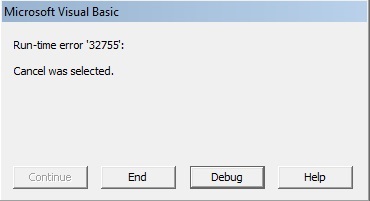
Seems to only do this during design-run, when create compiled .exe file, then that works fine.
But during design it can be a pain, because it cause VB to crash every time and have to reopen project.
Last edited by jpskiller; Nov 19th, 2015 at 02:35 PM.
-
Nov 19th, 2015, 03:10 PM
#840
Re: CommonControls (Replacement of the MS common controls)
Originally Posted by jpskiller
I tried that but still does same thing, when click cancel then a visual basic box appears with the information
Seems to only do this during design-run, when create compiled .exe file, then that works fine.
But during design it can be a pain, because it cause VB to crash every time and have to reopen project.
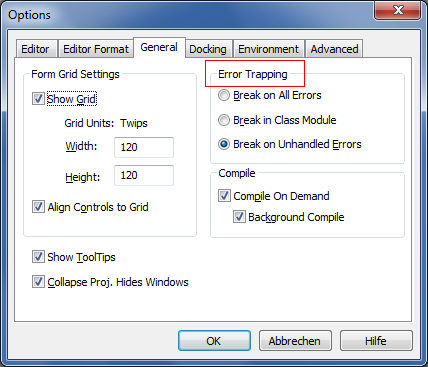
I think it has something todo with the error trapping settings. As you have this problem only in the IDE. Please advise what you have set.
Tools -> Options... -> General -> Error Trapping
 Posting Permissions
- You may not post new threads
- You may not post replies
- You may not post attachments
- You may not edit your posts
-
Forum Rules
|
Click Here to Expand Forum to Full Width
|




 Reply With Quote