|

-
Sep 29th, 2015, 10:12 AM
#1
Thread Starter
Addicted Member

 Is Visual Studio's bookmark functionality fixed in any version yet? Is Visual Studio's bookmark functionality fixed in any version yet?
I assume it's not just me where any bookmark will gradually move from where you set it.
Is there any way to jump back to previous locations in your code, i.e. say the last 5 locations of code I was looking at or even recent code changes?
-
Sep 29th, 2015, 10:21 AM
#2
Re: Is Visual Studio's bookmark functionality fixed in any version yet?
There's actually a "stack" of edit locations you can move through. In my keyboard setup (I use the C# bindings) you can push Ctrl+- to move backwards, or Ctrl+Shift+- to move forwards. (That's the minus key on the keyboard.) It looks like in the VB6 keybindings, Ctrl+Shift+F2 goes backwards, but if you want to move forwards you have to set up your own keyboard shortcut.
You can figure out what they are (or create new bindings) yourself by going into Tools>Options, then selecting the "Keyboard" section. In "Show Commands Containing", type "View.Navigate". The two commands you're interested in are "View.NavigateBackward" and "View.NavigateForward".
This answer is wrong. You should be using TableAdapter and Dictionaries instead.
-
Sep 29th, 2015, 10:44 AM
#3
Thread Starter
Addicted Member
Re: Is Visual Studio's bookmark functionality fixed in any version yet?
Thanks - I really ought to spend some time and read the manual - I've been using VS2010 for a couple of years and only noticed the split windows draggy thing on the right a month or so ago!
As always, too busy writing code to have time to work out how to use the tools properly. I'll stick those shortcuts to the bottom of my screen.
-
Sep 29th, 2015, 12:32 PM
#4
Re: Is Visual Studio's bookmark functionality fixed in any version yet?
I still find cool new tricks in it, don't feel bad. There's thousands of commands, with many hundreds of them not even bound to shortcut keys! There's no telling what great stuff is there but no one deemed important enough to call out and make obvious.
This answer is wrong. You should be using TableAdapter and Dictionaries instead.
-
Sep 29th, 2015, 05:44 PM
#5
Re: Is Visual Studio's bookmark functionality fixed in any version yet?
I've usually used the buttons on the "Standard" toolbar (which those hot keys trigger), but I think I'll try to ingrain the key strokes as I usually prefer keyboard shortcuts to drag and click.
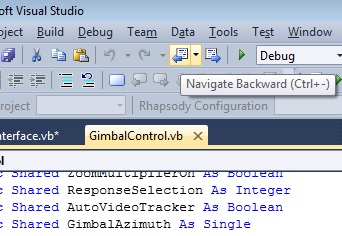
Note, than there is a little dropdown arrow there where you can get a list of files and line snippets within the file where you've been so you can theoretically skip directly to a place you've been recently by selecting the line, but I usually just navigate back and forth as the snippet is short, and kind of from the middle of the line so I don't usually recognize the place I want to go to anyway.
For another option, especially if you want to make a note to remind you of where you left off, or where you need to return to continue coding, is using the Task List. There are a number of options there.
Press Ctrl-K, Ctrl-H (default binding), to add a shortcut, for example. View the Task List, Shortcuts and you'll see the line as a description, the file it is in, and the line number.
Set a number of shortcuts and you have a convenient list of items you can double-click on to jump to that line in the code.
Don't know if they will drift like bookmarks or not.
You can also add tasks items by inserting a formatted comment, and create your own tags to be used in the comments to be added to a list.
-
Sep 30th, 2015, 02:27 AM
#6
Thread Starter
Addicted Member
Re: Is Visual Studio's bookmark functionality fixed in any version yet?
 Originally Posted by passel

I've usually used the buttons on the "Standard" toolbar (which those hot keys trigger), but I think I'll try to ingrain the key strokes as I usually prefer keyboard shortcuts to drag and click.
Note, than there is a little dropdown arrow there where you can get a list of files and line snippets within the file where you've been so you can theoretically skip directly to a place you've been recently by selecting the line, but I usually just navigate back and forth as the snippet is short, and kind of from the middle of the line so I don't usually recognize the place I want to go to anyway.
For another option, especially if you want to make a note to remind you of where you left off, or where you need to return to continue coding, is using the Task List. There are a number of options there.
Press Ctrl-K, Ctrl-H (default binding), to add a shortcut, for example. View the Task List, Shortcuts and you'll see the line as a description, the file it is in, and the line number.
Set a number of shortcuts and you have a convenient list of items you can double-click on to jump to that line in the code.
Don't know if they will drift like bookmarks or not.
You can also add tasks items by inserting a formatted comment, and create your own tags to be used in the comments to be added to a list.
I'm sure those 2 buttons were not there yesterday!
Just found the task list with some tasks that I added possibly years ago!
Normally I just leave a typo in the code to remind me where I left off the previous day which will then appear in the error window
Tags for this Thread
 Posting Permissions
- You may not post new threads
- You may not post replies
- You may not post attachments
- You may not edit your posts
-
Forum Rules
|
Click Here to Expand Forum to Full Width
|



 Reply With Quote
