|

-
Dec 25th, 2010, 04:34 PM
#1
Recover data from corrupted NTFS boot drive marked as RAW
Due to a recent power failure, my system became unbootable. Fortunately my OS (windows 7) was installed on a different drive than my boot drive & I also had some unformatted space on my harddisk. So after trying a few things to boot it all of which failed, I installed a fresh instance of windows 7 in the unformatted partition, and made it the bootable drive. Then I added my old working OS to the Boot Menu and my old OS is accessible again. I was desperately needing this because I didn't wanted to install everything afresh.
My drive letters have changed in the new installed OS. The old bootable drive which was C: is now D: and is showing the filesystem as RAW. The drive contents are inaccessible. When I try to open that drive, I get either of these two messages:
"D: is not accessible. The file or directory is corrupted and unreadable."
or,
"The parameter is incorrect."
Running CHKDSK from command prompt still detects it correctly as NTFS file system, though it can't finish checking the whole drive.

This is an overview of how my system looks at present:
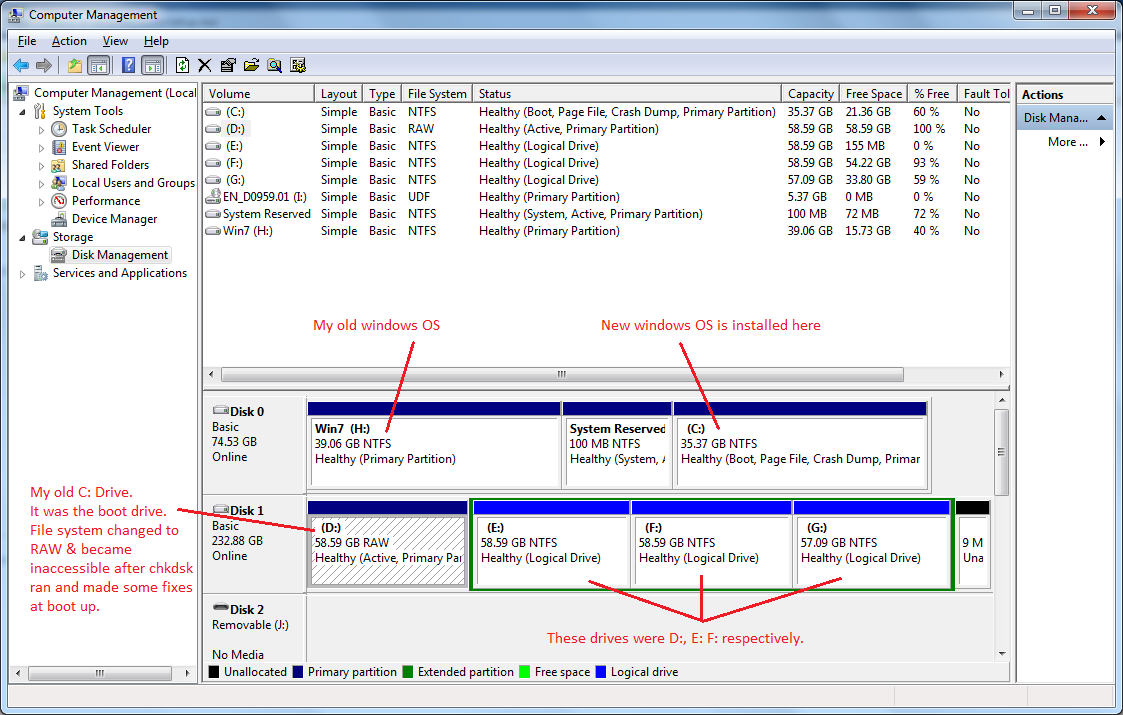
So now I have two problems left:
1. Recovering the C: drive (now D: drive). I know that the drive contents are intact and safe; only my MBR is corrupted.
So it would be good if I can find any free tool that can fix the MBR if possible, or recover the entire drive contents otherwise.
I have tried quite a few tools, but they don't list the D: drive in the list of drives they find. A few of them that show the corrupted drive in their list are not able to work in it, one error or the other and they give up.
2. The file access to all drives has become utterly slow. To backup a mere 3.5 GB of data from E: drive, took more than 24 hours and still didn't complete. So I gave up. Though I can see the files in the drive and use them properly. But I can't backup the files to any external drive.
-
Dec 25th, 2010, 06:20 PM
#2
Addicted Member


Re: Recover data from corrupted NTFS boot drive marked as RAW
TestDisk is an excellent freeware (OpenSource) utility that I would personally use before any commercial product for a situation such as yours.
-
Dec 25th, 2010, 07:02 PM
#3
Re: Recover data from corrupted NTFS boot drive marked as RAW
Chkdsk might be able to fix it, but might also be able to corrupt some files.
Using parameters '/f/r/x' it should run till the end.
But note this is something you might want to keep as last resort.
Delete it. They just clutter threads anyway.
-
Dec 26th, 2010, 04:13 AM
#4
Re: Recover data from corrupted NTFS boot drive marked as RAW
 Originally Posted by pcuser

TestDisk is an excellent freeware (OpenSource) utility that I would personally use before any commercial product for a situation such as yours.
Already tried TestDisk. It didn't work.
Originally Posted by TheBigB
Chkdsk might be able to fix it, but might also be able to corrupt some files.
Using parameters '/f/r/x' it should run till the end.
But note this is something you might want to keep as last resort.
CHKDSK runs at every system startup but in the end it ends with a message saying there is not enough disk space to write changes to the MFT. So after letting it run for the first few startups, I now cancel it because it does no good; it might instead be corrupting more files.
-
Dec 26th, 2010, 06:59 AM
#5
Re: Recover data from corrupted NTFS boot drive marked as RAW
Ok I ran CHKDSK C: /F/R/X/B and this is what comes up.
The exact error message is:
Correcting errors in the Master File Table (MFT) mirror.
Insufficient disk space to repair master file table (MFT) mirror.
CHKDSK aborted.

-
Sep 27th, 2015, 09:59 PM
#6
New Member
Re: Recover data from corrupted NTFS boot drive marked as RAW
Hello, from my experiences, without any write protection, it is always easy to convert drive RAW file system back to NTFS. But, before you start to format this drive from RAW to NTFS, I also want to ask whether there are still very, very important data stored on this drive.
If you do left something useful there, do not format this drive before you extract your drive data out from this drive with RAW file system drive recovery software. But, if you do leave nothing valuable there, merely format it to restore its common use carefully.
Hope these words can help you out.
 Posting Permissions
- You may not post new threads
- You may not post replies
- You may not post attachments
- You may not edit your posts
-
Forum Rules
|
Click Here to Expand Forum to Full Width
|



 icon on the left of the post.


 Reply With Quote