[VB6] Code Snippet: Get/set/del file zone identifier (Run file from internet? source)
So I'm sure everyone has been asked by Explorer whether or not they want to open a file they downloaded from the internet. But how does Explorer know whether or not to ask this question? This information is recorded in an Alternative Data Stream, which is a disk level entry that's attached to the file, but not inside the file itself. Think of it like the date stamps on a file- they're not in the file itself right? A blank text file has them. And not in some database or registry, it's low level associated data on the disk itself.
There's several other uses for alternative data streams, and it's possible to read and write to them like a normal file, e.g. Open "C:\file.txt:Zone.Identifier" For... (if you know their name; not easy but covered by Karl Peterson).
But here we don't have to do that. For the specific case of the Zone Identifier, Windows provides an interface that allows for very simple access to read it, change it, or delete it. IZoneIdentifier, with its default implementation PersistentZoneIdentifier, makes this easy.
Requirements
-oleexp.tlb - IDE-only, you don't need to include anything when distributing your compiled app.
-Windows XP SP2 or higher
-This only works on NTFS file systems. If your hard drive is formatted as FAT32 or something else, this does not work.
Code
Code:
Public Function GetFileSecurityZone(sFile As String) As URLZONE
'returns the Zone Identifier of a file, using IZoneIdentifier
'This could also be done by ready the Zone.Identifier alternate
'data stream directly; readfile C:\file.txt:Zone.Identifier

Dim lz As Long
Dim pZI As PersistentZoneIdentifier
Set pZI = New PersistentZoneIdentifier

Dim pIPF As IPersistFile
Set pIPF = pZI

pIPF.Load sFile, STGM_READ
pZI.GetId lz
GetFileSecurityZone = lz

Set pIPF = Nothing
Set pZI = Nothing

End Function

Public Sub SetFileSecurityZone(sFile As String, nZone As URLZONE)
'As suggested in the enum, you technically can set it to custom values
'If you do, they should be between 1000 and 10000.
Dim pZI As PersistentZoneIdentifier
Set pZI = New PersistentZoneIdentifier

pZI.SetId nZone
Dim pIPF As IPersistFile
Set pIPF = pZI
pIPF.Save sFile, 1

Set pIPF = Nothing
Set pZI = Nothing

End Sub

Public Sub RemoveFileSecurityZone(sFile As String)
Dim pZI As PersistentZoneIdentifier
Set pZI = New PersistentZoneIdentifier

pZI.Remove
Dim pIPF As IPersistFile
Set pIPF = pZI
pIPF.Save sFile, 1

Set pIPF = Nothing
Set pZI = Nothing
End Sub
It's that simple. No other code needed.
Now you can go get rid of those prompts for your downloads, or find files that were downloaded.
There's another way to determine the zone that doesn't rely solely on what a file says about itself, using IInternetSecurityManager:
Code:
'apis only needed until next oleexp update
Public Declare Function CLSIDFromString Lib "ole32" (ByVal lpszGuid As Long, pGuid As Any) As Long
Public Declare Function CoCreateInstance Lib "ole32" (rclsid As Any, ByVal pUnkOuter As Long, ByVal dwClsContext As Long, riid As Any, pvarResult As Any) As Long


Public Function GetFileEffectiveZone2(sFile As String) As URLZONE
'using this method takes into account other factors to determine level
Dim pISM As IInternetSecurityManager
'Set pISM = New InternetSecurityManager - Forgot this in latest OLEEXP release, already in the code for next release. to use it now use CoCreateInstance:

Dim tCLSID As UUID
Dim IID_IInternetSecurityManager As UUID

Const IID_IISM As String = "{79EAC9EE-BAF9-11CE-8C82-00AA004BA90B}"
Const CLSID_InternetSecurityManager As String = "{7b8a2d94-0ac9-11d1-896c-00c04fb6bfc4}"

Call CLSIDFromString(StrPtr(CLSID_InternetSecurityManager), tCLSID)
Call CLSIDFromString(StrPtr(IID_IISM), IID_IInternetSecurityManager)

Call CoCreateInstance(tCLSID, 0, CLSCTX_INPROC_SERVER Or CLSCTX_LOCAL_SERVER, IID_IInternetSecurityManager, pISM)

Dim dwZone As Long
pISM.MapUrlToZone StrPtr(sFile), dwZone, MUTZ_ISFILE Or MUTZ_DONT_UNESCAPE
Set pISM = Nothing
GetFileEffectiveZone2 = dwZone

End Function
Here's what Raymond Chen says about this method:
Note also that if you want your application to be sensitive to the file zone (so that you can disable features for untrusted documents), you should use the IInternetSecurityManager::MapUrlToZone function rather than using only the file zone identifier, because the effective zone of a file is a combination of the file's declared zone as well as its physical location. (For example, a file in the Temporary Internet Files directory or on an untrusted server should not be given full trust regardless of what it claims. Additional reading.)
Last edited by fafalone; Sep 21st, 2015 at 04:26 AM.
Re: [VB6] Code Snippet: Get/set/del file zone identifier (Run file from internet? sou
Here's what Raymond Chen... a file in the Temporary Internet Files directory...
I think that operating system does not 'see file' in Temprary Internet Files folder - at least Findfile API call 'offers file not found' - when request with known file name or trying to enumerate files in IE temp folder.
Re: [VB6] Code Snippet: Get/set/del file zone identifier (Run file from internet? sou
What?
It says a file in that location isn't given a trusted zone number, even if the file itself has that number. Not sure where you got the idea the file couldn't be seen.
What folder are you talking about that FindFile can't search (i don't know where each version of IE stores temp files), and even if it's marked as virtual so findfile didn't work, enumerating with IShellFolder and IShellItem would be able to list them.
Re: [VB6] Code Snippet: Get/set/del file zone identifier (Run file from internet? sou
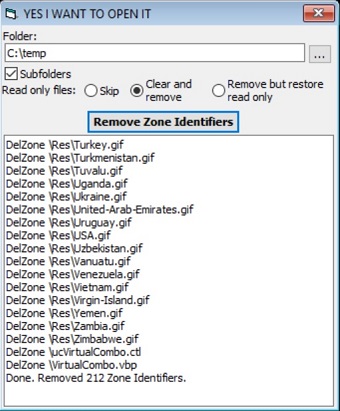
I recently made a utility for myself that removes the zone identifier (if Internet or Untrusted) from every file in a folder, and since this was only ever a snippet, I'm adding it here.
ZoneStripper
Removes the Zone Identifier from all files in a given folder; the Zone Identifier is what web browsers add to files resulting in a Security Warning popup noting they're from the internet asking if you're sure you want to open them. I was annoyed because Windows 10 raises this warning on .vbp files despite them not being executables.
Features:
-Folder picker via FileOpenDialog or TextBox with AutoComplete enabled
-Recursive optional
-Handle read only files by skipping, clearing read only and removing, or removing but restoring read only afterwards
-Log showing files the zone identifier is removed from
Requirements
-Windows Vista or newer, because while the original snippet is still good on XP, the folder picker and file enumeration in this utility uses Vista+ interfaces
-oleexp.tlb as a reference, and mIID.bas added to the project (included with the oleexp download)
NOTE - This version is outdated.
There's a newer version on GitHub made in twinBASIC.




 Reply With Quote
