|

-
Sep 12th, 2015, 06:47 PM
#1
VB6 StarRating-Control (cairo-Rendering)
This is an implementation, based on Vector-Drawing (with the cairo-Wrapper-Classes from vbRichClient5).
No (PNG- or other) Images were used - just plain Drawing-Commands (to gain more flexibility with regards to
the Stars Shape - and to easier allow for different Base-Colors to fill the interior of the given Star-DrawingPath).
A normal VB6-UserControl is used as the Host for these Drawings - fully transparent and alpha-aware.
The Star-Rendering will be smooth and antialiased, even when the Controls are resized
(to behave properly in DPI-aware Apps).
The MinHeight of the Control is 16-, its MaxHeight 56-Pixels.
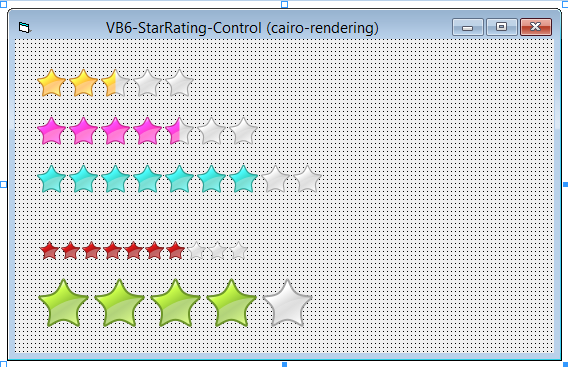
The ScreenShot below shows, how the rendering behaves with different Sizes (and Colors).
The Value of the Control can be set also per Mouse-Interaction (Drag- or Click) - and
will (in Drag-Mode) show a darker "Hover-Overlay" (so the older Value can be seen for comparison,
until the Mouse-Button is released).
Here's the Source-Zip: StarRating2.zip
(updated with a fix for: "Allow Zero-Detection whilst clicking outside the first Star")
New version - (containing the fix above, but also a new modRC5Regfree.bas, which when included
into a Project, will ensure regfree-loading of the RC5-Main-Classes automatically - when:
- your App will run from a compiled Executable ... and
- when a \Bin\-SubFolder exists below your App.Path, which contains copies of the 3 RC5 BaseDlls
Version 3: StarRating3.zip
And here a ScreenShot:
Olaf
Last edited by Schmidt; Sep 13th, 2015 at 03:52 PM.
-
Sep 13th, 2015, 05:48 AM
#2
Member

Re: VB6 StarRating-Control (cairo-Rendering)
Code:
Private Sub ucStarRating_Click(Index As Integer, NewValue As Single, Cancel As Boolean)
  Debug.Print "New Value from Ctl-Index(" & Index & ") per MouseClick: "; NewValue
End Sub
Why is this code used in the test form?
-
Sep 13th, 2015, 06:29 AM
#3
Re: VB6 StarRating-Control (cairo-Rendering)
 Originally Posted by Monster4869

Code:
Private Sub ucStarRating_Click(Index As Integer, NewValue As Single, Cancel As Boolean)
  Debug.Print "New Value from Ctl-Index(" & Index & ") per MouseClick: "; NewValue
End Sub
Why is this code used in the test form?
To show "in action", the only Event I've implemented in the Usercontrol so far.
It will allow you, to validate the NewValue (which the Control will set as the
new one internally, when you don't switch Cancel to True) - and it also allows
you, to influence the NewValue - to "round to whole Numbers for example", since
it is passed as a ByRef-Param - and it also allows you, to update your DB-Record
or something, with the incoming NewValue...
Olaf
-
Sep 13th, 2015, 06:53 AM
#4
Frenzied Member
Re: VB6 StarRating-Control (cairo-Rendering)
Mouse click can't go to zero though drag selection can go to zero. Improvement can be done by detect whether mouse in STAR region.
-
Sep 13th, 2015, 07:30 AM
#5
Re: VB6 StarRating-Control (cairo-Rendering)
Originally Posted by Jonney
Mouse click can't go to zero though drag selection can go to zero. Improvement can be done by detect whether mouse in STAR region.
Thanks Jonney - good catch.
Now solved in version 2 in the opener-post.
Olaf
-
Sep 13th, 2015, 08:07 AM
#6
Frenzied Member
Re: VB6 StarRating-Control (cairo-Rendering)
Originally Posted by Schmidt
Thanks Jonney - good catch.
Now solved in version 2 in the opener-post.
Olaf
The cCairoSurface is really amazing... Thanks for sharing this example.
TeeChart used Cairo I think.
Last edited by Jonney; Sep 13th, 2015 at 08:49 AM.
-
Sep 13th, 2015, 11:07 AM
#7
Member
Re: VB6 StarRating-Control (cairo-Rendering)
to use this control.... We always have to register the RC5 dll in the desired system...... Is there a workaround to integrate the dll within the project so we can use the project by just opening the exe file in a system without registering the rc5 dll manually!!
-
Sep 13th, 2015, 12:13 PM
#8
Re: VB6 StarRating-Control (cairo-Rendering)
Originally Posted by Monster4869
to use this control.... We always have to register the RC5 dll in the desired system......
Is there a workaround to integrate the dll within the project so we can use the project by just opening the exe file in a system without registering the rc5 dll manually!!
Yes - I've described this in quite some detail here:
http://www.vbforums.com/showthread.p...rectCOM-Helper
The RC5 has two "Main-Entry-Point-Objects":
- New_c
- Cairo
From those two Objects, any other Object-instances can be derived or created.
(From New_c -> e.g. New_c.FSO ... or from Cairo -> e.g. Cairo.CreateSurface).
When you discipline yourself a bit, to only derive RC5-ClassInstances from those two Base-Objects
(or from other RC5-ParentObjects, down the hierarchy), then all you need to make your App work regfree
with the RC5 is the following:
Into a *.bas-Module, which contains Sub Main - make sure the Project is set to start from Sub Main as well:
Code:
Option Explicit

Declare Function LoadLibraryW Lib "kernel32" (ByVal StrPtr_FileName As Long) As Long
Declare Function GetInstanceEx Lib "DirectCom" (StrPtr_FName As Long, StrPtr_ClassName As Long, _
                                    Optional ByVal UseAlteredSearchPath As Boolean = True) As Object

Public New_c As cConstructor, Cairo As cCairo '<- gobal declarations for New_c and Cairo

Sub Main()
  If App.LogMode Then 'we run compiled, so we try a regfree instancing of New_c ...
    LoadLibraryW StrPtr(App.Path & "\Bin\DirectCOM.dll") 'pre-loading DirectCOM.dll first from our \Bin\-Folder
    Set New_c = GetInstanceEx(StrPtr(App.Path & "\Bin\vbRichClient5.dll"), StrPtr("cConstructor")) 'now using GetInstanceEx from DirectCOM.dll
  End If

  If New_c Is Nothing Then Set New_c = New cConstructor ' in IDE-Mode (or in case of failure) we try to instantiate from a registered version normally per 'New'
  Set Cairo = New_c.Cairo 'just derive the Cairo-Instance from New_c ... now the two RC5-Main-Objects are alive
End Sub
That's it already.
Edit: Well, not really - not for this case here, where we have a Project-Private UserControl to consider: 
Ok, here some corrections (along with apologies)...
The above code is in order as it is - in Projects which don't use UserControls with RC5-classes.
UserControls are "special" with regards to "Sub Main()-Initialization-code of Public Variables -
they want to "run" their initialization already much earlier than when you press the "Play-Button"
(that's the main-reason, I prefer normal Classes over VB6-Usercontrols - wherever possible).
Well, to make a "non-initialized global Variable" (which was not filled yet from Sub Main())
a more "active behaving Member of our App" (one, which auto-initializes itself) - we have
to elevate the Variable to "Property Get Status" (not losing that much performance over the version above):
The below module will fix the behaviour (and also doesn't require your App-Settings to run from Sub Main()).
Code:
Option Explicit

Private Declare Function LoadLibraryW Lib "kernel32" (ByVal StrPtr_FileName As Long) As Long
Private Declare Function GetInstanceEx Lib "DirectCom" (StrPtr_FName As Long, StrPtr_ClassName As Long, Optional ByVal UseAlteredSearchPath As Boolean = True) As Object

Public Property Get New_c() As cConstructor
Static statNew_c As cConstructor
  If statNew_c Is Nothing Then 'try to instantiate it for the first time

    If App.LogMode Then 'we run compiled, so we try a regfree instancing of New_c first ...
      LoadLibraryW StrPtr(App.Path & "\Bin\DirectCOM.dll") 'pre-loading DirectCOM.dll first from our \Bin\-Folder
      Set statNew_c = GetInstanceEx(StrPtr(App.Path & "\Bin\vbRichClient5.dll"), StrPtr("cConstructor")) 'now using GetInstanceEx from DirectCOM.dll
    End If

    If statNew_c Is Nothing Then Set statNew_c = New cConstructor 'in IDE-Mode (or in case of failure) we try to instantiate from a registered version normally per 'New'
  End If

  Set New_c = statNew_c 'just  hand over the (now initialized) Reference from the Static-Variable
End Property

Public Property Get Cairo() As cCairo
Static statCairo As cCairo
  If statCairo Is Nothing Then 'try to ...
    Set statCairo = New_c.Cairo '...instantiate it for the first time
  End If
  Set Cairo = statCairo 'just  hand over the (now initialized) Reference from the Static-Variable
End Property
Just make sure, that (before running your Exe or packing everything into a Zip), the above, magenta-colored \Bin\ path indeed exists
(containing the 3 RC5-BaseDlls which are then hosted in that SubFolder one level below your App.Path).
And no, the Binary-Copies of these 3 Base-Dlls don't have to be registered (there, in each and every Apps Bin-SubFolder).
You have to register the RC5-Dlls in only one, single and non-changing location on your Dev-machine
(e.g. on C:\RC5\ - this is enough for all the RC5-Demos to work, which are floating around in the Web and on this site).
Olaf
Last edited by Schmidt; Sep 13th, 2015 at 03:29 PM.
-
Sep 13th, 2015, 01:14 PM
#9
Member
Re: VB6 StarRating-Control (cairo-Rendering)
What am i doing wrong? Nothing happens
should i do something like
fTest.load 'its not working
in sub main
Last edited by Monster4869; Sep 13th, 2015 at 01:20 PM.
-
Sep 13th, 2015, 01:14 PM
#10
Member
Re: VB6 StarRating-Control (cairo-Rendering)
What am i doing wrong? Nothing happens
should i do something like
fTest.load 'its not working
in sub main
StarRating.zip
-
Sep 13th, 2015, 02:24 PM
#11
Re: VB6 StarRating-Control (cairo-Rendering)
Originally Posted by Monster4869
should i do something like
fTest.load
in sub main
Of course, (nearly there)...
If you want to see something of your GUI, you'll have to show it - try:
fTest.Show
(at the end of Sub Main, after you initialized New_c and Cairo there)...
And before I forget...
In your "real Application" this would be your Main-Form
(however you named it - e.g. fMain.Show or MyForm.Show).
Also make sure, that in your real App, your MainForm contains a Form_Terminate-
Eventhandler as shown and used in the Demo (for RC5-cleanup, no matter if "RC5-stuff"
was used on this MainForm - or only on other Forms).
Olaf
Last edited by Schmidt; Sep 13th, 2015 at 02:28 PM.
-
Sep 13th, 2015, 03:05 PM
#12
Member
Re: VB6 StarRating-Control (cairo-Rendering)
I'm not able to build an exe file... I get pointed to
Code:
Set Stg = New_c.Collection(False)
in the user control initilize event of ucstarrating
StarRating.zip
Last edited by Monster4869; Sep 13th, 2015 at 03:09 PM.
-
Sep 13th, 2015, 03:16 PM
#13
Re: VB6 StarRating-Control (cairo-Rendering)
Originally Posted by Monster4869
I'm not able to build an exe file... I get pointed to
Code:
Set Stg = New_c.Collection(False)
in the user control initilize event of ucstarrating
Sorry for misleading you with my Module-Code in Post #8 (please read my corrections there):
Newly uploaded now: Version 3, which contains a Module (modRC5Regfree.bas), which does
everything in the right way now (for UserControls which contain RC5-Code).
Olaf
-
Sep 14th, 2015, 09:48 AM
#14
Member
Re: VB6 StarRating-Control (cairo-Rendering)
Thank You!! 
-
May 5th, 2016, 08:28 AM
#15
Junior Member
Re: VB6 StarRating-Control (cairo-Rendering)
Hi Olaf,
Another best control !
Congratulations and thanks to continue vbRichClient development.
-
Jul 6th, 2018, 02:06 PM
#16
PowerPoster
Re: VB6 StarRating-Control (cairo-Rendering)
Originally Posted by Schmidt
Sorry for misleading you with my Module-Code in Post #8 (please read my corrections there):
Newly uploaded now: Version 3, which contains a Module (modRC5Regfree.bas), which does
everything in the right way now (for UserControls which contain RC5-Code).
Olaf
Possible to use t his code in a subitem of listview?
-
Jul 9th, 2018, 04:43 AM
#17
Re: VB6 StarRating-Control (cairo-Rendering)
Originally Posted by luca90
Possible to use t his code in a subitem of listview?
Easy, when you use an ownerdrawn (virtual) List-Control -
not that easy, when we talk about the "normal" ListView.
Olaf
-
Jul 21st, 2018, 04:03 PM
#18
Re: VB6 StarRating-Control (cairo-Rendering)
Nice control. Thank you, Schmidt.
I think that when you want to select option "0 stars", the control should recognize the tapping in a slightly wider range from the left edge of the star, otherwise user must be almost a sniper to shoot "0 stars" at a first try
-
Jul 22nd, 2018, 04:05 AM
#19
Re: VB6 StarRating-Control (cairo-Rendering)
Originally Posted by Dragokas
I think that when you want to select option "0 stars", the control should recognize the tapping in a slightly wider range from the left edge of the star, otherwise user must be almost a sniper to shoot "0 stars" at a first try
Well, a somewhat similar point was discussed in Postings #4 and #5 already...
The Control is more thought for "Click- and -Drag" - even supporting a kind of Preview in that mode, which leaves the Previous-Value visible on MouseDown -
not that much thought for "Tap-Mode" (although it understand that as well in the meantime)...
If you want a bit more "Clicking-Space" at the lefthand-side of the Control, you will have to
ensure that yourself (by shifting the Drawing-Output a few Pixels to the right).
Easiest way to do that is with a new introduced Const at Ctl-Level like e.g.:
Code:
Private Const xOffs = 5
Shifting Drawing-Output with Cairo is quite easy (adding a single line at the top of the Draw-Routine):
Code:
Private Sub Draw(CC As cCairoContext, StarPath As cCairoPath)
  CC.TranslateDrawings xOffs, 0
  ...
What remains is, to ensure that the Mouse-X-Coord respects (and compensates for) this Offset as well,
so at the Top of UserControl_MouseDown and UserControl_MouseMove you should each add another line:
And that's it already.
Olaf
-
Jul 22nd, 2018, 08:36 AM
#20
Re: VB6 StarRating-Control (cairo-Rendering)
 Posting Permissions
- You may not post new threads
- You may not post replies
- You may not post attachments
- You may not edit your posts
-
Forum Rules
|
Click Here to Expand Forum to Full Width
|



 Reply With Quote