|

-
Aug 31st, 2015, 01:15 AM
#1
Thread Starter
Junior Member

 [RESOLVED] Assign dynamic value to checkboxes [RESOLVED] Assign dynamic value to checkboxes
HI,
I have created a runtime checkboxes in vba. This checkboxes are reference to excel rows :-
Equipment Finishing (painting, scratches, damage, etc)
Equipment Alignment (doors, removable panels/covers, locks, section-to section, etc)
Equipment / Device Labels/Nameplates and Component Layout
Torque Marking
Component / Device Inspection (damage to parts, missing screws, etc)
|
GIS Swgr |
SF6 Swgr |
| Equipment Finishing (painting, scratches, damage, etc) |
0.5 |
0.1 |
| Equipment Alignment (doors, removable panels/covers, locks, section-to section, etc) |
- |
0.2 |
| Equipment / Device Labels/Nameplates and Component Layout |
0.5 |
0.4 |
| Torque Marking |
0.5 |
- |
| Component / Device Inspection (damage to parts, missing screws, etc) |
- |
0.2 |
I created a form with combo box which have "GIS Swgr" "SF6 Swgr" "MC Swgr"
as list. When the user changes the item in combo box it searches in excel and automatically hides the checboxes where there is "-" in row. I am using the below code to do the same.
Code:
Const sSHEET_NAME   As String = "Hour Per Equipment"
Const FORM_TOP      As Integer = 20
Const iPITCH        As Integer = 25
Const FORM_LEFT     As Integer = 12
Const iWidth        As Integer = 350
Dim ctlCheckBox     As MSForms.Control
Dim wks             As Worksheet
Const Elect_Strt     As Integer = 29
Const Elect_End      As Integer = 65
Dim Elect_Top        As Integer
Dim iRow2           As Integer
Dim Elect_left      As Integer

col_num = cboEqpTypes.ListIndex + 2
Set wks = ThisWorkbook.Sheets(sSHEET_NAME)
Vis_Top = FORM_TOP

For iRow = Vis_Strt To Vis_End
    If wks.Cells(iRow, col_num) <> "-" Then
        Set ctlCheckBox = Me.MultiPage1.Pages(0).Controls.Add("Forms.Checkbox.1")

         With ctlCheckBox
            .Caption = Cells(iRow, "A")
            .Name = "cb" & iRow
            .Left = FORM_LEFT
            .Top = Vis_Top
            .Width = iWidth
        End With
           Vis_Top = Vis_Top + iPITCH
        End If
    Next iRow
My requirement now is that when a user selects "GIS Swgr" in combo box, it will show the checkboxes. Now I want to assign numbers to this checkboxes such that when a user checks
Equipment Finishing (painting, scratches, damage, etc)
Equipment / Device Labels/Nameplates and Component Layout
then it should add "0.50" and "0.50" and return a msg box with total as "1". Similarly when a user selects "SF6 Swgr" then it should do the same with "0.1" and "0.4" and add them and return Total as msgbox "0.5"
Thanks
-
Aug 31st, 2015, 06:33 AM
#2
Re: Assign dynamic value to checkboxes
I have created a runtime checkboxes in vba. This checkboxes are reference to excel rows
This should be in the office development forum... VBA isn't quite the same as VB6. I'll ask the mods to move it.
-tg
-
Aug 31st, 2015, 11:53 AM
#3
Re: Assign dynamic value to checkboxes
I'm not quite sure what you are asking but checkboxes only have 3 possible values, unchecked, checked and greyed or 0,1 and 2
Of course you can use a variable and write code to update the value of the variable when the checkbox is clicked or changes its value but the checkbox itself will only ever have one of those 3 values listed above.
-
Aug 31st, 2015, 02:59 PM
#4
Re: Assign dynamic value to checkboxes
 Originally Posted by DataMiser

I'm not quite sure what you are asking but checkboxes only have 3 possible values, unchecked, checked and greyed or 0,1 and 2.
Maybe he's asking about the checkbox caption/label?
-
Sep 1st, 2015, 08:23 AM
#5
Thread Starter
Junior Member
Re: Assign dynamic value to checkboxes
Sorry guys its my fault, I was not able to explain it properly. 
I have created a runtime checkboxes. This checkboxes are reference to excel rows :-
Equipment Finishing (painting, scratches, damage, etc)
Equipment Alignment (doors, removable panels/covers, locks, section-to section, etc)
Equipment / Device Labels/Nameplates and Component Layout
Torque Marking
Component / Device Inspection (damage to parts, missing screws, etc)
I want checkbox to hold values
0.50
-
0.50
0.50
0.25
and at the end i want to add this values. This values will not be fixed. It will change depend on selection of header("Gis Swgr" "SF6 swgr" and so on).
Attachment 129811
I had put "Gis Swgr" "SF6 swgr" and so on in combo box. If combo box change then checkbox value should get change.
-
Sep 1st, 2015, 09:13 AM
#6
Re: Assign dynamic value to checkboxes
Well either you do not mean "Value" or you did not pay attention. The Value of a check box can only be 0,1 or 2 which is unchecked, checked and greyed. Those are the only values possible for a check box.
Now if as suggested in post #4 you mean the caption or some other property then it may be possible but you need to tell us what you want to do if that be the case.
This is also Excel rather than VB so it should be in the Office section rather than the VB section.
-
Sep 2nd, 2015, 02:53 AM
#7
Thread Starter
Junior Member
Re: Assign dynamic value to checkboxes
Hi DataMiser,
I mean to say sir that, whichever checkboxes are checked the value should get added.
Attachment 129841
As shown in the above image. I checked some checkboxes. Now, when I will click on ADD Button it should show me Message as "0.5"
Similarly, when I select - 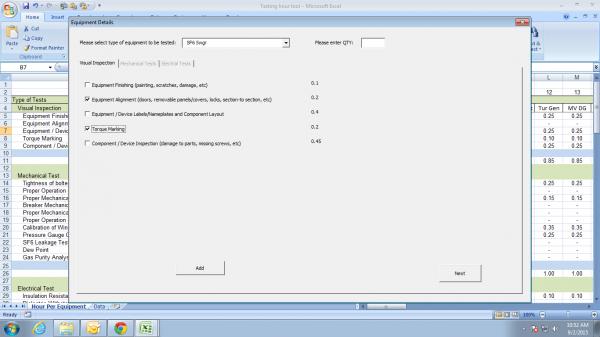 it should show me Message as "0.4". Is it possible to do the same. it should show me Message as "0.4". Is it possible to do the same.
The checkboxes are placed separately and the values are placed in "labels". The values which are shown are actually placed in "labels" rather than "textbox" because I don't want the user to change the values which are shown.
Last edited by MOHAMMEDSALMAN; Sep 2nd, 2015 at 02:57 AM.
-
Sep 2nd, 2015, 03:13 AM
#8
Re: Assign dynamic value to checkboxes
The best argument against democracy is a five minute conversation with the average voter - Winston Churchill
Hadoop actually sounds more like the way they greet each other in Yorkshire - Inferrd
-
Sep 2nd, 2015, 05:08 AM
#9
Re: Assign dynamic value to checkboxes
this is quite simple to do, what are the names of all your check boxes and labels containing values?
assuming your checkboxes are checkbox1 to checkbox5 and the labels are label6 to label10 try like
Code:
for i = 1 to 5
     if me.controls("checkbox" & i) then tot = tot + me.controls("label" & i + 5)
next
msgbox tot
harder to do if your controls have meaningful names
i do my best to test code works before i post it, but sometimes am unable to do so for some reason, and usually say so if this is the case.
Note code snippets posted are just that and do not include error handling that is required in real world applications, but avoid On Error Resume Next
dim all variables as required as often i have done so elsewhere in my code but only posted the relevant part
come back and mark your original post as resolved if your problem is fixed 
pete
-
Sep 2nd, 2015, 07:08 AM
#10
Thread Starter
Junior Member
Re: Assign dynamic value to checkboxes
Thanks westconn1 ,
As per your given code I got the following output in Message box. I still not got output as per my requirement.
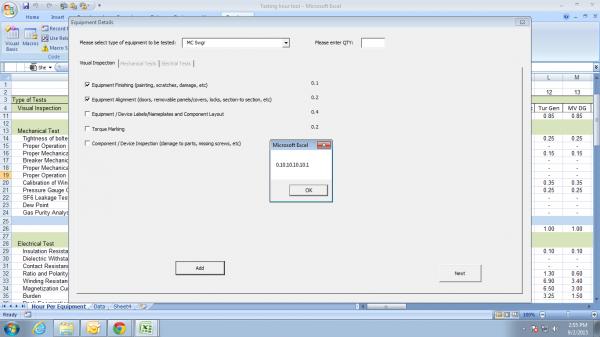
I am using the following code for Labels and checkboxes
Code:
Private Sub MultiPage1_Change()
Const sSHEET_NAME   As String = "Hour Per Equipment"
Const FORM_TOP      As Integer = 20
Const iPITCH        As Integer = 25
Const FORM_LEFT     As Integer = 12
Const iWidth        As Integer = 350
Dim ctlcheckbox     As MSForms.Control
Dim lbl             As MSForms.Label
Dim wks             As Worksheet

Const Vis_Strt      As Integer = 5
Const Vis_End       As Integer = 10
Dim Vis_Top         As Integer
Dim iRow            As Integer


col_num = cboEqpTypes.ListIndex + 2
Set wks = ThisWorkbook.Sheets(sSHEET_NAME)
Vis_Top = FORM_TOP

Dim dummy, dummy1, dummy2 As String
looper = 0
dummy = CStr(wks.Cells(looper + 5, col_num).Value)


Do While dummy <> ""
    If wks.Cells(looper + 5, col_num).Value <> "-" Then
       Set ctlcheckbox = Me.MultiPage1.Pages(0).Controls.Add("Forms.Checkbox.1")

            With ctlcheckbox
                .Caption = Cells(looper + 5, "A")
                .name = "cb" & looper + 5
                .Left = FORM_LEFT
                .Top = Vis_Top
                .Width = iWidth
            End With

        Set lbl = Me.MultiPage1.Pages(0).Controls.Add("Forms.label.1")

             With lbl
                .Caption = Cells(looper + 5, col_num).Value
                .name = "lbl" & looper + 5
                .Left = 400
                .Top = Vis_Top
                .Width = 66
                .Height = 25
            End With

           Vis_Top = Vis_Top + iPITCH
    End If
    looper = looper + 1
    dummy = CStr(wks.Cells(looper + 5, col_num).Value)
Loop
I have created checkboxes and labels dynamically.
Please help me in this ..
Last edited by MOHAMMEDSALMAN; Sep 2nd, 2015 at 07:46 AM.
-
Sep 2nd, 2015, 03:48 PM
#11
Re: Assign dynamic value to checkboxes
try dimensioning tot as double
from your code looks like should be
Code:
dim tot as double
for i = 5 to 9
     if me.controls("cb" & i) then tot = tot + me.controls("lbl" & i )
next
msgbox tot
if the number of rows, therefore the number of chckboxes is not static then keep looper as global variable and use
for i = 5 to looper + 4
as i do not see looper dimensioned in your code it may already be global
if this is not correct, post a sample workbook with code
i do my best to test code works before i post it, but sometimes am unable to do so for some reason, and usually say so if this is the case.
Note code snippets posted are just that and do not include error handling that is required in real world applications, but avoid On Error Resume Next
dim all variables as required as often i have done so elsewhere in my code but only posted the relevant part
come back and mark your original post as resolved if your problem is fixed
pete
-
Sep 3rd, 2015, 09:03 AM
#12
Thread Starter
Junior Member
Re: Assign dynamic value to checkboxes
Hi westconn1,
Can I add the values when the user clicks the checkbox but without placing labels in forms.
I have already created checkboxes that are dynamically generated from excel file.
Please see the below code which I had created till now to dynamically add checkbox and to change the checkboxes visibility if combo box value changes.
Code:
Option Explicit
Dim eqp_count As Integer, vtest_count As Integer, mtest_count As Integer, etest_count As Integer
Dim test_info() As eqp_test_info


Private Sub cboEqpTypes_Change()
Dim looper As Integer
'Initializing Multipages

'Visual test page
For looper = 1 To vtest_count
    frmEqpDetails.Controls.Remove "vcb" & looper
Next looper

Call MultiPage1_Change
End Sub

Private Sub CommandButton1_Click()
MultiPage1.Page2.Enabled = True
End Sub

Private Sub CommandButton2_Click()
MultiPage1.Page3.Enabled = True
End Sub

Private Sub MultiPage1_Change()
Const sSHEET_NAME   As String = "Hour Per Equipment"
Const FORM_TOP      As Integer = 18
Const LEFT_CA       As Integer = 12
Const LEFT_CB       As Integer = 366
Const CNTRL_HEIGHT  As Integer = 17.25
Const CNTRL_WIDTH   As Integer = 342.75

Dim ctlcheckbox     As MSForms.Control
Dim wks             As Worksheet

Dim col_num As Integer, looper As Integer, test_count As Integer
Dim dummy As String

'for Visual
Const Vis_Strt      As Integer = 5

'for Mechanical
Const Mech_Strt     As Integer = 14

'for Electrical
Const Elect_Strt     As Integer = 29

col_num = cboEqpTypes.ListIndex + 2
Set wks = ThisWorkbook.Sheets(sSHEET_NAME)

looper = 0
vtest_count = 0
mtest_count = 0
etest_count = 0

dummy = CStr(wks.Cells(looper + Vis_Strt, col_num).Value)

Do While dummy <> ""
'dynamically creating check boxes for visual checks
    If wks.Cells(looper + Vis_Strt, col_num).Value <> "-" Then
        vtest_count = vtest_count + 1
        Set ctlcheckbox = Me.MultiPage1.Pages(0).Controls.Add("Forms.Checkbox.1")
        With ctlcheckbox
            .Caption = Cells(looper + Vis_Strt, "A")
            .name = "vcb" & vtest_count
            If vtest_count <= 20 Then
                .Left = LEFT_CA
                .Top = FORM_TOP * vtest_count
                .Width = CNTRL_WIDTH
                .Height = CNTRL_HEIGHT
            Else
                .Left = LEFT_CB
                .Top = FORM_TOP * (vtest_count - 20)
                .Width = CNTRL_WIDTH
                .Height = CNTRL_HEIGHT
            End If
        End With
    End If
    looper = looper + 1
    dummy = CStr(wks.Cells(looper + Vis_Strt, col_num).Value)
Loop

If vtest_count = 0 Then
    Me.MultiPage1.Page1.Enabled = False
Else
    Me.MultiPage1.Page1.Enabled = True
End If

'For Mechanical Tests

looper = 0
dummy = CStr(wks.Cells(looper + Mech_Strt, col_num).Value)

Do While dummy <> ""
    If wks.Cells(looper + Mech_Strt, col_num) <> "-" Then
        mtest_count = mtest_count + 1
        Set ctlcheckbox = Me.MultiPage1.Pages(1).Controls.Add("Forms.Checkbox.1")
        With ctlcheckbox
            .Caption = Cells(looper + Mech_Strt, "A")
            .name = "mcb" & mtest_count
            If mtest_count <= 20 Then
                .Left = LEFT_CA
                .Top = FORM_TOP * mtest_count
                .Width = CNTRL_WIDTH
                .Height = CNTRL_HEIGHT
            Else
                .Left = LEFT_CB
                .Top = FORM_TOP * (mtest_count - 20)
                .Width = CNTRL_WIDTH
                .Height = CNTRL_HEIGHT
            End If
        End With
    End If
    looper = looper + 1
    dummy = CStr(wks.Cells(looper + Mech_Strt, col_num).Value)
Loop

If mtest_count = 0 Then
    Me.MultiPage1.Page2.Enabled = False
Else
    Me.MultiPage1.Page2.Enabled = True
End If


'For Electrical Tests

looper = 0
dummy = CStr(wks.Cells(looper + Elect_Strt, col_num).Value)

Do While dummy <> ""
    If wks.Cells(looper + Elect_Strt, col_num) <> "-" Then
        etest_count = etest_count + 1
        Set ctlcheckbox = Me.MultiPage1.Pages(2).Controls.Add("Forms.Checkbox.1")
        With ctlcheckbox
            .Caption = Cells(looper + Elect_Strt, "A")
            .name = "ecb" & etest_count
            If etest_count <= 20 Then
                .Left = LEFT_CA
                .Top = FORM_TOP * etest_count
                .Width = CNTRL_WIDTH
                .Height = CNTRL_HEIGHT
            Else
                .Left = LEFT_CB
                .Top = FORM_TOP * (etest_count - 20)
                .Width = CNTRL_WIDTH
                .Height = CNTRL_HEIGHT
            End If
        End With
    End If
    looper = looper + 1
    dummy = CStr(wks.Cells(looper + Elect_Strt, col_num).Value)
Loop

If etest_count = 0 Then
    Me.MultiPage1.Page3.Enabled = False
Else
    Me.MultiPage1.Page3.Enabled = True
End If

End Sub
I have also defined the user defined type variables to add the values. But I dont have idea on how to write the code to use them properly. Here is the code for UDT
Code:
Option Explicit
Public Type eqp_test_info
    eqp_type As String
    eqp_tag_num As String
    eqp_qty As Integer
    vis_tests() As String
    vis_times() As Long
    mech_tests() As String
    mech_times() As Long
    elec_tests() As String
    elec_times() As Long
End Type

Public vis_count As Integer
Public mech_count As Integer
Public elec_count As Integer
Its like activating a cell when a form checkbox is checked and then adding the activated cell values.
Please help me in this.
Thanks.
Last edited by MOHAMMEDSALMAN; Sep 3rd, 2015 at 09:35 AM.
-
Sep 4th, 2015, 05:13 AM
#13
Re: Assign dynamic value to checkboxes
Can I add the values when the user clicks the checkbox but without placing labels in forms.
yes of course, but probably would require a class collection of checkbox objects, each checkbox when created can be added to the collection and have events, the tag property of the check box could be used to contain the value to be added and can be assigned when the control is created, this would be quite advanced code, i will try to find an example later
i do my best to test code works before i post it, but sometimes am unable to do so for some reason, and usually say so if this is the case.
Note code snippets posted are just that and do not include error handling that is required in real world applications, but avoid On Error Resume Next
dim all variables as required as often i have done so elsewhere in my code but only posted the relevant part
come back and mark your original post as resolved if your problem is fixed
pete
-
Sep 6th, 2015, 01:06 AM
#14
Thread Starter
Junior Member
Re: Assign dynamic value to checkboxes
Thanks westconn1,
Ok. Please let me know. Also tell me how to create class with collection of checkbox and how to use events.
-
Sep 6th, 2015, 03:53 AM
#15
Re: Assign dynamic value to checkboxes
here is a working sample of basic code, you will have to modify to work in your project
in a class module named cboxes
Code:
Public WithEvents cb As MSForms.CheckBox


Private Sub cb_Click()
Call UserForm1.xxdostuff(cb)
End Sub

Public Sub init(ctl As MSForms.CheckBox)
Set cb = ctl
End Sub

Private Sub Class_Terminate()
Set cb = Nothing
End Sub
added to your userform
at the top in the general section
Code:
Dim ccb As cboxes
Public col As New Collection
anywhere in the useform code
Code:
Public Sub xxdostuff(ctl As MSForms.CheckBox)
Dim tot As Double
For Each chkbox In UserForm1.col
    If chkbox.cb Then tot = tot + CDbl(chkbox.cb.Tag)
Next
MsgBox tot & "   " & ctl.Name & " clicked"
End Sub
modify to your code for adding checkboxes
Code:
Dim ctlcheckbox As MSForms.CheckBox
Vis_Top = 10

For irow = 1 To 5
'    If wks.Cells(iRow, col_num) <> "-" Then
        Set ctlcheckbox = Me.Controls.Add("Forms.Checkbox.1")
        Set ccb = New cboxes
        ccb.init ctlcheckbox
        col.Add ccb
         With ctlcheckbox
            .Caption = "my test " & irow
            .Name = "cb" & irow
            .Left = 10
            .Top = Vis_Top
            .Width = 200
            .Visible = True
            .Tag = Cells(irow, 3)
        End With
           Vis_Top = Vis_Top + 20
'        End If
    Next irow
note i changed some of your variables to literal values, for positioning etc, just change back, the tag value is the value to add for each checkbox
i do my best to test code works before i post it, but sometimes am unable to do so for some reason, and usually say so if this is the case.
Note code snippets posted are just that and do not include error handling that is required in real world applications, but avoid On Error Resume Next
dim all variables as required as often i have done so elsewhere in my code but only posted the relevant part
come back and mark your original post as resolved if your problem is fixed
pete
-
Sep 6th, 2015, 07:06 AM
#16
Thread Starter
Junior Member
Re: Assign dynamic value to checkboxes
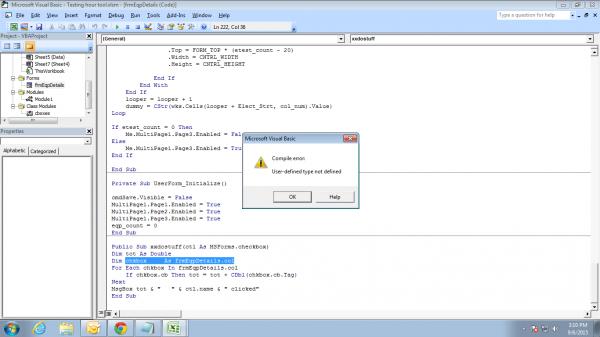
I am getting the above error while I am running the code. Please check Mr. Westconn1.
Last edited by MOHAMMEDSALMAN; Sep 6th, 2015 at 07:10 AM.
-
Sep 6th, 2015, 07:41 AM
#17
Re: Assign dynamic value to checkboxes
you maybe able to read those images, but i have great difficulty with it, please post code and error messages as text
try
Code:
dim chkbox as cboxes
i do my best to test code works before i post it, but sometimes am unable to do so for some reason, and usually say so if this is the case.
Note code snippets posted are just that and do not include error handling that is required in real world applications, but avoid On Error Resume Next
dim all variables as required as often i have done so elsewhere in my code but only posted the relevant part
come back and mark your original post as resolved if your problem is fixed
pete
-
Sep 6th, 2015, 08:11 AM
#18
Thread Starter
Junior Member
Re: Assign dynamic value to checkboxes
Code:
Dim ccb As cboxes
Public col As New Collection
Dim chkbox As frmEqpDetails.col

Public WithEvents cb As MSForms.checkbox

Private Sub cb_Click()
Call frmEqpDetails.xxdostuff(cb)
End Sub

Public Sub init(ctl As MSForms.checkbox)
Set cb = ctl
End Sub

Private Sub Class_Terminate()
Set cb = Nothing
End Sub
I am using the above code in class module and below code in Form.
Code:
Public Sub xxdostuff(ctl As MSForms.checkbox)
Dim tot As Double
Dim chkbox     As frmEqpDetails.col
For Each chkbox In frmEqpDetails.col
    If chkbox.cb Then tot = tot + CDbl(chkbox.cb.Tag)
Next
MsgBox tot & "   " & ctl.name & " clicked"
End Sub


Private Sub MultiPage1_Change()
Const sSHEET_NAME   As String = "Hour Per Equipment"
Const FORM_TOP      As Integer = 18
Const LEFT_CA       As Integer = 12
Const LEFT_CB       As Integer = 366
Const CNTRL_HEIGHT  As Integer = 17.25
Const CNTRL_WIDTH   As Integer = 342.75

Dim ctlcheckbox     As MSForms.Control
Dim wks             As Worksheet

Dim col_num As Integer, looper As Integer, test_count As Integer
Dim dummy As String

'for Visual
Const Vis_Strt      As Integer = 5

'for Mechanical
Const Mech_Strt     As Integer = 14

'for Electrical
Const Elect_Strt     As Integer = 29

col_num = cboEqpTypes.ListIndex + 2
Set wks = ThisWorkbook.Sheets(sSHEET_NAME)

looper = 0
vtest_count = 0
mtest_count = 0
etest_count = 0

dummy = CStr(wks.Cells(looper + Vis_Strt, col_num).Value)

Do While dummy <> ""
'dynamically creating check boxes for visual checks
    If wks.Cells(looper + Vis_Strt, col_num).Value <> "-" Then
           vtest_count = vtest_count + 1
        Set ctlcheckbox = Me.MultiPage1.Pages(0).Controls.Add("Forms.Checkbox.1")
        Set ccb = New cboxes
        ccb.init ctlcheckbox
        col.Add ccb
        With ctlcheckbox
            .Caption = Cells(looper + Vis_Strt, "A")
            .name = "vcb" & vtest_count
            If vtest_count <= 20 Then
                .Left = LEFT_CA
                .Top = FORM_TOP * vtest_count
                .Width = CNTRL_WIDTH
                .Height = CNTRL_HEIGHT
            Else
                .Left = LEFT_CB
                .Top = FORM_TOP * (vtest_count - 20)
                .Width = CNTRL_WIDTH
                .Height = CNTRL_HEIGHT
                .Tag = Cells(looper + Vis_Strt, col_num)
            End If
        End With
    End If
    looper = looper + 1
    dummy = CStr(wks.Cells(looper + Vis_Strt, col_num).Value)
Loop


If vtest_count = 0 Then
    Me.MultiPage1.Page1.Enabled = False
Else
    Me.MultiPage1.Page1.Enabled = True
End If
-
Sep 6th, 2015, 08:19 AM
#19
Re: Assign dynamic value to checkboxes
added to your userform
at the top in the general section
recheck the above instructions, this should be in the userform, not the class module
Dim chkbox As frmEqpDetails.col
i doubt this is correct and should be removed
i do my best to test code works before i post it, but sometimes am unable to do so for some reason, and usually say so if this is the case.
Note code snippets posted are just that and do not include error handling that is required in real world applications, but avoid On Error Resume Next
dim all variables as required as often i have done so elsewhere in my code but only posted the relevant part
come back and mark your original post as resolved if your problem is fixed
pete
-
Sep 7th, 2015, 01:17 AM
#20
Thread Starter
Junior Member
Re: Assign dynamic value to checkboxes
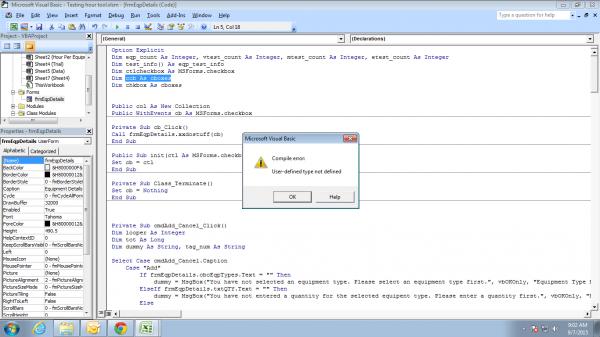
Hi Westconn1,
I am getting the above error while I am running the code. The error is "User defined type not defined". I am getting this error for "dim ccb as cboxes". Please find the below code which I am using :-
Code:
Option Explicit
Dim eqp_count As Integer, vtest_count As Integer, mtest_count As Integer, etest_count As Integer
Dim test_info() As eqp_test_info
Dim ctlcheckbox As MSForms.checkbox
Dim ccb As cboxes               'error
Dim chkbox As cboxes                          'error


Public col As New Collection
Public WithEvents cb As MSForms.checkbox

Public Sub init(ctl As MSForms.checkbox)
Set cb = ctl
End Sub

Private Sub Class_Terminate()
Set cb = Nothing
End Sub

Private Sub MultiPage1_Change()
Const sSHEET_NAME   As String = "Hour Per Equipment"
Const FORM_TOP      As Integer = 18
Const LEFT_CA       As Integer = 12
Const LEFT_CB       As Integer = 366
Const CNTRL_HEIGHT  As Integer = 17.25
Const CNTRL_WIDTH   As Integer = 342.75

Dim ctlcheckbox     As MSForms.Control
Dim wks             As Worksheet

Dim col_num As Integer, looper As Integer, test_count As Integer
Dim dummy As String

'for Visual
Const Vis_Strt      As Integer = 5

'for Mechanical
Const Mech_Strt     As Integer = 14

'for Electrical
Const Elect_Strt     As Integer = 29

col_num = cboEqpTypes.ListIndex + 2
Set wks = ThisWorkbook.Sheets(sSHEET_NAME)

looper = 0
vtest_count = 0
mtest_count = 0
etest_count = 0

dummy = CStr(wks.Cells(looper + Vis_Strt, col_num).Value)

Do While dummy <> ""
'dynamically creating check boxes for visual checks
    If wks.Cells(looper + Vis_Strt, col_num).Value <> "-" Then
           vtest_count = vtest_count + 1
        Set ctlcheckbox = Me.MultiPage1.Pages(0).Controls.Add("Forms.Checkbox.1")
        Set chbox = New cboxes
        ccb.init ctlcheckbox
        col.Add chbox
        With ctlcheckbox
            .Caption = Cells(looper + Vis_Strt, "A")
            .name = "vcb" & vtest_count
            If vtest_count <= 20 Then
                .Left = LEFT_CA
                .Top = FORM_TOP * vtest_count
                .Width = CNTRL_WIDTH
                .Height = CNTRL_HEIGHT
            Else
                .Left = LEFT_CB
                .Top = FORM_TOP * (vtest_count - 20)
                .Width = CNTRL_WIDTH
                .Height = CNTRL_HEIGHT
                .Tag = Cells(looper + Vis_Strt, col_num)
            End If
        End With
    End If
    looper = looper + 1
    dummy = CStr(wks.Cells(looper + Vis_Strt, col_num).Value)
Loop


If vtest_count = 0 Then
    Me.MultiPage1.Page1.Enabled = False
Else
    Me.MultiPage1.Page1.Enabled = True
End If

Public Sub xxdostuff(ctl As MSForms.checkbox)
Dim tot As Double
Dim chkbox As frmEqpDetails.col
For Each chkbox In frmEqpDetails.col
    If chkbox.cb Then tot = tot + CDbl(chkbox.cb.Tag)
Next
MsgBox tot & "   " & ctl.name & " clicked"
End Sub
As you told I had done the same.
recheck the above instructions, this should be in the userform, not the class module
Please help.
Last edited by MOHAMMEDSALMAN; Sep 7th, 2015 at 01:30 AM.
-
Sep 7th, 2015, 04:29 AM
#21
Re: Assign dynamic value to checkboxes
Option Explicit
Dim eqp_count As Integer, vtest_count As Integer, mtest_count As Integer, etest_count As Integer
Dim test_info() As eqp_test_info
Dim ctlcheckbox As MSForms.checkbox
Dim ccb As cboxes 'error
Dim chkbox As cboxes 'error
Public col As New Collection
Public WithEvents cb As MSForms.checkbox
only variables that are required to be global should be in the general section, the rest should be declared within the procedures, please move them to the appropriate places
Public WithEvents cb As MSForms.checkbox
Public Sub init(ctl As MSForms.checkbox)
Set cb = ctl
End Sub
Private Sub Class_Terminate()
Set cb = Nothing
End Sub
these 2 procedures and the cb_click procedure should be in the class module, the rest should be in the userform or other code modules
what is the name of your class module?
if you are having problem incorporating your existing code, try starting a new project (workbook) and getting this part of the code to work first, then when you can see how it works, you can try again to join it into your existing code
i thought i was very clear about what had to go into each code module, but you seem to have really mixed them
i do my best to test code works before i post it, but sometimes am unable to do so for some reason, and usually say so if this is the case.
Note code snippets posted are just that and do not include error handling that is required in real world applications, but avoid On Error Resume Next
dim all variables as required as often i have done so elsewhere in my code but only posted the relevant part
come back and mark your original post as resolved if your problem is fixed
pete
-
Sep 7th, 2015, 05:27 AM
#22
Thread Starter
Junior Member
Re: Assign dynamic value to checkboxes
 Posting Permissions
- You may not post new threads
- You may not post replies
- You may not post attachments
- You may not edit your posts
-
Forum Rules
|
Click Here to Expand Forum to Full Width
|



 Reply With Quote


