View Poll Results: Which version of VS 2015 did you or plan to install?
- Voters
- 11. You may not vote on this poll
-
Visual Studio Community 2015
-
Visual Studio Professional
-
Visual Studio Enterprise
-
Visual Studio Express for Desktop
-
Visual Studio Express for Web
-
Visual Studio Express for Windows
-
Dont plan on using any 2015 versions

-
Aug 5th, 2015, 12:35 PM
#1
Visual Studio 2015
Ok so we have seen it and some have tried it but my question is, who is actually using it and what version did you install?
Im surprized at the lack of any threads on the topic or did I miss something lol
VB/Office Guru™ (AKA: Gangsta Yoda™  ®) ®)
I dont answer coding questions via PM. Please post a thread in the appropriate forum. 
Microsoft MVP 2006-2011
Office Development FAQ (C#, VB.NET, VB 6, VBA)
Senior Jedi Software Engineer MCP (VB 6 & .NET), BSEE, CET
If a post has helped you then Please Rate it! 
• Reps & Rating Posts • VS.NET on Vista • Multiple .NET Framework Versions • Office Primary Interop Assemblies • VB/Office Guru™ Word SpellChecker™.NET • VB/Office Guru™ Word SpellChecker™ VB6 • VB.NET Attributes Ex. • Outlook Global Address List • API Viewer utility • .NET API Viewer Utility •
System: Intel i7 6850K, Geforce GTX1060, Samsung M.2 1 TB & SATA 500 GB, 32 GBs DDR4 3300 Quad Channel RAM, 2 Viewsonic 24" LCDs, Windows 10, Office 2016, VS 2019, VB6 SP6
-
Aug 5th, 2015, 12:43 PM
#2
Re: Visual Studio 2015
Reviews I've read suggest it is incomplete and confusing in places. Win10 support seems to be coming seperately?
Example: Visual Studio 2015 Launched - Any App Any Developer
-
Aug 5th, 2015, 01:02 PM
#3
Re: Visual Studio 2015
But windows 10 is now available so that shouldnt be an issue anymore, no?
VB/Office Guru™ (AKA: Gangsta Yoda™ ®)
I dont answer coding questions via PM. Please post a thread in the appropriate forum.
Microsoft MVP 2006-2011
Office Development FAQ (C#, VB.NET, VB 6, VBA)
Senior Jedi Software Engineer MCP (VB 6 & .NET), BSEE, CET
If a post has helped you then Please Rate it!
• Reps & Rating Posts • VS.NET on Vista • Multiple .NET Framework Versions • Office Primary Interop Assemblies • VB/Office Guru™ Word SpellChecker™.NET • VB/Office Guru™ Word SpellChecker™ VB6 • VB.NET Attributes Ex. • Outlook Global Address List • API Viewer utility • .NET API Viewer Utility •
System: Intel i7 6850K, Geforce GTX1060, Samsung M.2 1 TB & SATA 500 GB, 32 GBs DDR4 3300 Quad Channel RAM, 2 Viewsonic 24" LCDs, Windows 10, Office 2016, VS 2019, VB6 SP6
-
Aug 5th, 2015, 01:54 PM
#4
Re: Visual Studio 2015
I intend to install it, but not until I get a new computer. I don't have enough HD space left on this one for another program of any reasonable size.
My usual boring signature: Nothing
 
-
Aug 5th, 2015, 02:13 PM
#5
Re: Visual Studio 2015
Im out of SSD space for the install too but Im gonna throw another SSD at it to get space. I do need a new computer and have half the components so far. 6 core i7
VB/Office Guru™ (AKA: Gangsta Yoda™ ®)
I dont answer coding questions via PM. Please post a thread in the appropriate forum.
Microsoft MVP 2006-2011
Office Development FAQ (C#, VB.NET, VB 6, VBA)
Senior Jedi Software Engineer MCP (VB 6 & .NET), BSEE, CET
If a post has helped you then Please Rate it!
• Reps & Rating Posts • VS.NET on Vista • Multiple .NET Framework Versions • Office Primary Interop Assemblies • VB/Office Guru™ Word SpellChecker™.NET • VB/Office Guru™ Word SpellChecker™ VB6 • VB.NET Attributes Ex. • Outlook Global Address List • API Viewer utility • .NET API Viewer Utility •
System: Intel i7 6850K, Geforce GTX1060, Samsung M.2 1 TB & SATA 500 GB, 32 GBs DDR4 3300 Quad Channel RAM, 2 Viewsonic 24" LCDs, Windows 10, Office 2016, VS 2019, VB6 SP6
-
Aug 5th, 2015, 03:06 PM
#6
Re: Visual Studio 2015
I'm due for a replacement, but I'm even more due for a long walk in the woods, so I won't be dealing with the computer for another month, or more.
My usual boring signature: Nothing
-
Aug 6th, 2015, 02:03 AM
#7
Re: Visual Studio 2015
I've got a big project to deliver in the next few months so I'm putting it off until then. I know what I'm like and the first thing I'd do would be to load up the project in 2015 and risk a bunch of instability.
Once the project's out the door and I'm confident I can't accidentally turn it into rhubarb crumble I'll be installing the community edition... because I qualify.
The best argument against democracy is a five minute conversation with the average voter - Winston Churchill
Hadoop actually sounds more like the way they greet each other in Yorkshire - Inferrd
-
Aug 6th, 2015, 09:34 AM
#8
Re: Visual Studio 2015
We're using VS2013 Community Edition for the current projects, but we just installed VS2015 Enterprise for a new project we're starting next week.
-
Aug 6th, 2015, 09:39 AM
#9
Re: Visual Studio 2015
 Originally Posted by FunkyDexter

I've got a big project to deliver in the next few months so I'm putting it off until then. I know what I'm like and the first thing I'd do would be to load up the project in 2015 and risk a bunch of instability.
Once the project's out the door and I'm confident I can't accidentally turn it into rhubarb crumble I'll be installing the community edition... because I qualify.
If somebody came up with a program that turned software into rhubarb crumble....that would be phat, and I would be fat.
My usual boring signature: Nothing
-
Aug 6th, 2015, 12:20 PM
#10
Re: Visual Studio 2015
What does it bring to the table to make the average programmer that much more productive? I've not seen anything compelling to upgrade from 2010. It does seem to be style over substance.
It appears (anecdotally) that this is one of the most unstable development environments/frameworks since 1.0. But then, windows 7 is working fine, Win 10 is an incremental upgrade (or downgrade, depending how you look at it).
Maybe I'm just a VB6er...
"Ok, my response to that is pending a Google search" - Bucky Katt.
"There are two types of people in the world: Those who can extrapolate from incomplete data sets." - Unk.
"Before you can 'think outside the box' you need to understand where the box is."
-
Aug 6th, 2015, 02:20 PM
#11
Re: Visual Studio 2015
VS2015 does seem to be a bit of a non-event.
-
Aug 6th, 2015, 02:36 PM
#12
Re: Visual Studio 2015
Originally Posted by SJWhiteley
What does it bring to the table to make the average programmer that much more productive? I've not seen anything compelling to upgrade from 2010. It does seem to be style over substance.
Generally speaking, every VS release since 2010 has been a non-event for lots of people, because the major advances were in remote areas. I believe that VS2015 was supposed to bring the JS editor up to being a first-class language, which is really necessary. What MS generally does is gives you a good IDE, but all the low hanging fruit was plucked for the .NET languages and C/C++ a few genrations back. In 2013, there were some new visual indicators to help with navigating code, and 2015 has gone further in this area. Those features don't appear to add much value, at first, but as I got using 2013, I found that I began relying on them more and more to move rapidly around large code pages. That's hardly a necessary change, but they do add a small amount.
I am interested to see what improvements have been made in the JS editor, because that is an area that is RIPE for improvements. I'll be doing the upgrade to try those out, primarily. I may also do it to see if I can get XNA working in 2015. It has been possible to get it working in 2012 and 2013, so I expect that it will work in 2015, which may be enough to get me to move some XNA projects over to that (from 2010).
It all has to wait until I have a computer that has more free HD space than it has RAM, though.
My usual boring signature: Nothing
-
Aug 6th, 2015, 07:42 PM
#13
Re: Visual Studio 2015
Originally Posted by RobDog888
But windows 10 is now available so that shouldnt be an issue anymore, no?
True, the Win10 SDK is supposed to be out now and it should have an expansion pack for VS 2015. Still waiting to hear from anyone who has tried it though.
It does seem odd that people are clinging to obsolete versions. .Net has never claimed to offer stability anyway, so it isn't as if long term support should be an issue. Just rewrite every year or two.
.NET 4 Versions End of Life Here Before Devs Know It
.NET vNext isn't here just yet, but Microsoft wants developers to move on to .NET Framework 4.5.2 as soon as possible, with support for versions 4 up to 4.5.1 ending mid-January 2016.
-
Aug 7th, 2015, 10:22 AM
#14
Re: Visual Studio 2015
I'm not so sure that "clinging" is the right word. For the first several versions of .NET, you got a LOT of good stuff with each version. For example, 2005 offered up huge improvements with the generics alone. 2008 added in LINQ and a few other things that were well received. 2010 was the best looking of all the releases and added a few other things. But since then, what are we really getting?
Software companies have an obvious incentive to keep releasing new versions. Without new versions, they don't get repeat customers often enough to keep on going. The problem is that eventually you end up with a program that is good enough that there isn't much else that can be added. As far as the feature set is concerned, C/C++ won't change much once they are fully ANSI standard compliant, .NET will only continue to evolve as long as there is somewhere new worth going, and there isn't anything obviously lacking in the core language. So, all that's left is to try to add features to the IDE, which has happened in 2012, 2013, and 2015, but the high-yield improvements were plucked a long time back.
So, MS is trying to offer up reasons to upgrade, but the reasons are becoming increasingly weak simply because the product is reaching a state of sufficiency.
My usual boring signature: Nothing
-
Aug 7th, 2015, 10:31 AM
#15
Re: Visual Studio 2015
Well each release has had a pretty long list of changes and new features. But I suppose a large number of them just don't matter to an individual programmer until they need some of them.
So as long as you can still target a supported Framework in order to avoid the unpatched attack vulnerabilities, moving to a newer VS probably really isn't that important. Then perhaps the only issue left is dealing with the learning curve when something new you need comes out and you have stayed umpteen releases behind.
Even then most people probably don't make use of the myriad nook and crannies of each VS release (there is a ton of stuff in each one). That probably does a lot to whittle down the height of the learning curve you have to climb.
-
Aug 8th, 2015, 03:44 PM
#16
Re: Visual Studio 2015
I have yet to see a learning curve, aside from 2012 when they changed all the button icons, thereby confusing the people who were used to a standard set of MS icons that had been in use for over a decade. All the features that have been added since 2005 have been optional to some extent. For example, when LINQ was introduced, plenty of people jumped on that. However, LINQ makes more compact code, it doesn't make better code. I have yet to measure a LINQ statement that is as fast as a non-LINQ equivalent (though I think that it might be if you are using a JOIN in the LINQ statement, I just have yet to measure that).
It could be said that Tasks added something truly new, because they are a simpler way to do threading than using a thread, and there is some learning to that, but you can accomplish the same ....uhhh...tasks using threading, and have been able to since VS2002. Tasks may be more efficient than threading, so they may be a true performance advantage, unlike LINQ where the advantage was more aesthetic, but measuring that gain is relatively difficult.
I just think that it comes down to what you said in the last statement, without the learning curve bit: Most people probably don't make use of the myriad nooks and crannies of each VS release. The releases are about trying to keep us upgrading, but all the significant improvements have already been realized. That makes the incentive to upgrade pretty anemic.
My usual boring signature: Nothing
-
Aug 15th, 2015, 03:10 PM
#17
Re: Visual Studio 2015
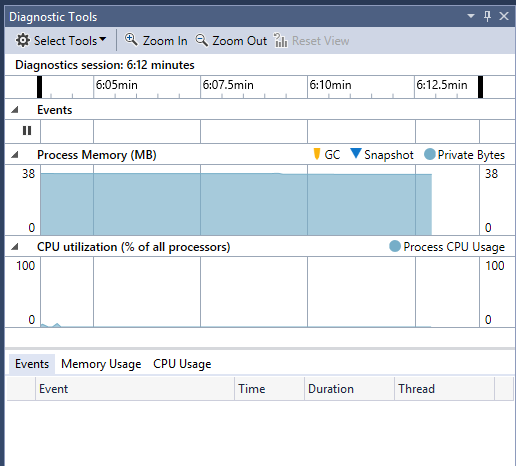
I just upgraded because MS wouldnt let me download 2013 on my new PC. Did older versions have Diagnostic Tools? I dont remember them, but they are pretty cool.
My usual boring signature: Something
-
Aug 17th, 2015, 12:37 PM
#18
Re: Visual Studio 2015
I installed the Enterprise version several weeks ago on Windows 7.
What bugged me was several times it crashed when adding a new project to an existing solution, not that I care so much but some have, the changed to "Imported namespaces". If you code in C# when typing in code Intellisense reacts quickly where prior to 2015 VB.NET did not, now it does, no biggie but a tad irritating.
I like the Lambda support in the Immediate window and conditions under break-points along with how they are implemented yet could use some better docs to include {} usage, not just # usage (yeah it's vague I know) under conditions in break-points.
We started a solution in VS2013 a month prior to 2015 release so we will decide to use or not use for the next solution in mid fall.
-
Aug 17th, 2015, 01:08 PM
#19
Re: Visual Studio 2015
I like the Lambda support in the Immediate window
That ones the big win for me too. I use Lamdas a lot and this is a fundamental debugging tool I've been chomping at the bit for.
The best argument against democracy is a five minute conversation with the average voter - Winston Churchill
Hadoop actually sounds more like the way they greet each other in Yorkshire - Inferrd
-
Aug 20th, 2015, 09:06 AM
#20
Re: Visual Studio 2015
I want to use the blasted thing, it's really best-in-class when it comes to debugging. But it's slow as molasses and within a couple of weeks I'll be using Xamarin Studio on Mac OS X, so I don't want to get too cozy with it. Most of the really cool features I want to try are limited to non-Community editions, so this is one of the first times I've found myself deciding that they didn't make this VS for me.
This answer is wrong. You should be using TableAdapter and Dictionaries instead.
-
Aug 21st, 2015, 01:55 AM
#21
Re: Visual Studio 2015
It's giving me a small amount of grief at the moment. I created a class library to demo the strategy pattern in the "What if there was a new VB6" thread and I'd like to knock up a simple client to show how to use it. Should be easy but when I add a client project it won't let me add a reference to the core project. The totality of the eror messge it gives me is "Can't Add Reference". Well thanks for that then. A bit more info might be useful
I've got say that I'm liking what I've seen so far though. I'm still not mad keen on the look and feel (2010 was perfect in that regard IMO) but the functionality's all there. Maybe I've just got lucky but it's enabled some features I really needed at exactly the right time for me. If NSA reads this he'll understand when I say "Grid Layouts FTW!!!"
The best argument against democracy is a five minute conversation with the average voter - Winston Churchill
Hadoop actually sounds more like the way they greet each other in Yorkshire - Inferrd
-
Aug 21st, 2015, 03:31 AM
#22
Re: Visual Studio 2015
Most of the really cool features I want to try are limited to non-Community editions
Out of interest what are these features?
I was under the impression that the community edition was basically the Professional edition with different licencing is that not the case?
(I have the Professional Edition (2013 currently as we use that as a company) at work and home through my MSDN licence so i haven't installed the Community edition.
Please Mark your Thread "Resolved",  if the query is solved & Rate those who have helped you 
-
Aug 21st, 2015, 03:35 AM
#23
Re: Visual Studio 2015
If NSA reads this he'll understand when I say "Grid Layouts FTW!!!"
Initially i read that as *** lol !
edit - ok apparently i cant say the acronym but just switch the W and the F and you will get what i mean
Please Mark your Thread "Resolved", if the query is solved & Rate those who have helped you
-
Aug 21st, 2015, 09:39 AM
#24
Re: Visual Studio 2015
Originally Posted by NeedSomeAnswers
Out of interest what are these features?
I was under the impression that the community edition was basically the Professional edition with different licencing is that not the case?
(I have the Professional Edition (2013 currently as we use that as a company) at work and home through my MSDN licence so i haven't installed the Community edition.
Here's some stuff I am mad I probably can't use:
That's actually a pretty short list, but both look like really big quality fo life improvements. I can code just fine without them, but you know what? I'd also pay $50 to piecemeal enable them. I don't have several hundred dollars and my company's already paying a LOT for me to use Xamarin Studio, so I'm content to just not have these features. I don't need the dang TFS parts of CodeLens, what'd be nice is to see my methods annotated with the reference/test information. But hey, they've got to pay the R&D bills somehow, right?
It'd be cool to see CE allow you to buy features via microtransactions, so maybe if I want a handful of Ultimate features I can get them without dropping a grand.
This answer is wrong. You should be using TableAdapter and Dictionaries instead.
 Posting Permissions
- You may not post new threads
- You may not post replies
- You may not post attachments
- You may not edit your posts
-
Forum Rules
|
Click Here to Expand Forum to Full Width
|



 Reply With Quote


