|

-
Jul 1st, 2015, 05:34 AM
#1
Thread Starter
Lively Member


 [RESOLVED] Draw Perpendicular Bisector Line [RESOLVED] Draw Perpendicular Bisector Line
Hi,
I need to draw a perpendicular bisector line of a drawn line as shown in attached image.
Required things are:
I do have coordinates of first line i.e. Pt1, Pt2.
1) Find mid point of line.
2) Find Points of perpendicular bisector from mid point, so that the second line drawn is exactly of equal height as of first line.
3) Second line height must be exactly equal to first line.

Line in orange color is first line drawn.
I need to find coordinates of second line in green color.
-
Jul 1st, 2015, 09:52 AM
#2
Re: Draw Perpendicular Bisector Line
There's different ways to approach this...
1) Vector-Math (there should be different VB-Modules to be found on the Web)
2) Trigonometry-Math
3) 2D-Matrix-based Coord-Transformations
I'll describe an approach for the last point above, because it's (IMO)
the easiest way to think about the problem - along the tasks you already
layed out in your original posting...
1) Find mid point of line...
This is relatively easy, since the "mass-center-point of a set of points of equal mass"
can simply be derived by calculating the average of all x- and y-
components of said points separately.
In case of a simple line, the "number of points in such a set" is only 2.
So, to calculate the new center-point on a line, the averaging formulas boil down to:
xc = (x1 + x2) / 2
yc = (y1 + y2) / 2
With that center point given, the Coord-Transform will have to
perform only the following "atomic ops" (which can be Translate, Rotate, Scale)...
- Translate the Coord-System to the new centerpoint (xc, yc)...
- Rotate the Coord-System 90 (or -90) degrees
- Translate the Coord-System back by the amount of the former (xc, yc)-shift
- then calculate the new Points on that transformed Coord-Systems Matrix
Using a library which supports a 2D-Matrix, you can express the above task nearly unchanged
(with regards to the wording) e.g. in a function like that (using the 2D-Matrix from vbRichClient5-Cairo-Wrapper):
Code:
Sub GetTransformedPoints(x1#, y1#, x2#, y2#, Optional xc#, Optional yc#)
  With Cairo.CreateIdentityMatrix
    xc = (x1 + x2) / 2: yc = (y1 + y2) / 2 '<- calculate the center-point

    .TranslateCoords xc, yc
      .RotateCoordsDeg -90
    .TranslateCoords -xc, -yc 'reverse the translation (after rotation)

    .CalculatePoint x1, y1 'transform the new Point1 "in place" (ByRef)
    .CalculatePoint x2, y2 'same for the new Point2
  End With
End Sub
To test that, you can put the following into a VB-Form (after checking in
a reference to vbRichClient5):
Code:
Private Sub Form_Load()
Dim CC As cCairoContext
Set CC = Cairo.CreateSurface(800, 600).CreateContext
    CC.SetSourceColor vbWhite: CC.Paint

Dim x1#, y1#, x2#, y2#, xc#, yc#
    x1 = 100: y1 = 220
    x2 = 300: y2 = 80

  'draw original Line and its points
  CC.DrawLine x1, y1, x2, y2, False, 4, &H3399FF
  DrawPointAndCaption CC, x1, y1, vbMagenta, "P1"
  DrawPointAndCaption CC, x2, y2, vbMagenta, "P2"

  GetTransformedPoints x1, y1, x2, y2, xc, yc '<- derive new transformed points ByRef

  'draw derived Line, based on the new points
  CC.DrawLine x1, y1, x2, y2, False, 4, &H22CC44
  DrawPointAndCaption CC, x1, y1, vbCyan, "PB1"
  DrawPointAndCaption CC, x2, y2, vbCyan, "PB2"
  DrawPointAndCaption CC, xc, yc, vbBlue, "PC"

Set Picture = CC.Surface.Picture
End Sub

Sub DrawPointAndCaption(CC As cCairoContext, x#, y#, ByVal Color&, Optional Caption$)
  CC.ARC x, y, 7
    CC.SetSourceColor Color, 0.33 'set Point-Color with 33% Alpha
  CC.Fill
  If Len(Caption) Then CC.TextOut x + 10, y - 8, Caption & "(" & x & ", " & y & ")"
End Sub

'...place the code for the GetTransformedPoints-routine here
The above code will then produce this Drawing-output:
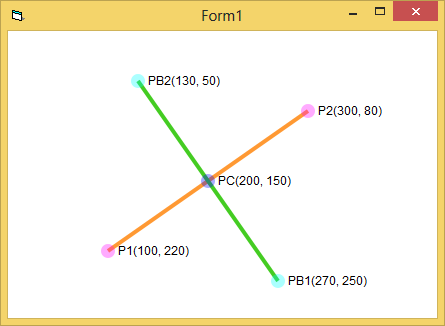
In case you're using GDI+, there's similar Matrix-Functions available,
which perhaps LaVolpe or Tanner will explain in more detail...
Olaf
Last edited by Schmidt; Jul 1st, 2015 at 10:17 AM.
Reason: Correction of the wording with regards to sets of points of equal mass
-
Jul 1st, 2015, 01:55 PM
#3
Re: Draw Perpendicular Bisector Line
An interactive example.
Click and drag to draw an original line and a 90 degree center rotated version.
Code:
Private phase As Integer

Private Sub Form_Load()
  AutoRedraw = True
End Sub

Private Sub Form_MouseMove(Button As Integer, Shift As Integer, X As Single, Y As Single)
  Static sx As Single, sy As Single 'Start of original line
  Dim mx As Single, my As Single    'Middle of original line
  Dim dx As Single, dy As Single    'delta between middle and one end of original line

  If Button = vbLeftButton Then
   If phase = 0 Then            'Anchor one end of the original line
     phase = 1
     sx = X: sy = Y             'Start X,Y
   End If

   mx = (X + sx) / 2            'Find mid point of the line, mx, my
   my = (Y + sy) / 2

   dx = X - mx: dy = Y - my     'delta X from the mid point to one end of the line
   Cls                          'draw from midpoint out +/- deltas on normal axis
   Line (mx - dy, my + dx)-(mx + dy, my - dx)
   Line (sx, sy)-(X, Y)         'draw the "original" line
  End If
End Sub

Private Sub Form_MouseUp(Button As Integer, Shift As Integer, X As Single, Y As Single)
  phase = 0
End Sub
Last edited by passel; Jul 1st, 2015 at 02:21 PM.
-
Jul 20th, 2015, 04:08 AM
#4
Thread Starter
Lively Member
 Re: Draw Perpendicular Bisector Line Re: Draw Perpendicular Bisector Line
Thanks to Schmidt and Passel for replying and giving the insights on this big issue I was facing.
A very big thanks to Passel, Your solution is what I wanted and exactly worked in my scenario. Sorry for replying late over this thread, because got busy finishing up and implementing things from your reply.
My issue is resolved.
Regards,
AmolT.
Tags for this Thread
 Posting Permissions
- You may not post new threads
- You may not post replies
- You may not post attachments
- You may not edit your posts
-
Forum Rules
|
Click Here to Expand Forum to Full Width
|



 Reply With Quote
