|

-
May 15th, 2015, 06:45 PM
#1
 [RESOLVED] How to pass value from form to custom class? Please help [RESOLVED] How to pass value from form to custom class? Please help
I have a process class that needs a fps integer from the main form. This integer changes between 24 to 30fps. I tried to pass this integer by making it publically shared on form1, but the ffmpeg process wouldn't start because it didn't recieve it. I know this is the problem because when I manually enter this integer to the process class arguments, ffmpeg starts.
Form1:
Code:
Public Class Form1


Public shared fps As Single


    Dim proc2 As New VideoProcess


    Private Sub Record_Click(ByVal sender As System.Object, ByVal e As System.EventArgs) Handles Record.Click

    fps = 30

    'starts ffmpeg process for captured frames
    proc2.Start()

    End Sub
Process Class:
Code:
Public Class VideoProcess


    Inherits Process

    Dim dir As String = Environment.GetFolderPath(Environment.SpecialFolder.MyVideos)


    Public Sub New()

    StartInfo.FileName = dir & "\" & "\Captured\ffmpeg.exe"
    StartInfo.Arguments = String.Format("-f image2pipe -r " & Form1.fps & " -i pipe:.bmp -pix_fmt yuv420p -c:v libx264 -crf 18 -g 1 -y -r " & Form1.fps & " " & dir & "\Captured\Temp.mp4")
    StartInfo.UseShellExecute = False
    StartInfo.WindowStyle = ProcessWindowStyle.Hidden
    StartInfo.RedirectStandardInput = True
    StartInfo.RedirectStandardOutput = True
    StartInfo.CreateNoWindow = True

    End Sub


End Class
Niya gave me the idea of adding a custom property to the process class, but that also didn't work. Should've!
Code:
Public Class Form1
    Dim proc2 As New VideoProcess

    Private Sub Record_Click(ByVal sender As System.Object, ByVal e As System.EventArgs) Handles Record.Click
    'starts ffmpeg process for captured frames
    proc2.FPS = 30
    proc2.Start()
    End Sub

End Class
Code:
Public Class VideoProcess
    Inherits Process

    Dim dir As String = Environment.GetFolderPath(Environment.SpecialFolder.MyVideos)

    Public Property FPS As Integer
    Public Sub New()

    StartInfo.FileName = dir & "\" & "\Captured\ffmpeg.exe"
    StartInfo.Arguments = String.Format("-f image2pipe -r " & Me.FPS.ToString & " -i pipe:.bmp -pix_fmt yuv420p -c:v libx264 -crf 18 -g 1 -y -r " & Me.FPS.ToString & " " & dir & "\Captured\Temp.mp4")
    StartInfo.UseShellExecute = False
    StartInfo.WindowStyle = ProcessWindowStyle.Hidden
    StartInfo.RedirectStandardInput = True
    StartInfo.RedirectStandardOutput = True
    StartInfo.CreateNoWindow = True

    End Sub

End Class
How can I pass this integer from the main form to this process class? Please help
Last edited by Peter Porter; May 15th, 2015 at 09:00 PM.
-
May 15th, 2015, 08:33 PM
#2
Re: How to pass value from form to custom class? Please help
Passing it in the constructor is one way,..
Code:
Public Class Form1

    Private proc2 As VideoProcess = Nothing
    Private Property fps As Integer

    Private Sub Button1_Click(sender As System.Object, e As System.EventArgs) Handles Button1.Click
        Me.fps = 30
        proc2 = New VideoProcess(Me.fps)
    End Sub

End Class
Code:
Public Class VideoProcess

    Public Property FPS As Integer

    Public Sub New(ByVal fps As Integer)
        Me.FPS = fps
        MessageBox.Show(String.Format("Me.FPS = {0}", Me.FPS))
    End Sub

End Class
-
May 15th, 2015, 08:55 PM
#3
Re: How to pass value from form to custom class? Please help
Edgemeal, thank you!
I made some minor changes. It works like a charm!
Code:
Public Class Form1

    Private proc2 As VideoProcess = Nothing
    Private Property fps As Integer

    Private Sub Record_Click(sender As System.Object, e As System.EventArgs) Handles Record.Click
        fps = CInt(Button1.Text) 'this button's text changes from 24 to 30fps
        proc2 = New VideoProcess(fps)
        proc2.Start()
    End Sub

End Class
Code:
Public Class VideoProcess

    Inherits Process

    Dim dir As String = Environment.GetFolderPath(Environment.SpecialFolder.MyVideos)

    Public Sub New(ByVal fps As Integer)

        StartInfo.FileName = dir & "\" & "\Captured\ffmpeg.exe"
        StartInfo.Arguments = String.Format("-f image2pipe -r " & fps & " -i pipe:.bmp -pix_fmt yuv420p -c:v libx264 -crf 18 -g 1 -y -r " & fps & " " & dir & "\Captured\Temp.mp4")
        StartInfo.UseShellExecute = False
        StartInfo.WindowStyle = ProcessWindowStyle.Hidden
        StartInfo.RedirectStandardInput = True
        StartInfo.RedirectStandardOutput = True
        StartInfo.CreateNoWindow = True

    End Sub


End Class
Last edited by Peter Porter; May 15th, 2015 at 09:16 PM.
-
May 15th, 2015, 09:02 PM
#4
Re: [RESOLVED] How to pass value from form to custom class? Please help
& FPS &
If FPS is an Integer then VB will automatically convert it to a string using MS.VB class, I believe .ToString is the preferred .Net way,
& FPS.ToString &
-
May 15th, 2015, 09:13 PM
#5
Re: [RESOLVED] How to pass value from form to custom class? Please help
tostring does not convert the object. Only gets its string representation.
-
May 15th, 2015, 09:15 PM
#6
Re: [RESOLVED] How to pass value from form to custom class? Please help
I dont see any need for a new class here. I also notice you are using default instances.
-
May 15th, 2015, 09:33 PM
#7
Re: [RESOLVED] How to pass value from form to custom class? Please help
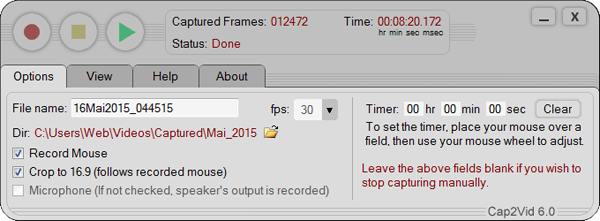
Just trying to better organize my code for my project below. 
Last edited by Peter Porter; May 15th, 2015 at 09:53 PM.
-
May 16th, 2015, 02:12 PM
#8
Re: [RESOLVED] How to pass value from form to custom class? Please help
 Originally Posted by ident

tostring does not convert the object. Only gets its string representation.
I'm not sure what actually goes on behind the code, but when you use & Integer & the IL code produces legacy code using MS.VB, same code as if you used CStr() instead of .ToString,...
Code:
Dim s As String = (1).ToString
vb.net Code:
call instance string [mscorlib]System.Int32::ToString()
Code:
Dim s As String = CStr(1)
vb.net Code:
call string [Microsoft.VisualBasic]Microsoft.VisualBasic.CompilerServices.Conversions::ToString(int32)
Last edited by Edgemeal; May 17th, 2015 at 05:15 PM.
Tags for this Thread
 Posting Permissions
- You may not post new threads
- You may not post replies
- You may not post attachments
- You may not edit your posts
-
Forum Rules
|
Click Here to Expand Forum to Full Width
|



 Reply With Quote


