|

-
May 11th, 2015, 06:49 PM
#1
 [RESOLVED] Listview clear/adding items blinking, best approach to stop the blink [RESOLVED] Listview clear/adding items blinking, best approach to stop the blink
I am currently adding like this
Code:
Public Sub UpdateBooks()
Dim Rs As cRecordset  'vbrichclient5
Dim lstItem As ListItem

  With ListView1
      .Visible = False
      .ListItems.Clear
        Set Rs = BitFinex.MemDB.GetRs("SELECT * FROM vwBookBids")
          Do While Not Rs.EOF
              Set lstItem = .ListItems.Add(, , Rs("Price").Value)
                  lstItem.SubItems(1) = Rs("Amount").Value
              Rs.MoveNext
          Loop
      .Visible = True
  End With

End Sub
I use .visible = false/true at the moment, but there is a flicker, I have tried to use a .Refresh instead of visible false/true and it did stop the flicker however the loading is very slow (because of the refresh in a loop)..=
What solutions have you guys tried and been successful with the results?
-
May 11th, 2015, 07:21 PM
#2
Re: Listview clear/adding items blinking, best approach to stop the blink
Try using LockWindowUpdate API.
-
May 11th, 2015, 08:39 PM
#3
Re: Listview clear/adding items blinking, best approach to stop the blink
 Originally Posted by dee-u

Try using LockWindowUpdate API.
I tried like this
Code:
Public Sub UpdateBooks()
Dim Rs As cRecordset  'vbrichclient5
Dim lstItem As ListItem
LockWindowUpdate Listview1.hWnd
  With ListView1
      .ListItems.Clear
        Set Rs = BitFinex.MemDB.GetRs("SELECT * FROM vwBookBids")
          Do While Not Rs.EOF
              DoEvents
              Set lstItem = .ListItems.Add(, , Rs("Price").Value)
                  lstItem.SubItems(1) = Rs("Amount").Value
              Rs.MoveNext
          Loop
  End With
LockWindowUpdate 0&
End Sub
Edit: Forgot to remove .visible... it is a lot better flickers only once in a while now. I notice if I add a DoEvents it barely ever flicks
Last edited by Max187Boucher; May 11th, 2015 at 08:51 PM.
-
May 11th, 2015, 09:03 PM
#4
Re: Listview clear/adding items blinking, best approach to stop the blink
If you're adding so much stuff it's noticeably slow and there's flickering, you should really step up to a better ListView. For best performance you should roll your own that way it only implements the features you need when you need them, but there's also krool's common controls pack in the code bank. Anything that is using CreateWindowEx. It will take a fraction of the time to add items... like 30 seconds could become 5 seconds. And there's no flicker at all if it's done right.
-
May 11th, 2015, 09:06 PM
#5
Re: Listview clear/adding items blinking, best approach to stop the blink
Didn't think about krool's common control will have a look at it, I was using mshflexgrid which works but, was just experimenting with the listview, thanks will post back
Edit:
Used Krool's Listview with lockwindow api and its working good now thanks fafalone and dee-u
Last edited by Max187Boucher; May 11th, 2015 at 09:23 PM.
-
May 11th, 2015, 10:43 PM
#6
Re: Listview clear/adding items blinking, best approach to stop the blink
It should add items without flicker even without LockWindowUpdate if there's a DoEvents in there. With LockWindowUpdate you can't see the items while they're being added, so of course nothing flickers. Did you try it without that first?
-
May 11th, 2015, 10:55 PM
#7
Re: Listview clear/adding items blinking, best approach to stop the blink
Flickers
Code:
With ListBid
      .ListItems.Clear
        Set Rs = BitFinex.MemDB.GetRs("SELECT * FROM vwBookBids")
          Do While Not Rs.EOF
          DoEvents
              Set lstItem = .ListItems.Add(, , Rs("Price").Value)
                  lstItem.SubItems(1) = Rs("Amount").Value
              Rs.MoveNext
          Loop
  End With
Does not flicker (barely visible)
Code:
LockWindowUpdate ListBid.hWnd
With ListBid
      .ListItems.Clear
        Set Rs = BitFinex.MemDB.GetRs("SELECT * FROM vwBookBids")
          Do While Not Rs.EOF
              Set lstItem = .ListItems.Add(, , Rs("Price").Value)
                  lstItem.SubItems(1) = Rs("Amount").Value
              Rs.MoveNext
          Loop
  End With
LockWindowUpdate 0&
-
May 14th, 2015, 12:28 PM
#8
Re: [RESOLVED] Listview clear/adding items blinking, best approach to stop the blink
Since you're using the RC5 already for the Data- and Web-related parts,
why not use the Widgets from vbWidgets.dll for flickerfree rendering in your GUI.
The cwVList is easily adaptable to simple Listing-requirements as above -
and there would be no need to copy any data over from the cRecordsets -
just pair each cwVList-Widget-Instance you create with a "companion-Rs"
(both appropriately named) - and be (aside from a handful of drawing-calls)
"done with it".
The "visualization-performance" would be much better than with any
"copy data-fields over into the Control"-approach.
You could host your several "Ticker-Visualization-Widgets" e.g. in a
separate ToolForm of type cWidgetForm (which you could create as
freestanding TopLevel-Window and show from your Main-Form at any time.
To reproduce the following example you would need to download the
vbWidgets-Project-Zip from its GitHub-Repo:
https://github.com/vbRichClient/vbWidgets
(over the small "Download as Zip"-Button down at the right-hand-side,
... followed by placing vbWidgets.dll beside the place where you registered
... vbRichClient5.dll - then register that vbWidgets.dll too)
Then open a new VB-StdExe-Project and include the two references
(vbRichClient5 and vbWIdgets).
Add a new Module to the freshly opened VB-Project (in addition to Form1),
switch the Project Start-Mode to "Sub Main" - and place the following code in the module:
Code:
Option Explicit

Public MemDB As cMemDB, fTool As New cfTool 'MemDB and fTool-Window are globally reachable

Sub Main()
  Set MemDB = New_c.MemDB 'create a Demo-Instance of the global MemDB
      MemDB.Exec "Create Table SomeBids(Amount Text, Price Text)" 'and add a simple table to it

  Dim i As Long
  For i = 1 To 20 'add a few Demo-Records
    MemDB.ExecCmd "Insert Into SomeBids Values(?,?)", Str(i), Str(i + 0.01)
  Next i

  Cairo.ImageList.AddIconFromResourceFile "LstIco", "shell32.dll", 322, 32, 32 'add an image-resource

  Form1.Show 'show the normal VB-MainForm
End Sub
Into Form1 goes this code here:
Code:
Option Explicit

Private WithEvents tmrUpdates As cTimer

Private Sub Form_Load()
  Caption = "Click Me, to show the Tool-Window with the Bids-Ticker"
End Sub

Private Sub Form_Click()
  fTool.Form.Show , Me
  Set tmrUpdates = New_c.Timer(500, True)
End Sub

Private Sub tmrUpdates_Timer() 'just to simulate some Updates, as they could also come in over the Web-API
  With MemDB.GetRs("Select * From SomeBids")
      !Price = Str(Val(!Price.Value) + 0.01)  'change the Price of the first record
      .MoveNext
      !Price = Str(Val(!Price.Value) + 0.01) 'change the Price of the second record

      .AddNew 'and add a new Record to expand the MemDB-Tables content a bit
        !Amount = Str(.RecordCount)
        !Price = Str(.RecordCount + 0.01)
      .UpdateBatch
  End With
End Sub
Finally, this code here has to be placed in a Private Class you will have to add under the name: cfTool
Code:
Option Explicit

Public WithEvents Form As cWidgetForm
Private RsBids As cRecordset, WithEvents lstBids As cwVList, WithEvents tmrRefresh As cTimer

Private Sub Class_Initialize()
  Set Form = Cairo.WidgetForms.Create(vbSizableToolWindow, "Bids-Ticker-List", True, 200, 300, True) 'create the Tool-Window
  Set lstBids = Form.Widgets.Add(New cwVList, "lstBids") 'add the new Control to our Form
      lstBids.HeaderHeight = 24
      lstBids.RowHeight = 21
  Set tmrRefresh = New_c.Timer(1000, True)
End Sub

Private Sub Form_ResizeWithDimensions(ByVal NewWidth As Long, ByVal NewHeight As Long)
  lstBids.Widget.Move 0, 0, NewWidth, NewHeight 'adjust the Widget to the full Form-Dimensions in this case
End Sub

Private Sub Form_QueryUnload(Cancel As Boolean, UnloadMode As QueryUnloadConstants)
  If UnloadMode = vbFormControlMenu Then Cancel = 1: Form.Hide 'just hide in this case
End Sub

Private Sub tmrRefresh_Timer()
  Set RsBids = MemDB.GetRs("Select * From SomeBids") 'get the latest Data-Snapshot from the MemDB
  lstBids.ListCount = RsBids.RecordCount '<- that's all what's needed to enforce a Refresh on the lstBids
End Sub

Private Sub lstBids_OwnerDrawItem(ByVal Index As Long, CC As vbRichClient5.cCairoContext, ByVal dx As Single, ByVal dy As Single, ByVal Alpha As Single)
  'the Data is quite nicely decoupled - and sitting outside (in our RsBids)
  'and aside from giving the lstBids the current ListCount, there's only this Drawing-Routine which has a relation to the Rs-Data

  'Ok, first we draw our Icon ("by ImageList-StringKey" - such an Icon-Rendering is possible for any Column)
  CC.RenderSurfaceContent "LstIco", 6, 2, 16, 16

  'first Column (Textrendering - Left-Aligned, first half of the available Space - minus the Icon-Space)
  CC.DrawText 24, 0, dx \ 2 - 24, dy, RsBids.ValueMatrix(Index, 0), True, vbLeftJustify, 2, True
  'second Column (Textrendering - Right-Aligned, second half of the available space)
  CC.DrawText dx \ 2, 0, dx \ 2, dy, RsBids.ValueMatrix(Index, 1), True, vbRightJustify, 2, True

  CC.DrawLine dx \ 2, 0, dx \ 2, dy, True, 1, vbBlack, 0.1 'draw a vertical Col-Separator (if wanted)
End Sub

'this is optional - if you don't want a header on your list, just don't set any VList.HeaderHeight > 0 (it defaults to 0)
Private Sub lstBids_OwnerDrawHeader(CC As vbRichClient5.cCairoContext, ByVal dx As Single, ByVal dy As Single, ByVal Alpha As Single)
  If RsBids Is Nothing Then Exit Sub
  Cairo.Theme.DrawTo CC, lstBids.Widget, thmTypeButtonFace, 0, 0, 0, dx, dy 'Header-BackGround-Coloring

  CC.SelectFont "Tahoma", 10, &H444444, True 'text-rendering again (this time with a somewhat larger font)
  CC.DrawText 0, 0, dx \ 2, dy, RsBids(0).Name, True, vbCenter, 2, True
  CC.DrawText dx \ 2, 0, dx \ 2, dy, RsBids(1).Name, True, vbCenter, 2, True

  CC.DrawLine dx \ 2, 0, dx \ 2, dy, True, 1, vbBlack, 0.1 'draw a vertical Col-Separator (if wanted)
End Sub
Resulting in that ScreenShot then (the ToolWindow with the cwVList constantly updated flickerfree any second)
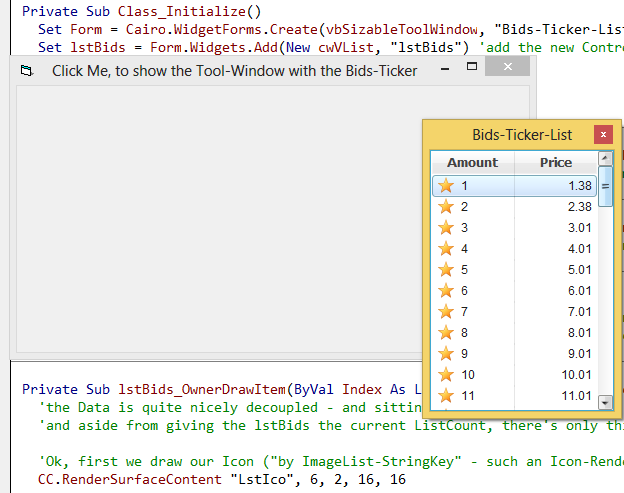
So, the difference is, that you will have to place 4 lines of code in the OwnerDraw-Event, instead using
basically the same amount of code-lines for Data-Copy-Over in case of "conventional ListControls".
Olaf
-
May 14th, 2015, 09:37 PM
#9
Re: [RESOLVED] Listview clear/adding items blinking, best approach to stop the blink
Very nice demo Olaf I got it to work, now a new question can you add widgets to normal vb forms? Or do I have to work with the new form that contains the widget... or perhaps can I move the whole tool form/widget into a normal form (SetParent api) what would you suggest. By the way I like how flawless it is no flicker whatsoever.
-
May 15th, 2015, 05:23 AM
#10
Re: [RESOLVED] Listview clear/adding items blinking, best approach to stop the blink
Originally Posted by Max187Boucher
... now a new question can you add widgets to normal vb forms?
Yes, there's an older, still supported mode - which involves the definition and usage
of a generic (Std-Exe-Project-Private) UserControl (Code for that "ucPanel" further below).
In conjunction with that ucPanel-Control you can then host Widgets (in the ucPanel)
together with normal VB-Controls on normal VB-Forms (including proper Tabbing-
and Focus-delegation then).
Below I'll post an example for that.
Originally Posted by Max187Boucher
...or do I have to work with the new form that contains the widget...
Why not, working directly with the new Form-Engine is recommended - and vbWidgets.dll
contains enough Widget-Encapsulations to replace nearly anything you use on your old VB-Forms.
The example below shows (in addition to the two cwVList-Widgets) also a cwButton-
as well as a cwTextBox-Widget (just to demonstrate that it's not that hard to work with that).
Originally Posted by Max187Boucher
...or perhaps can I move the whole tool form/widget into a normal form (SetParent api) what would you suggest.
No, wouldn't recommend that - the ucPanel-Mode which I describe now in an example -
is thought for that:
ucPanel-Mode:
In case you want to mix normal VB-Controls on a normal VB-Form with Widgets,
it works best (with regards to tabbing and focus-stuff), when you introduce a small,
normal VB-UserControl which then acts as a ContainerHost for an RC5-cWidgetRoot -
and can be used in a generic way (allowing any amount of cwWidget-Classes to be
added over the Widgets-Collection it exposes in a Property).
One can place multiple ucPanels on the same normal VB-Form (each hosting different Widgets) -
but I'd recommend to "bundle as many Widgets in the same ucPanel-Container as possible"
(to save some resources - using an ucPanel for each and every small single cwTextbox or cwLabel
would be overkill resource-wise).
So the below example avoids that (hosting two cwVlist-Widgets, a cwButton and a cwTextBox,
on a single ucPanel).
Here's a ScreenShot how that looks like on a normal VB-Form (I've set the BackColor of the
ucPanel-WidgetRoot to vbWhite, so that one can better see, which range it covers on the VB-Form).
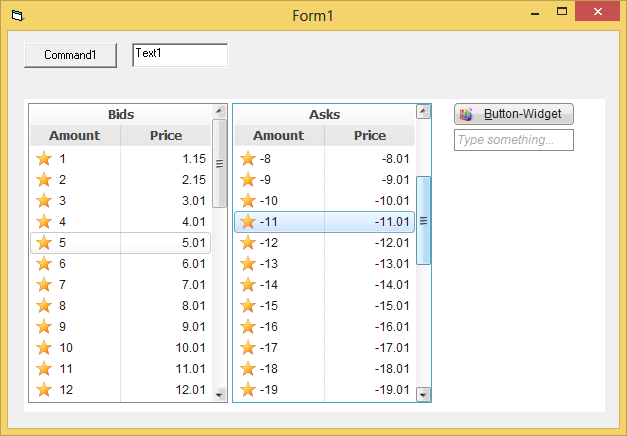
To test the following Demo-Code one would again need to put references into
a normal, fresh VB6-Std-Project (to vbRichClient5 and vbWidgets as well).
Now we need (in addition to the normal VB-Form, Form1) only one additional
Code-Module: a UserControl-Module, which should be named ucPanel.
The following code needs to be pasted into it:
Code:
Option Explicit

Event BubblingEvent(Sender As Object, EventName As String, P1, P2, P3, P4, P5, P6, P7)
Event ResizeWithDimensions(ByVal NewWidth As Long, ByVal NewHeight As Long)
Event DragOverDst(Data As vbRichClient5.cDataObject, ByVal AllowedEffects As vbRichClient5.WidgetDropEffects, Effect As vbRichClient5.WidgetDropEffects, Button As Integer, Shift As Integer, x As Single, y As Single)
Event DragDropDst(Data As vbRichClient5.cDataObject, ByVal AllowedEffects As vbRichClient5.WidgetDropEffects, Effect As vbRichClient5.WidgetDropEffects, Button As Integer, Shift As Integer, x As Single, y As Single)
Event NewWidgetCreateDimensions(ParentWidget As cWidgetBase, ByVal x As Single, ByVal y As Single, ByVal dx As Single, ByVal dy As Single)

Private WithEvents mWidgetRoot As cWidgetRoot

Private Sub UserControl_Initialize()
  ScaleMode = vbPixels
End Sub

Public Property Get WidgetRoot() As cWidgetRoot
  If mWidgetRoot Is Nothing Then 'let's create the Root-Object and hold it in mWidgetRoot
    Set mWidgetRoot = Cairo.WidgetRoot
        mWidgetRoot.RenderContentIn Me
  End If
  Set WidgetRoot = mWidgetRoot
End Property

Public Property Get Widgets() As cWidgets 'this hands out the WidgetRoots-Widgets-Collection directly, to spare an indirection
  Set Widgets = WidgetRoot.Widgets
End Property

Public Property Get ScaleWidth() As Single
  ScaleWidth = UserControl.ScaleWidth
End Property
Public Property Get ScaleHeight() As Single
  ScaleHeight = UserControl.ScaleHeight
End Property

'what remains is event-redirection/reraising to be compatible here as well (to the cWidgetForms)
Private Sub mWidgetRoot_ResizeWithDimensions(ByVal NewWidth As Long, ByVal NewHeight As Long)
  RaiseEvent ResizeWithDimensions(NewWidth, NewHeight)
End Sub
Private Sub mWidgetRoot_BubblingEvent(Sender As Object, EventName As String, P1, P2, P3, P4, P5, P6, P7)
  RaiseEvent BubblingEvent(Sender, EventName, P1, P2, P3, P4, P5, P6, P7)
End Sub
Private Sub mWidgetRoot_DragDropDst(Data As vbRichClient5.cDataObject, ByVal AllowedEffects As vbRichClient5.WidgetDropEffects, Effect As vbRichClient5.WidgetDropEffects, Button As Integer, Shift As Integer, x As Single, y As Single)
  RaiseEvent DragDropDst(Data, AllowedEffects, Effect, Button, Shift, x, y)
End Sub
Private Sub mWidgetRoot_DragOverDst(Data As vbRichClient5.cDataObject, ByVal AllowedEffects As vbRichClient5.WidgetDropEffects, Effect As vbRichClient5.WidgetDropEffects, Button As Integer, Shift As Integer, x As Single, y As Single)
  RaiseEvent DragOverDst(Data, AllowedEffects, Effect, Button, Shift, x, y)
End Sub
Private Sub mWidgetRoot_NewWidgetCreateDimensions(ParentWidget As vbRichClient5.cWidgetBase, ByVal x As Single, ByVal y As Single, ByVal dx As Single, ByVal dy As Single)
  RaiseEvent NewWidgetCreateDimensions(ParentWidget, x, y, dx, dy)
End Sub
Now, close the ucPanel-Code-Module (as well as its visual representation) - and
drag a new instance of it up in an appropriate size (as seen on the ScreenShot above)
onto your Form1 (leave the Default-Name it gets - ucPanel1 - as it is).
Now the following code needs to be pasted into Form1, before running the project:
Code:
Option Explicit

Private MemDB As cMemDB
Private WithEvents tmrUpdates As cTimer, WithEvents tmrRefresh As cTimer
Private RsBids As cRecordset, lstBids As cwVList
Private RsAsks As cRecordset, lstAsks As cwVList
Private btnTest As cwButton, txtTest As cwTextBox 'just to introduce some other Widgets, also shown on the Panel

Private Sub Form_Load()
  Cairo.ImageList.AddIconFromResourceFile "LstIco", "shell32.dll", 322, 32, 32 'add an image-resource
  Cairo.ImageList.AddIconFromResourceFile "BtnIco", "shell32.dll", 167, 32, 32 'add an image-resource

  Set MemDB = New_c.MemDB 'create a Demo-Instance of the global MemDB
      MemDB.Exec "Create Table SomeBids(Amount Text, Price Text)" 'and add a simple table to it
      MemDB.Exec "Create Table SomeAsks(Amount Text, Price Text)" 'and add a simple table to it

  Dim i As Long
  For i = 1 To 20 'add a few Demo-Records
    MemDB.ExecCmd "Insert Into SomeBids Values(?,?)", Str(i), Str(i + 0.01)
    MemDB.ExecCmd "Insert Into SomeAsks Values(?,?)", Str(-i), Str(-i - 0.01)
  Next i

  Set tmrUpdates = New_c.Timer(2000, True)
  Set tmrRefresh = New_c.Timer(1000, True)

  Me.Show 'it's good to show the Form, before adding the Widgets to the ucPanel
  Set lstBids = ucPanel1.Widgets.Add(New cwVList, "lstBids", 4, 4, 200, 300)
  Set lstAsks = ucPanel1.Widgets.Add(New cwVList, "lstAsks", 208, 4, 200, 300)
  Set btnTest = ucPanel1.Widgets.Add(New cwButton, "btnTest", 430, 4, 120, 22)
      btnTest.Widget.ImageKey = "BtnIco"
      btnTest.Caption = "&Button-Widget"
  Set txtTest = ucPanel1.Widgets.Add(New cwTextBox, "txtTest", 430, 30, 120, 22)
      txtTest.CueBannerText = "Type something..."
  ucPanel1.WidgetRoot.BackColor = vbWhite '<- just to make the area of the ucPanel more obvious on the VB-Form here
  ucPanel1.WidgetRoot.Refresh
End Sub

Private Sub tmrUpdates_Timer()
  SimulateChangesInTable MemDB.GetRs("Select * From SomeBids")
  SimulateChangesInTable MemDB.GetRs("Select * From SomeAsks")
End Sub

Private Sub SimulateChangesInTable(Rs As cRecordset)
  Rs!Price = Str(Val(Rs!Price.Value) + 0.01)  'change the Price of the first record
  Rs.MoveNext
  Rs!Price = Str(Val(Rs!Price.Value) + 0.01) 'change the Price of the second record

  Rs.AddNew 'and add a new Record to expand the MemDB-Tables content a bit
    Rs!Amount = Str(Rs.RecordCount)
    Rs!Price = Str(Rs.RecordCount + 0.01)
  Rs.UpdateBatch 'just to update the MemDB-Table in each round with some new Data
End Sub

Private Sub tmrRefresh_Timer()
  RefreshListData lstBids, RsBids, "Select * From SomeBids"
  RefreshListData lstAsks, RsAsks, "Select * From SomeAsks"
End Sub

Private Sub RefreshListData(Lst As cwVList, Rs As cRecordset, SQL As String)
  Set Rs = MemDB.GetRs(SQL)  'get the latest Data-Snapshot from the MemDB
  Lst.HeaderHeight = 44
  Lst.RowHeight = 21
  Lst.ListCount = Rs.RecordCount 'that's all what's needed to enforce a Refresh on the lstBids
End Sub

Private Sub ucPanel1_BubblingEvent(Sender As Object, EventName As String, P1, P2, P3, P4, P5, P6, P7)
  Select Case EventName
    Case "OwnerDrawHeader": DrawListHeader IIf(Sender Is lstBids, RsBids, RsAsks), P1, P2, P3
    Case "OwnerDrawItem":   DrawListItem IIf(Sender Is lstBids, RsBids, RsAsks), P1, P2, P3, P4
    Case "Click":           If Sender Is btnTest Then MsgBox "Hello from Widget-Button"
    Case "Change":          If Sender Is txtTest Then Caption = txtTest.Text 'just reflect it in the Form-Caption
  End Select
End Sub

Private Sub DrawListItem(Rs As cRecordset, ByVal Index As Long, ByVal CC As cCairoContext, ByVal dx As Single, ByVal dy As Single)
  CC.RenderSurfaceContent "LstIco", 6, 2, 16, 16

  CC.DrawText 24, 0, dx \ 2 - 24, dy, Rs.ValueMatrix(Index, 0), True, vbLeftJustify, 2, True
  CC.DrawText dx \ 2, 0, dx \ 2, dy, Rs.ValueMatrix(Index, 1), True, vbRightJustify, 2, True

  CC.DrawLine dx \ 2, 0, dx \ 2, dy, True, 1, vbBlack, 0.1 'draw a vertical Col-Separator (if wanted)
End Sub

Private Sub DrawListHeader(Rs As cRecordset, ByVal CC As cCairoContext, ByVal dx As Single, ByVal dy As Single)
  Cairo.Theme.DrawTo CC, lstBids.Widget, thmTypeButtonFace, 0, 0, 0, dx, dy

  CC.SelectFont "Tahoma", 10, &H444444, True 'text-rendering again (this time with a somewhat larger font)
  CC.DrawText 0, 0, dx, dy \ 2, IIf(Rs Is RsBids, "Bids", "Asks"), True, vbCenter, 2, True

  CC.DrawText 0, dy \ 2, dx \ 2, dy \ 2, Rs(0).Name, True, vbCenter, 2, True
  CC.DrawText dx \ 2, dy \ 2, dx \ 2, dy \ 2, Rs(1).Name, True, vbCenter, 2, True

  CC.DrawLine dx \ 2, dy \ 2, dx \ 2, dy, True, 1, vbBlack, 0.1   'draw a vertical Col-Separator (if wanted)
End Sub

Private Sub Form_Terminate()
  If Forms.Count = 0 Then New_c.CleanupRichClientDll
End Sub
In case you want more IDE-stability in this mode (allowing Stop-Button-presses for example) -
I'd recommend to download the latest RC5-version 5.0.29 which contains better protection in such cases.
HTH
Olaf
Last edited by Schmidt; May 15th, 2015 at 05:44 AM.
-
May 15th, 2015, 09:42 PM
#11
Re: [RESOLVED] Listview clear/adding items blinking, best approach to stop the blink
Much appreciated again, I can work from these examples, how would you suggest changing the back color of a cell am I doing it correctly?
Code:
Private Sub DrawListItem(Rs As cRecordset, ByVal Index As Long, ByVal CC As cCairoContext, ByVal dx As Single, ByVal dy As Single)
  CC.RenderSurfaceContent "DollarICO", -4, 0, 32, 32
  CC.RenderSurfaceContent "BitcoinICO", dx \ 2 - 16, -18, 64, 64

  CC.SelectFont "Tahoma", 10, &H444444, True  'text-rendering again (this time with a somewhat larger font)
  CC.DrawTextCell 30, 0, dx \ 2 - 24, CSng(dy), Rs.ValueMatrix(Index, 0), True, vbLeftJustify, 2, vbRed
  'CC.DrawText 30, 0, dx \ 2 - 24, dy, Rs.ValueMatrix(Index, 0), True, vbLeftJustify, 2, True
  CC.DrawTextCell dx \ 2 + 30, 0, dx \ 2, CSng(dy), Rs.ValueMatrix(Index, 1), True, vbLeftJustify, 2, vbRed
  'CC.DrawText dx \ 2 + 30, 0, dx \ 2, dy, Rs.ValueMatrix(Index, 1), True, vbLeftJustify, 2, True

  CC.DrawLine dx \ 2, 0, dx \ 2, dy, True, 1, vbBlack, 0.1 'draw a vertical Col-Separator (if wanted)
End Sub
Notice the cSng() in there its because it cannot be ByVal so I have to assgin a variable, wondering if there is a different (better) approach. Also another question is should I add an argument to the function to know if its lstbids or lstasks (to change backcolor to green 'bid / red 'ask') or should I check the SQL string for bid or ask? How would you go about this. Just getting into you RC5 will need a bit of guidance to make it work... I will be using RC5 from now on, better graphics, better peformance, more function such as PNG icons... I just need to get used to it 
I modified it a bit now its starting to look great!

Last edited by Max187Boucher; May 15th, 2015 at 09:53 PM.
-
May 16th, 2015, 11:34 AM
#12
Re: [RESOLVED] Listview clear/adding items blinking, best approach to stop the blink
So I got it working like I wanted except one thing is not working properly (i think)
Code:
'Form_Load code
.....
  Set lstBids = ucPanel1.Widgets.Add(New cwVList, "lstBids", 4, 4, 200, 300)
  Set lstAsks = ucPanel1.Widgets.Add(New cwVList, "lstAsks", 208, 4, 200, 300)
  lstBids.Widget.BackColor = &HC0C0FF 'Red
  lstAsks.Widget.BackColor = &HC0FFC0 'Green
.....
The problem is that lstAsks 's "Border Caption Color" & "Column Header" is Red(&HC0C0FF) instead of Green(&HC0FFC0)

Working a bit more with the options given I found if I change (remove) the Theme it works as excepted

Code:
'In DrawListHeader event
'Cairo.Theme.DrawTo CC, lstBids.Widget, thmTypeButtonFace, 0, 0, 0, dx, dy
When removing that theme everything is normal, but leaving it how would I change only lstAsks's header columns color?
Edit: How do you get the selected item's text?? lstbids.??
Or perhaps how do you get text from any item with it's index? like .textmatrix or .listitems
Last edited by Max187Boucher; May 16th, 2015 at 12:12 PM.
-
May 16th, 2015, 12:24 PM
#13
Re: [RESOLVED] Listview clear/adding items blinking, best approach to stop the blink
Originally Posted by Max187Boucher
Code:
'In DrawListHeader event
'Cairo.Theme.DrawTo CC, lstBids.Widget, thmTypeButtonFace, 0, 0, 0, dx, dy
When removing that theme everything is normal, but leaving it how would I change only lstAsks's header columns color?
If you look carefully into the line you commented out above - it is always the lstBids.Widget
which is passed into the Theme-Rendering routine (hence the same Theme-coloring for the Header,
also in case of the lstAsks-Widget).
So I overlooked that in the (now shared for both Widgets) Drawing-Routine.
To handle that more thoroughly, one should pass (as you already suggested) the
current Widget in question into the routine (and then perhaps determine the
correct Recordset this Widget belongs to - in the Drawing-Handler-Routines themselves...
This would need changes in the central Bubbling-Event-Handler (simply handing the current Sender over)
Code:
Private Sub ucPanel1_BubblingEvent(Sender As Object, EventName As String, P1, P2, P3, P4, P5, P6, P7)
  Select Case EventName
    Case "OwnerDrawHeader": DrawListHeader Sender, P1, P2, P3
    Case "OwnerDrawItem":   DrawListItem Sender, P1, P2, P3, P4
    Case "Click":           If Sender Is btnTest Then MsgBox "Hello from Widget-Button"
    Case "Change":          If Sender Is txtTest Then Caption = txtTest.Text 'just reflect it in the Form-Caption
  End Select
End Sub
And then appropriately adapted Drawing-Handlers:
Code:
Private Sub DrawListItem(Lst As cwVList, ByVal Index As Long, ByVal CC As cCairoContext, ByVal dx As Single, ByVal dy As Single)
Dim Rs As cRecordset
Set Rs = IIf(Lst Is lstBids, RsBids, RsAsks)
   '... a.s.o
End Sub

Private Sub DrawListHeader(Lst As cwVList, ByVal CC As cCairoContext, ByVal dx As Single, ByVal dy As Single)
Dim Rs As cRecordset
Set Rs = IIf(Lst Is lstBids, RsBids, RsAsks)

  Cairo.Theme.DrawTo CC, Lst.Widget, thmTypeButtonFace, 0, 0, 0, dx, dy
   '... a.s.o
End Sub
What you might want to adapt to (for a look which remains more "in style") with your
choosen BackColor, is the ListWidgets-SelectionColor:
Code:
  Set lstBids = ucPanel1.Widgets.Add(New cwVList, "lstBids", 4, 4, 200, 300)
      lstBids.Widget.BackColor = &HC0C0FF  'Red
      lstBids.Widget.SelectionColor = vbRed
  Set lstAsks = ucPanel1.Widgets.Add(New cwVList, "lstAsks", 208, 4, 200, 300)
      lstAsks.Widget.BackColor = &HC0FFC0 'Green
      lstAsks.Widget.SelectionColor = vbGreen
Just experiment a bit, I'm sure you will get the hang of all that new Widget-handling soon enough.
Olaf
-
May 16th, 2015, 01:16 PM
#14
Re: [RESOLVED] Listview clear/adding items blinking, best approach to stop the blink
Olaf how can I get the text of an item?
-
May 16th, 2015, 01:31 PM
#15
Re: [RESOLVED] Listview clear/adding items blinking, best approach to stop the blink
Originally Posted by Max187Boucher
Olaf how can I get the text of an item?
The (ZeroBased) VList.ListIndex can be used for a lookup into the currently associated
cRecordset over its .ValueMatrix-Method (which works zerobased on its RowIndex, too).
Some slight changes in the Bubbling-Event are necessary, as shown below...
Code:
Private Sub ucPanel1_BubblingEvent(Sender As Object, EventName As String, P1, P2, P3, P4, P5, P6, P7)
  Select Case EventName
    Case "OwnerDrawHeader": DrawListHeader Sender, P1, P2, P3
    Case "OwnerDrawItem":   DrawListItem Sender, P1, P2, P3, P4
    Case "Change":          If Sender Is txtTest Then Caption = txtTest.Text 'just reflect it in the Form-Caption
    Case "Click"
      If TypeOf Sender Is cwButton Then HandleButtonClicks Sender
      If TypeOf Sender Is cwVList Then HandleListClicks Sender
  End Select
End Sub

Private Sub HandleButtonClicks(Btn As cwButton)
  MsgBox "Button-Click on: " & Btn.Widget.Key
End Sub

Private Sub HandleListClicks(Lst As cwVList)
  If Lst.ListIndex < 0 Then Exit Sub
  Dim Rs As cRecordset
  Set Rs = IIf(Lst Is lstBids, RsBids, RsAsks)
  Me.Caption = Rs.ValueMatrix(Lst.ListIndex, 0) & " " & Rs.ValueMatrix(Lst.ListIndex, 1)
End Sub
Olaf
-
May 16th, 2015, 02:07 PM
#16
Re: [RESOLVED] Listview clear/adding items blinking, best approach to stop the blink
I thought about using memdb afterwards but this gives a better idea of how I could do it (with a listclick event) thanks again Olaf
-
May 16th, 2015, 02:26 PM
#17
Re: [RESOLVED] Listview clear/adding items blinking, best approach to stop the blink
Originally Posted by Max187Boucher
I thought about using memdb afterwards but this gives a better idea of how I could do it (with a listclick event) thanks again Olaf
Yep, such a "loose Binding" as we have it here ...
(a Control "without Data", but with an associated Data-Container -> a cRecordset)
that allows quite some flexibility - e.g. in case you need more "associated context",
you could simply introduce a unique ID into the associated Recordsets (and their underlying Tables)
as an additionally available Field (simply by specifying a different Select-String).
This way you could then still render only the needed Field-Values into a given VList-Row
(leaving out the ID-Field) - but on a List-Click you can then access these hidden, additional
Fields of course - e.g. doing a "single-Record-Select using the ID-Field in the Where Clause"
to retrieve more details from the MemDB (maybe even from another Table).
Olaf
-
May 16th, 2015, 07:53 PM
#18
Re: [RESOLVED] Listview clear/adding items blinking, best approach to stop the blink
How do I know which event can bubble? Do you have a documentation on the events of your controls? I can find it out by debug.print in the bubble event, but since I'm thinking of exploring RC5 I will need information once in a while and so far you've been more than just help.
Now that I understand what a widget really is I understand that any widget (on a UC) could be a control like a commandbutton or textbox but with powerful drawing capabilities and styling that vb never had, unless you have a very good knowledge of the APIs of course.
-
May 17th, 2015, 11:45 AM
#19
Re: [RESOLVED] Listview clear/adding items blinking, best approach to stop the blink
Originally Posted by Max187Boucher
How do I know which event can bubble?
One way would be, to use the IDEs ObjectExplorer, selecting the WidgetClass in question
(all the Events a given Class may raise, are marked with a "Flash-Icon").
Easier perhaps is, to type (in an empty Class- or Form-codemodule) simply the Widgets you are interested in, as e.g.:
Private WithEvents W as cWidgetBase, WithEvents VList as cwVList
(in case you're interested in all the Events of the cWidgetBase-Class and the cwVList-type)
And then select in the DropDown-Combo to your left either W (for all BaseEvents)
or VList (to get all the specific Events e.g. a cwVList adds on top of the ones in the WidgetBase).
The IDE-Editor-Combo to the right will then provide all the Events you care to lookup.
The cWidgetBase is a "special case" and a "must have" for any specific Widget-Implementation,
and its Events are always raised automatically also as Bubbling-Events in "W_SomeEvent"-style
(without the need for you to write any code for concrete Event-Raising in the concrete Widget).
Originally Posted by Max187Boucher
I understand that any widget (on a UC) could be a control like a commandbutton or textbox but with powerful drawing capabilities and styling that vb never had, unless you have a very good knowledge of the APIs of course.
Yep, the Widgets need a "special Host", which can be either a cWidgetForm-Container,
or the above outlined ucPanel-Control (in case you want to host them together with
normal Controls on a VB-Form).
There's 3 Tutorials, listed at the top of the page below, which can help you with a
better understanding of the Drawing-, the WidgetForm- and the Widgets-Concept.
http://vbrichclient.com/#/en/Demos/GUI/
To make it more clear, that a Widget is not that different from a VB-UserControl,
the following might help.
- to implement your own UserControl (or Widget) - a new Code-Module has to be opened
..(in case of a UserControl - a new UserControl-Module, in case of a Widget a new Class-Module is sufficient)
- in the UserControl-Module (to e.g. draw a red ellipse within its Bounds and react to its Click-Event)
..we could write (in the UserControl-Module):
Code:
Option Explicit

Private Sub UserControl_Initialize()
  UserControl.ScaleMode = vbPixels
  UserControl.BackColor = vbWhite
  UserControl.ForeColor = vbRed
End Sub

Private Sub UserControl_Click()
  MsgBox "Hello from UserControl_Click"
End Sub

Private Sub UserControl_Paint()
Dim dx As Single, dy As Single
    dx = UserControl.ScaleWidth
    dy = UserControl.ScaleHeight

  UserControl.Cls
  UserControl.DrawWidth = 2
  Circle (dx \ 2, dy \ 2), dx \ 2, UserControl.ForeColor, , , dy / dx
End Sub
In case of ones own Widget-Implementation which does the same thing, we would write:
(magenta colored lines are "generic Copy&Paste necessities for each Widget-Class - VB6
does a quite similar thing under the covers for its Control-Module-internal UserControl-Variable)
Code:
Option Explicit

Private WithEvents W As cWidgetBase '<- W is an equivalent to VBs internal UserControl-Variable

Public Property Get Widget() As cWidgetBase: Set Widget = W: End Property
Public Property Get Widgets() As cWidgets: Set Widgets = W.Widgets: End Property

Private Sub Class_Initialize()
  Set W = Cairo.WidgetBase
      W.BackColor = vbWhite
      W.ForeColor = vbRed
End Sub

Private Sub W_Click()
  MsgBox "Hello from W_Click"
End Sub

Private Sub W_Paint(CC As cCairoContext, ByVal xAbs As Single, ByVal yAbs As Single, ByVal dx_Aligned As Single, ByVal dy_Aligned As Single, UserObj As Object)
Dim dx As Single, dy As Single
    dx = W.ScaleWidth
    dy = W.ScaleHeight

  'here's the equivalent to Usercontrol.Cls (clearing the BackGround with the current BackColor)
  CC.SetSourceColor W.BackColor
  CC.Paint 'now paint the whole Widget-Area with the above set W.BackColor

  'that's the equivalent to UserControl.DrawWidth = 2
  CC.SetLineWidth 2

  'and that's the equivalent to the UserControl.Circle-call (drawing a red Ellipse-Outline)
  CC.Ellipse dx / 2, dy / 2, dx, dy, True
  CC.SetSourceColor W.ForeColor
  CC.Stroke 'draw the outline in the above set Color
End Sub
Resulting in that Output then:
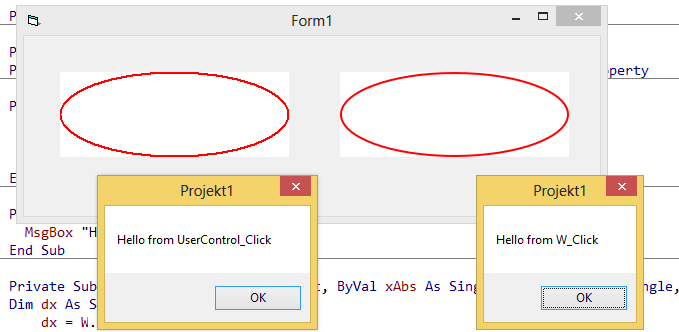
Olaf
-
May 17th, 2015, 02:15 PM
#20
Hyperactive Member

Re: [RESOLVED] Listview clear/adding items blinking, best approach to stop the blink
Excellent explanation.
Olaf, the most important missing in vBrichClient.com site is the lack of elusive and well written articles like this last post. It would certainly capt interest from a lot more people.
It's just my opinion, not a critic
-
May 18th, 2015, 09:17 AM
#21
Re: [RESOLVED] Listview clear/adding items blinking, best approach to stop the blink
Olaf, what did you use to create the object/surface of the W_ implementation?
-
May 18th, 2015, 10:56 AM
#22
Re: [RESOLVED] Listview clear/adding items blinking, best approach to stop the blink
Originally Posted by Max187Boucher
Olaf, what did you use to create the object/surface of the W_ implementation?
I've named the Widget-Class I've posted above: cwMyWidget -
and had a ucPanel included in the fresh Std-Project as well...
Then the following was sufficient in the VB-Form (after drawing-up the VB-Ellipse-Usercontrol
to the left hand side - and the ucPanel as ucPanel1 on the right-hand-side of the Form):
Code:
Option Explicit

Private Sub Form_Load()
  Me.Show
  'add our self-created Widget to the Widgets-Collection of ucPanel1, covering it fully
  ucPanel1.Widgets.Add New cwMyWidget, "MyWidget", 0, 0, ucPanel1.ScaleWidth, ucPanel1.ScaleHeight
  ucPanel1.WidgetRoot.Refresh
End Sub
That's it already.
Olaf
 Posting Permissions
- You may not post new threads
- You may not post replies
- You may not post attachments
- You may not edit your posts
-
Forum Rules
|
Click Here to Expand Forum to Full Width
|



 Reply With Quote
 ™
™