|

-
Apr 12th, 2015, 07:21 AM
#1
Thread Starter
Member

 Possible to count selection / highlighted text Possible to count selection / highlighted text
Anyone have any idea on how to COUNT how many "words" (Not character count) are in a selection? I want to be about to have a paragraph in a text field and highlight part of it and get an automatic count displayed in a label but just highlighting it. I don't want to have any buttons to push for this action..
This is what I have right now that counts the full amount of words in a text box (Have to push button to have that displayed)
I want to keep this in because I still want a button to calculate how many words are total in a text box.
Code:
        Dim strInput As String
        strInput = RichTextBox1.Text
        Dim strSplit() As String
        strSplit = strInput.Split(CChar(" "))
        Label7.Text = strSplit.Length
-
Apr 12th, 2015, 07:44 AM
#2
Re: Possible to count selection / highlighted text
Run that code in the textbox's MouseUp event handler. Then rather than using the entire text, set strInput to the textbox's Selection property
Process control doesn't give you good quality, it gives you consistent quality.
Good quality comes from consistently doing the right things.
Vague general questions have vague general answers. A $100 donation is required for me to help you if you PM me asking for help. Instructions for donating to one of our local charities will be provided.
______________________________ Last edited by kebo : Now. Reason: superfluous typo's
-
Apr 12th, 2015, 07:48 AM
#3
Thread Starter
Member
Re: Possible to count selection / highlighted text
Not sure if I know where to start with that or not..
-
Apr 12th, 2015, 07:57 AM
#4
Re: Possible to count selection / highlighted text
Create the MouseUp event handler by selecting the MouseUp declaration in the IDE....
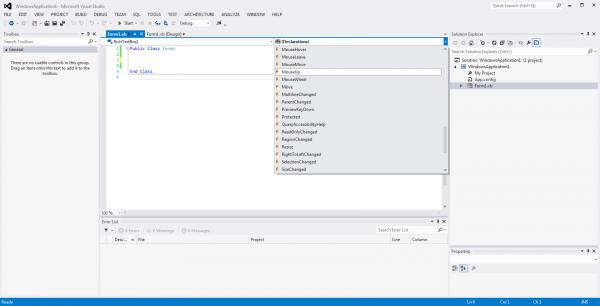
vb Code:
Private Sub RichTextBox1_MouseUp(sender As Object, e As MouseEventArgs) Handles RichTextBox1.MouseUp
        'put the code here
End Sub
Process control doesn't give you good quality, it gives you consistent quality.
Good quality comes from consistently doing the right things.
Vague general questions have vague general answers. A $100 donation is required for me to help you if you PM me asking for help. Instructions for donating to one of our local charities will be provided.
______________________________ Last edited by kebo : Now. Reason: superfluous typo's
-
Apr 12th, 2015, 08:04 AM
#5
Thread Starter
Member
Re: Possible to count selection / highlighted text
Is this what yours saying I need to do? If so its not quite working but feels close. it is updating as words are typed but how do I get it so when I paste a paragraph in and highlight half it gives me a count on that..?
Code:
    Private Sub RichTextBox1_MouseUp(sender As Object, e As MouseEventArgs) Handles RichTextBox1.MouseUp
        Dim strInput As String
        strInput = RichTextBox1.Text
        Dim strSplit() As String
        strSplit = strInput.Split(CChar(" "))
        Label7.Text = strSplit.Length

        Dim t As Integer = CStr((strSplit.Length / TextBox1.Text)) ' assuming the value represent seconds...
        Dim ts As New TimeSpan(0, 0, t)
        Label5.Text = (ts.ToString)
    End Sub
-
Apr 12th, 2015, 08:11 AM
#6
Re: Possible to count selection / highlighted text
That code will run right after you complete the highlight sequence (i.e. when you MouseUp). If label7 is updating while you type, then you are setting it elsewhere in your code. Not sure we the timeSpan bit is there. You should go back and look at my comments in your other thread
Process control doesn't give you good quality, it gives you consistent quality.
Good quality comes from consistently doing the right things.
Vague general questions have vague general answers. A $100 donation is required for me to help you if you PM me asking for help. Instructions for donating to one of our local charities will be provided.
______________________________ Last edited by kebo : Now. Reason: superfluous typo's
-
Apr 12th, 2015, 08:27 AM
#7
Thread Starter
Member
Re: Possible to count selection / highlighted text
so what exactly is the highlight sequence? did I miss that?
-
Apr 12th, 2015, 08:31 AM
#8
Re: Possible to count selection / highlighted text
 Originally Posted by bdenn

so what exactly is the highlight sequence? did I miss that?
MouseDown in the text
MouseDrag to highlight the text
MouseUp to complete the highlight sequence
Process control doesn't give you good quality, it gives you consistent quality.
Good quality comes from consistently doing the right things.
Vague general questions have vague general answers. A $100 donation is required for me to help you if you PM me asking for help. Instructions for donating to one of our local charities will be provided.
______________________________ Last edited by kebo : Now. Reason: superfluous typo's
-
Apr 12th, 2015, 08:37 AM
#9
Thread Starter
Member
Re: Possible to count selection / highlighted text
I must be becoming an annoyance by now..
So each one of those needs to be RichTextBox1.Mouse Down and so on?
This sequence is what tells the program that what is highlighted will be counted and them displayed into the label as a number value?
-
Apr 12th, 2015, 08:42 AM
#10
Re: Possible to count selection / highlighted text
No. It's all good.
The highlight sequence is what I am referring to as the user sequence of events to highlight the text. All you should be dealing with is the selected text after it has been selected. So you should be be running your code in the MouseUp event handler because the text will only be highlighted after the mouseUp event occurs. Once it does occur, you can get the highlighted text using the textbox's Selection property.
Process control doesn't give you good quality, it gives you consistent quality.
Good quality comes from consistently doing the right things.
Vague general questions have vague general answers. A $100 donation is required for me to help you if you PM me asking for help. Instructions for donating to one of our local charities will be provided.
______________________________ Last edited by kebo : Now. Reason: superfluous typo's
-
Apr 12th, 2015, 08:51 AM
#11
Thread Starter
Member
Re: Possible to count selection / highlighted text
ok. so as of right now what is happening is I paste in the paragraph and when I click in the RichTextBox1 it updates the label. What code do I need to write so that it reads only what is highlighted? I'm assuming that I can do both actions here one being I highlight one section and it tells me the length and another that tells me the length of everything in RichTextBox1
-
Apr 12th, 2015, 10:08 AM
#12
Re: Possible to count selection / highlighted text
this does what you want.
vb Code:
Private Sub RichTextBox1_MouseUp(sender As Object, e As MouseEventArgs) Handles RichTextBox1.MouseUp
         If Me.RichTextBox1.SelectedText.Length > 0 Then
            Dim strInput As String = RichTextBox1.SelectedText.Trim
            Dim strSplit() As String = strInput.Split(" "c)
            Label1.Text = strSplit.Count & " words"
        End If
     End Sub
Alternatively, you could put the code in the MouseMove event and check for the left mouse button and update the label dynamically as the user drags the mouse
vb Code:
Private Sub RichTextBox1_Mouse(sender As Object, e As MouseEventArgs) Handles RichTextBox1.MouseMove
         If e.Button = Windows.Forms.MouseButtons.Left AndAlso Me.RichTextBox1.SelectedText.Length > 0 Then
            Dim strInput As String = RichTextBox1.SelectedText.Trim
            Dim strSplit() As String = strInput.Split(" "c)
            Label1.Text = strSplit.Count & " words"
        End If
    End Sub
Process control doesn't give you good quality, it gives you consistent quality.
Good quality comes from consistently doing the right things.
Vague general questions have vague general answers. A $100 donation is required for me to help you if you PM me asking for help. Instructions for donating to one of our local charities will be provided.
______________________________ Last edited by kebo : Now. Reason: superfluous typo's
-
Apr 12th, 2015, 10:33 AM
#13
Thread Starter
Member
Re: Possible to count selection / highlighted text
I got that working thanks! so it looks like the following code. Now how do I incorporate it converting to time (Code Below)
Code:
    Private Sub RichTextBox1_MouseUp(sender As Object, e As MouseEventArgs) Handles RichTextBox1.MouseUp
        If Me.RichTextBox1.SelectedText.Length > 0 Then
            Dim strInput As String = RichTextBox1.SelectedText.Trim
            Dim strSplit() As String = strInput.Split(" "c)
            Label9.Text = strSplit.Count
            Label10.Text = CStr((strSplit.Length / TextBox1.Text))
        End If

    End Sub
Code:
        Dim t As Integer = CStr((strSplit.Length / TextBox1.Text)) ' assuming the value represent seconds...
        Dim ts As New TimeSpan(0, 0, t)
        Label5.Text = (ts.ToString)
-
Apr 12th, 2015, 10:45 AM
#14
Re: Possible to count selection / highlighted text
you start by turning on Option Strict.
Process control doesn't give you good quality, it gives you consistent quality.
Good quality comes from consistently doing the right things.
Vague general questions have vague general answers. A $100 donation is required for me to help you if you PM me asking for help. Instructions for donating to one of our local charities will be provided.
______________________________ Last edited by kebo : Now. Reason: superfluous typo's
-
Apr 12th, 2015, 10:54 AM
#15
Thread Starter
Member
Re: Possible to count selection / highlighted text
Thanks so much for your help. It is all operational right now. I need to fix up the code though. Next step will be at some point to tell it when it sees the word VO or SOT or PKG it calculates everything under that. problem I would never know if VO or SOT or PKG comes first its always different.
Tags for this Thread
 Posting Permissions
- You may not post new threads
- You may not post replies
- You may not post attachments
- You may not edit your posts
-
Forum Rules
|
Click Here to Expand Forum to Full Width
|



 Reply With Quote

