|

-
Mar 25th, 2015, 10:07 PM
#1
Thread Starter
Fanatic Member

-
Mar 25th, 2015, 11:55 PM
#2
Re: ComboBoxitis
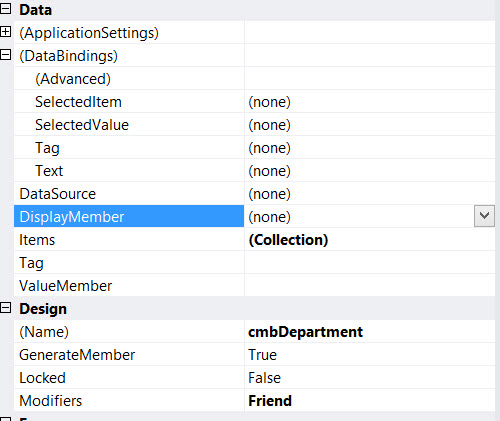
I cannot seem to figure out what combination of properties or even if I have used all of the appropriate properties, to achieve what I am after with the combo box.
Perhaps it would help if you actually explained what that is. We can't tell you how to achieve something if we don't know what the something is.
-
Mar 26th, 2015, 12:17 AM
#3
Thread Starter
Fanatic Member
Re: ComboBoxitis
That is what I attempted to do. Let me explain again. I want to use a combo box to select from a field in a table and place the data from another field in that same table into a field in another table. To be honest I really don't know how to describe it better than I did in the previous post. So let me try again.
The combo box needs to work with 2 tables and 3 fields.
Table1 has two fields. Table2 has one field of interest.
I want to show in the select list field A from table 1. When the user makes a selection from that field then the value from another field is then placed in the field in Table 2. As stated before, I have made numerous efforts using the different properties of the comboBox (see above) with no success. What I am hoping for is that someone can explain to me how to appropriately use the properties to select from one fieldA in Table1 and place the value from fieldB in Table1 into FieldA in Table2. Sorry if that is a poor job explaining, but I have no idea what more you need to explain to me. I would guess that this is probably a pretty common usage for a combo box, so my guess is that it is not difficult if one has some idea of the usage of the properties for a combobox. Am I wrong?
-
Mar 26th, 2015, 01:53 AM
#4
Re: ComboBoxitis
I'm not sure whether you have re-read your first post or not but nowhere does it actually explain what's supposed to happen when the user makes a selection. Anyway, you're not wrong about it being simple.
First of all, you need to bind Table1 to the ComboBox in order to display the list of strMBDept values and expose the strMBDeptID value that corresponds to the selection. To do that, assign the BindingSource for Table1 to the DataSource property of the ComboBox, select the strMBDept as the DisplayMember and strMBDeptID as the ValueMember. Now, when you select an item, the corresponding strMBDeptID value will be exposed via the SelectedValue property. As such, you need to bind the SelectedValue property of the ComboBox to the strMBDepartment column of the BindingSource for Table2.
Now, the Current property of the BindingSource for Table2 is going to have to be set to choose the record that you want to choose the department for. That is usually done using a BindingNavigator or by selection in some other bound control but you can do it in code too. When you set the Current property, either directly or indirectly, the value from the appropriate column is pushed into the SelectedValue of the ComboBox and the appropriate item text displayed. When you make a selection, the corresponding value is pushed from the SelectedValue back to the record.
-
Mar 26th, 2015, 11:11 AM
#5
Thread Starter
Fanatic Member
Re: [RESOLVED] ComboBoxitis
I was indeed able to make that work. Actually, I am afraid that I already had it working but what was showing up in the fields was not what was being placed into the fields. I think I forgot to refresh the screen. Anyway, I am getting the data I wanted into the correct place. I thank you.
Tags for this Thread
 Posting Permissions
- You may not post new threads
- You may not post replies
- You may not post attachments
- You may not edit your posts
-
Forum Rules
|
Click Here to Expand Forum to Full Width
|



 [RESOLVED] ComboBoxitis

 Reply With Quote

