|

-
Mar 23rd, 2015, 01:30 PM
#1
Thread Starter
Lively Member

-
Mar 23rd, 2015, 02:15 PM
#2
Re: VBA Count Columns given
Assuming you can find the bottom of your data by looking for the last filled cell in column AB:
Code:
Sub countExpiry()
    Dim wb As Workbook
    Dim wsDetail As Worksheet
    Dim wsSummary As Worksheet
    Dim lr As Long
    Dim j As Long
    Dim cnt180 As Integer
    Dim cnt90 As Integer
    Dim cnt60 As Integer
    Dim cnt30 As Integer
    Dim cntCurrent As Integer
    Dim writeRow As Long

    Set wb = ActiveWorkbook
    Set wsDetail = wb.Worksheets("detail")
    Set wsSummary = wb.Worksheets("summary")

    lr = wsDetail.Range("ab" & Rows.Count).End(xlUp).Row

    With wsDetail
        For j = 6 To lr
            If .Range("w" & j).Value <> "x" Then
                If .Range("aa" & j).Value = "30" Then
                    cnt30 = cnt30 + 1
                    writeRow = wsSummary.Range("k" & Rows.Count).End(xlUp).Row + 1
                    wsSummary.Range("k" & writeRow).Value = .Range("d" & j).Value
                ElseIf .Range("z" & j).Value = "60" Then
                    cnt60 = cnt60 + 1
                    writeRow = wsSummary.Range("h" & Rows.Count).End(xlUp).Row + 1
                    wsSummary.Range("h" & writeRow).Value = .Range("d" & j).Value
                ElseIf .Range("y" & j).Value = "90" Then
                    cnt90 = cnt90 + 1
                    writeRow = wsSummary.Range("e" & Rows.Count).End(xlUp).Row + 1
                    wsSummary.Range("e" & writeRow).Value = .Range("d" & j).Value
                ElseIf .Range("x" & j).Value = "180" Then
                    cnt180 = cnt180 + 1
                    writeRow = wsSummary.Range("b" & Rows.Count).End(xlUp).Row + 1
                    wsSummary.Range("b" & writeRow).Value = .Range("d" & j).Value
                Else
                    cntCurrent = cntCurrent + 1
                End If
            End If
        Next j
    End With
    With wsSummary
        .Range("c12").Value = cnt180
        .Range("f12").Value = cnt90
        .Range("i12").Value = cnt60
        .Range("l12").Value = cnt30
        .Range("o12").Value = cntCurrent
    End With
End Sub
My two worksheets are named "summary" and "detail" for example.
-
Mar 23rd, 2015, 02:41 PM
#3
Thread Starter
Lively Member
Re: VBA Count Columns given
vbfbryce,
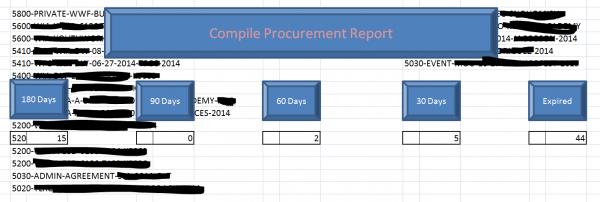
You're something amazing... It works, however, I had to manipulate it a tad of course to fit my sheet names but the lists are going into the columns starting in row 2... how can I get it to start on row 13 instead... this is what it looks like:
-
Mar 23rd, 2015, 02:45 PM
#4
Thread Starter
Lively Member
Re: VBA Count Columns given
vbfbryce,
I figured it out... I saw you were counting up so I placed the "#" in the box to initiate the start point... thanks a million, you're amazing!
-
Mar 23rd, 2015, 03:04 PM
#5
Re: VBA Count Columns given
You're welcome (and I forget to mention that I put the "#" and a "0" in row 12 before running the code!).
Tags for this Thread
 Posting Permissions
- You may not post new threads
- You may not post replies
- You may not post attachments
- You may not edit your posts
-
Forum Rules
|
Click Here to Expand Forum to Full Width
|



 [RESOLVED] VBA Count Columns given

 Reply With Quote