|

-
Jan 14th, 2015, 01:12 PM
#1
Thread Starter
WiggleWiggle


listbox Broken?
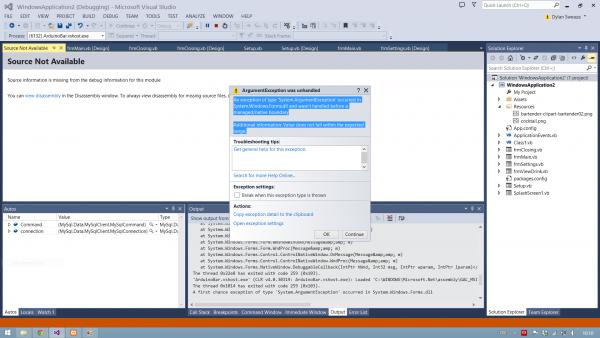
I tried adding a listbox to one of my forms and I get this error when the form loads:
Code:
An exception of type 'System.ArgumentException' occurred in System.Windows.Forms.dll and wasn't handled before a managed/native boundary

Additional information: Value does not fall within the expected range.
And it doesnt show me what is causing it. I have added listboxes to other applications but it doesnt seem to like this project... I have since opted to use listview since i find it better anyway. But still...
-
Jan 14th, 2015, 02:21 PM
#2
Re: listbox Broken?
 Originally Posted by dclamp

I tried adding a listbox to one of my forms and I get this error when the form loads:
Code:
An exception of type 'System.ArgumentException' occurred in System.Windows.Forms.dll and wasn't handled before a managed/native boundary

Additional information: Value does not fall within the expected range.
And it doesnt show me what is causing it. I have added listboxes to other applications but it doesnt seem to like this project... I have since opted to use listview since i find it better anyway. But still...
I have no problems adding listboxes to any projects. If you get past the Me.Startup event, you could try adding a handler to get the underlying exception information:
Code:
Private Sub MyApplication_Startup(sender As Object, e As Microsoft.VisualBasic.ApplicationServices.StartupEventArgs) Handles Me.Startup
        AddHandler AppDomain.CurrentDomain.UnhandledException, AddressOf CatchUnhandledExceptions
    End Sub

    Private Sub CatchUnhandledExceptions(sender As Object, e As UnhandledExceptionEventArgs)
        Messagebox.Show(e.ExceptionObject.ToString())
    End Sub
-
Jan 14th, 2015, 02:26 PM
#3
Hyperactive Member
Re: listbox Broken?
Drill down into the error details you should be able to gets. More specific error to then determine what is causing it .
What are you doing with the list box in the form ?
-
Jan 14th, 2015, 03:54 PM
#4
Re: listbox Broken?
I've had this happen when I mungle a control name... open the designer file, and look for the newly added listbox, you may even get a design-time syntax error message that will tell you the root of the issue.
-tg
-
Jan 14th, 2015, 05:42 PM
#5
Thread Starter
WiggleWiggle
Re: listbox Broken?
When i get a second I will play around with it some more.
Simply adding the control to a form and loading the form as enough to cause the error. There is no interaction with the listbox.
I will follow up
 Posting Permissions
- You may not post new threads
- You may not post replies
- You may not post attachments
- You may not edit your posts
-
Forum Rules
|
Click Here to Expand Forum to Full Width
|



 Reply With Quote
