|

-
Dec 30th, 2014, 10:36 AM
#1
Thread Starter
Junior Member

Increment cell data on search
I have a datagridview on which I perform a search (for a keyword). The rows in which the keyword exists are highlighted and a checkbox in a DGV column is checked. What I need to do is is to add a reference to each of the highlighted rows in Col2 which is based on a user entered format and incremented by 1. For example, the format might be "PRG_CR123_x" where x is the incremented number. I'm sort of succeeding BUT what I actually get is the row number NOT the row number of the search. In the screenshot you can see that the first row in the search is row 18 but the 'TC' col needs to show "PRG_1" and so on.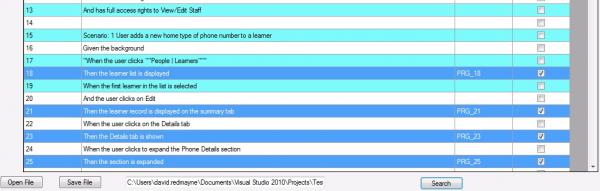
Here's my code so far.
Thanks
David
Private Sub cmdSearch_Click(sender As System.Object, e As System.EventArgs) Handles cmdSearch.Click
Dim i As Integer = 0
Dim Inc As String = txtCurFormat.Text
For Each row As DataGridViewRow In DataGridView1.Rows
Dim KeyWord As String = row.Cells(1).Value.ToString
If KeyWord.Contains("Then") Then
'row.DefaultCellStyle.BackColor = Color.Red
row.Selected = True
row.Cells(3).Value = True
row.Cells(2).Value = inc & i
End If
i = i + 1
Next
End Sub
-
Dec 30th, 2014, 12:32 PM
#2
Re: Increment cell data on search
First use code tags or highlight the code and press the VE button in the forum editor toolbar. This will keep your indented VB formatting and make your post easier to understand.
The problem is simple. You need to put your i = i + 1 inside your if statement.
As it is currently outside the if statement it is increasing on every pass in the loop.
If you want it to start at one then initialize your i variable to 1 instead of 0.
Honestly if you had stepped through your code in debug mode you would have seen the problem and not needed to post this question.
VB Code:
Private Sub cmdSearch_Click(sender As System.Object, e As System.EventArgs) Handles cmdSearch.Click
    Dim Inc As String = txtCurFormat.Text
    Dim i As Integer = 1
     For Each row As DataGridViewRow In DataGridView1.Rows
      Dim KeyWord As String = row.Cells(1).Value.ToString
      If KeyWord.Contains("Then") Then
        'row.DefaultCellStyle.BackColor = Color.Red
        row.Selected = True
        row.Cells(3).Value = True
        row.Cells(2).Value = Inc & i
        i = i + 1
      End If
    Next
  End Sub
Last edited by Gruff; Dec 30th, 2014 at 12:37 PM.
Burn the land and boil the sea
You can't take the sky from me
~T
-
Dec 30th, 2014, 01:17 PM
#3
Thread Starter
Junior Member
Re: Increment cell data on search
 Originally Posted by Gruff

First use code tags or highlight the code and press the VE button in the forum editor toolbar. This will keep your indented VB formatting and make your post easier to understand.
The problem is simple. You need to put your i = i + 1 inside your if statement.
As it is currently outside the if statement it is increasing on every pass in the loop.
If you want it to start at one then initialize your i variable to 1 instead of 0.
Honestly if you had stepped through your code in debug mode you would have seen the problem and not needed to post this question.
VB Code:
Private Sub cmdSearch_Click(sender As System.Object, e As System.EventArgs) Handles cmdSearch.Click
Dim Inc As String = txtCurFormat.Text
Dim i As Integer = 1
For Each row As DataGridViewRow In DataGridView1.Rows
Dim KeyWord As String = row.Cells(1).Value.ToString
If KeyWord.Contains("Then") Then
'row.DefaultCellStyle.BackColor = Color.Red
row.Selected = True
row.Cells(3).Value = True
row.Cells(2).Value = Inc & i
i = i + 1
End If
Next
End Sub
Thank you Gruff - apologies ..I wasn't aware of the VE button but will use from now on.
Sorry for wasting forum member's time...clearly we're not all geniuses!!!
Job done though.
David
-
Dec 30th, 2014, 03:39 PM
#4
Re: Increment cell data on search
Debugging is the first step all the time. If you aren't familiar with breakpoints and stepping, play with that, because they are the most valuable tools at your disposal. Far more than this forum, or even the whole internet. Without those tools, you are staring at the code guessing at what it is doing. With those tools, you can watch every step of the way. You can see the sausage being made.
By the way, the # tag also does some code formatting. Which one you use is a matter of preference. I find that # is nicer in many cases because it makes copying and pasting easier. The VE tag (which is really VB, with the right side missing) makes for a prettier display, but a copying pain. Your choice.
My usual boring signature: Nothing
 
Tags for this Thread
 Posting Permissions
- You may not post new threads
- You may not post replies
- You may not post attachments
- You may not edit your posts
-
Forum Rules
|
Click Here to Expand Forum to Full Width
|



 Reply With Quote


