|

-
Dec 28th, 2014, 02:25 AM
#1
Thread Starter
PowerPoster

Combobo DropDown Autosize based on item length.
Hi, all.
I am using a SQLDataReader to insert items into a Combobox from two different columns in the same table. Account Number and Account Name. There are four spaces between the Account Number and Account Name. The Account Number is a length of 9 characters and the max length of the Account Name is 50.
I have attempted to make sure the DropDown of the ComboBox auto sizes based on the longest item in the ComboBox, but I get no errors and it is not autosizing based on the longest item.
So, in short, the maximum characters for the items would be 63 characters.
This is what I have so far.
Code:
    Private Sub Combobox_DropDown(ByVal sender As Object, _
                                  ByVal e As System.EventArgs) Handles SubAccountOfAssets.DropDown, _
                                                                       SubAccountOfEquity.DropDown, _
                                                                       SubAccountOfExpense.DropDown, _
                                                                       SubAccountOfIncome.DropDown, _
                                                                       SubAccountOfLiability.DropDown

        AutoSizeComboboxDropDown(sender)
    End Sub
Code:
   Public Sub AutoSizeComboboxDropDown(ByVal CBName As Control)
        Try
            With CType(CBName, ComboBox)
                Dim Gfx As Graphics = .CreateGraphics
                Dim TheFont As Font = .Font
                Dim TheWidth As Integer = .DropDownWidth
                Dim ScrollBarWidth As Integer = IIf((.Items.Count > .MaxDropDownItems), SystemInformation.VerticalScrollBarWidth, 0)
                Dim TheItem As String

                For Each TheItem In .Items
                    Dim TheNewWidth As Integer = CInt(Gfx.MeasureString(TheItem, TheFont).Width) + ScrollBarWidth

                    If TheWidth < TheNewWidth Then
                        TheWidth = TheNewWidth
                    End If
                Next TheItem

                .DropDownWidth = TheWidth
            End With
        Catch CastEx As InvalidCastException
            MessageBox.Show(CastEx.ToString(), _
                            "Invalid Cast Exception", _
                            MessageBoxButtons.OK, _
                            MessageBoxIcon.Error, _
                            MessageBoxDefaultButton.Button1)

        End Try
    End Sub
Any suggestions or ideas as to why the DropDown for the ComboBox is not autosizing itself?
-
Dec 28th, 2014, 04:45 AM
#2
Re: Combobo DropDown Autosize based on item length.
I cut and pasted your code with these items in the comboBox.items collection
 Originally Posted by myComboBox.Items.ToString
kjhgkjhiuhyyiyghuiygluyhgukvkyvcycjtucxutrdxrdxrtdxrxkjhihui8ughi87ygh86tr54 v yrd trydrtdxtrsdxtrsxtesreaszresa
adscsad
sdvcs
sfv
ewfvewrvgewrvgwer
Here is my result...
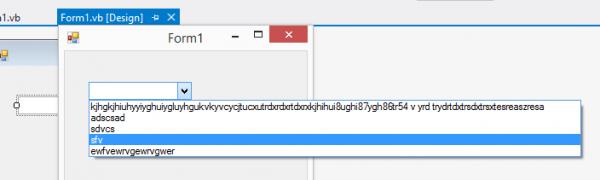
It that not what you get?
kevin
Process control doesn't give you good quality, it gives you consistent quality.
Good quality comes from consistently doing the right things.
Vague general questions have vague general answers. A $100 donation is required for me to help you if you PM me asking for help. Instructions for donating to one of our local charities will be provided.
______________________________ Last edited by kebo : Now. Reason: superfluous typo's
-
Dec 28th, 2014, 04:48 AM
#3
Thread Starter
PowerPoster
Re: Combobo DropDown Autosize based on item length.
Originally Posted by kebo

I cut and pasted your code with these items in the comboBox.items collection
Here is my result...
It that not what you get?
kevin
Nope. The longest item is cut off. It is not resizing the width to fit the longest item.
The items in the ComboBox are added from an SQLDataReader, which shouldn't matter at all.
I am sure I am missing something simple.
-
Dec 28th, 2014, 04:56 AM
#4
Thread Starter
PowerPoster
Re: Combobo DropDown Autosize based on item length.
This is what I am getting in my testing.
 Posting Permissions
- You may not post new threads
- You may not post replies
- You may not post attachments
- You may not edit your posts
-
Forum Rules
|
Click Here to Expand Forum to Full Width
|



 Reply With Quote
