|

-
Dec 23rd, 2014, 08:52 PM
#1
VB6 create DDL-Schema-instructions from JET-MDBs (to apply to a new created *.mdb)
As the title says - the Demo will show, how to create DDL-SQL-instructions from a given *.mdb-File,
using two small Classes (cJETDDL and cJETDDLTable).
The DDL is created for existing:
- Table-Definitions
- Index-Definitions
- Foreign-Key relations
- Views and Queries
In the example I'm using (also coming included in the Demo-Zip) the "official JET-Demo-DB" (NWind.mdb).
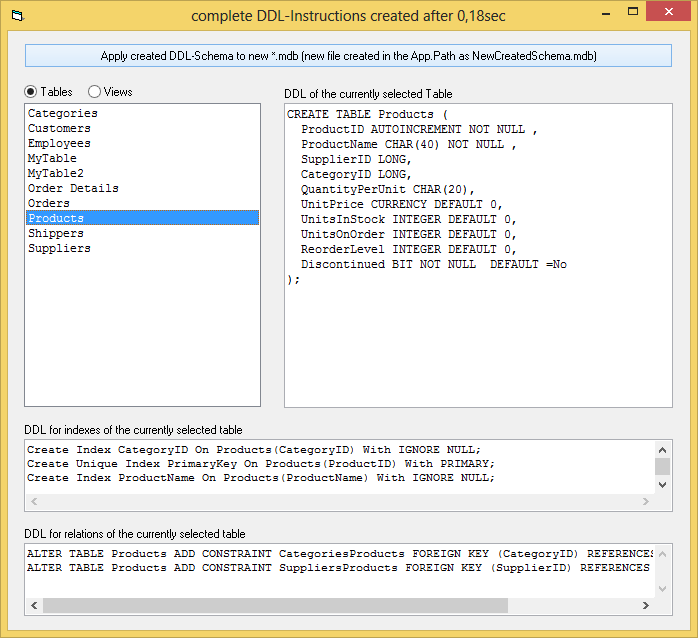
There's a little GUI around the functionality of the two above mentioned Classes, which shows
the Text-Output they did produce for the different kinds of DDL-Statements.
Here's a ScreenShot:
And here is the Demo-zip.
I think the whole thing is educational for those who want to learn DDL, to define - or alter
their DB-Schemas "per Code".
Olaf
-
Dec 23rd, 2014, 09:47 PM
#2
Hyperactive Member

Re: VB6 create DDL-Schema-instructions from JET-MDBs (to apply to a new created *.mdb
This is useful, thanks.
Is there a reason for not using ADOX to retrieve DDLs? I used it to create a SQLite db from a mdb a few years ago (I believe I still have the code, somewhere).
-
Dec 23rd, 2014, 10:03 PM
#3
Re: VB6 create DDL-Schema-instructions from JET-MDBs (to apply to a new created *.mdb
 Originally Posted by Carlos Rocha

Is there a reason for not using ADOX to retrieve DDLs? I used it to create a SQLite db from a mdb a few years ago (I believe I still have the code, somewhere).
I was already familiar with:
Cnn.OpenSchema(adSchemaTables) ... (or adSchemaIndexes, adSchemaForeignKeys, adSchemaViews)
So there was no pressing need ... aside from that, I think also ADOX is not able, to hand out
the underlying DDL directly by appropriate COM-methods - maybe in case of SQL-Server (not tested) -
but I think for JET it would have meant quite similar parsing-efforts to finally build the DDL-Strings.
If you have something based on ADOX, which would "straighten out" the currently used Code
in the two Classes significantly, then I'd certainly take a look and would change (and shorten)
the Sources appropriately.
Regards,
Olaf
-
Dec 23rd, 2014, 10:28 PM
#4
Hyperactive Member
Re: VB6 create DDL-Schema-instructions from JET-MDBs (to apply to a new created *.mdb
After a fast search in my code I found the way I retrieved DDLs for Views (translated from VO):
oCatalog.Views.Item(sView).Command.CommandText
It seems Tables, Indexes and Procedures were handled in a different way. I can find it with a little more time if you are interested.
-
Dec 23rd, 2014, 10:41 PM
#5
Re: VB6 create DDL-Schema-instructions from JET-MDBs (to apply to a new created *.mdb
Originally Posted by Carlos Rocha
After a fast search in my code I found the way I retrieved DDLs for Views (translated from VO):
oCatalog.Views.Item(sView).Command.CommandText
Ah - yes, for Views there *was* an appropriate Field, which contained their SQL-Definition...
(using adSchemaViews, this is the Rs.Field with the Name: VIEW_DEFINITION) - so in this case
the needed efforts are also very small - and quite similar to ADOX.
Originally Posted by Carlos Rocha
It seems Tables, Indexes and Procedures were handled in a different way. I can find it with a little more time if you are interested.
As said, don't put too much efforts into it on your end - especially not, when (after a fast "looking over"),
you find that the DDL is not as easy retrievable as in case of the Views...
Olaf
-
Dec 24th, 2014, 08:38 AM
#6
Hyperactive Member
Re: VB6 create DDL-Schema-instructions from JET-MDBs (to apply to a new created *.mdb
Originally Posted by Schmidt
As said, don't put too much efforts into it on your end - especially not, when (after a fast "looking over"),
you find that the DDL is not as easy retrievable as in case of the Views...
You are right, there's no equivalent for Tables.
Happy Christmas
Carlos
-
Dec 24th, 2014, 12:39 PM
#7
Re: VB6 create DDL-Schema-instructions from JET-MDBs (to apply to a new created *.mdb
You have a couple of minor bugs I found on first trial:
Code:
CREATE TABLE Products (
  ProductID AUTOINCREMENT NOT NULL ,
  ProductName CHAR(40) NOT NULL ,
  SupplierID LONG,
  CategoryID LONG,
  QuantityPerUnit CHAR(20),
  UnitPrice CURRENCY DEFAULT 0,
  UnitsInStock INTEGER DEFAULT 0,
  UnitsOnOrder INTEGER DEFAULT 0,
  ReorderLevel INTEGER DEFAULT 0,
  Discontinued BIT NOT NULL DEFAULT =No
);
Should be:
Code:
CREATE TABLE Products (
  ProductID AUTOINCREMENT NOT NULL,
  ProductName CHAR(40) NOT NULL,
  SupplierID LONG,
  CategoryID LONG,
  QuantityPerUnit CHAR(20),
  UnitPrice CURRENCY DEFAULT 0,
  UnitsInStock INTEGER DEFAULT 0,
  UnitsOnOrder INTEGER DEFAULT 0,
  ReorderLevel INTEGER DEFAULT 0,
  Discontinued BIT NOT NULL DEFAULT No
);
I.e. you have some extra spaces before and after commas (trivial point), but more importantly an extraneous "=" before the DEFAULT value No.
Just nitpicking though, and easily repaired. Should be a useful tool for exploring and self-education as well as documenting and reverse engineering an "inherited" MDB created by somebody else.
I'd call this a "schema decompiler" myself, but in any case a nice idea.
I might even consider including the concept into my JeTTY command-line/batch MDB client. Right now SHOW TABLE xxx produces:
-
Dec 24th, 2014, 04:34 PM
#8
Re: VB6 create DDL-Schema-instructions from JET-MDBs (to apply to a new created *.mdb
Originally Posted by dilettante
You have a couple of minor bugs I found on first trial:
Code:
CREATE TABLE Products (
 ...
  Discontinued BIT NOT NULL DEFAULT =No
);
Should be:
Code:
CREATE TABLE Products (
  ...
  Discontinued BIT NOT NULL DEFAULT No
);
I.e. you have some extra spaces before and after commas (trivial point), but more importantly an extraneous "=" before the DEFAULT value No.
Both are "cosmetics", since JET understands also '=' when placed between the DEFAULT -Keyword and the following DefaultValue.
Originally Posted by dilettante
Just nitpicking though, and easily repaired.
Thanks for looking over the code though.
Well, since it's Christmas - with "striving for a nicer appearance" you *have* a point right there -
(also with regards to other DB-Engines which might not be that forgiving in case of that equal-sign),
so I've re-uploaded the Zip again with appropriate corrections. 
Originally Posted by dilettante
I'd call this a "schema decompiler" myself, but in any case a nice idea.
I might even consider including the concept into my JeTTY command-line/batch MDB client.
The more it is used, the earlier potentially remaining bugs will pop out (there still might be some -
e.g. in the Select Case for the FieldType-Mapping).
Olaf
-
Dec 25th, 2014, 11:22 AM
#9
Re: VB6 create DDL-Schema-instructions from JET-MDBs (to apply to a new created *.mdb
Actually no:
Code:
>open Test.mdb;
#Opened database Test.mdb (Jet4X "2000")
>include BadProducts.txt;
#INCLUDing C:\Users\Theodore\Desktop\JeTTY\BadProducts.txt
CREATE TABLE Products (
  ProductID AUTOINCREMENT NOT NULL,
  ProductName CHAR(40) NOT NULL,
  SupplierID LONG,
  CategoryID LONG,
  QuantityPerUnit CHAR(20),
  UnitPrice CURRENCY DEFAULT 0,
  UnitsInStock INTEGER DEFAULT 0,
  UnitsOnOrder INTEGER DEFAULT 0,
  ReorderLevel INTEGER DEFAULT 0,
  Discontinued BIT NOT NULL DEFAULT = No
);
#Err: &H80040E14 (-2147217900) in Microsoft JET Database Engine
      Syntax error in CREATE TABLE statement.
#End INCLUDE of C:\Users\Theodore\Desktop\JeTTY\BadProducts.txt
>
-
Dec 25th, 2014, 01:57 PM
#10
Re: VB6 create DDL-Schema-instructions from JET-MDBs (to apply to a new created *.mdb
Actually Yes:
'...latebound Example, creating a new *.mdb File in the Temp-Folder
Code:
Private Sub Form_Click()
Const JetPrefix = "Provider=Microsoft.Jet.OLEDB.4.0;Data Source="
Dim FileName As String, Cnn As New ADODB.Connection

  FileName = Environ("temp") & "\NewTest.mdb"
  On Error Resume Next
    Kill FileName 'try to ensure, we start with a new created file
  On Error GoTo 0

  CreateObject("ADOX.Catalog").Create JetPrefix & FileName 'create a new, empty *.mdb-File

  With CreateObject("ADODB.Connection")
    .Open JetPrefix & FileName  'open a Connection on this new DB-File

    .Execute "Create Table T(ID Long, Txt Char(99) Default ='foo')"
    .Execute "Insert Into T(ID) Values(1)" 'insert the first record (but only touching the ID-Field)
    Debug.Print .Execute("Select =Txt From T")(0) 'print content of the Txt-Field of that first record
    Debug.Print .Execute("Select ='bar' From T")(0) 'print an expression (a leading equal-sign is ignored as whitespace)
  End With
End Sub
-
Dec 28th, 2014, 03:00 PM
#11
Re: VB6 create DDL-Schema-instructions from JET-MDBs (to apply to a new created *.mdb
Sorry but you are still wrong. As it says in the documentation:
A default value is the value that is entered in a field any time a new record is added to a table and no value is specified for that particular column. To set a default value for a field, use the DEFAULT keyword after declaring the field type in either an ADD COLUMN or ALTER COLUMN clause.
ALTER TABLE tblCustomers
ALTER COLUMN Address TEXT(40) DEFAULT Unknown
Notice that the default value is not enclosed in single quotes. If it were, the quotes would also be inserted into the record. The DEFAULT keyword can also be used in a CREATE TABLE statement.
CREATE TABLE tblCustomers (
CustomerID INTEGER CONSTRAINT PK_tblCustomers
PRIMARY KEY,
[Last Name] TEXT(50) NOT NULL,
[First Name] TEXT(50) NOT NULL,
Phone TEXT(10),
Email TEXT(50),
Address TEXT(40) DEFAULT Unknown)
What you have done is exploit a little-known feature that allows a default expression to be added as the "default value" and this must be evaluated at the time of every INSERT, etc.
See:
Code:
>create database new1.mdb;
#Created new database new1.mdb (Jet4X "2000")
>Create Table T(ID Long, Txt Char(99) Default ='foo');
#Ok
>Insert Into T(ID) Values(1);
#Ok
>show table T;
                                                          Page 1 of 1
COLUMN_NAME COLUMN_DEFAULT IS_NULLABLE DATA_TYPE CHARACTER_MAXIMUM_LEN
─────────── ────────────── ─────────── ───────── ─────────────────────
ID          *null*         True        LONG      *null*
Txt         ='foo'         True        WCHAR     99
>select * from T;
                                                          Page 1 of 1
ID Txt
── ───────────────────────────────────────────────────────────────────
1  foo
>
vs. the correct:
Code:
>create database new2.mdb;
#Created new database new2.mdb (Jet4X "2000")
>Create Table T(ID Long, Txt Char(99) Default foo);
#Ok
>Insert Into T(ID) Values(1);
#Ok
>show table T;
                                                          Page 1 of 1
COLUMN_NAME COLUMN_DEFAULT IS_NULLABLE DATA_TYPE CHARACTER_MAXIMUM_LEN
─────────── ────────────── ─────────── ───────── ─────────────────────
ID          *null*         True        LONG      *null*
Txt         foo            True        WCHAR     99
>select * from T;
                                                          Page 1 of 1
ID Txt
── ───────────────────────────────────────────────────────────────────
1  foo
>
Same results, wrong (inefficient) approach relying on a feature that isn't even documented as far as I can determine.
-
Dec 28th, 2014, 03:09 PM
#12
Re: VB6 create DDL-Schema-instructions from JET-MDBs (to apply to a new created *.mdb
Another example of this weird construct:
Code:
JeTTY version 0.5.68
>create database junk.mdb;
>create table t(T text(1),D date default =Date());
#Ok
>insert into t (T) values ("X");
#Ok
>select * from t;
 Page 1 of 1
T D
─ ──────────
X 12/28/2014
>
-
Dec 28th, 2014, 05:02 PM
#13
Re: VB6 create DDL-Schema-instructions from JET-MDBs (to apply to a new created *.mdb
Looks like the "=" isn't even required then!
Code:
>alter table t alter column D date default Date();
#Ok
>show table t;
                                                          Page 1 of 1
COLUMN_NAME COLUMN_DEFAULT IS_NULLABLE DATA_TYPE CHARACTER_MAXIMUM_LEN
─────────── ────────────── ─────────── ───────── ─────────────────────
T           *null*         True        WCHAR     1
D           Date()         True        DATE      *null*
>insert into t(T) values("A");
#Ok
>select * from t;
 Page 1 of 1
T D
─ ──────────
A 12/28/2014
>
-
Dec 28th, 2014, 05:14 PM
#14
Re: VB6 create DDL-Schema-instructions from JET-MDBs (to apply to a new created *.mdb
Originally Posted by dilettante
Sorry but you are still wrong.
Nope - you still don't get it...
Firstly, what you pointed out *is* cosmetics - in that there was no need to change anything in the original
code - it was not broken - and would have worked for the accepted Default-expressions "as they were"
(no matter if coming with a leading equal-sign or not).
What you now seem to discover for the first time is, that the JET engine
treats Default-"Values" apparently as expressions.
You're quite late with that recognition - and the documentation (you sure it wasn't a book from some "Expert"?) is wrong of course,
when it says: "...the default value is not enclosed in single quotes. If it were, the quotes would also be inserted into the record"
Any simple default-value provocing Insert-Test test will render the above citation wrong...
E.g. all of the following DDL Table constructions will succeed:
Create Table T(ID Long, Txt Text(99) Default 'foo bar' , ... ) ' will later hand out [foo bar] as the Field-Default-value (*without* any quotes)
Create Table T(ID Long, Dat DateTime Default Now() , ... ) ' will later hand out the current DateTime as the Field-Default-value
Create Table T(ID Long, Qrt Integer Default DatePart('q',Now()) , ... ) ' will later hand out the current year-quarter as the Field-Default-value
Create Table T(ID Long, L Long Default 1+2*3 , ... ) ' will later hand out 7 as the Field-Default-value
And in case there's an "immediately leading equal-sign" in front of the default-expression, it is just ignored by the JET-expression-parser.
Originally Posted by dilettante
What you have done is exploit a little-known feature that allows a default expression to be added as the "default value" and this must be evaluated at the time of every INSERT, etc.
Wrong again - there's no "special evaluation, in case there's a leading equal sign" -
there's *always-an-evaluation*... (since any default-value is always treated as an expression) period.
Originally Posted by dilettante
Same results, wrong (inefficient) approach relying on a feature that isn't even documented as far as I can determine.
You clearly don't know what you're talking about, when you mark your apparently preferred default specification of:
Create Table T(ID Long, Txt Text(99) Default foo , ... )
as "correct and easier to resolve", compared to:
Create Table T(ID Long, Txt Text(99) Default 'foo' , ... )
The *latter* (quoted) version is the one which is easier resolvable by the expression-parser,
because it signalizes with the quotes, that it contains a simple string-literal, which is
parsable much faster by the expression-evaluator then...
Whereas what the expression-evaluator has to do in case of your (non-quoted) foo-defaultvalue is,
to check if the term foo is among "special functions", or reserved words - only if it is not found there,
is the expression-evaluator able to treat it (and hand it out) as a String-Literal.
I also don't see, how you will ever be able, to specify the string literal 'foo bar' as
a default value, with your currently promoted syntax (which will also fail for unquoted
string-literals as e.g. now, rnd, etc...)
Olaf
 Posting Permissions
- You may not post new threads
- You may not post replies
- You may not post attachments
- You may not edit your posts
-
Forum Rules
|
Click Here to Expand Forum to Full Width
|



 Reply With Quote