|

-
Dec 14th, 2014, 12:25 AM
#11
Re: [vb6]Alpha Image Control v2 - Final Update (15 Jan 2012)
Interesting idea, especially for animation. Here's some tips/steps to get you going. But you kinda hurt my feelings when you offered those examples from PlanetSourceCode and didn't include mine which could be found here. Just kidding about hurt feelings
1) Add the alpha image control (AIC) to a test form and add an image to it, ensure it animates correctly when the form is in runtime. Once this is verified, we can play.
2) Gonna need quite a few APIs and I'll list them below & provide some code to get you started
3) Ensure the AIC is sized same as you want the form sized (remember just testing), doesn't matter where it is positioned. Make the form borderless
4) The AIC props: Enabled=False, AlignCenter=False, Aspect=Scaled
Note: if rotating image, then AlignCenter=True, but you have to offset where to paint in the PaintImageAsDrawnToHDC calls on the form
5) Paste this code in the form & change the AIC name to what you called your AIC
6) Load, run & play. Double click on the form to unload it. Click, hold & drag to move it.
7) Never make the form 100% transparent. You may need task manager to kill it.
Most of the code below is needed for applying ULW to the form. You are using the AIC for just 2 reasons: notify when new animated frame is rendered and to draw the frame to another hDC. If you are manually updating the AIC to a new image thereby animating it yourself, you would simply erase the memory bitmap (via FillMemory API) & then call the pvUpdateWindow after setting the AIC image
Code:
Option Explicit

Private Declare Function UpdateLayeredWindow Lib "user32.dll" (ByVal hWnd As Long, ByVal hdcDst As Long, ByRef pptDst As Any, ByRef psize As Any, ByVal hdcSrc As Long, ByRef pptSrc As Any, ByVal crKey As Long, ByRef pblend As Long, ByVal dwFlags As Long) As Long
Private Declare Function GetWindowLong Lib "user32.dll" Alias "GetWindowLongA" (ByVal hWnd As Long, ByVal nIndex As Long) As Long
Private Declare Function SetWindowLong Lib "user32.dll" Alias "SetWindowLongA" (ByVal hWnd As Long, ByVal nIndex As Long, ByVal dwNewLong As Long) As Long
Private Declare Function SetLayeredWindowAttributes Lib "user32.dll" (ByVal hWnd As Long, ByVal crKey As Long, ByVal bAlpha As Byte, ByVal dwFlags As Long) As Long
Private Declare Function ReleaseCapture Lib "user32.dll" () As Long
Private Declare Function SendMessage Lib "user32.dll" Alias "SendMessageA" (ByVal hWnd As Long, ByVal wMsg As Long, ByVal wParam As Long, ByRef lParam As Any) As Long
Private Declare Function GetDC Lib "user32.dll" (ByVal hWnd As Long) As Long
Private Declare Function SelectObject Lib "gdi32.dll" (ByVal hdc As Long, ByVal hObject As Long) As Long
Private Declare Function DeleteObject Lib "gdi32.dll" (ByVal hObject As Long) As Long
Private Declare Function ReleaseDC Lib "user32.dll" (ByVal hWnd As Long, ByVal hdc As Long) As Long
Private Declare Sub FillMemory Lib "kernel32.dll" Alias "RtlFillMemory" (ByRef Destination As Any, ByVal Length As Long, ByVal Fill As Byte)
Private Declare Function CreateCompatibleDC Lib "gdi32.dll" (ByVal hdc As Long) As Long
Private Declare Function CreateDIBSection Lib "gdi32.dll" (ByVal hdc As Long, ByRef pBitmapInfo As Any, ByVal un As Long, ByRef lplpVoid As Long, ByVal Handle As Long, ByVal dw As Long) As Long
Private Declare Function DeleteDC Lib "gdi32.dll" (ByVal hdc As Long) As Long
Private Const WS_EX_LAYERED As Long = &H80000
Private Const GWL_EXSTYLE As Long = -20
Private Const ULW_ALPHA As Long = &H2
Private Const ULW_COLORKEY As Long = &H1
Private Const WM_NCLBUTTONDOWN As Long = &HA1
Private Const HTCAPTION As Long = 2
Private Const AC_SRC_ALPHA As Long = &H1
Private Const AC_SRC_OVER As Long = &H0
Private Const GWL_STYLE As Long = -16
Private Const WS_BORDER As Long = &H800000
Private Type POINTAPI
    X As Long
    Y As Long
End Type

Private Type Size
    cX As Long
    cY As Long
End Type
Private Type BITMAPINFOHEADER        ' GDI structure
    biSize As Long
    biWidth As Long
    biHeight As Long
    biPlanes As Integer
    biBitCount As Integer
    biCompression As Long
    biSizeImage As Long
    biXPelsPerMeter As Long
    biYPelsPerMeter As Long
    biClrUsed As Long
    biClrImportant As Long
End Type

Private m_hDC As Long, m_hBmp As Long, m_DIBptr As Long
Private m_Opacity As Long
Private m_MousePoints As POINTAPI
Private m_Size As Size


Private Sub AlphaImgCtl1_AnimationFrameChanged(Frame As Long)
    FillMemory ByVal m_DIBptr, m_Size.cX * m_Size.cY * 4&, 0
    AlphaImgCtl1.PaintImageAsDrawnToHDC m_hDC, 0, 0
    Call pvUpdateWindow
End Sub

Private Sub Form_DblClick()
    Unload Me
End Sub

Private Sub Form_Load()

    m_MousePoints.X = -1&
    m_Opacity = 255
    m_Size.cX = ScaleX(AlphaImgCtl1.Width, Me.ScaleMode, vbPixels)
    m_Size.cY = ScaleY(AlphaImgCtl1.Height, Me.ScaleMode, vbPixels)
    If pvCreateLWdc = False Then
        Stop
        ' error couldn't create a basic DC & bitmap
    End If
    Me.Move Me.Left, Me.Top, ScaleX(AlphaImgCtl1.Width, Me.ScaleMode, vbTwips), ScaleY(AlphaImgCtl1.Height, Me.ScaleMode, vbTwips)
    AlphaImgCtl1.PaintImageAsDrawnToHDC m_hDC, 0, 0
    SetWindowLong Me.hWnd, GWL_EXSTYLE, GetWindowLong(Me.hWnd, GWL_EXSTYLE) Or WS_EX_LAYERED
    Call pvUpdateWindow
    Show
    DoEvents
    AlphaImgCtl1.Animate2.StartAnimation

End Sub

Private Sub pvUpdateWindow()
    Dim srcPt As POINTAPI
    Dim lBlendFunc As Long
    lBlendFunc = AC_SRC_OVER Or (m_Opacity * &H10000) Or (AC_SRC_ALPHA * &H1000000)
    UpdateLayeredWindow Me.hWnd, 0&, ByVal 0&, m_Size, m_hDC, srcPt, 0&, lBlendFunc, ULW_ALPHA
End Sub

Private Sub Form_MouseMove(Button As Integer, Shift As Integer, X As Single, Y As Single)
    If Button = vbLeftButton And m_MousePoints.X > -1& Then
        If m_MousePoints.X <> X And m_MousePoints.Y <> Y Then
            ReleaseCapture
            m_MousePoints.X = -1
            SendMessage Me.hWnd, WM_NCLBUTTONDOWN, HTCAPTION, ByVal 0&
        End If
    End If
End Sub

Private Sub Form_MouseDown(Button As Integer, Shift As Integer, X As Single, Y As Single)
    If Button = vbLeftButton Then
        m_MousePoints.X = X
        m_MousePoints.Y = Y
    End If
End Sub

Private Function pvCreateLWdc() As Boolean
    Dim bhi As BITMAPINFOHEADER
    Dim tDC As Long
    With bhi
        .biBitCount = 32
        .biHeight = -m_Size.cY
        .biWidth = m_Size.cX
        .biPlanes = 1
        .biSize = Len(bhi)
    End With
    tDC = GetDC(0)
    m_hDC = CreateCompatibleDC(tDC)
    ReleaseDC 0, tDC
    m_hBmp = CreateDIBSection(m_hDC, bhi, 0&, m_DIBptr, 0&, 0&)
    If m_hBmp <> 0 Then
        m_hBmp = SelectObject(m_hDC, m_hBmp)
        pvCreateLWdc = True
    Else
        DeleteDC m_hDC: m_hDC = 0&
    End If
End Function

Private Sub Form_Unload(Cancel As Integer)
    If m_hBmp <> 0 Then
        DeleteObject SelectObject(m_hDC, m_hBmp)
        DeleteDC m_hDC
    End If
End Sub
Now the AIC wasn't designed for this. There is a waste of CPU cycles going on as the control is actually drawing on the form, but you can't see that. But the AIC does send us a message to let us know that animation frame changed & we can have the AIC paint to our memory DC. All is good, though double painting is going on. My CPU hardly noticed the animated form, larger the image, may be noticed a bit more? Have fun
Edited: If you have any question regarding the posted code, ask.
I think you may have given me a reason to add similar functionality in the new version of this control, if I ever get it done. A way to link the AIC to user-defined DC and do all the painting directly to that DC vs the AIC's DC (which is really its container's DC)
The screenshot shown below is a single frame from a 20 frame animation. The form (goldfish) is 100% opaque and you can clearly see the alphablending through its fins. The source image is a PNG with various levels of translucency.
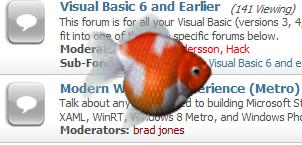
Last edited by LaVolpe; Dec 14th, 2014 at 02:49 PM.
Reason: added screenshot
Tags for this Thread
 Posting Permissions
- You may not post new threads
- You may not post replies
- You may not post attachments
- You may not edit your posts
-
Forum Rules
|
Click Here to Expand Forum to Full Width
|



 Reply With Quote