|

-
Nov 16th, 2014, 09:59 AM
#1
Thread Starter
Addicted Member

 [RESOLVED] Making a Shape move along a Line [RESOLVED] Making a Shape move along a Line
Using the Line tool, I have drawn a line on my form. I also have a Shape on my form. The shape starts at either end, but I need to have it move along the Line to the other end. The Shape needs to follow the Line, no matter the angle it is drawn. How do I do this?
Using VB6 with Windows7.

-
Nov 16th, 2014, 12:54 PM
#2
Re: Making a Shape move along a Line
Try this formula. Ensure you pass the distance to move in appropriate scale units of the Line's container. For simplicity, suggest just changing the line's container (form, picbox, whatever) to a ScaleMode of vbPixels. The DistanceToMove parameter is number of units from the line's X1,Y1 point. Obviously you will want to center the shape over the returned NewX,NewY coordinates.
Code:
Private Sub GetNextPoint(Path As VB.Line, DistanceToMove As Long, NewX As Single, NewY As Single)

' DistanceToMove is number of ScaleUnits (twips,pixels,etc) to move from Path's X1,Y1 properties
' NewX & NewY will be the coordinates relative to Path's X1,Y1 & DistanceToMove

Dim dx As Single, dy As Single
Dim sLen As Single

dx = Path.X2 - Path.X1
dy = Path.Y2 - Path.Y1
sLen = Sqr(dx * dx + dy * dy)

NewY = (dy * DistanceToMove) / sLen + Path.Y1
NewX = (dx * DistanceToMove) / sLen + Path.X1

End Sub
Edited: I didn't add any logic to test whether your distance exceeds the line length. You can test that yourself. Just calc the length as shown in the subroutine & ensure you don't pass a distance greater than that. Or, within the subroutine, if DistanceToMove > sLen then return Path.X2,Path.Y2 as the NewX,NewY values
As-is, the line is used just for a starting point, direction & angle, there is no stopping point in the logic. You can traverse that line in either direction at an infinite +/- DistanceToMove
After re-reading your post, shape can start at either end? This changes the logic within the subroutine. Modified below:
Code:
Private Sub GetNextPoint(Path As VB.Line, ByVal DistanceToMove As Long, StartAtX1Y1 As Boolean, _
                             NewX As Single, NewY As Single)

' DistanceToMove is number of ScaleUnits (twips,pixels,etc) to move from Path's X1,Y1 properties
' NewX & NewY will be the coordinates relative to Path's X1,Y1 & DistanceToMove
' StartAtX1Y1 is true if starting point is X1,Y1 else False if starting from X2,Y2

Dim dx As Single, dy As Single
Dim sLen As Single

    dx = Path.X2 - Path.X1
    dy = Path.Y2 - Path.Y1
    sLen = Sqr(dx * dx + dy * dy)
    If StartAtX1Y1 = False Then DistanceToMove = sLen - DistanceToMove
    NewY = (dy * DistanceToMove) / sLen + Path.Y1
    NewX = (dx * DistanceToMove) / sLen + Path.X1

End Sub
Last edited by LaVolpe; Nov 16th, 2014 at 01:38 PM.
-
Nov 16th, 2014, 01:16 PM
#3
Re: Making a Shape move along a Line
 Originally Posted by Conroy Vanderbluff

Using the Line tool, I have drawn a line on my form. I also have a Shape on my form. The shape starts at either end, but I need to have it move along the Line to the other end. The Shape needs to follow the Line, no matter the angle it is drawn. How do I do this?
There's a lot of VB6-modules out there on the Web, which define basic routines for 2D-Vector-Math.
And you only need a few of those routines, to accomplish what you want -
(below is a small Class-Module which defines such a "Subset of V-functions to begin with).
Into a *.bas-Module, named modVector2D:
Code:
Option Explicit

Sub vDraw(Cont, V As cV, Optional ByVal Radius& = 5, Optional ByVal Color& = vbBlue)
  Cont.FillColor = Color
  Cont.Circle (V.x, V.y), Radius, Color
End Sub

Function vInit(ByVal x As Double, ByVal y As Double) As cV
  Set vInit = New cV
  vInit.x = x
  vInit.y = y
End Function

Function vAdd(V1 As cV, V2 As cV) As cV
  Set vAdd = New cV
  vAdd.x = V1.x + V2.x
  vAdd.y = V1.y + V2.y
End Function

Function vSub(V1 As cV, V2 As cV) As cV
  Set vSub = New cV
  vSub.x = V1.x - V2.x
  vSub.y = V1.y - V2.y
End Function

Function vMul(V As cV, ByVal Scalar As Double) As cV
  Set vMul = New cV
  vMul.x = V.x * Scalar
  vMul.y = V.y * Scalar
End Function

Function vNeg(V As cV) As cV
  Set vNeg = New cV
  vNeg.x = -V.x
  vNeg.y = -V.y
End Function

Function vLength(V As cV) As Double
  vLength = Sqr((V.x * V.x) + (V.y * V.y))
End Function

Function vDist(V1 As cV, V2 As cV) As Double
  vDist = vLength(vSub(V1, V2))
End Function

Function vDotProd(V1 As cV, V2 As cV) As Double
  vDotProd = (V1.x * V2.x) + (V1.y * V2.y)
  If vDotProd = 0 Then vDotProd = 1
End Function

Function vNorm(V As cV) As cV
Dim Length As Double
  Length = vLength(V)
  Set vNorm = New cV
  If Length Then vNorm.x = V.x / Length
  If Length Then vNorm.y = V.y / Length
End Function
The above Module-Code needs to be accompanied by a small Project-Private-Class, named cV:
Code:
Option Explicit

Public x As Double, y As Double

Public Function Clone() As cV
  Set Clone = New cV
      Clone.x = x
      Clone.y = y
End Function
Then it's a good idea to encapsulate certain Objects and their behaviour in a Class as well...
For your case, an encapsulation of the three Point-Elements (A, B and the moving Obj) -
all in one Class, would look this way:
Into a Project-Private-Class, named cObj:
Code:
Option Explicit

Public Enum eFromTo
  trvAB
  trvBA
End Enum

Public vPos As cV          'the location-Vector of our Obj
Public vDir As cV          'the (normalized) direction-Vector of our Obj
Public vA As cV, vB As cV  'location-Vectors of points A and B
Public Speed As Double     'the travel-speed of our Obj
Public FromTo As eFromTo   'the travel-direction of our Obj

Public Sub CalcNewPos()
  If FromTo = trvAB Then Set vDir = vNorm(vSub(vB, vA)) Else Set vDir = vNorm(vSub(vA, vB))
  Set vPos = vAdd(vPos, vMul(vDir, Speed))
End Sub

Public Function ABDist() As Double
  ABDist = vDist(vA, vB)
End Function

Public Function TravelDist() As Double
  TravelDist = vDist(vPos, IIf(FromTo = trvAB, vA, vB))
End Function

Public Sub SwitchTravelDirection()
  FromTo = IIf(FromTo = trvAB, trvBA, trvAB)
End Sub

Sub DrawOn(Cont)
  Cont.Line (vA.x, vA.y)-(vB.x, vB.y), vbMagenta
  vDraw Cont, vPos, 16, vbRed
  vDraw Cont, vA, 8, vbBlue
  vDraw Cont, vB, 8, vbGreen
End Sub
As you can see - due to the included Vector-Math-HelperCode, the code within that Class is lean and understandable.
What now remains, is to bring all together in a Form:
Code:
Option Explicit

Private WithEvents TRedraw As vB.Timer

Private Obj1 As New cObj, Obj2 As New cObj

Private Sub Form_Load() 'just some Inits
  Set TRedraw = Controls.Add("VB.Timer", "TRedraw"): TRedraw.Interval = 20
  AutoRedraw = True
  ScaleMode = vbPixels
  FillStyle = 0

  Set Obj1.vA = vInit(50, 50) 'init the Movement-restriction-points A
  Set Obj1.vB = vInit(400, 300) '...and B
  Set Obj1.vPos = Obj1.vA.Clone 'init our Obj-Pos to the same location-Vector as Point vA
      Obj1.FromTo = trvAB 'define the current travel-direction as "from A-To-B"
      Obj1.Speed = 4 'and the Speed of the Object

  Set Obj2.vA = vInit(200, 300) 'init the Movement-restriction-points A
  Set Obj2.vB = vInit(300, 50) '...and B
  Set Obj2.vPos = Obj2.vB.Clone 'init our Obj-Pos to the same location-Vector as Point vB
      Obj2.FromTo = trvBA 'define the current travel-direction as "from B-To-A"
      Obj2.Speed = 7 'and the Speed of the Object
End Sub

Private Sub TRedraw_Timer()
  CheckAndMove Obj1
  CheckAndMove Obj2

  RedrawAll
End Sub

Private Sub CheckAndMove(Obj As cObj)
  If Obj.TravelDist > Obj.ABDist Then Obj.SwitchTravelDirection
  Obj.CalcNewPos 'reposition, according to the current travel-direction and speed
End Sub

Private Sub RedrawAll()
  Cls
  Obj1.DrawOn Me
  Obj2.DrawOn Me
End Sub
And the result is two Objects which are rendered on the Form, bouncing between
their A and B-Points with different Speeds.
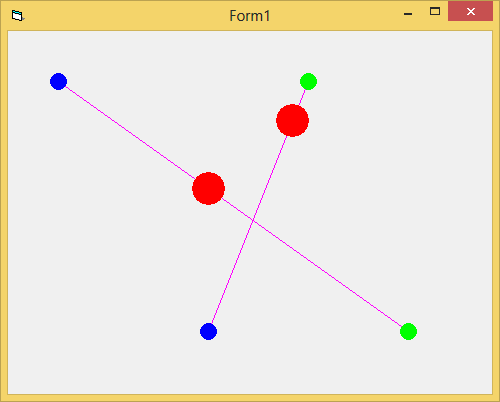
Olaf
Last edited by Schmidt; Nov 16th, 2014 at 01:40 PM.
-
Nov 16th, 2014, 01:33 PM
#4
Thread Starter
Addicted Member
Re: Making a Shape move along a Line
Schmidt, I am getting a lot of errors using your code, specifically
Code:
Private Obj1 As New cObj, Obj2 As New cObj
LaVolpe, I will try to use your code, though it seems very general.
Thank you both.
-
Nov 16th, 2014, 01:41 PM
#5
Thread Starter
Addicted Member
Re: Making a Shape move along a Line
LaVolpe, can you explain how I would use your code?
-
Nov 16th, 2014, 01:42 PM
#6
Re: Making a Shape move along a Line
Originally Posted by Conroy Vanderbluff
LaVolpe, I will try to use your code, though it seems very general.
Thank you both.
It's generic & simple for traversing lines at a constant speed (i.e., 1 pixel at an interval). I have routines that can traverse, arcs, & bezier curves, basically any contiguous path. Way more complicated than what you requested. The code I posted (later modified for reverse direction) works for straight lines
-
Nov 16th, 2014, 01:42 PM
#7
Re: Making a Shape move along a Line
Originally Posted by Conroy Vanderbluff
Schmidt, I am getting a lot of errors using your code, specifically
Code:
Private Obj1 As New cObj, Obj2 As New cObj
You will need to get the Class-Names right in your Test-Project...
I've edited my earlier posting, to make these ClassNames more "visually present".
To summarize again - you will need (in a new StdExe-Project)
- the usual Form (the default-name Form1 is sufficient)
- a *.bas Module for the Vector-Math-Functions (name it as you like)
- a private Class-Module, named cV
- a private Class-Module, named cObj
Olaf
-
Nov 16th, 2014, 01:47 PM
#8
Re: Making a Shape move along a Line
Originally Posted by Conroy Vanderbluff
LaVolpe, can you explain how I would use your code?
Sample below is using the updated version I posted back in my first reply
Simple. Assume the form's ScaleMode is pixels else need to convert distance to form's scalemode
- move 20 pixels from start of line
Code:
Dim NewX as Single, NewY as Single

    GetNextPoint Line1, 20, True, Newx, Newy
    Shape1.Move NewX - Shape1.Width \ 2, NewY - Shape1.Height \ 2
- move 20 pixels from end of line
Code:
Dim NewX as Single, NewY as Single

    GetNextPoint Line1, 20, False, Newx, Newy
    Shape1.Move NewX - Shape1.Width \ 2, NewY - Shape1.Height \ 2
edited: a complete sample
1) On a form, add a line control, default name of Line1. Draw it as you wish
2) Add a timer & command button to the form, leaving default names. Ensure button doesn't overlap line
3) Add a shape control to the form, default name
4) In the command button's click event add this
Code:
If Timer1.Tag = "" Then ' start animation
    Timer1.Tag = 0 ' starting distance
    If MsgBox("Start animation from start of line", vbYesNo + vbQuestion, "Direction?") = vbYes Then
        Line1.Tag = "1"
    Else
        Line1.Tag = "0"
    End If
    Me.ScaleMode = vbPixels
    Timer1.Interval = 15
    Timer1.Enabled = True
Else ' stop animation & reset
    Timer1.Enabled = False
    Timer1.Tag = ""
End If
5) In the Timer1_Event add this code
Code:
Dim x As Single, y As Single
GetNextPoint Line1, Val(Timer1.Tag), CBool(Val(Line1.Tag)), x, y
Shape1.Move x - Shape1.Width \ 2, y - Shape1.Height \ 2
Timer1.Tag = Val(Timer1.Tag) + 1
6) And here's the same modified routine from post #2. Add it to your form
Code:
Private Sub GetNextPoint(Path As VB.Line, ByVal DistanceToMove As Long, StartAtX1Y1 As Boolean, Newx As Single, Newy As Single)

' DistanceToMove is number of ScaleUnits (twips,pixels,etc) to move from Path's X1,Y1 properties
' NewX & NewY will be the coordinates relative to Path's X1,Y1 & DistanceToMove

Dim dx As Single, dy As Single
Dim sLen As Single

    dx = Path.X2 - Path.X1
    dy = Path.Y2 - Path.Y1
    sLen = Sqr(dx * dx + dy * dy)
    If StartAtX1Y1 = False Then DistanceToMove = sLen - DistanceToMove
    Newy = (dy * DistanceToMove) / sLen + Path.Y1
    Newx = (dx * DistanceToMove) / sLen + Path.X1

End Sub
Now run the project & click the button to start/stop/reset animation
Last edited by LaVolpe; Nov 16th, 2014 at 04:05 PM.
-
Nov 16th, 2014, 04:22 PM
#9
Thread Starter
Addicted Member
Re: [RESOLVED] Making a Shape move along a Line
Resolved. Thanks, LaVolpe! 
-
Nov 16th, 2014, 04:23 PM
#10
Re: [RESOLVED] Making a Shape move along a Line
Originally Posted by Conroy Vanderbluff
Resolved. Thanks, LaVolpe!
Welcome. Be sure to test whether your shape slides off the line if required (distance < 0 or distance > line length)
Tags for this Thread
 Posting Permissions
- You may not post new threads
- You may not post replies
- You may not post attachments
- You may not edit your posts
-
Forum Rules
|
Click Here to Expand Forum to Full Width
|



 Reply With Quote

