|

-
Nov 1st, 2014, 05:25 PM
#1
Thread Starter
Junior Member

Spacing Help!
I am not good at spacing my program. I have my program spaced like this:
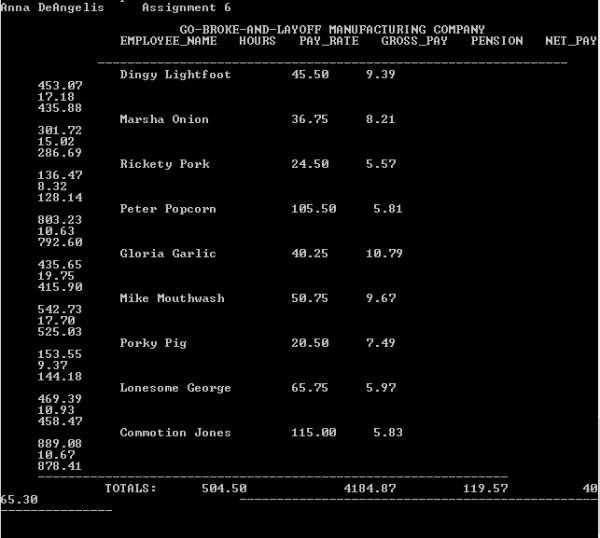
With these numbers:
Console.WriteLine(AUTHOR & vbNewLine)
Console.WriteLine(Space(24) & HEAD1 & vbNewLine & Space(15) & _
HEAD2 & vbNewLine & Space(13) & LINE)
If Not File.Exists(Diskfile) Then
Console.WriteLine("File: " & Diskfile & " does not exist")
Console.WriteLine(vbNewLine & vbNewLine) : Exit Sub : End If
FileOpen(1, Diskfile, OpenMode.Input)
While Not EOF(1)
Tokens = New StringTokenizer(LineInput(1), Delimiter)
Name = Tokens.NextToken() & " " & Tokens.NextToken()
Name = Name.PadRight(15)
hours = Tokens.NextToken()
payRate = Tokens.NextToken()
grossPay = CalculateGrossPay(hours, payRate)
pension = CalculatePension(hours, payRate)
netPay = grossPay - pension
totalHours = totalHours + hours
totalGrossPay = totalGrossPay + grossPay
totalPension = totalPension + pension
totalNetPay = totalNetPay + netPay
Console.Write(Space(16) & Name)
Console.Write(Space(8) & "{0:F2}", hours)
Console.WriteLine(Space(5) & "{0:F2}", payRate)
Console.WriteLine(Space(5) & "{0:F2}", grossPay)
Console.WriteLine(Space(5) & "{0:F2}", pension)
Console.WriteLine(Space(5) & "{0:F2}", netPay)
End While
FileClose(1)
Console.Write(Space(5) & LINE & vbCrLf & Space(14) & "TOTALS:")
Console.Write(Space(6) & "{0:F2}", totalhours)
Console.Write(Space(13) & "{0:F2}", totalGrossPay)
Console.Write(Space(9) & "{0:F2}", totalPension)
Console.Write(Space(10) & "{0:F2}", totalNetPay)
Console.Write(Space(27) & LINE & vbCrLf & vbCrLf)
End Sub 'Main()
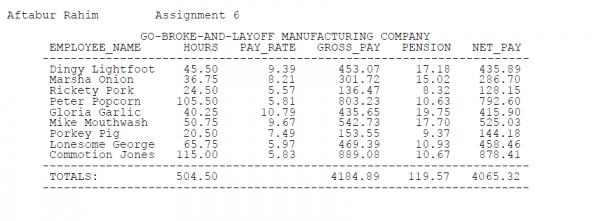
I need it spaced to look like this:
-
Nov 1st, 2014, 05:36 PM
#2
Re: Spacing Help!
is there a reason you need to use a console app? Nothing against console apps, but there are controls in the system.windows.forms namespace that make all that go away (in lieu of other stuff that may or may not be difficult).
Process control doesn't give you good quality, it gives you consistent quality.
Good quality comes from consistently doing the right things.
Vague general questions have vague general answers. A $100 donation is required for me to help you if you PM me asking for help. Instructions for donating to one of our local charities will be provided.
______________________________ Last edited by kebo : Now. Reason: superfluous typo's
-
Nov 1st, 2014, 05:50 PM
#3
Thread Starter
Junior Member
Re: Spacing Help!
How do I fix the spacing? It needs to be in columns.
-
Nov 1st, 2014, 08:08 PM
#4
Re: Spacing Help!
Read this:
http://www.vbforums.com/showthread.p...put&highlight=
The Console.Write and .WriteLine methods work the same way as StringBuilder.AppendFormat in that you can provide a format string as the first argument and then values toy plug into it.
-
Nov 2nd, 2014, 07:06 PM
#5
Thread Starter
Junior Member
Re: Spacing Help!
I created a whole new thread with my new question and post for this same program I am trying to do:
http://www.vbforums.com/showthread.p...7-Spacing-help!
-
Nov 3rd, 2014, 09:43 AM
#6
Re: Spacing Help!
 Originally Posted by TKDlover14

O thats no good. You shouldn't be creating a new thread for the same topic.
Process control doesn't give you good quality, it gives you consistent quality.
Good quality comes from consistently doing the right things.
Vague general questions have vague general answers. A $100 donation is required for me to help you if you PM me asking for help. Instructions for donating to one of our local charities will be provided.
______________________________ Last edited by kebo : Now. Reason: superfluous typo's
Tags for this Thread
 Posting Permissions
- You may not post new threads
- You may not post replies
- You may not post attachments
- You may not edit your posts
-
Forum Rules
|
Click Here to Expand Forum to Full Width
|



 Reply With Quote


