|

-
Nov 2nd, 2014, 06:41 PM
#1
Thread Starter
Junior Member

Spacing help!
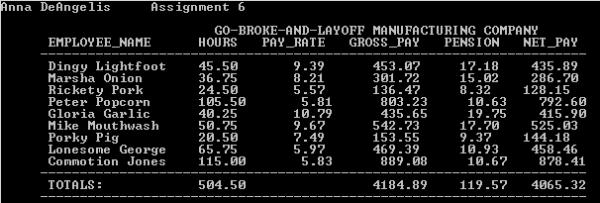
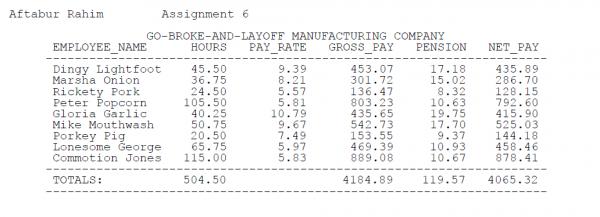
I need help lining up the decimal point for each number. Here is my code:
' Program: P06.vb
' Author: Anna DeAngelis
Imports System.IO
Imports RahimLibrary
Module P05
Const AUTHOR As String = "Anna DeAngelis Assignment 6"
Const HEAD1 As String = "GO-BROKE-AND-LAYOFF MANUFACTURING COMPANY"
Const HEAD2 As String = _
" EMPLOYEE_NAME HOURS PAY_RATE GROSS_PAY PENSION NET_PAY "
Const LINE = "---------------------------------------------------------------------"
Const FMT = "0.00"
Sub Main()
Dim Tokens As StringTokenizer
Dim Delimiter As Char() = {" ", ",", ";", ":"}
Dim Diskfile As String = "P06.DAT"
Console.Clear()
Dim Name As String
Dim hours, payRate, grossPay, pension, netPay, totalHours, totalGrossPay, totalPension, totalNetPay As Decimal
totalHours = 0 : totalGrossPay = 0 : totalPension = 0 : totalNetPay = 0
Console.WriteLine(AUTHOR & vbNewLine)
Console.WriteLine(Space(27) & HEAD1 & vbNewLine & Space(4) & _
HEAD2 & vbNewLine & Space(5) & LINE)
If Not File.Exists(Diskfile) Then
Console.WriteLine("File: " & Diskfile & " does not exist")
Console.WriteLine(vbNewLine & vbNewLine) : Exit Sub : End If
FileOpen(1, Diskfile, OpenMode.Input)
While Not EOF(1)
Tokens = New StringTokenizer(LineInput(1), Delimiter)
Name = Tokens.NextToken() & " " & Tokens.NextToken()
Name = Name.PadRight(15)
hours = Tokens.NextToken()
payRate = Tokens.NextToken()
grossPay = CalculateGrossPay(hours, payRate)
pension = CalculatePension(hours, payRate)
netPay = grossPay - pension
totalHours = totalHours + hours
totalGrossPay = totalGrossPay + grossPay
totalPension = totalPension + pension
totalNetPay = totalNetPay + netPay
Console.Write(Space(6) & Name)
Console.Write(Space(4) & "{0:F2}", hours)
Console.Write(Space(7) & "{0:F2}", payRate)
Console.Write(Space(6) & "{0:F2}", grossPay)
Console.Write(Space(5) & "{0:F2}", pension)
Console.WriteLine(Space(4) & "{0:F2}", netPay)
End While
FileClose(1)
Console.Write(Space(5) & LINE & vbCrLf & Space(6) & "TOTALS:")
Console.Write(Space(12) & "{0:F2}", totalhours)
Console.Write(Space(16) & "{0:F2}", totalGrossPay)
Console.Write(Space(4) & "{0:F2}", totalPension)
Console.WriteLine(Space(3) & "{0:F2}", totalNetPay)
Console.Write(Space (5) & LINE & vbCrLf & vbCrLf)
End Sub 'Main()
'---------------------------Function: CalculateGrossPay---------------------------
Function CalculateGrossPay (ByVal hours As Decimal,
ByVal rate As Decimal) As Decimal
Dim gross as Decimal
If (hours > 40) Then : gross = (40 + (hours - 40) * 1.5) * rate
Else: gross = hours * rate
End If
gross = Utility.Round(gross, 2)
Return Gross
End Function 'CalculateGrossPay
'---------------------------Function: CalculatePension---------------------------
Function CalculatePension (ByVal hours As Decimal,
ByVal payRate As Decimal) As Decimal
Dim pension as Decimal
If (hours > 30) Then : pension = 30 * payRate * 0.061
Else: pension = hours * payRate * 0.061
End If
pension = Utility.Round(pension, 2)
Return Pension
End Function 'CalculatePension
End Module 'P06
Here is my result:
The whole thing needs to be formatted to look like this and to line up like this:
-
Nov 2nd, 2014, 09:17 PM
#2
Re: Spacing help!
Code:
Console.Write(Space(4) & "{0:F2}", hours)
The problem is "hours" can be different lenghts. The way I solve these problems is to space like this "Space(10 - hours.Length)", but this means "hours" would need to be a String. So, you need to know the maximum length of the variable your trying to format. In this case "hours" will never be longer than 6. So, you want to space 4 + 6 = Space(10 - hours.Length).
this would apply to all the variables.
-
Nov 2nd, 2014, 10:32 PM
#3
Re: Spacing help!
I've already shown you how to do this and you ignored the advice. If every number has two decimal places then the logical thing to do is simply right-align all the numbers and the decimal points will lineup automatically. The CodeBank link that I provided in a previous thread on this same subject shows how to do that.
-
Nov 3rd, 2014, 09:40 AM
#4
Re: Spacing help!
I would be using Console.SetCursonPostion for this I think. No on second thought, I would ditch the console app and use a datagridview.
kevin
Process control doesn't give you good quality, it gives you consistent quality.
Good quality comes from consistently doing the right things.
Vague general questions have vague general answers. A $100 donation is required for me to help you if you PM me asking for help. Instructions for donating to one of our local charities will be provided.
______________________________ Last edited by kebo : Now. Reason: superfluous typo's
Tags for this Thread
 Posting Permissions
- You may not post new threads
- You may not post replies
- You may not post attachments
- You may not edit your posts
-
Forum Rules
|
Click Here to Expand Forum to Full Width
|



 Reply With Quote


