|

-
Sep 25th, 2014, 07:23 AM
#1
Thread Starter
Junior Member

VB writing excel & graph problem
Dear all
I am using arduino and ACS712 sensor . I am taking reading serially from Sensor and dispaly on VB and trying to plot graph and excel sheet for record. CUrrently i am facing below 2 problems.
1) averaging sample for every1s
2) writing into excel sheet every 1 min including current and watthour.
I am pasting my code here. I am facing problem in writing into Excel sheet
I also can you check my this part of code. I see my curve get deflection high low instead of cumulative curve.
Code:
If Avg_count = 1 Then
                Power = (distance * voltage) / 3600
                watt_hour = watt_hour + Power
                'Twatt.Text = watt_hour
                Display.Text = watt_hour
                voltage_text.Text = 24

                System.Threading.Thread.Sleep(250)
                If watt_hour > 1000 Then
                    watt_hour = 1.0 + watt_hour
                End If

                Avg_count = Avg_count + 1

            End If
            If Avg_count > 1 Then
                Avg_count = 0
            End If
if i use this line i get excel file written improperly
Code:
 If Not IO.File.Exists((csvFile)) Then

                    headerText = "Date,TIME ,current,Watt "
                End If

                Using outFile = My.Computer.FileSystem.OpenTextFileWriter(csvFile, True)
                    If headerText.Length > 0 Then
                        outFile.WriteLine(headerText)
                    End If

                    Dim date1 As String = "24-10-2014"
                    Dim time1 As String = TimeOfDay()

                    Dim watt1 As String = CStr(watt_hour)
                    Dim x As String = date1 + "," + time1 + "," + distance + "," + watt1
                    outFile.Write(x)
                End Using
            End If

If i replace with below. In excel sheet it write date,time,current properly .
Code:
 If Not IO.File.Exists((csvFile)) Then
                    'headerText = "Date,TIME ,current, "
                              End If

                Using outFile = My.Computer.FileSystem.OpenTextFileWriter(csvFile, True)
                    If headerText.Length > 0 Then
                        outFile.WriteLine(headerText)
                    End If
                     Dim date1 As String = "24-10-2014"
                    Dim time1 As String = TimeOfDay()

                    Dim watt1 As String = CStr(watt_hour)
                     'Dim x As String = date1 + "," + time1 + "," + distance
                    'outFile.Write(x)

                End Using
            End If
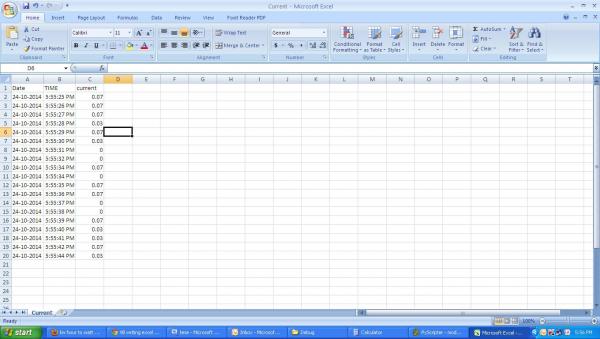
My complete code
Code:
Imports System
Imports System.IO.Ports
Imports System.ComponentModel
Imports System.Threading

Imports System.Drawing
Imports System.Drawing.Drawing2D
Imports System.Windows.Forms
Imports System.Windows.Forms.DataVisualization.Charting


Public Class Form1
    Dim myPort As Array
    Dim Distance As Integer

    Dim dT As DataTable

    Private Sub Form1_Load(ByVal sender As System.Object, ByVal e As System.EventArgs) Handles MyBase.Load
        myPort = IO.Ports.SerialPort.GetPortNames()
        PortComboBox.Items.AddRange(myPort)
        BaudComboBox.Items.Add(9600)
        BaudComboBox.Items.Add(19200)
        BaudComboBox.Items.Add(38400)
        BaudComboBox.Items.Add(57600)
        BaudComboBox.Items.Add(115200)
        ConnectButton.Enabled = True
        DisconnectButton.Enabled = False
        Call initializeDataTable()
        Call initializeChart()
        Chart1.DataSource = dT
        Timer1.Interval = 1000
        Timer1.Start()
    End Sub


    Private Sub initializeDataTable()

        dT = New DataTable
        dT.Columns.Add(New DataColumn("time", GetType(DateTime)))
        dT.Columns.Add(New DataColumn("current", GetType(Double)))
    End Sub

    Private Sub initializeChart()

        Chart1.Series.Clear()
        'create the new charting series....
        Dim newSeries As New DataVisualization.Charting.Series
        With newSeries
            'assign the series to a chart area....
            .ChartArea = Chart1.ChartAreas(0).Name

            'define the xvalue member. It must match the datatable's column name
            .XValueMember = "time"
            .XValueType = DataVisualization.Charting.ChartValueType.DateTime
            'define the yValue meber. It too must match the datatable column name
            .YValueMembers = "current"
            .XValueType = DataVisualization.Charting.ChartValueType.Double

            'select the chart type
            .ChartType = DataVisualization.Charting.SeriesChartType.Line
        End With

        'turn off the xAxis labels
        Chart1.ChartAreas(0).AxisX.LabelStyle.Enabled = False

        'add the series to the chart
        Chart1.Series.Add(newSeries)

    End Sub

    Private Sub ConnectButton_Click(ByVal sender As System.Object, ByVal e As System.EventArgs) Handles ConnectButton.Click
        SerialPort1.PortName = PortComboBox.Text
        SerialPort1.BaudRate = BaudComboBox.Text
        SerialPort1.Open()
        Timer1.Start()

        'lblMessage.Text = PortComboBox.Text & " Connected."
        ConnectButton.Enabled = False
        DisconnectButton.Enabled = True
    End Sub

    Private Sub DisconnectButton_Click(ByVal sender As System.Object, ByVal e As System.EventArgs) Handles DisconnectButton.Click
        SerialPort1.Close()

        DisconnectButton.Enabled = False
        ConnectButton.Enabled = True
    End Sub
    Dim rnd As New Random

    Private Sub Timer1_Tick(ByVal sender As System.Object, ByVal e As System.EventArgs) Handles Timer1.Tick
        Static counter As Integer = 0
        Static average_sum As Double = 0
        Static Avg_count As Integer = 0
        Dim voltage As Double = 24
        Dim Power As Double
        Static Cc_count As Long = 0
        Static watt_hour As Double


        Try

            SerialPort1.Write("c")
            System.Threading.Thread.Sleep(250)
            Dim k As Double
            Dim distance As String = SerialPort1.ReadLine()
            k = CDbl(distance)
            ListBoxSensor.Text = k
            Dim s As New Series
            counter = counter + 1
            Count_val.Text = counter

            Avg_count = Avg_count + 1


            ' drawing graph

            If Avg_count = 1 Then
                Power = (distance * voltage) / 3600
                watt_hour = watt_hour + Power
                'Twatt.Text = watt_hour
                Display.Text = watt_hour
                voltage_text.Text = 24

                System.Threading.Thread.Sleep(250)
                If watt_hour > 1000 Then
                    watt_hour = 1.0 + watt_hour
                End If

                Avg_count = Avg_count + 1

            End If
            If Avg_count > 1 Then
                Avg_count = 0
            End If

            Dim current As Double = watt_hour
            'Dim current As Double = k
            Dim r As DataRow = dT.NewRow
            r("time") = Now
            'r("current") = k
            r("current") = watt_hour
            'add the row
            dT.Rows.Add(r)

            'remove any row older than 1 minute
            Dim oldestTime As DateTime = Now.AddMinutes(-1)
            Do While DirectCast(dT.Rows(0)("time"), DateTime) < oldestTime

                dT.Rows.RemoveAt(0)

            Loop
            'finally bind the chart....
            Chart1.DataBind()

            'write into excel sheet for every 1 minute ..................
            If Cc_count < 10 Then
                Cc_count = Cc_count + 1
                Dim array(10) As Double
                For value As Double = 0 To Cc_count
                    array(Cc_count) = distance
                    average_sum = average_sum + array(Cc_count)
                    value = value + 1
                    V_count.Text = value

                    AVG_count_text.Text = Cc_count
                    If value > 10 Then
                        average_sum = average_sum / value
                        System.Threading.Thread.Sleep(250)
                        AVG_CR1.Text = average_sum
                        Cc_count = 0
                    End If

                Next

                'If value = 10 Then
                '    average_sum = average_sum / Avg_count
                '    System.Threading.Thread.Sleep(250)
                '    AVG_CR1.Text = average_sum
                '    Cc_count = 0
                'End If

            End If

            If counter = 60 Then
                counter = 0
                Dim headerText = ""
                Dim csvFile As String = IO.Path.Combine(My.Application.Info.DirectoryPath, "Current.csv")

                'If Avg_count = 1 Then
                '    Power = (distance * voltage) / 3600
                '    watt_hour = watt_hour + Power

                '    If watt_hour > 1000 Then
                '        KW_hour = 1 + watt_hour
                '    End If
                'End If

                If Not IO.File.Exists((csvFile)) Then
                    'headerText = "Date,TIME ,current, "
                    headerText = "Date,TIME ,current,Watt "
                End If

                Using outFile = My.Computer.FileSystem.OpenTextFileWriter(csvFile, True)
                    If headerText.Length > 0 Then
                        outFile.WriteLine(headerText)
                    End If
                    ' Dim y As String = DateAndTime.Now()

                    'Dim date1 As String = DateAndTime.Year(2014)
                    ' Integer Year1= DateAndTime.Year()
                    Dim date1 As String = "24-10-2014"
                    Dim time1 As String = TimeOfDay()

                    Dim watt1 As String = CStr(watt_hour)
                    Dim x As String = date1 + "," + time1 + "," + distance + "," + watt1
                    outFile.Write(x)


                    'Dim x As String = date1 + "," + time1 + "," + distance
                    'outFile.Write(x)

                End Using
            End If


        Catch ex As Exception

            ' MsgBox("Error in Timer1_Tick: " & ex.Message)
        End Try


    End Sub

    Private Sub Relay_ON_Click(ByVal sender As System.Object, ByVal e As System.EventArgs) Handles Relay_ON.Click
        SerialPort1.Write("1")
    End Sub

    Private Sub Relay_Off_Click(ByVal sender As System.Object, ByVal e As System.EventArgs) Handles Relay_Off.Click
        SerialPort1.Write("0")
    End Sub


    Private Sub Browse_btn_Click(ByVal sender As System.Object, ByVal e As System.EventArgs) Handles Browse_btn.Click
       OpenFileDialog1.InitialDirectory = "C:\"
        OpenFileDialog1.FileName = "Open A File..."
        OpenFileDialog1.Multiselect = False
        OpenFileDialog1.Filter = "Executable Files|*.csv"
        If OpenFileDialog1.ShowDialog = Windows.Forms.DialogResult.OK Then
            Dim sName As String = OpenFileDialog1.SafeFileName
            TextBox1.Text = OpenFileDialog1.FileName
        End If

    End Sub


    Private Sub OK_Pressed_Click(ByVal sender As System.Object, ByVal e As System.EventArgs) Handles OK_Pressed.Click

    End Sub


    Private Sub RichTextBox1_TextChanged(ByVal sender As System.Object, ByVal e As System.EventArgs)

    End Sub
End Class
Last edited by AJITnayak; Sep 25th, 2014 at 07:27 AM.
-
Sep 25th, 2014, 09:04 AM
#2
Re: VB writing excel & graph problem
First up, turn on Option Strict/Explicit. Change + for &, you are appending strings, not adding numbers.
-
Sep 25th, 2014, 11:12 PM
#3
Thread Starter
Junior Member
Re: VB writing excel & graph problem
How to turn on Option Strict/Explicit.??? As you said i changed to
Code:
Dim x As String = date1 & "," & time1 & "," & distance & "," & watt1
Tags for this Thread
 Posting Permissions
- You may not post new threads
- You may not post replies
- You may not post attachments
- You may not edit your posts
-
Forum Rules
|
Click Here to Expand Forum to Full Width
|



 Reply With Quote
