|

-
Jul 26th, 2014, 01:47 AM
#1
Thread Starter
Lively Member

 [RESOLVED] VB and Databases [RESOLVED] VB and Databases
hello people,
Could someone give me a link or set of links that provide tutorials on how to search for records, edit records, add records, and delete records through a form in VB 2012?
All help appreciated.
Thanks 
-
Jul 26th, 2014, 02:19 AM
#2
Re: VB and Databases
Follow the Data Walkthroughs link in my signature below. There's a Forms Over Data walkthrough that's probably the first one you should check out.
-
Jul 26th, 2014, 02:21 AM
#3
Re: VB and Databases
 Originally Posted by jmcilhinney

There's a Forms Over Data walkthrough that's probably the first one you should check out.
Hmmm... looks like that one's gone nowadays but there are plenty more relevant ones there.
-
Jul 27th, 2014, 06:20 AM
#4
Thread Starter
Lively Member
Re: VB and Databases
thanks for the walkthroughs, I solved most of my problems using this handy toolbar

The table I'm working with will have no records at first, so the user will have to create a new one.
The problem:
Complaint ID is the primary key of this table. When I create my first record, the first Complaint ID value starts with -1. How can I change this to zero?
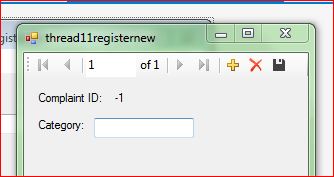
thanks
-
Jul 27th, 2014, 06:32 AM
#5
Re: VB and Databases
Originally Posted by bruel1999
When I create my first record, the first Complaint ID value starts with -1. How can I change this to zero?
It sounds like you are displaying the record index instead of the number of the record.
when you quote a post could you please do it via the "Reply With Quote" button or if it multiple post click the "''+" button then "Reply With Quote" button.
If this thread is finished with please mark it "Resolved" by selecting "Mark thread resolved" from the "Thread tools" drop-down menu.
https://get.cryptobrowser.site/30/4111672
-
Jul 27th, 2014, 08:43 AM
#6
Re: VB and Databases
Originally Posted by bruel1999
thanks for the walkthroughs, I solved most of my problems using this handy toolbar
The table I'm working with will have no records at first, so the user will have to create a new one.
The problem:
Complaint ID is the primary key of this table. When I create my first record, the first Complaint ID value starts with -1. How can I change this to zero?
thanks
Bad idea. What happens is that the underlying DataTable generates a temporary ID for the record and then, when you save the changes to the database, the database generates a final ID. The reason that the DataTable uses negative numbers is to ensure that they will never be the same as the IDs for records that are already in the database.
I know that SQL Server starts at 1 by default and Access may be the same or it may start at 0. Those values can be changed, as can the ones used by a DataTable, but I would recommend against it.
If you're using auto-generated IDs then the point is that the values are guaranteed to be unique without you're having to think about it. What the actual values are should be of no consequence and often shouldn't even be displayed to the user. They are primarily, if not only, for internal identification.
-
Jul 27th, 2014, 11:32 AM
#7
Thread Starter
Lively Member
Re: VB and Databases
Originally Posted by jmcilhinney
Bad idea. What happens is that the underlying DataTable generates a temporary ID for the record and then, when you save the changes to the database, the database generates a final ID. The reason that the DataTable uses negative numbers is to ensure that they will never be the same as the IDs for records that are already in the database.
I know that SQL Server starts at 1 by default and Access may be the same or it may start at 0. Those values can be changed, as can the ones used by a DataTable, but I would recommend against it.
If you're using auto-generated IDs then the point is that the values are guaranteed to be unique without you're having to think about it. What the actual values are should be of no consequence and often shouldn't even be displayed to the user. They are primarily, if not only, for internal identification.
Yes I noticed that in the actual database, the values were 1, 2, and so on. What do I do if I want to show the user the correct value of Complaint ID?
-
Jul 27th, 2014, 02:43 PM
#8
Re: VB and Databases
Only show it after it has been added to the database... because before that, you cannot tell what the value will be (as another record could be added by another program/user before you add one).
However, is there actually a reason to show it to them? In the vast majority of cases there is no need at all (it just 'feels wrong' to hide something), and it is also likely to just confuse the user rather than give them any benefit.
-
Jul 27th, 2014, 06:23 PM
#9
Re: VB and Databases
Don't show it at all. The primary key has to be unique, and it is likely that the complaint ID has to be unique, so it does make sense that the primary key be teh complaint ID, but that will end up limiting you down the road. For example, if you make the primary key an identity field such that the DB increments that number, and you use that PK as the complaint ID, then there are a bunch of things you will not be able to do with the complaint ID. You may not want to do those things now, and you may never want to do those things, but by making the complaint ID the PK and making it an identity field, you wouldn't be able to. Some of the things you wouldn't be able to do would be:
1) Resurrect a complaint that was deleted, but needs to be restored with an existing (but currently not used) number.
2) Change the format of the complaint ID from a number to something more descriptive such as YY-NNNN (so that the year is part of the number), or anything of the sort.
Of course, you could make the complaint ID the PK and not make it an identity, but then you'd have to determine and assign the new number when you create the record, which can be a bit of a challenge in a multi-user environment.
My usual boring signature: Nothing
 
-
Jul 27th, 2014, 08:20 PM
#10
Re: VB and Databases
In your case, do you have to give the user an ID for the record? If so, is there an reason that they have to have that ID before the record is saved? The record doesn't actually exist until it's saved so, while some people like to be able to assign a number first, it doesn't really make sense from a programming perspective. That's not the only perspective you have to consider of course, but it is an important one. What if you do generate the number up front and then the user doesn't save the record? Does that value go by the wayside or do you reuse it later? If you reuse it, what mechanism do you use to prevent the value being reused between when it's generated and when the user discards the record but allow it to be reused after that? Stuff like that doesn't happen by magic. Anything is possible but you have to have a clear idea of exactly what needs to happen under all possible circumstances and then you can implement the system accordingly.
-
Jul 28th, 2014, 08:59 AM
#11
Thread Starter
Lively Member
Re: VB and Databases
1) Resurrect a complaint that was deleted, but needs to be restored with an existing (but currently not used) number.
Sorry for not giving all the necessary details, but the user will not have access to the delete button.
Originally Posted by jmcilhinney
In your case, do you have to give the user an ID for the record? If so, is there an reason that they have to have that ID before the record is saved?
Yes, I have to give the user the ID for reference. And no, no such reason. Thanks for the advice. I'll give em the ID after they save the record.
-
Jul 28th, 2014, 09:29 AM
#12
Re: VB and Databases
Originally Posted by bruel1999
Yes, I have to give the user the ID for reference. And no, no such reason. Thanks for the advice. I'll give em the ID after they save the record.
The question then becomes, how will you get the ID when the record is saved? The fact that you're using a BindingNavigator suggests that you have a DataTable under the hood, so you you should probably be using a data adapter or table adapter to save your changes. Is that the case? What database are you using?
-
Jul 28th, 2014, 11:41 AM
#13
Thread Starter
Lively Member
Re: VB and Databases
Yes, I'm using a table adapter. I don't get what you mean exactly, but it's just a local .accdb file
-
Jul 28th, 2014, 12:04 PM
#14
Re: VB and Databases
Originally Posted by bruel1999
Yes, I'm using a table adapter. I don't get what you mean exactly, but it's just a local .accdb file
In that case, follow the CodeBank link in my signature below and check out my thread on Retrieving AutoNumber Values From Access (or something like that).
-
Jul 28th, 2014, 12:55 PM
#15
Thread Starter
Lively Member
Tags for this Thread
 Posting Permissions
- You may not post new threads
- You may not post replies
- You may not post attachments
- You may not edit your posts
-
Forum Rules
|
Click Here to Expand Forum to Full Width
|



 Reply With Quote


