|

-
Jun 19th, 2014, 06:23 PM
#1
 [RESOLVED] fit table to webpage [RESOLVED] fit table to webpage
I have an aspx page which contains a table with 2 textboxes, and a nested table containing several other controls.
How can I autosize the main table so it fills the available page, and resize the 2 textbox rows to fill 50% each (height) of the remaining space and 100% width after the other fixed sized rows are displayed?
- Coding Examples:
- Features:
- Online Games:
- Compiled Games:
-
Jun 20th, 2014, 01:52 AM
#2
Re: fit table to webpage
I am not really sure about your design. I mean i cannot grasp exactly what your design is.
With that said, you need to know that you cannot put percentages in "td" so this will have to be with either fixing the controls of the table or using divs.
Also i don't understand how will your textbox grow in height of 100%. Is it multicolumn?
Anyhow i put out a primitive design from what i can guess.
Also note that a post to html-css forum might help you better as there are some designers lurking there.
Code:
<html xmlns="http://www.w3.org/1999/xhtml">
<head runat="server">
    <title></title>
    <style type="text/css">
    .tbl
    {
/* this will not do as you need to style the body and i am not sure you want that,
       height:100%;
 */
    }

    .txtb
    {
     position:relative;
     width:50%;
    }
    </style>
</head>
<body>
    <form id="form1" runat="server">
    <div>
    <table width="100%" class="tbl"  border="1" cellspacing="0" cellpadding="0" >
<tr>
      <td>
          <asp:TextBox ID="TextBox1" runat="server" CssClass="txtb"></asp:TextBox>
          </td>
</tr>
<tr>

 <td>
           <asp:TextBox ID="TextBox2" runat="server" CssClass="txtb"></asp:TextBox>
          </td>

</tr>
<tr>
<td>
 <table width="100%" border="1" cellspacing="0" cellpadding="0" >
<tr>
      <td>inside table</td>
</tr>
</table>
</td>
</tr>
</table>
    </div>
    </form>
</body>
</html>
There is also the ability to use a prefixed css solution, like bootstrap but i haven't fully explored these solutions.
Last edited by sapator; Jun 20th, 2014 at 01:56 AM.
ἄνδρα μοι ἔννεπε, μοῦσα, πολύτροπον, ὃς μάλα πολλὰ
πλάγχθη, ἐπεὶ Τροίης ἱερὸν πτολίεθρον ἔπερσεν·
-
Jun 20th, 2014, 02:01 AM
#3
Re: fit table to webpage
Thanks for answering. I tried that, but it doesn't autosize vertically.
This is what i'm trying, but it's not working:
Code:
<head>
<meta http-equiv="Content-Type" content="text/html; charset=iso-8859-1" />
<title>Untitled Document</title>
<style type="text/css">
* {/* for demo only */
    margin:0;
    padding:0;
}
html, body, outer {
    height:100%;
    width:100%;
    border-collapse:collapse;
    table-layout:fixed;
}
table#outer {
    margin:0 0 -10px;
}
#outer td
{
	background:red;
    border:1px solid #000;
    padding-bottom:10px;
    vertical-align:top;
}
#row1 {
    border-collapse:collapse;
    table-layout:fixed;
    width:100%;
    height:3%;
}
#row1 td {
    background:green;
    padding:0;
}
#row2 {
    border-collapse:collapse;
    table-layout:fixed;
    width:100%;
    height:44%;
}
#row2 td {
    background:yellow;
    padding:0;
}
#row3 {
    border-collapse:collapse;
    table-layout:fixed;
    width:100%;
    height:3%;
}
#row3 td {
    background:green;
    padding:0;
}
#row4 {
    border-collapse:collapse;
    table-layout:fixed;
    width:100%;
    height:44%;
}
#row4 td {
    background:yellow;
    padding:0;
}
#row5 {
    border-collapse:collapse;
    table-layout:fixed;
    width:100%;
    height:3%;
}
#row5 td {
    background:green;
    padding:0;
}
#row6 {
    border-collapse:collapse;
    table-layout:fixed;
    width:100%;
    height:3%;
}
#row6 td {
    background:green;
    padding:0;
}
#footer {
    position:relative;
    height:10px;
    background:blue;
}

</style>
</head>
<body>
<table id="outer">
    <tr>
        <td><table id="row1">
                <tr>
                    <td  width="5%";/>
                    <td width="90%";>Test</td>
                    <td  width="5%";/>
                </tr>
        </table></td>
    </tr>
    <tr>
        <td><table id="row2">
                <tr>
                    <td  width="5%";/>
                    <td width="90%";>Test</td>
                    <td  width="5%";/>
                </tr>
        </table></td>
    </tr>
    <tr>
        <td><table id="row3">
                <tr>
                    <td  width="5%";/>
                    <td width="90%";>Test</td>
                    <td  width="5%";/>
                </tr>
        </table></td>
    </tr>
    <tr>
        <td><table id="row4">
                <tr>
                    <td  width="5%";/>
                    <td width="90%";>Test</td>
                    <td  width="5%";/>
                </tr>
        </table></td>
    </tr>
    <tr>
        <td><table id="row5">
                <tr>
                    <td  width="5%";/>
                    <td width="90%";>Test</td>
                    <td  width="5%";/>
                </tr>
        </table></td>
    </tr>
    <tr>
        <td><table id="row6">
                <tr>
                    <td  width="5%";/>
                    <td width="90%";>Test</td>
                    <td  width="5%";/>
                </tr>
        </table></td>
    </tr>
</table>
<div id="footer">Footer</div>
</body>
</html>
- Coding Examples:
- Features:
- Online Games:
- Compiled Games:
-
Jun 20th, 2014, 02:07 AM
#4
Re: fit table to webpage
Again, not sure what your design should look like.Can you draw an image or explain more?
P.S. I told you that td cannot use percentages.
ἄνδρα μοι ἔννεπε, μοῦσα, πολύτροπον, ὃς μάλα πολλὰ
πλάγχθη, ἐπεὶ Τροίης ἱερὸν πτολίεθρον ἔπερσεν·
-
Jun 20th, 2014, 02:12 AM
#5
Re: fit table to webpage
Hmm. I show some examples of td with percentages. I need to brush up on my css as i was thinking it cannot be done.
ἄνδρα μοι ἔννεπε, μοῦσα, πολύτροπον, ὃς μάλα πολλὰ
πλάγχθη, ἐπεὶ Τροίης ἱερὸν πτολίεθρον ἔπερσεν·
-
Jun 20th, 2014, 02:45 AM
#6
Re: fit table to webpage
ok. here's a diagram:
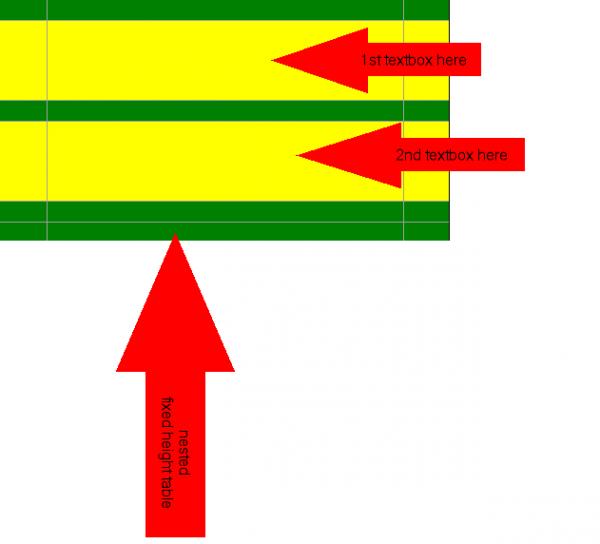
edit: It's the yellow rows that I want to resize as the whole table resizes. The green rows are fixed height
Last edited by .paul.; Jun 20th, 2014 at 02:58 AM.
- Coding Examples:
- Features:
- Online Games:
- Compiled Games:
-
Jun 20th, 2014, 03:01 AM
#7
Re: fit table to webpage
So you either expand your row with some control or do this:
Code:
#row2 td {
    background:yellow;
    padding:0;
     min-height: 100px;
}
ἄνδρα μοι ἔννεπε, μοῦσα, πολύτροπον, ὃς μάλα πολλὰ
πλάγχθη, ἐπεὶ Τροίης ἱερὸν πτολίεθρον ἔπερσεν·
-
Jun 20th, 2014, 03:28 AM
#8
Re: fit table to webpage
How do I expand the row with a textbox with the height being a percentage?
Also, the html/css I posted doesn't fill the page either horizontally or vertically
- Coding Examples:
- Features:
- Online Games:
- Compiled Games:
-
Jun 20th, 2014, 03:38 AM
#9
Re: fit table to webpage
That is why i remembered that percentages will not do in "td".
I think you must expand with either pixels or with controls. I am not sure at this as my CSS is limited.
Your CSS fits the page horizontally.
Vertically it depends on what you need. You need to expand each "tr" according to a specific screen(like mobile)? This is very tricky and i think you will need a CSS class like bootstrap. You can also use Javascript to expand each row. Take the full screen size with JS and calculate the amount of expansion for each row.
Having said that, if you expand all the rows then the result will look bad as you will have huge expanded rows with small textboxes hanging on the top of each row.
ἄνδρα μοι ἔννεπε, μοῦσα, πολύτροπον, ὃς μάλα πολλὰ
πλάγχθη, ἐπεὶ Τροίης ἱερὸν πτολίεθρον ἔπερσεν·
-
Jun 20th, 2014, 03:41 AM
#10
- Coding Examples:
- Features:
- Online Games:
- Compiled Games:
-
Jun 20th, 2014, 03:54 AM
#11
Re: fit table to webpage
No problem.
As i've said you can bring this to the HTML CSS forum that i suspect you will get more answers.
Thanks for the rep 
ἄνδρα μοι ἔννεπε, μοῦσα, πολύτροπον, ὃς μάλα πολλὰ
πλάγχθη, ἐπεὶ Τροίης ἱερὸν πτολίεθρον ἔπερσεν·
Tags for this Thread
 Posting Permissions
- You may not post new threads
- You may not post replies
- You may not post attachments
- You may not edit your posts
-
Forum Rules
|
Click Here to Expand Forum to Full Width
|



 Reply With Quote