|

-
May 14th, 2014, 12:35 PM
#1
Thread Starter
Lively Member

Setting a ContextMenuStrip's width manually = submenu "arrows" in the wrong place
Hey guys,
I've got a context menu strip that I would like to appear at a specific width, so I set its autosize to "false", and specified an exact width for it. Which works (kinda). Only problem now is, the submenu "arrows" that it contains no longer appear at the far right side of the control, as they should (they are closer to the middle). Here's a screenshot...
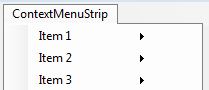
How do I fix this? I couldn't find any property that controls the location of the arrows.
Thanks!
-
May 14th, 2014, 05:47 PM
#2
Re: Setting a ContextMenuStrip's width manually = submenu "arrows" in the wrong place
 Originally Posted by BMAN645

How do I fix this? I couldn't find any property that controls the location of the arrows.
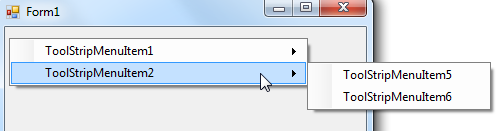
Easiest way I can see to do that is to just leave autosize to true for the ContextMenuStrip and all the menu items. Add a menu item (to top of menu) and type a long word for the Text property so menu resizes to width you want, and set that menus Visible property to false. Now when menu is displayed you don't see top menu item but width is still intact.
Last edited by Edgemeal; May 14th, 2014 at 06:28 PM.
Reason: Clarify: Long word is for Text property :)
-
May 14th, 2014, 06:06 PM
#3
Re: Setting a ContextMenuStrip's width manually = submenu "arrows" in the wrong place
Originally Posted by Edgemeal
Easiest way I can see to do that is to just leave autosize to true for the ContextMenuStrip and all the menu items. Add a menu item (to top of menu) and type a long word so menu resizes to width you want, and set that menus Visible property to false. Now when menu is displayed you don't see top menu item but width is still intact.
Nice and easy quick trick 
VB/Office Guru™ (AKA: Gangsta Yoda™  ®) ®)
I dont answer coding questions via PM. Please post a thread in the appropriate forum. 
Microsoft MVP 2006-2011
Office Development FAQ (C#, VB.NET, VB 6, VBA)
Senior Jedi Software Engineer MCP (VB 6 & .NET), BSEE, CET
If a post has helped you then Please Rate it! 
• Reps & Rating Posts • VS.NET on Vista • Multiple .NET Framework Versions • Office Primary Interop Assemblies • VB/Office Guru™ Word SpellChecker™.NET • VB/Office Guru™ Word SpellChecker™ VB6 • VB.NET Attributes Ex. • Outlook Global Address List • API Viewer utility • .NET API Viewer Utility •
System: Intel i7 6850K, Geforce GTX1060, Samsung M.2 1 TB & SATA 500 GB, 32 GBs DDR4 3300 Quad Channel RAM, 2 Viewsonic 24" LCDs, Windows 10, Office 2016, VS 2019, VB6 SP6
-
May 15th, 2014, 10:47 AM
#4
Thread Starter
Lively Member
Re: Setting a ContextMenuStrip's width manually = submenu "arrows" in the wrong place
Thanks Edgemeal. Yeah, I actually thought about doing something similar (just typing a bunch of blank space after one of the menu items), which has the same effect... but I was hoping to come up with a less "ghetto" solution, lol. But I reckon it will get the job done.
Tags for this Thread
 Posting Permissions
- You may not post new threads
- You may not post replies
- You may not post attachments
- You may not edit your posts
-
Forum Rules
|
Click Here to Expand Forum to Full Width
|



 Reply With Quote


