|

-
May 6th, 2014, 08:51 PM
#1
Thread Starter
Junior Member

Problem with VB Code
The database Microland.accdb is maintained by the Microland Computer Warehouse, a mail-order computer-supply company. The tables below show data in the three tables in the database. The table Customers identifies each customer by an ID number and gives, in addition to the name and address, the total amount of purchases during the current year prior to today. The table Inventory identifies each product in stock by an ID number and gives, in addition to its description and price (per unit), the quantity in stock at the beginning of the day. The table Orders gives the orders received today. Assume that it is now the end of the day. Write a Visual Basic program that uses the three tables to do the following two tasks:
1. Display in a listbox the items that are out of stock and those that must be reordered to satisfy today’s orders.
2. Display in a listbox bills for all customers who ordered during the day. Each bill should show the customer’s name, address, items ordered (with costs), and total cost of the order.
My problem however is with the 'MICROLANDDataSet.Orders and MICROLANDDataSet.Inventory'. I keep getting an error saying, 'reference to a non-shared member requires an object reference'. Any ideas on how to fix this?
Code:
Imports System.Data.OleDb
Imports MicroLand.MICROLANDDataSet

Public Class MicroLand

    Dim con As New OleDbConnection
    Dim dataset As New MICROLANDDataSet

    Private Sub btnOut_Click(sender As System.Object, e As System.EventArgs) Handles btnOut.Click


        Dim query1 = From anyOrder In MICROLANDDataSet.Orders
                    Join itsStockItem In MICROLANDDataSet.Inventory
                    On anyOrder.itemID Equals itsStockItem.itemID
                    Let orderQuantity = anyOrder.quantity
                    Select itsStockItem.quantity, itsStockItem.description, anyOrder.itemID
                    Order By quantity, itemID


        ''Test connection to make sure it opens first
        Try
            con = New OleDb.OleDbConnection("provider= microsoft.ace.oledb.12.0;Data Source = C:\Users\HPG62-220US\Documents\Visual Studio 2010\Projects\Asignment 9\Asignment 9\bin\Debug\MICROLAND.accdb; Persist Security Info=False;")
            Try
                Call con.Open()
            Catch ex As Exception
                MessageBox.Show("Could not connect")
            End Try

            If con.State = ConnectionState.Open Then
                MessageBox.Show("Connection is open")
            End If
        Catch ex As Exception
        End Try

        Dim ReturnedData As DataTable

        ReturnedData = query1.Copy()

        lstOutput.Items.Add("Here are the items that are out of")
        lstOutput.Items.Add("inventory or must be reordered.")
        lstOutput.Items.Add("")
        lstOutput.Items.Add("The numbers shown give the")
        lstOutput.Items.Add("minimum reorder quantity required.")
        lstOutput.Items.Add("")
        lstOutput.Items.Add(query1)
        con.Close()
    End Sub

    Private Sub btnBills_Click(sender As System.Object, e As System.EventArgs) Handles btnBills.Click

    End Sub
End Class
-
May 6th, 2014, 09:33 PM
#2
Re: Problem with VB Code
MICROLANDDataSet is a class, not an object. You have declared a variable named 'dataset' and assigned an object of that type to it, so you should be using 'dataset.Orders' and 'dataset.Inventory'. What you're doing is like taking dog for a walk rather than taking A dog for a walk. One is a type of thing and the other is a thing. You might know what a dog is but you can't take that knowledge for a walk; you have to actually have a dog.
-
May 6th, 2014, 09:54 PM
#3
Thread Starter
Junior Member
Re: Problem with VB Code
Well, that fixed that one, but when I tried debugging it found another issue.
Code:
ReturnedData = query1.Copy()
Says: ''Copy' is not a member of 'System.Linq.IOrderedEnumerable(Of <anonymous type>)'.'
-
May 6th, 2014, 10:02 PM
#4
Re: Problem with VB Code
Which it's not. Even if it was, to expect it to return a DataTable is unrealistic. That code doesn't do anything with that DataTable anyway so is it even required? You seem to be joining those two tables and projecting only a subset of the columns. What do you actually want to do with the results of that operation? Is 'lstOutput' a ListBox and you're trying to display them in that? If so then nothing you have suggests you will succeed. Is a ListBox really appropriate for tabular data, given that it doesn't have multiple columns? Wouldn't a DataGridView be more appropriate?
-
May 6th, 2014, 10:28 PM
#5
Thread Starter
Junior Member
Re: Problem with VB Code
I would like the DataGridView to display the tables in it. Problem right now is that on this part of the code:
Code:
dgvOutput.Item.Add("Here are the items that are out of")
        dgvOutput.Item.Add("inventory or must be reordered.")
        dgvOutput.Item.Add("")
        dgvOutput.Item.Add("The numbers shown give the")
        dgvOutput.Item.Add("minimum reorder quantity required.")
        dgvOutput.Item.Add("")
        dgvOutput.Item.Add(query1)
With the dgvOutput.Item it says: error BC30516: Overload resolution failed because no accessible 'Item' accepts this number of arguments.
Updated Code:
Code:
Imports System.Data.OleDb
Imports MicroLand.MICROLANDDataSet

Public Class MicroLand

    Dim con As New OleDbConnection
    Dim dataset As New MICROLANDDataSet

    Private Sub btnOut_Click(sender As System.Object, e As System.EventArgs) Handles btnOut.Click


        Dim query1 = From anyOrder In dataset.Orders
                    Join itsStockItem In dataset.Inventory
                    On anyOrder.itemID Equals itsStockItem.itemID
                    Let orderQuantity = anyOrder.quantity
                    Select itsStockItem.quantity, itsStockItem.description, anyOrder.itemID
                    Order By quantity, itemID


        ''Test connection to make sure it opens first
        Try
            con = New OleDb.OleDbConnection("provider= microsoft.ace.oledb.12.0;Data Source = C:\Users\Kenneth I. Curtis\Documents\LIU Post\CS 106\Curtis_Final_1\MicroLand\MicroLand\MICROLAND.ACCDB; Persist Security Info=False;")
            Try
                Call con.Open()
            Catch ex As Exception
                MessageBox.Show("Could not connect")
            End Try

            If con.State = ConnectionState.Open Then
                MessageBox.Show("Connection is open")
            End If
        Catch ex As Exception
        End Try

        dgvOutput.Item.Add("Here are the items that are out of")
        dgvOutput.Item.Add("inventory or must be reordered.")
        dgvOutput.Item.Add("")
        dgvOutput.Item.Add("The numbers shown give the")
        dgvOutput.Item.Add("minimum reorder quantity required.")
        dgvOutput.Item.Add("")
        dgvOutput.Item.Add(query1)
        con.Close()
    End Sub

    Private Sub btnBills_Click(sender As System.Object, e As System.EventArgs) Handles btnBills.Click

    End Sub

End Class
-
May 6th, 2014, 10:38 PM
#6
Re: Problem with VB Code
I looked back at your original post and it specifically states to use a ListBox. Perhaps you should have read that too.
As I said, a ListBox can only display a simple list so, if your results have multiple properties, you have to combine those multiple values into one for display. I would probably suggest using String.Format or String.Join for that. You can do it as part of your LINQ query so that your result is a list of Strings, which you can add as a batch (Items.AddRange) or bind (DataSource).
That text that describes the results does not belong in the ListBox. It should be displayed in a Label above or the like.
-
May 6th, 2014, 11:24 PM
#7
Thread Starter
Junior Member
Re: Problem with VB Code
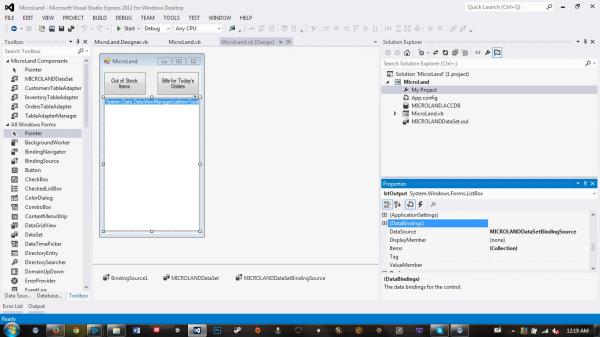
Now I'm getting: Items collection cannot be modified when the DataSource property is set. For all the lstOutputs. I've been trying to replace all the ()'s with something that could work, but nothing is working.
Sorry for sounding helpless, I'm not really the strongest programmer in the world.
This is the setup in the properties:
-
May 6th, 2014, 11:41 PM
#8
Re: Problem with VB Code
Why exactly do you want to modify the Items collection? Your query result contains the items that you need to show so you simply assign that to the DataSource property and you're done.
Tags for this Thread
 Posting Permissions
- You may not post new threads
- You may not post replies
- You may not post attachments
- You may not edit your posts
-
Forum Rules
|
Click Here to Expand Forum to Full Width
|



 Reply With Quote

