|

-
May 1st, 2014, 03:50 AM
#1
Thread Starter
Junior Member

 Beginner Simple Coding questions. Help please? Beginner Simple Coding questions. Help please?
Hey Vb-Forums. I have a few questions on how to write the code for a few operations i'd like to do.
1. For the program i'd like to be able to use one button that changes the BackColor of the program.
Example
Code:
BackColour = Colour.Aqua
In a buttons code. How do I make it so the second time the button is pressed it change the colour to another listed one? So pressing it over and over again will go through a cycle of colours?
2. Undo button, The program requires people to press buttons to add scores to a basketball score. If they make a mistake like click the wrong score as in, give a team three points instead of two, what would type in my "Undo" button code to undo the last action?
3. How do I change the properties of a MsgBox so instead of a thingy that said "Great shot!" with an "Okay" button it has no okay button and just dissapears automatically after about two seconds?
4. There are two text boxes that change according to what buttons are pressed. You press "Free throw Blue" it will give one point to the Blue team (Textbox1) and the same idea for the other team (Textbox2). What code would I type in to make MsgBoxes that say "Blue team in the lead!" when one team is ahead? Aswell as when the scores are even it displays "Even game" or something like that. How do I write these types of things?
You don't have to answer all the questions, It would just be lovely. It's an assessment task that i've been working on for awhile and I need some help with it.
Thanks very much in advance 
Last edited by Dr Quack; May 1st, 2014 at 05:26 AM.
-
May 1st, 2014, 04:31 AM
#2
Re: Beginner Simple Coding questions. Help please?
1. In the button_Click event, have a static variable holding an integer. Each time you press the button, you increase the counter and use a Select to set the colour accordingly.
Code:
Sub Button_Click(...)
   Static ColourCounter as Integer = 0
   ColourCounter+=1
   If ColourCounter=12 Then ColourCounter=1 ' Only allow 12 colours
   Select Case ColourCounter
      Case 1
         BackColour=Color.Aqua
      Case 2
         BackColor=Color.Red
      etc....
   End Select
2.To undo an operation, you need to store the current values of variables before they are changed by the user. How you implement this depends on what type of action you want to undo. Clicking the undo button simply copies the stored values back.
3. As far as I know you can't do that. You need to create your own form, make it look like a messagebox and when you .show it, start a timer in the form. After 2 seconds, the timer tick event fires and you can stop the timer and close the form.
4. I don't understand your requirements here. can you explain more clearly?
-
May 1st, 2014, 05:26 AM
#3
Thread Starter
Junior Member
Re: Beginner Simple Coding questions. Help please?
4. Oh~! Wow, A huge section of that question disappeared. -.- Sorry about that, The full question is
There are two text boxes that change according to what buttons are pressed. You press "Free throw Blue" it will give one point to the Blue team (Textbox1) and the same idea for the other team (Textbox2). What code would I type in to make MsgBoxes that say "Blue team in the lead!" when one team is ahead? Aswell as when the scores are even it displays "Even game" or something like that. How do I write these types of things?
-
May 1st, 2014, 05:38 AM
#4
Re: Beginner Simple Coding questions. Help please?
First of all, I wouldn't use a message box or even a form that looks like a messagebox. I would use a label. You can change the size and colour of the font so that it is easily visible if you want. Ever time the value in textbox1 or textbox2 changes, several events fire. You can choose to use .OnTextChanged, .OnValidating or .OnValidated. Of the final 2, the best to choose is .OnValidated because it ALWAYS fires whereas .OnValidating sometimes doesn't.
In your .OnValidated event, for example, check the values of both the textboxes and set the value of the label accordingly.
-
May 2nd, 2014, 04:57 AM
#5
Thread Starter
Junior Member
Re: Beginner Simple Coding questions. Help please?
Sorry, I'm not sure how to use the .OnValidated code to make an Undo button. :\ Sorry.
-
May 2nd, 2014, 05:22 AM
#6
Re: Beginner Simple Coding questions. Help please?
At the top of your code page, you have 2 dropdown boxes. If you click the down arrow in the left one, you should find an entry for TextBox1. Click that. Then click the down arrow on the right hand dropdown. All the available methods are listed there. You will find OnValidated. Click that and the basics of TextBox1_OnValidated will be created for you. You can put the code to set your label to "Draw" "Blue winning" etc in there.
Repeat for TextBox2.
This is not the method for the Undo button.
To make the undo button, Save the old value of your textboxes when your user clicks on it (TextBox1_Click or TextBox1_Enter). In btnUndo_Click(), you can then reset the values: Textbox1.Value=tb1SavedValue: TextBox2.Value=tb2SavedValue
-
May 2nd, 2014, 05:38 AM
#7
Thread Starter
Junior Member
Re: Beginner Simple Coding questions. Help please?
Yet Again, I'm so sorry. I'm very very new to this. I'll put a screenshot up. 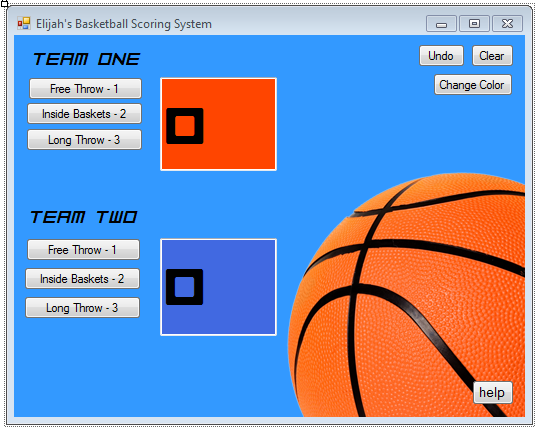
The Photo there shows what it is.
I don't know how to Save the value of my Textboxes.
Is there a way I can just to something like that sort of thing?
Button Sub - Etc
TextBox1.Text
clear the last entered value
TextBox2.Text
clear the last entered value.
Is there a simple line of Code that I can use to just do that?
This is an Assessment task that needs to be done by 9:00 PM Friday and it's 8:27 PM Friday so yeaaaaahhh.
It's the very final thing I need to do in the task. I'm sorry i've been a hastle. I'll get less annoying once I get started and know the basics. I'm only about 4 hours experience or so haha.
Tags for this Thread
 Posting Permissions
- You may not post new threads
- You may not post replies
- You may not post attachments
- You may not edit your posts
-
Forum Rules
|
Click Here to Expand Forum to Full Width
|



 Reply With Quote