|

-
Apr 28th, 2014, 08:04 PM
#1
Thread Starter
Member

 [RESOLVED] XML string help [RESOLVED] XML string help
(Using the url http://weather.yahooapis.com/forecastrss?w=2459115)
For the XML I can easily display the "ttl" element into a label, but for the
Code:
<yweather:forecast day="Mon" date="28 Apr 2014" low="49" high="61" text="Showers Late" code="45"/>
,
I can't figure out how to separate the Monday, monday's low, and and Monday's high, ext., into multiple labels.
Any help? I'm using the code below to get the current temp and stuff.
Code:
Dim wc As New WebClient
        Dim mytext As String

        mytext = wc.DownloadString("http://weather.yahooapis.com/forecastrss?w=2459115")

        Dim mt As New Xml.XmlDocument
        mt.LoadXml(mytext)

        Dim rr As Xml.XmlNodeList = mt.GetElementsByTagName("ttl")

        For Each ee As Xml.XmlElement In rr
            MsgBox(ee.InnerText)
        Next
Thank you very much!
Last edited by jj103; Apr 28th, 2014 at 08:24 PM.
Reason: Turns out ttl isn't the current temp...duh...
-
Apr 28th, 2014, 08:41 PM
#2
Re: XML string help
this is the simplest way I can think of. in the code, I removed the namespace:
Code:
Dim xml As XElement = XElement.Parse("<yweather:forecast day=""Mon"" date=""28 Apr 2014"" low=""49"" high=""61"" text=""Showers Late"" code=""45""/>".Replace("yweather:", ""))
Label1.Text = xml.@day
Label2.Text = xml.@date
Label3.Text = xml.@low
Label4.Text = xml.@high
Label5.Text = xml.@text
Label6.Text = xml.@code
- Coding Examples:
- Features:
- Online Games:
- Compiled Games:
-
Apr 29th, 2014, 01:11 AM
#3
Fanatic Member
Re: XML string help
or as i said last time have a look at what I gave you
Code:
Dim tt As Xml.XmlNodeList = mt.GetElementsByTagName("yweather:forecast")
For Each ee As Xml.XmlElement In tt
MsgBox(ee.GetAttribute("day").ToString) 'can get day or any of the others by their name
Next
My CodeBank Submissions
- Listbox with transparency and picture support - Click Here
- Check for a true internet connection - Click Here
- Open Cash drawer connected to receipt printer - Click Here
- Custom color and size border around form - Click Here
- Upload file to website without user logins, includes PHP - Click Here
- List All Removable USB Storage Devices - Click Here
- Custom On/Off Slide Control - Click Here
- Insert multiple rows of data into one database table using parameters - Click Here
- Trigger USB/Serial Cash Drawer - Click Here
-
Apr 30th, 2014, 04:53 PM
#4
Thread Starter
Member
Re: XML string help
Thank you!
But the problem with that is when I set it to a label it just displays the last one, and on the message box it just floods me with messageboxs. Any suggestions?
-
Apr 30th, 2014, 04:55 PM
#5
Thread Starter
Member
Re: XML string help
Thank for the help!
But the issue with that is it's just using that particular string. I need it to download the xml from the source and break up the different days.
Perhaps I'd have it go through and get the specific line of code (like in numbers, line 1 being the top line of code going down)?
Any suggestions?
-
May 1st, 2014, 02:53 AM
#6
Fanatic Member
Re: XML string help
well this would depend on how you want to display it, if in a listbox with days then easy but into a label like the below is easy
Code:
Dim tt As Xml.XmlNodeList = mt.GetElementsByTagName("yweather:forecast")
For Each ee As Xml.XmlElement In tt
if ee.GetAttribute("day").ToString ="Mon" then
label1.text = ee.GetAttribute("day").ToString
end if
'MsgBox(ee.GetAttribute("day").ToString) 'can get day or any of the others by their name
Next
or if adding to a listbox
Code:
Dim tt As Xml.XmlNodeList = mt.GetElementsByTagName("yweather:forecast")
        For Each ee As Xml.XmlElement In tt
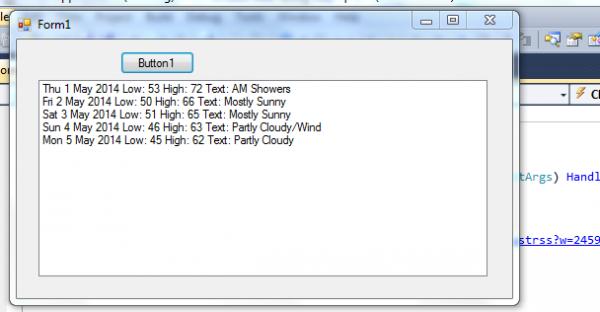
            ListBox1.Items.Add(ee.GetAttribute("day").ToString & " " & ee.GetAttribute("date").ToString & " Low: " & ee.GetAttribute("low").ToString & " High: " & ee.GetAttribute("high").ToString & " Text: " & ee.GetAttribute("text").ToString)
        Next
my listbox isnt pretty but gets all data like so:
My CodeBank Submissions
- Listbox with transparency and picture support - Click Here
- Check for a true internet connection - Click Here
- Open Cash drawer connected to receipt printer - Click Here
- Custom color and size border around form - Click Here
- Upload file to website without user logins, includes PHP - Click Here
- List All Removable USB Storage Devices - Click Here
- Custom On/Off Slide Control - Click Here
- Insert multiple rows of data into one database table using parameters - Click Here
- Trigger USB/Serial Cash Drawer - Click Here
Tags for this Thread
 Posting Permissions
- You may not post new threads
- You may not post replies
- You may not post attachments
- You may not edit your posts
-
Forum Rules
|
Click Here to Expand Forum to Full Width
|



 Reply With Quote

