Re: How Can I show Form2 Without Show all Project Forms !?
I'm not sure what code you are using that shows them all. One of the properties of a form is the 'Visible' property. You should be able to set it to false at design time, load the form any time and then set Visible to True.
But there is also the modal or modeless issue, and the Z-order. In this case I think it would be nice if you post the part of your code that shows the form.
Last edited by Honduras 2811; Apr 6th, 2014 at 05:43 PM.
Reason: Clarification
Re: How Can I show Form2 Without Show all Project Forms !?
Thank you for replay
I don`t want hide any form I want it all visible
example:
if I set Form2 Topmost from systray that will Bring all forms !
I know Only Form2 will be Topmost but I don`t want show all forms when I do this
Re: How Can I show Form2 Without Show all Project Forms !?
Your question doesn't make any sense
In one sentence you say that you don;t want to hide any forms that you want them all visible and then you turn around and say you don't want them visible.
You can toggle any form visible or not visible at any time. Using API you can set a from as top most but I really don;t know what you are trying to say as your post contradicts itself.
Re: How Can I show Form2 Without Show all Project Forms !?
Originally Posted by Noob13
Thank you for replay
I don`t want hide any form I want it all visible
example:
if I set Form2 Topmost from systray that will Bring all forms !
I know Only Form2 will be Topmost but I don`t want show all forms when I do this
Once again, I'm having a little trouble understanding. You say you don't want to hide anything, but, in your example you say you don't want to show any of them except Form2.
Last edited by Honduras 2811; Apr 6th, 2014 at 05:50 PM.
Reason: Clarification.
Re: How Can I show Form2 Without Show all Project Forms !?
My Project Have Main Base I need it always visible on Desktop
if I call form2 from taskbar or systray it will show all forms
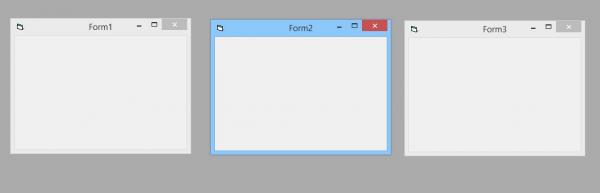
as you can see form1 bring with form2 ontop opened folder
I want form1 stay show and active on desktop if there is nothing hide it I can see it and if I need it i can call it alone
sorry I trying hard to figure it out to you but my English not the best
Re: How Can I show Form2 Without Show all Project Forms !?
I think I'm starting to understand.
Try this: Show the Base form with Style = vbModal. Drag it where it is out of the way. Only show Form2 from the button on the base form.
Like under the button have
Code:
Private Sub cmdNote2_Click()
     Form2.Show
End Sub
Does that sound reasonable? Don't show Form2 any other way.
The Base form is the only one you should try to show any other way. I'm still not sure where the systray and taskbar come into it. When you start the application the Base form, only, should be shown automatically if you have set it as the Startup Object under Project Properties. Just don't close it.
Oh, ShowInTaskbar should be set to False on all the forms except maybe the base form.
This is not a very good explanation. Do you need me to clarify anything.
Last edited by Honduras 2811; Apr 6th, 2014 at 06:46 PM.
Reason: Added note
Re: How Can I show Form2 Without Show all Project Forms !?
If your form is not vbmodal then it shouldn't bring two forms at once, not sure you need to show us the code from the clock form... maybe form_click event?
Re: How Can I show Form2 Without Show all Project Forms !?
Well, that leaves out vbModal. I don't know why both forms show, but it may be an operating system thing. I don't recognize the OS that you are using. I've never tried to show a form except from another form in the same project, so I don't think I can help you. Sorry.
Re: How Can I show Form2 Without Show all Project Forms !?
you could do it with api setwindowpos or/and api showwindow... you could make the clock form topmost with setwindowpos and then use the showwindow and set the control from to appear behind everything.
But I don't understand why you can't use form.visible
Re: How Can I show Form2 Without Show all Project Forms !?
this is just example , clock from I got it from planet-source-code (analogue clock gadget)
Not form_click event if I use two empty Form I`ll got the same thing
Re: How Can I show Form2 Without Show all Project Forms !?
Originally Posted by Max187Boucher
I'm trying to understand what you are saying but its hard.
You got two forms.
-Form1
-Form2
1. No code at all in the forms.
2. You click run (in vb6 IDE), Form1 Opens up, Form2 will be hidden.
So what your saying is in your OS if you follow my steps Form1 & Form2 will show?
Form1.Show and Form2.show
now go to Desktop open folder or MyComputer However and Cover form1 and form2
tray to call form2 as you wish from taskbar or systray .....
it`ll show form1 and form2 ontop ""folder or MyComputer"" not only form2
Re: How Can I show Form2 Without Show all Project Forms !?
Well, it sounds like you are saying that you have two forms open and active in your program and then you send the program to the background and then click on the program to bring it back in focus which of course brings the program into focus [which consists of two open forms] not just the form you clicked on. If you want one form visible and the other hidden then you need to write some code. The simple method being .Hide
Re: How Can I show Form2 Without Show all Project Forms !?
Originally Posted by DataMiser
Well, it sounds like you are saying that you have two forms open and active in your program and then you send the program to the background and then click on the program to bring it back in focus which of course brings the program into focus [which consists of two open forms] not just the form you clicked on. If you want one form visible and the other hidden then you need to write some code. The simple method being .Hide
Re: How Can I show Form2 Without Show all Project Forms !?
Originally Posted by Noob13
that`s right But I don`t want use hide
Why? I never understand it when someone says I want my program to do X but I do not want to code it to do X.
If you want a form hidden then hide it, or unload it. If you do not want to hide it then that means you want it to be visible but you say you don't want it visible.
Sounds like you need to stop and think about what it is that you are really trying to do.
Re: How Can I show Form2 Without Show all Project Forms !?
Originally Posted by DataMiser
Why? I never understand it when someone says I want my program to do X but I do not want to code it to do X.
If you want a form hidden then hide it, or unload it. If you do not want to hide it then that means you want it to be visible but you say you don't want it visible.
Sounds like you need to stop and think about what it is that you are really trying to do.
Comeon I never said "don't want it visible"
I want all forms visible and when I call form2 only show form2 not bring all forms
Re: How Can I show Form2 Without Show all Project Forms !?
The thing here noob is, its all as one project so without hooking (controlling windows messages) its all one big project with different windows so it will bring all forms to the front. Only way is to set form1 topmost but then that form will ALWAYS be in front unless told to not be topmost. I'm sure hooking would work in this case but it requires you to catch the right message wm_(message).
But hooking can lead to vb crash or even windows crash, if not unhooked or controlled properly.
Re: How Can I show Form2 Without Show all Project Forms !?
Originally Posted by Max187Boucher
The thing here noob is, its all as one project so without hooking (controlling windows messages) its all one big project with different windows so it will bring all forms to the front. Only way is to set form1 topmost but then that form will ALWAYS be in front unless told to not be topmost. I'm sure hooking would work in this case but it requires you to catch the right message wm_(message).
But hooking can lead to vb crash or even windows crash, if not unhooked or controlled properly.
so hard so far
i like it simple and I think its impossible but i`ll never Quit
Re: How Can I show Form2 Without Show all Project Forms !?
Can you attach your project to your next post (click the Go Advanced button and then the Manage Attachments button) so we can finally understand what it is that you want to happen?
Last edited by Bonnie West; Apr 6th, 2014 at 10:46 PM.
Reason: Added instructions
On Local Error Resume Next: If Not Empty Is Nothing Then Do While Null: ReDim i(True To False) As Currency: Loop: Else Debug.Assert CCur(CLng(CInt(CBool(False Imp True Xor False Eqv True)))): Stop: On Local Error GoTo 0
Re: How Can I show Form2 Without Show all Project Forms !?
Looks like (what a thread!) you want your clock 'form' (gadget) to stay on top no matter what other MS windows a user clicks on. And I am guessing that as you add other 'gadgets' that you would want THEM to also remain on top, yet your main form (the little one in the bottom left) can be 'hidden/partially hidden' by other MS windows. Is that just about it?
Re: How Can I show Form2 Without Show all Project Forms !?
Originally Posted by SamOscarBrown
Looks like (what a thread!) you want your clock 'form' (gadget) to stay on top no matter what other MS windows a user clicks on. And I am guessing that as you add other 'gadgets' that you would want THEM to also remain on top, yet your main form (the little one in the bottom left) can be 'hidden/partially hidden' by other MS windows. Is that just about it?
no ,just try it like this : open Project with 2 forms and cover it with anything
now try click form1 or form2 from taskbar it will bring out form1 & form2 !
you click only one form and the question is why all forms is bring out too ?
Re: How Can I show Form2 Without Show all Project Forms !?
Originally Posted by Noob13
you click only one form and the question is why all forms is bring out too ?
Because when you activate any of the Forms in your app, VB automatically brings to the foreground all the other visible Forms as well. Most non-VB apps don't behave that way, so I guess you could consider that behavior as a bug. I'm afraid there's nothing you can do about it though, unless you fight VB by subclassing or via another low-level, hackish method.
On Local Error Resume Next: If Not Empty Is Nothing Then Do While Null: ReDim i(True To False) As Currency: Loop: Else Debug.Assert CCur(CLng(CInt(CBool(False Imp True Xor False Eqv True)))): Stop: On Local Error GoTo 0
Re: How Can I show Form2 Without Show all Project Forms !?
Originally Posted by Bonnie West
Because when you activate any of the Forms in your app, VB automatically brings to the foreground all the other visible Forms as well.
There is a workaround for that, but IIRC it involves setting the windows GWL_HWNDPARENT , something like...
Code:
Private Declare Function SetWindowLong Lib "user32.dll" Alias "SetWindowLongA" ( ByVal hwnd As Long, ByVal nIndex As Long, ByVal dwNewLong As Long) As Long
Private Const GWL_HWNDPARENT As Long = -8

Dim oFrm As Form2
Set oFrm = New Form2
oFrm.Show
SetWindowLong oFrm.hWnd, GWL_HWNDPARENT, 0&
Though its been years since I used that so may be incorrect,
I got a couple tricks like that from this old thread here.
EDIT some code I was using in my app...
Code:
Public Sub SetWinSelf(f As Form)
' this makes a form not activate other forms open on desktop when it gets the focus.
' FOR COMPILED EXE.
        f.Show
        SetWindowLong f.hwnd, GWL_HWNDPARENT, CreateWindowEx( _
         &H80, "ThunderRT6Main", vbNullString, &H94000000, _
         0&, 0&, 0&, 0&, 0&, 0&, GetWindowLong(f.hwnd, GWL_HINSTANCE), 0&)
For testing in IDE, .
Code:
    ' **** CODE TO TEST IN IDE ONLY *******
    'SetWindowLong Chld.hWnd, _
              GWL_HWNDPARENT, _
              CreateWindowEx( _
                             &H80, "ThunderMain", _
                             vbNullString, &H94000000, _
                             0&, 0&, 0&, 0&, 0&, 0&, _
                             GetWindowLong(Chld.hWnd, GWL_HINSTANCE), _
                             0&)
I don't have VB6 installed on any PCs anymore so can't test, but I believe the above hides the form from taskbar also, don't really remember , see URL above.
HTH.
Last edited by Edgemeal; Apr 7th, 2014 at 12:43 PM.
Re: How Can I show Form2 Without Show all Project Forms !?
Originally Posted by Edgemeal
There is a workaround for that, but IIRC it involves setting the windows GWL_HWNDPARENT , something like...
Code:
Private Declare Function SetWindowLong Lib "user32.dll" Alias "SetWindowLongA" ( ByVal hwnd As Long, ByVal nIndex As Long, ByVal dwNewLong As Long) As Long
Private Const GWL_HWNDPARENT As Long = -8

Dim oFrm As Form2
Set oFrm = New Form2
oFrm.Show
SetWindowLong oFrm.hWnd, GWL_HWNDPARENT, 0&
Though its been years since I used that so may be incorrect,
I got a couple tricks like that from this old thread here.
EDIT some code I was using in my app...
Code:
Public Sub SetWinSelf(f As Form)
' this makes a form not activate other forms open on desktop when it gets the focus.
' FOR COMPILED EXE.
        f.Show
        SetWindowLong f.hwnd, GWL_HWNDPARENT, CreateWindowEx( _
         &H80, "ThunderRT6Main", vbNullString, &H94000000, _
         0&, 0&, 0&, 0&, 0&, 0&, GetWindowLong(f.hwnd, GWL_HINSTANCE), 0&)
For testing in IDE, .
Code:
    ' **** CODE TO TEST IN IDE ONLY *******
    'SetWindowLong Chld.hWnd, _
              GWL_HWNDPARENT, _
              CreateWindowEx( _
                             &H80, "ThunderMain", _
                             vbNullString, &H94000000, _
                             0&, 0&, 0&, 0&, 0&, 0&, _
                             GetWindowLong(Chld.hWnd, GWL_HINSTANCE), _
                             0&)
I don't have VB6 installed on any PCs anymore so can't test, but I believe the above hides the form from taskbar also, don't really remember , see URL above.
HTH.
Thank you so much
WOW ,
SetWindowLong Form1.hwnd, GWL_HWNDPARENT, 0&
it working perfectly
you can use portable vb6 ,
PM me if you want my modern copy
Re: [RESOLVED] How Can I show Form2 Without Show all Project Forms !?
Originally Posted by Noob13
what if ""ShowInTaskbar = False""
How can I keep it False ?
When Click on Form it`s back True !
SetWindowLong Form1.hwnd, GWL_HWNDPARENT, 0&
Thankx
Did you try using that 2nd part of that code instead?...
SetWindowLong f.hwnd, GWL_HWNDPARENT, CreateWindowEx(.....
Note, one was for compiled exe and other for testing in IDE.
EDIT, just in case you need the API declares..
Code:
Private Const GWL_HWNDPARENT As Long = (-8)
Private Const GWL_HINSTANCE As Long = (-6)
Private Declare Function GetWindowLong Lib "user32" Alias "GetWindowLongA" (ByVal hwnd As Long, ByVal nIndex As Long) As Long
Private Declare Function SetWindowLong Lib "user32" Alias "SetWindowLongA" (ByVal hwnd As Long, ByVal nIndex As Long, ByVal dwNewLong As Long) As Long
Private Declare Function CreateWindowEx Lib "user32" Alias "CreateWindowExA" (ByVal dwExStyle As Long, ByVal lpClassName As String, ByVal lpWindowName As String, ByVal dwStyle As Long, ByVal X As Long, ByVal Y As Long, ByVal nWidth As Long, ByVal nHeight As Long, ByVal hWndParent As Long, ByVal hMenu As Long, ByVal hInstance As Long, lpParam As Any) As Long

Private Sub Example_Usage(f As Form)
    f.Show
    SetWindowLong f.hwnd, GWL_HWNDPARENT, CreateWindowEx(&H80, "ThunderRT6Main", vbNullString, &H94000000, 0&, 0&, 0&, 0&, 0&, 0&, GetWindowLong(f.hwnd, GWL_HINSTANCE), 0&)
End Sub
Last edited by Edgemeal; Apr 7th, 2014 at 06:53 PM.
Re: [RESOLVED] How Can I show Form2 Without Show all Project Forms !?
Originally Posted by Edgemeal
Did you try using that 2nd part of that code instead?...
SetWindowLong f.hwnd, GWL_HWNDPARENT, CreateWindowEx(.....
Note, one was for compiled exe and other for testing in IDE.
Yes I test it
Public Declare Function CreateWindowEx Lib "user32" Alias "CreateWindowExA" (ByVal dwExStyle As Long, ByVal lpClassName As String, ByVal lpWindowName As String, ByVal dwStyle As Long, ByVal X As Long, ByVal Y As Long, ByVal nWidth As Long, ByVal nHeight As Long, ByVal hWndParent As Long, ByVal hMenu As Long, ByVal hInstance As Long, lpParam As Any) As Long
Public Const GWL_HINSTANCE = (-6)
Set the appropiate window classname, "ThunderMain" if you test it in the IDE, or compiled for instance in VB6 "ThunderRT6Main".



 [RESOLVED] How Can I show Form2 Without Show all Project Forms !?


 Reply With Quote
 Originally Posted by Noob13


 , see URL above.