|

-
Mar 31st, 2014, 05:02 PM
#1
Thread Starter
PowerPoster

How can I separate items in a listbox that were put there using an array?
Hi there folks, I have a listbox called Studentlist. It has 4 different items put there in an array like this.
VB Code:
Option Explicit
 Private Students As Object
Students.AddNew Array("Name", "Points", "Avatar", "Birthday"), Array(EditRosterV3.StudentNameTXT(0).Text, EditRosterV3.PointCountLBL(0).Caption, EditRosterV3.StudentAvatarPathTXT(0).Text, EditRosterV3.StudentBdayLBL(0).Caption)
The listbox is set up like this..
Set Students = CreateObject("ADODB.Recordset")
Students.Fields.Append "Name", 202, 4000 '202=adVarWChar
Students.Fields.Append "Points", 3 '3=adInteger
Students.Fields.Append "Avatar", 202, 4000 '202=adVarWChar
Students.Fields.Append "Birthday", 202, 4000 '202=adVarWChar
And items are put into the listbox like this...
VB Code:
Private Sub FillList(Optional ByVal OrderByClause As String)
Dim i As Long
  Students.Sort = OrderByClause
  StudentList.Clear
  For i = 1 To Students.RecordCount
    Students.AbsolutePosition = i
    StudentList.AddItem Students!Points & vbTab & Students!Name & vbTab & Students!Birthday & vbTab & Students!Avatar
  Next i
End Sub
Now the reason why we do that is so we can organize the student names alphabetically, and keep track of whos birthday, points, avatar are whoms, so when the names are reordered, the other things stay with the student.
Now my problem is I am trying to copy the items back into their original textboxes and label captions, these are the same ones they came from, so again they stay in order with the student.
I can do it by going StudentNameTXT(0).text = Students!Name, but it will only give me the last item entered at the bottom of the list, I would like to have it go to the top.
Is there some trick I am missing here? Thanks!!!!
-
Mar 31st, 2014, 05:16 PM
#2
Re: How can I separate items in a listbox that were put there using an array?
Why don't you use an MSHFlexgrid instead of listboxes/textboxes....easy to sort any way you want.....
-
Apr 1st, 2014, 01:22 AM
#3
Re: How can I separate items in a listbox that were put there using an array?
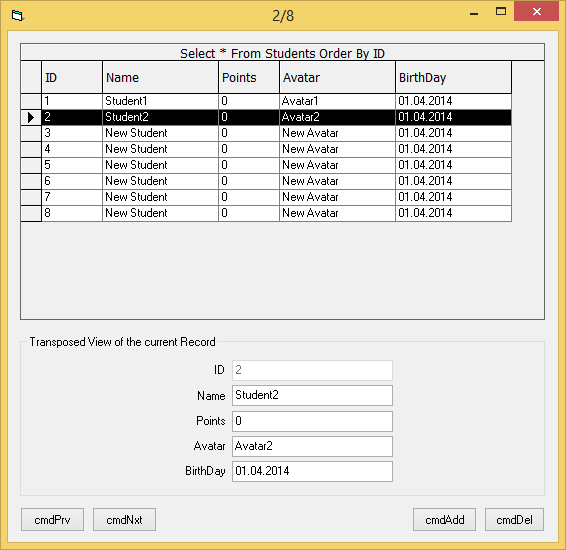
I've made a simple Demo now, which shows how to:
- Create a new *.mdb (without using MS-Access) in a single line of code
- Create your first small Table in this yet empty *.mdb-File in a single line of code
- Select your first ADO-Recordset from the new created table in a single line of code
- Add new Records to the created Table, over the Recordset.AddNew-method
- Bind that ADO-Recordset to a VB6-DataGrid -
- But also how to bind the same Rs to a set of Textboxes, which show the current Record transposed
- Navigate, Add, Edit+Delete Records on this Recordset
(all of the above in the same Form, and without an ADODC-control - the Datagrid is the only external Component).
Here's the Download-Link for the small Demo:
http://vbRichClient.com/Downloads/AdoSimpleGrid.zip
Here a Screenshot:
Here's the complete Form-Code:
Code:
Option Explicit

Public WithEvents Rs As ADODB.Recordset

Private Sub Form_Load()
Dim FileName As String, i As Long
  FileName = App.Path & "\students.mdb"

  If CreateObject("Scripting.FilesystemObject").FileExists(FileName) Then
    OpenConn FileName 'DB-File already exists, so we just open it

  Else 'DB-File doesn't exist yet, so we create a new one - and a new Table in it as well
    CreateDB FileName
    OpenConn FileName
    Cnn.Execute "Create Table Students(ID AutoIncrement, Name Text, Points Int, Avatar Text, BirthDay DateTime)"
  End If

  Set Rs = GetRs("Select * From Students Order By ID") 'define our Recordset

  'ensure a few Demo-Records in the Table, if there aren't any yet
  If Rs.RecordCount = 0 Then
    AddNewRecord "Student1", "Avatar1"
    AddNewRecord "Student2", "Avatar2"
  End If

  'ensure a direct Rs-Databinding to dynamically created TextFields and Labels (we need Txt(0) and Lbl(0) for that)
  For i = 0 To Rs.Fields.Count - 1
    If i Then Load Txt(i): Txt(i).Visible = True: Load Lbl(i): Lbl(i).Visible = True

    Txt(i).Move Txt(i).Left, (i + 1) * Txt(i).Height * 1.2
    Lbl(i).Move Lbl(i).Left, (i + 1) * Txt(i).Height * 1.2 + Txt(i).Height * 0.15
    Set Txt(i).DataSource = Rs
        Txt(i).Enabled = UCase(Rs.Fields(i).Name) <> "ID"
        Txt(i).DataField = Rs.Fields(i).Name
        Lbl(i).Caption = Rs.Fields(i).Name
  Next i

  'in parallel to the textboxes we bind a VB6-DataGrid (the lines below are the complete DG-Handling-Code)
  Set DG.DataSource = Rs
      DG.MarqueeStyle = dbgNoMarquee
      DG.HeadFont.Name = "Tahoma": DG.HeadFont.Size = 10: DG.HeadLines = 2
      DG.Caption = Rs.Source 'visualize the SQL-String our Rs was derived from
      DG.AllowUpdate = False 'we allow changes only over our Text-Fields (not over the Grid-Cells)
End Sub

Private Sub DG_RowColChange(LastRow As Variant, ByVal LastCol As Integer)
  If DG.SelBookmarks.Count Then DG.SelBookmarks.Remove 0
  If Rs.RecordCount Then DG.SelBookmarks.Add DG.Bookmark
End Sub

Private Sub Form_Unload(Cancel As Integer)
  Me.ValidateControls
End Sub

Private Sub AddNewRecord(Optional ByVal StudentName As String, Optional ByVal Avatar As String)
  Rs.AddNew
  Rs!Name = IIf(Len(StudentName), StudentName, "New Student")
  Rs!Points = 0
  Rs!Avatar = IIf(Len(Avatar), Avatar, "New Avatar")
  Rs!BirthDay = Int(Now)
  Rs.Update
  Rs.MoveLast
End Sub

Private Sub DeleteRecord()
  If Rs.BOF Or Rs.EOF Then Exit Sub
  Rs.Delete
  Rs.Update
  Rs.MovePrevious
End Sub

Private Sub UpdatePrvNxtButtonState()
  cmdPrv.Enabled = Rs.AbsolutePosition > 1
  cmdNxt.Enabled = Abs(Rs.AbsolutePosition) < Rs.RecordCount
End Sub

Private Sub cmdPrv_Click()
  Rs.MovePrevious
End Sub
Private Sub cmdNxt_Click()
  Rs.MoveNext
End Sub
Private Sub cmdAdd_Click()
  AddNewRecord
End Sub
Private Sub cmdDel_Click()
  DeleteRecord
End Sub

Private Sub Txt_Validate(Index As Integer, Cancel As Boolean)
If Rs.RecordCount = 0 Then Exit Sub
   On Error GoTo 1
     Rs(Txt(Index).DataField).Value = Txt(Index).Text
     Rs.Update
1: If Err Then MsgBox Err.Description: Cancel = True
End Sub

Private Sub Rs_MoveComplete(ByVal adReason As ADODB.EventReasonEnum, ByVal pError As ADODB.Error, adStatus As ADODB.EventStatusEnum, ByVal pRecordset As ADODB.Recordset)
  If adReason = adRsnRequery Then Exit Sub Else UpdatePrvNxtButtonState

  'Don't move out of record-index-range
  If Rs.BOF And Rs.RecordCount > 0 Then Rs.AbsolutePosition = 1
  If Rs.EOF And Rs.RecordCount > 0 Then Rs.AbsolutePosition = Rs.RecordCount

  'simple reporting of the current Record-position within the Rs
  Me.Caption = IIf(Rs.RecordCount, Rs.AbsolutePosition, 0) & "/" & Rs.RecordCount
End Sub
Olaf
Last edited by Schmidt; Apr 1st, 2014 at 05:14 AM.
Reason: Changes To ensure a ShortDate as BirthDay
 Posting Permissions
- You may not post new threads
- You may not post replies
- You may not post attachments
- You may not edit your posts
-
Forum Rules
|
Click Here to Expand Forum to Full Width
|



 Reply With Quote
